
Added: 4/24/2026
All-in-one AI image editor for generation, restoration, editing, upscaling, and video creation in one browser workspace.
Overview
Introduction
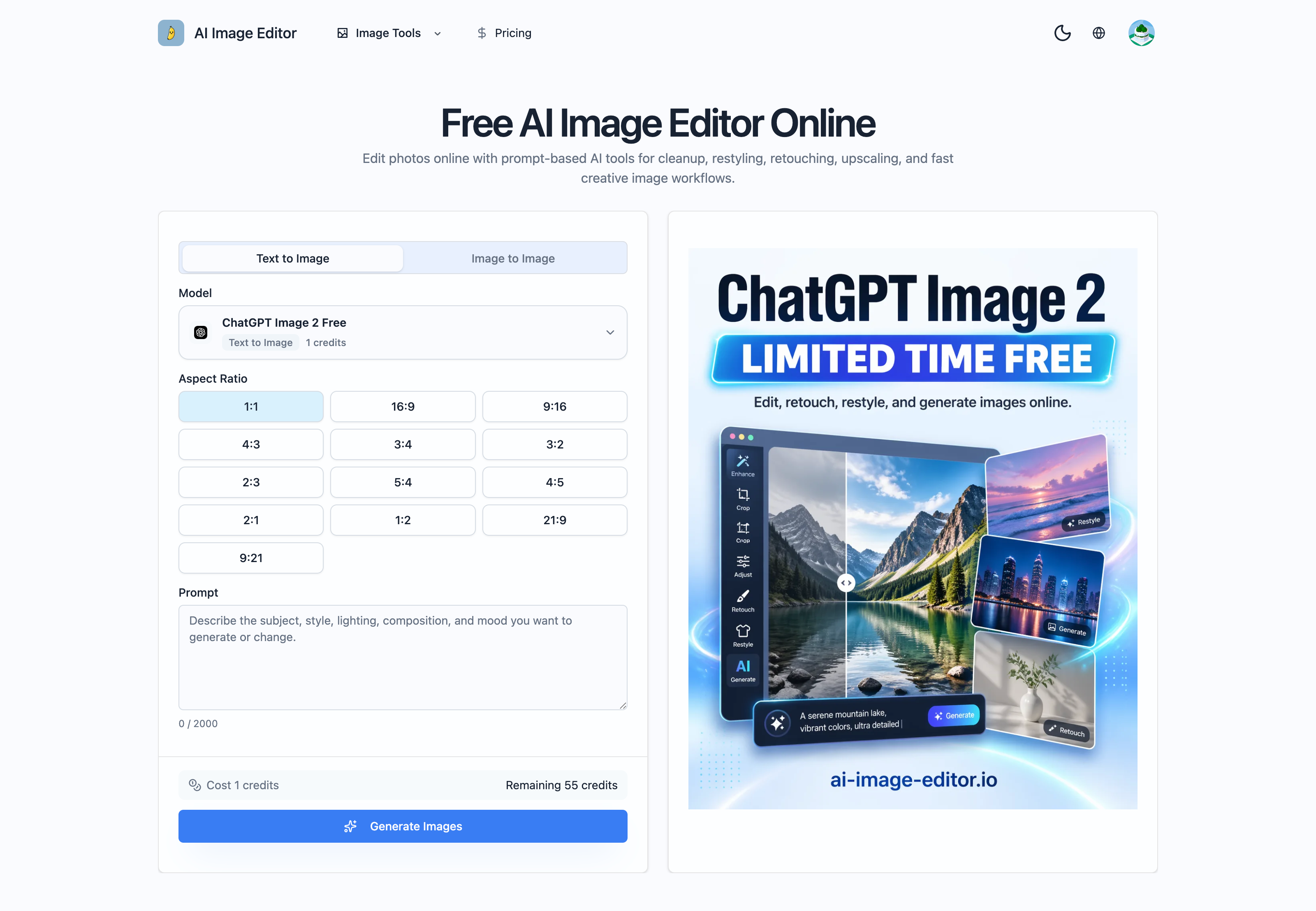
The AI Image Editor is a free online tool designed to empower users with AI-driven photo editing capabilities directly in their browser. This platform seeks to democratize access to advanced image manipulation, enabling both amateur and professional creators to enhance, transform, and generate visuals with ease. By leveraging cutting-edge AI algorithms, the tool simplifies complex editing tasks into prompt-based actions, streamlining workflows and fostering creative exploration. It's intended to eliminate traditional software barriers, offering a seamless workspace for retouching, restyling, upscaling, and generating images from scratch.
The editor stands out by combining multiple functionalities within a single interface. Whether you're looking to clean up imperfections, reimagine a photo's style, upscale resolution, or generate entirely new images, the AI Image Editor consolidates these tools in one place. This integration not only saves time but also provides a cohesive creative process, allowing users to iterate and refine their visions quickly. The platform’s AI-driven approach helps bridge the gap between imagination and final output, giving users unprecedented control over their creative projects.
With the AI Image Editor, even users without extensive technical skills can achieve professional-quality results. By using intuitive prompts, anyone can guide the AI to perform complex edits, unlocking new possibilities for visual storytelling and content creation. It empowers designers, marketers, and content creators to produce compelling visuals that resonate with their target audience, all within a free and accessible online environment.
Key Features
- Text-to-Image Generation: Create entirely new images from text prompts, allowing users to visualize concepts and ideas quickly. The AI interprets the prompt and generates a corresponding visual, opening possibilities for creating unique artwork, marketing assets, and mood boards.
- Image-to-Image Editing: Transform existing images using text prompts for restyling, retouching, changing backgrounds, and more. This feature allows users to iterate on existing visuals, refining their aesthetic and adapting them to different contexts.
- AI-Powered Upscaling: Increase the resolution of images without losing quality using sophisticated AI algorithms to fill in missing details. This is particularly useful for breathing new life into old or low-resolution images, making them suitable for high-definition displays and print media.
- Intelligent Retouching: Remove blemishes, correct imperfections, and enhance details in portraits and other photos, ensuring a professional and polished finish. The AI identifies areas needing improvement and applies targeted adjustments, streamlining the retouching process.
- Background Removal: Automatically remove backgrounds from images with precise edge detection, enabling users to isolate subjects and create visually appealing compositions. This powerful tool is indispensable for creating product shots, marketing materials, and graphic designs.
- Style Transfer: Apply the style of one image to another, transforming the look and feel of a photo to match a specific artistic direction or brand aesthetic. This feature lets users infuse their visuals with unique artistic flair, giving them a distinct and memorable identity.
- Prompt-Guided Vibe Control: Precisely control the mood, materials, color palette, lighting, and art direction using simple, intentional prompts to achieve desired aesthetics. This allows users to tailor the vibe and style of their images effectively.
- Multiple Reference Images: Upload more than one image when needing to combine subject, style, environment, or composition cues in a single generation, offering a high degree of creative flexibility.
Target Users
The AI Image Editor is designed for a diverse range of users, including:
- Marketers and Advertisers: Create eye-catching visuals for campaigns, social media, and websites without extensive design resources.
- E-commerce Businesses: Generate high-quality product images and lifestyle scenes to boost sales and improve customer engagement.
- Content Creators: Enhance their content with unique and visually appealing images, illustrations, and graphics.
- Designers: Quickly prototype ideas, explore visual styles, and streamline their creative workflows.
- Individuals: Edit and enhance personal photos, create unique artwork, and visualize their creative concepts.
Unique Selling Points
- Free and Accessible: Unlike many advanced photo editing tools, the Chatgpt Image 2 is freely available online, making it accessible to anyone with an internet connection.
- Prompt-Based Editing: Simplifies complex tasks into intuitive prompt-based actions, empowering users to achieve professional results without needing advanced technical skills.
- All-in-One Platform: Combines multiple AI-driven editing functionalities into a single interface, streamlining workflows and saving time.
- Repeatable Brand Systems: Keep a brand, character, or product line visually coherent across many outputs instead of generating disconnected one-off images.
Pros and Cons
Pros:
- Cost-Effective: Free access eliminates the need for expensive software subscriptions.
- User-Friendly: Intuitive prompt-based interface simplifies complex editing tasks.
- Versatile: Offers a wide range of AI-driven features for editing, enhancing, and generating images.
- Time-Saving: Streamlines workflows, enabling users to create visuals quickly.
- Accessible: Available online without the need for downloads or installations.
Cons:
- Internet Dependent: Requires a stable internet connection to function.
- Credit Limitations: Some features may be limited by credit usage, potentially requiring paid upgrades for heavy users.
- Reliance on AI: Results are dependent on the accuracy and capabilities of the AI algorithms.
FAQ
- Q: Is the AI Image Editor really free to use?
A: Yes, the AI Image Editor offers a free tier that provides access to a variety of features. However, some advanced features or higher usage levels may require credits or a subscription. - Q: What types of images can I edit with this tool?
A: You can edit a wide range of image types, including photos, illustrations, graphics, and artwork. The tool supports common image formats such as JPEG, PNG, and more. - Q: How accurate is the AI-powered background removal feature?
A: The background removal feature utilizes advanced AI algorithms for precise edge detection, delivering accurate results in most cases. However, the accuracy may vary depending on the complexity of the image and the contrast between the subject and the background. - Q: Can I use the AI Image Editor for commercial purposes?
A: Yes, you can use the AI Image Editor for commercial purposes, such as creating marketing materials, product images, and website graphics. However, it's crucial to review the terms of service to ensure compliance with any usage restrictions. - Q: What kind of support is available if I encounter issues?
A: The AI Image Editor typically provides online documentation, tutorials, and FAQs to address common issues. Additionally, you may be able to access community forums or support channels for further assistance.
Top Features
- Free access to powerful AI image editing tools.
- Generate visuals from text prompts quickly and easily.
- Transform existing images into compelling, creative content.
Traffic Analysis
Monthly Visits
--
Avg. Duration
--
Global Rank
--
Bounce Rate
--
Alternatives to AI Image Editor
Resize Image For
Free online tool to resize and perfect your photos for Instagram, keeping the full image in frame.

Editaimg AI Image Editor
Editaimg is an AI-powered image editor that allows users to enhance, transform, and create stunning visuals with ease, offering various AI-driven tools.
BratGenStudio
BratGenStudio is a creative online brat generator that lets users instantly create trendy aesthetic text and stylish brat-inspired visuals.
pixelcut
Pixelcut AI is a 100% free online tool that instantly removes image backgrounds and upscales photos to 2K/4K resolution — no sign-up, no software, no watermarks

GPT Image 2
AI image generator and photo editor for prompt edits, upscaling, cleanup, and creative assets: https://image-gpt.org/ai-photo-eidtor
Gemini watermark remover
Gemini Watermark Remover is a specialized online tool that helps users remove watermarks from images generated by Google Gemini AI.

Bulk AI Image Generator From Prompts
Stop generating one by one. Input your prompts and generate hundreds of AI images in bulk automatically. Try our fast batch generator now.

SVGMaker
SVGMaker is an AI-powered SVG creation platform that transforms ideas into clean, scalable vector graphics in seconds, no installs, no learning curve. Just type a prompt, upload an image, or optimize existing SVGs, and SVGMaker instantly creates professional-grade vectors for logos, icons, illustrations, and more. With its built-in, browser-based visual editor and AI-powered tools, you can easily tweak colors, shapes, layers, and optimize file sizes, making it perfect for designers, developers, and crafters alike. Beyond quick creation, it offers API access and MCP server support, letting teams and developers integrate real-time vector generation directly into their workflows.
