
The following guide details the OnStream APK with information on this streaming application and the best alternatives available

OnStream APK was once one of the most popular free media Apps (APKs) for watching TV series and movies without a subscription.
It provided users with an easy-to-use interface and a full library of content for viewing on popular media devices, streaming boxes, and more.
Unfortunately, OnStream (and its sister application Mobiflix) are no longer functioning at the high level they once did. If you install/launch the app, you will likely not be able to play any content, as they appear to no longer be developed.
If you are having problems with the application, we suggest using an alternative to watch Movies and TV Shows. We list some of the best replacement options below.
IMPORTANT NOTE: There are still numerous sources/websites that claim to have the OnStream app available for download.
We strongly suggest avoiding these as many are riddled with ads/malware that may infect your device and won’t provide you with a useful streaming experience.

If you come across a website such as the one pictured above, avoid it at all costs and make sure not to download any apps that claim to be OnStream.
Hide Your Digital Fingerprint
Continue reading for a full list of the best OnStream alternatives for your favorite device including Fire TV/Firestick and Android/Google TV Boxes.
Table of Contents
Best OnStream Alternatives
Here are the current best alternatives to the OnStream application.
1. Nuvio

Nuvio is currently the most feature-rich streaming APK available. With the help of third-party addons (or Plugins), users can enjoy HD content for Video on Demand, Live TV, and more.
Create your profile, configure it to your preferred settings, and watch all your favorites with no buffering at all.
2. Arvio

Arvio is similar to Nuvio in the fact that it also uses various addons to scrape popular sources for streaming media. It has tons of advanced features including Catalog management, Cloud capabilities, and more.
The developers of Arvio are continually updating the app to keep it functioning at peak performance. Give this one a try!
Exclusive Surfshark Discount
Your online activity is currently monitored by your ISP, app/addon/IPTV developers, government agencies, and the websites you visit.
- Become 100% anonymous while streaming and downloading.
- Use on Unlimited Devices & share 1 account with the entire family.
- Save 85% with the 24-Month Plan + Get 3 FREE Months.
Arvio on Android/Google/Fire TV
3. Reezn

A new addition to our list of OnStream alternatives, Reezn has recently been updated to V2 with new advancements and features for app users.
Reezn is an AIO (All-in-One) application that features more than just Movies/Shows so you can watch your favorites without switching APKs.
4. Kodi

Kodi has been one of the most popular media apps for many years and continues to provide users with a fabulous streaming experience on just about any device.
Many enjoy the customization it offers with various addons and Builds that let you browse content for Shows, Films, Anime, Live Streams, and so much more.
5. CinePlus

CinePlus is a fork of the popular BeeTV app and provides the same layout, style, and streaming options that this popular APK once provided.
It has free links as well as Debrid integration so you can always find a working source even if you don’t have any integration platforms.
How to Install OnStream APK on Google/Android TV & Fire TV
NOTE: This method no longer works. We suggest an alternative for streaming from our list above.
Before installing any 3rd party app, we always recommend connecting to our #1 VPN Provider to ensure a safe, anonymous downloading process.
Unlike other applications that serve up free content, OnStream is an “auto-play” APK that starts playback immediately after you select your movie/show.
This is the main reason it has continued to grow in popularity and quickly become one of the favorites among cord-cutters/streamers.
There is also a login feature that we suggest using for a more premium experience that will allow you to save your progress, add media to Favorites, and more.
If you use a Debrid Service such as TorBox, you will not be able to authorize this service for use as OnStream does not currently have debrid capabilities.
Users can easily install OnStream on various media devices including streaming devices such as the NVIDIA SHIELD, Firestick, and other popular Google/Android TV Devices.
In our guide below, we are using the popular Onn 4K Pro for installation but these steps will also work on just about any device you prefer.
Those using Android phones/tablets can install a separate application from the official website, which you will see in the screenshots below.
Continue reading for the installation guide as well as some important details and features regarding the application.

1. First install the Downloader App on your device. If you haven’t done this, refer to our Downloader tutorial. Launch Downloader from your list of installed apps.

2. Click the URL bar or the Hashtag icon at the top of the screen.

3. Enter 250931 which is the Downloader Code for the TROYPOINT Toolbox.

4. Wait until the TROYPOINT Toolbox loads.

5. Scroll down to find OnStream and select the TV Version (for streaming devices).

6. Click Install.

7. You may encounter a Google Play Protect message. If you see this, click Decline.

8. Click Done.

9. This will take you back to the Downloader App. Click delete to remove the installation file.

10. Click Delete again.

11. You have successfully installed OnStream on your device. Open OnStream from your list of installed apps.

12. If you are using a Fire TV device it’s important to note that you will receive this Warning message. Click Launch Anyway to continue using OnStream.
Note: Amazon is cracking down on third-party apps and this is why we suggest using an Android TV/Google TV device instead.

Install OnStream on Android Phone/Tablet
Unlike streaming devices like the Firestick and Google TV, installation on phones/tablets is a bit easier as the Downloader app is not required.
Instead, you can use your preferred browser for immediate download by following the instructions below.
1. Open your browser and visit troypoint.com/tb to access the TROYPOINT Toolbox.

2. Scroll down to find OnStream mobile and select it.

3. Wait for the file to download.

4. Wait for the file to install and click Open.

5. Select Install.

6. Choose Open.

7. You can now access OnStream on Android mobile.

OnStream APK Review
OnStream has become one of the most popular auto-play APKs among cord-cutters seeking instant playback without complicated setup. Here’s what to consider before installing.
What We Like
- Passed VirusTotal scan with no malicious files detected
- One-click auto-play starts content immediately
- Optional email login saves favorites and viewing progress
- Subtitle support in multiple languages
What We Don’t Like
- Numerous imposter websites distribute fake/malware-infected versions
- No debrid integration (although some prefer this)
- TrickMo banking trojan has been disguised as OnStream APK
- No live TV channels available (VOD only)
- Server downtime can cause temporary streaming issues
Details & Features
As noted above, OnStream APK is a simple app for viewing Movies and TV Shows. You will notice the user-friendly interface with various options to choose from.
The application does provide registration via email which will offer some added features. If you do so, we suggest using an anonymous email address such as StartMail.
The biggest addition with email sign-in is the My List tab which will allow you to add all of your favorites for quick access. Users will also have the ability to edit their avatar for personalization and more.

Unlike other popular streaming apps, OnStream APK does not provide debrid or trakt integration. Fortunately, links provided have auto-play capabilities for instant streaming of Movies and TV Shows. These links play extremely fast and most times in high definition including 1080p.
This is a great feature that we suggest checking out if you are familiar with APKs such as this. OnStream uses some of the most well-known scrapers to find high quality links that do not buffer.
Although the app focuses on simplicity, users can expect to find some added benefits within the app that will improve your streaming experience. This includes subtitle capabilities for closed captioning as shown below.

You can also filter resolution quality within playback of a show or movie. While Auto is typically auto selected, there are also options for 720p & 1080p.

While there are tons of Movies and TV Shows available, there are no live streams available within this app. We suggest an IPTV Service for those who wish to stream live television channels on Firestick and Android TV.
Those who prefer to use PC/Windows to access OnStream can do so via emulator such as BlueStacks. This is a simple process outlined in our Android Apps on PC Tutorial Guide that walks you through installation step-by-step.
Screenshots
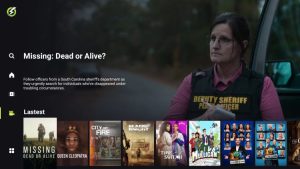
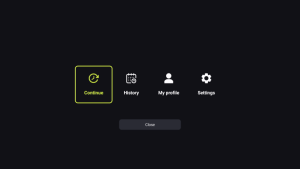
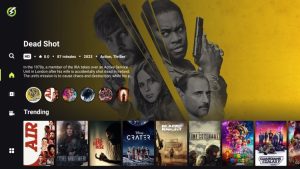

Official Website
There is a plethora of information available on the official website for OnStream including download links for your favorite device.
If you have questions, you can find most answers here as well as full features list and different guides including downloading capabilities that may be beneficial for you.
For all other questions, you can contact the developers via Telegram which is linked on the website. You can also find this within the application on various media devices.

Imposter Websites
It is important to point out that there are various “imposter” websites claiming to be the official site for OnStream.
Make sure you are only installing/downloading this application from the official website that we provide in our installation instructions above.
If you come across a site that has various ads and popups like the one below, it is probably a phony knockoff looking to take advantage of the OnSream name.

Make sure you do not download anything from these unofficial outlets as the download files will likely contain viruses/malware that can infect your media box or streaming device!
Is OnStream APK Legal?
It’s impossible for TROYPOINT to determine whether these unverified platforms hold the proper licensing.
At first glance, it appears that OnStream APK may be distributing copyrighted content without the proper licensing.
We only recommend using legal streaming apps to view both live and on-demand content. Ultimately, the end-user is responsible for content accessed within this unverified app.
Is This App Safe to Use?
We always make sure to scan these unverified apps and services with the scanning tool VirusTotal. Here is the results from the scan of the APK file.

While VirusTotal did not flag any malicious files with viruses/malware, we should always protect ourselves when watching content from unverified streaming apps.
The best way to do this is with a secure VPN that will protect your identity and anonymity when using unverified apps such as this.
Final Thoughts from Troy
While it seems as though auto-play applications were a thing of the past, OnStream has taken over this role and is currently the best available for those who prefer this type of playback.
The developers continue to update it with new features and additions which keeps it functioning at a high level.
Are you a fan of the OnStream APK? Let us know what you think of it in the comment section below!
This page includes affiliate links where TROYPOINT may receive a commission at no extra cost to you. Many times, visitors will receive a discount due to the special arrangements made for our fans. Learn more on my Affiliate Disclaimer page.


