Changebot logo

Customer updates for Changebot

The latest updates and product improvements.

This month we focused on making public pages, embeds, and update feeds more reliable.

This month’s new features

  • Fewer broken images or fonts after updates
  • Live edits appear on your site faster
  • Open the updates panel from any page element
  • Persistent, centered notifications you won't miss

More reliable assets, embeds, and caching

Pages and embedded widgets recover quickly after updates or interruptions, so visitors see current content.

  • Published changes update quickly so edits appear shortly after you publish.
  • Images, fonts, and scripts are less likely to go missing after updates.
  • Smarter caching reduces stale pages and avoids cache conflicts during updates.

Open updates panel from any page element

You can open the updates panel by clicking any matching element, simplifying integrations and links.

Central admin view for custom domains

Admins can view all customer custom domains in one place and act as team members for faster troubleshooting.

Improved toasts: persistence and placement

Notifications stay visible until dismissed and can appear centered; visual effects respect user preferences.

Improvements

  • Improved connection handling reduces duplicate notifications and intermittent errors.
  • Editor now uses full width on large screens for easier editing.

We're making it simpler to find and share the changes that matter. Recaps now surface fewer irrelevant items, previews give a single customer‑facing summary, semantic search helps you locate relevant changes fast, and embeds/pages are more reliable — all so your team can stay informed with less effort.

Find relevant changes faster

  • Search by concept and quickly open matching commits or PRs so you can pinpoint the right changes without digging through noise.
  • Click a date to set the comparison range and preview activity instantly — useful when preparing release notes or status updates.

Clear, shareable explanations

  • Previews show a single, customer‑facing summary line you can copy straight into announcements or internal updates.
  • Generated “What’s new” text is more focused and ready to share, so you spend less time editing and more time communicating.

Fewer false positives

  • Recaps automatically filter out internal/CI noise and skip PRs without customer‑facing commits, so your lists contain fewer irrelevant items.

More reliable embeds and pages

  • Improved delivery and caching mean embedded widgets and hosted changelogs stay available during brief origin problems — fewer interruptions for your readers.

Simpler automation management

  • Automation detail pages show triggers, cadence, targets, and the next run time so it’s easy to see what’s scheduled and when.

If you want help trying these features or updating an automation, reply to this note or visit the Automations page to get started.

Feature Changelog
We're excited to introduce a new Automation that allows you to configure automated periodic recaps for your products. A "periodic recap" is just a customer update we write on a regular cadence — every day, every week, or every month — based on the frequency you pick. Think of it as a short, regular summary of what's changed that you can send to customers automatically.

This feature makes it easier than ever to keep your customers informed. The system automatically collects data such as merged pull requests, notable commits, and tickets to generate a polished update.

Where the recap goes is up to you. You can send it to your inbox for review first, or publish it directly to any destination — Slack, Discord, your hosted Changelog, or anywhere else you communicate with customers.
  • Example: Send a private Slack message to customer-success once a month for manual review.
  • Example: Publish weekly recaps straight to your hosted Changelog without manual steps.
  • Example: Deliver daily summaries to a channel in Discord for an internal engineering channel.
Setting up these recaps is simple. This is an additional Automation available in the automation form — choose the 'Periodic Recap' option when creating or editing an automation, select the product, and pick the desired cadence. You can add it alongside other automations for the same product.

We hope this helps you keep customers in the loop with almost zero effort — spend less time writing updates and more time building great things.
Image
Screenshot 2026-04-02 at 11.44.46 PM.png 42.26 KB
Fix
We’re sharing a set of bug fixes this week that clear up confusing behavior and styling issues across the product.

Bug fixes
  • Password reset page: The page was mis-styled and the submit button wasn’t visible — that’s fixed. The page now uses the current two-column layout, the form styling is corrected, and the submit button appears as expected.
  • Publication display date: The changelog and feeds could show the wrong relative time (for example, “12 hours ago” after you’d just published) when using the Kitty template because a helper calculated the date at midnight. We now store and display the full datetime so the published time in the changelog, feeds, and API reflects the actual moment of publication.
  • Confusing publish button: The “Publish to more...” button on already-published updates while viewing the "Publications" tab would do nothing, and on other tabs would simply navigate to the "Publications" tab. We removed it.
  • Publish button in Recap and Spotlight wizards: On the publish screen in the Recap or Spotlight wizard the publish button could stay disabled even when destinations were pre-selected. It’s now enabled correctly unless there are no destinations selected.
  • Live chat streaming: Fixed an issue where streamed chat messages could appear garbled as they arrived. Replies now render cleanly during streaming.
  • Auto-growing chat input: The AI chat input in the Customer Update editor was a tiny, fixed single row, which made it hard to see your message if you had a lot to say. It now expands vertically as you type, growing upward from the input area, and resets to a single row after sending a message.
  • Preset chat commands in Recap builder: Preset chat commands didn’t work in the Recap builder — they now trigger correctly.
  • Animated GIF uploads: Newly uploaded animated GIFs were appearing as single frames. They now are properly animated.
  • Customer Update editor layout: On some pages the Customer Update editor wouldn’t use all the vertical space available. It now fills the available vertical space for a better editing experience.
Thanks for your patience. Enjoy the improvements!
Feature
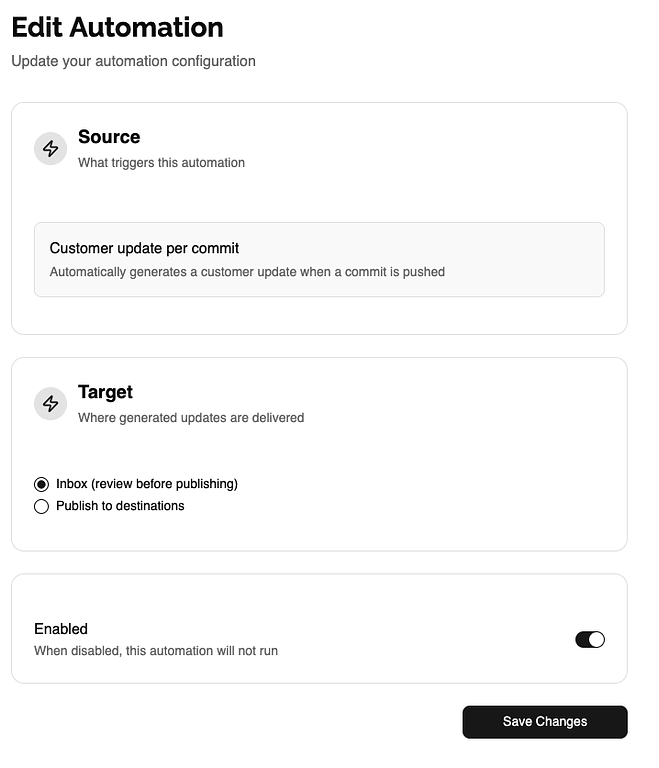
Automatically convert code changes into clear, on-brand updates. With Automations, you can define when updates are generated and where they’re sent, keeping customers informed with minimal effort. It drafts, previews, and routes update notes from your commit activity so your team can focus on shipping.

Why you'll like it
  • Save time — reduce the manual work of drafting and publishing update notes.
  • Stay consistent — generated updates follow your style and can be previewed before sending.
  • Keep control — set flows to draft for review or auto-publish once they meet your criteria.
  • Send updates where they belong — to the Inbox for review, or to any destinations, like Slack, Discord, or your hosted changelog.
We’ve removed the old Experimental settings pages — Automations replaces them with a more robust, user-friendly experience. To get started, open Automations in the sidebar and create your first rule. We'll be following up very soon with additional Automation sources like a daily recap generator and a development activity feed generator.
Image
Loading more updates...