
ArrayList is a dynamic collection, while an array has a fixed size. Java provides several ways to convert an ArrayList into an array based on your requirements.
- Converts an ArrayList to object arrays (String[], Integer[]), primitive arrays (int[]), and even 2D arrays.
- Supports multiple conversion techniques, including toArray(), manual copying with get(), and the Java Stream API.
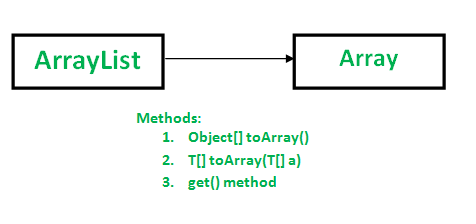
Methods to convert an ArrayList to an array
We can use any of the following methods to convert an ArrayList to an array, depending on the type of array and your specific requirements.
Method 1: Using Object[] toArray() method
- It is specified by toArray in interface Collection and interface List
- It overrides toArray in class AbstractCollection
- It returns an array containing all of the elements in this list in the correct order.
Syntax:
public Object[] toArray()
import java.io.*;
import java.util.List;
import java.util.ArrayList;

class GFG {
    public static void main(String[] args)
    {
        List<Integer> al = new ArrayList<Integer>();
        al.add(10);
        al.add(20);
        al.add(30);
        al.add(40);

        Object[] objects = al.toArray();

        // Printing array of objects
        for (Object obj : objects)
            System.out.print(obj + " ");
    }
}
Output
10 20 30 40
Note: toArray() method returns an array of type Object(Object[]). We need to typecast it to Integer before using as Integer objects. If we do not typecast, we get compilation error.
Now, Consider the following example:
import java.io.*;
import java.util.List;
import java.util.ArrayList;

class GFG {
    public static void main(String[] args)
    {
        List<Integer> al = new ArrayList<Integer>();
        al.add(10);
        al.add(20);
        al.add(30);
        al.add(40);

        // Error: incompatible types: Object[]
        // cannot be converted to Integer[]
        Integer[] objects = al.toArray();

        for (Integer obj : objects)
            System.out.println(obj);
    }
}
Output:
19: error: incompatible types: Object[] cannot be converted to Integer[]
        Integer[] objects = al.toArray();
                                      ^
1 error
It is therefore recommended to create an array into which elements of List need to be stored and pass it as an argument in toArray() method to store elements if it is big enough. Otherwise a new array of the same type is allocated for this purpose.
Method 2: Using T[] toArray(T[] a)
Note that the there is an array parameter and array return value. The main purpose of passed array is to tell the type of array. The returned array is of same type as passed array.
- If the passed array has enough space, then elements are stored in this array itself.
- If the passed array doesn't have enough space, a new array is created with same type and size of given list.
- If the passed array has more space, the array is first filled with list elements, then null values are filled.
Syntax:
public T[] toArray(T[] arr)
It throws ArrayStoreException if the runtime type of a is not a supertype of the runtime type of every element in this list.
import java.io.*;
import java.util.List;
import java.util.ArrayList;

class GFG {
    public static void main(String[] args)
    {
        List<Integer> al = new ArrayList<Integer>();
        al.add(10);
        al.add(20);
        al.add(30);
        al.add(40);

        Integer[] arr = new Integer[al.size()];
        arr = al.toArray(arr);

        for (Integer x : arr)
            System.out.print(x + " ");
    }
}
Output
10 20 30 40
Note : If the specified array is null then it will throw NullpointerException. See this for example.
Method 3: Manual method to convert ArrayList using get() method
We can use this method if we don't want to use java in built toArray() method. This is a manual method of copying all the ArrayList elements to the String Array[].
Syntax:
public E get(int index)
import java.io.*;
import java.util.List;
import java.util.ArrayList;

class GFG {
    public static void main(String[] args)
    {
        List<Integer> al = new ArrayList<Integer>();
        al.add(10);
        al.add(20);
        al.add(30);
        al.add(40);

        Integer[] arr = new Integer[al.size()];

        // ArrayList to Array Conversion
        for (int i = 0; i < al.size(); i++)
            arr[i] = al.get(i);

        for (Integer x : arr)
            System.out.print(x + " ");
    }
}
Output
10 20 30 40
Method 4: Using streams API of collections in java 8 to convert to array of primitive int type
We can use this streams() method of list and mapToInt() to convert ArrayList<Integer> to array of primitive data type int
Syntax:
int[] arr = list.stream().mapToInt(i -> i).toArray();
import java.io.*;
import java.util.List;
import java.util.ArrayList;

class GFG {
    public static void main(String[] args)
    {
        List<Integer> al = new ArrayList<Integer>();
        al.add(10);
        al.add(20);
        al.add(30);
        al.add(40);

        // ArrayList to Array Conversion
        int[] arr = al.stream().mapToInt(i -> i).toArray();

        for (int x : arr)
            System.out.print(x + " ");
    }
}
Output
10 20 30 40
Method 5: Convert 2D ArrayList to 2D Array
A two-dimensional ArrayList stores data in rows and columns using nested lists. To convert it into a 2D array, first create an array with the required dimensions and then copy each element from the nested ArrayList into the array.
Syntax:
T[][] array = new T[list.size()][];
for (int i = 0; i < list.size(); i++) {
array[i] = list.get(i).toArray(new T[0]);
}
- T represents the type of elements stored in the ArrayList.
- list.size() determines the number of rows in the 2D array.
- toArray(new T[0]) converts each inner ArrayList into a one-dimensional array.
import java.util.ArrayList;
import java.util.List;

public class GFG {

    public static void main(String[] args) {

        List<List<Integer>> list = new ArrayList<>();

        list.add(List.of(10, 20, 30));
        list.add(List.of(40, 50, 60));
        list.add(List.of(70, 80, 90));

        Integer[][] arr = new Integer[list.size()][];

        for (int i = 0; i < list.size(); i++) {
            arr[i] = list.get(i).toArray(new Integer[0]);
        }

        for (Integer[] row : arr) {
            for (Integer value : row) {
                System.out.print(value + " ");
            }
            System.out.println();
        }
    }
}
Output
10 20 30
40 50 60
70 80 90
Note: This approach works when each inner ArrayList represents a row. If the inner lists have different sizes, the resulting 2D array will be a jagged array, where each row can have a different number of columns.
