

JSON (JavaScript Object Notation) is a lightweight text format used to store and exchange data between applications.
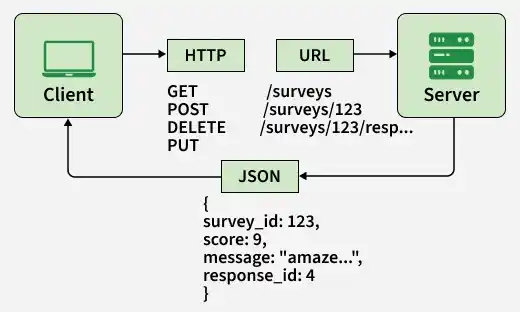
- Data Exchange: Transfers data between clients, servers, and applications.
- JavaScript Integration: Converts JSON strings into JavaScript values using JSON.parse() .
- Data Serialization: Converts JavaScript values into JSON strings using JSON.stringify().
Creating a JavaScript Object
JavaScript objects store data as key-value pairs. Although JSON uses a similar structure, a JavaScript object is not the same as JSON text.
const person = {
  "name": "Ben",
  "age": 30,
  "city": "New York"
};

console.log(person);
Output
{ name: 'Ben', age: 30, city: 'New York' }
- {} defines the object.
- "name", "age", and "city" are property names.
- "Ben", 30, and "New York" are the corresponding values.
- : separates property names and values, while , separates key-value pairs.
In JSON text, property names must use double quotes, strings must use double quotes, and functions and undefined values are not supported
Accessing JavaScript Object Properties
Object properties can be accessed using dot notation or bracket notation.
const myOrder = {
  name: "Earbuds",
  cost: 799,
  warranty: "1 year"
};

console.log(myOrder.name);
console.log(myOrder["cost"]);
console.log(myOrder["warranty"]);
Output
Earbuds
799
1 year
- Dot notation: Access a property using object.property.
- Bracket notation: Access a property using object["property"]. This is useful when property names contain spaces or are stored in variables.
Looping Through JavaScript Object Properties
The for...in loop iterates over an object's enumerable string-keyed properties. Bracket notation can be used to access each property's value.
const myOrder = {
  name: "Earbuds",
  cost: 799,
  warranty: "1 year"
};

for (const key in myOrder) {
  console.log(key, myOrder[key]);
}
Output
name Earbuds
cost 799
warranty 1 year
To iterate only over an object's own enumerable properties, use Object.keys(), Object.values(), or Object.entries(), depending on whether you need the keys, values, or both.
Converting a JSON String to a JavaScript Object
The JSON.parse() method converts a valid JSON string into a JavaScript value, such as an object or array.
const jsonString = '{"name": "GFG", "age": 30}';

const jsonObject = JSON.parse(jsonString);

console.log(jsonObject.name);
console.log(jsonObject.age);
Output
GFG
30
JSON.parse() throws a SyntaxError if the input contains invalid JSON. Use error handling when parsing JSON from external sources.
Converting a JavaScript Object to JSON
The JSON.stringify() method converts a JavaScript value into a JSON string. It is commonly used when sending data to APIs or storing data as text.
const person = {
  name: "Ben",
  age: 30,
  city: "New York"
};

const jsonString = JSON.stringify(person);

console.log(jsonString);
Output
{"name":"Ben","age":30,"city":"New York"}
JSON.stringify() serializes supported values into JSON text. Some JavaScript values, such as functions and undefined properties, are omitted from objects during serialization.
