Function calling
Function calling (also known as tool calling) provides a powerful and flexible way for OpenAI models to interface with external systems and access data outside their training data. This guide shows how you can connect a model to data and actions provided by your application. We'll show how to use function tools (defined by a JSON schema) and custom tools which work with free form text inputs and outputs.
How it works
Let's begin by understanding a few key terms about tool calling. After we have a shared vocabulary for tool calling, we'll show you how it's done with some practical examples.
The tool calling flow
Tool calling is a multi-step conversation between your application and a model via the OpenAI API. The tool calling flow has five high level steps:
- Make a request to the model with tools it could call
- Receive a tool call from the model
- Execute code on the application side with input from the tool call
- Make a second request to the model with the tool output
- Receive a final response from the model (or more tool calls)
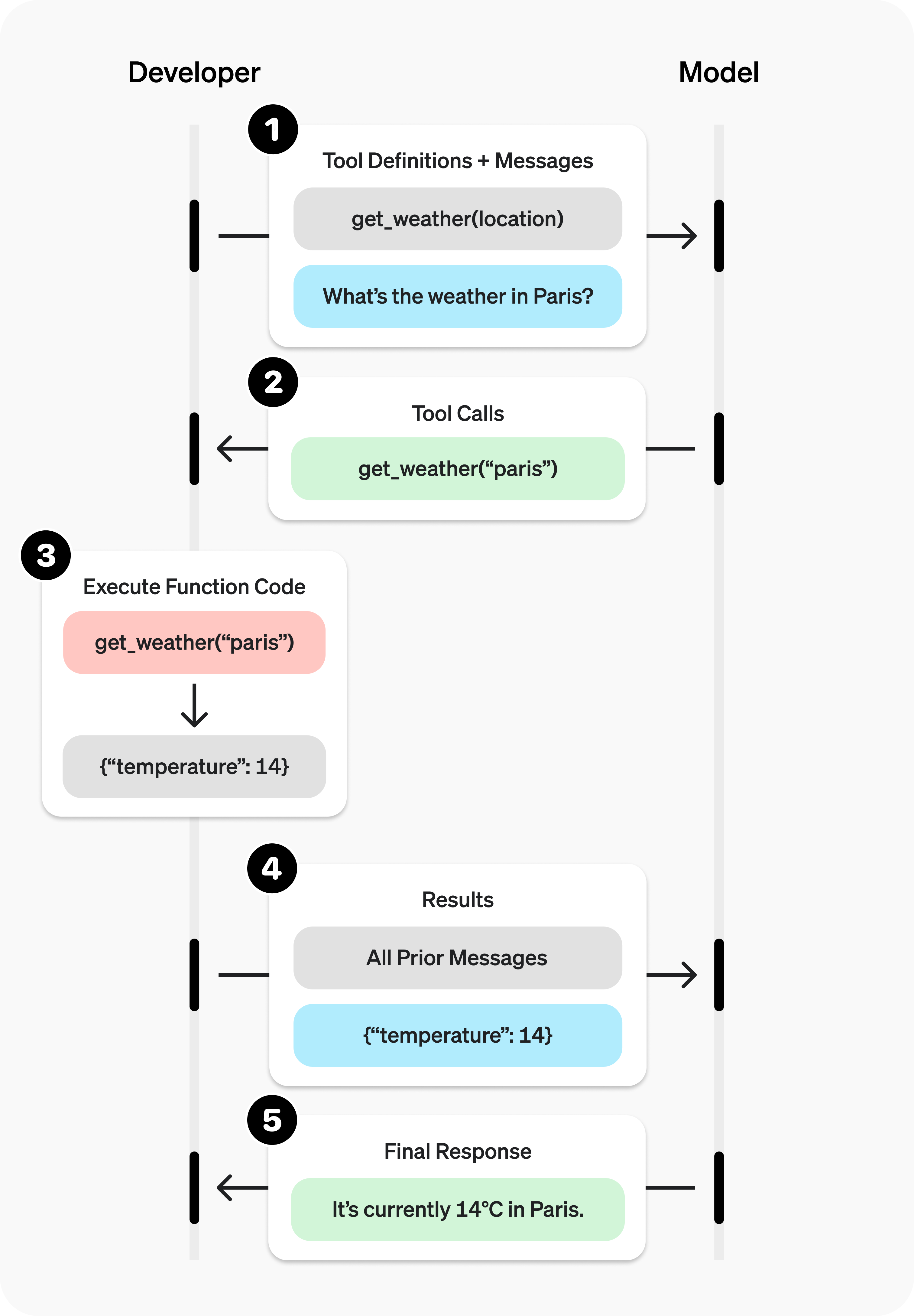
Function tool example
Let's look at an end-to-end tool calling flow for a get_horoscope function that gets a daily horoscope for an astrological sign.
1
2
3
4
5
6
7
8
9
10
11
12
13
14
15
16
17
18
19
20
21
22
23
24
25
26
27
28
29
30
31
32
33
34
35
36
37
38
39
40
41
42
43
44
45
46
47
48
49
50
51
52
53
54
55
56
57
58
59
60
61
62
63
64
65
66
67
68
69
70
71
from openai import OpenAI
import json

client = OpenAI()

# 1. Define a list of callable tools for the model
tools = [
    {
        "type": "function",
        "name": "get_horoscope",
        "description": "Get today's horoscope for an astrological sign.",
        "parameters": {
            "type": "object",
            "properties": {
                "sign": {
                    "type": "string",
                    "description": "An astrological sign like Taurus or Aquarius",
                },
            },
            "required": ["sign"],
        },
    },
]

def get_horoscope(sign):
    return f"{sign}: Next Tuesday you will befriend a baby otter."

# Create a running input list we will add to over time
input_list = [
    {"role": "user", "content": "What is my horoscope? I am an Aquarius."}
]

# 2. Prompt the model with tools defined
response = client.responses.create(
    model="gpt-5",
    tools=tools,
    input=input_list,
)

# Save function call outputs for subsequent requests
input_list += response.output

for item in response.output:
    if item.type == "function_call":
        if item.name == "get_horoscope":
            # 3. Execute the function logic for get_horoscope
            horoscope = get_horoscope(json.loads(item.arguments))

            # 4. Provide function call results to the model
            input_list.append({
                "type": "function_call_output",
                "call_id": item.call_id,
                "output": json.dumps({
                  "horoscope": horoscope
                })
            })

print("Final input:")
print(input_list)

response = client.responses.create(
    model="gpt-5",
    instructions="Respond only with a horoscope generated by a tool.",
    tools=tools,
    input=input_list,
)

# 5. The model should be able to give a response!
print("Final output:")
print(response.model_dump_json(indent=2))
print("\n" + response.output_text)Note that for reasoning models like GPT-5 or o4-mini, any reasoning items returned in model responses with tool calls must also be passed back with tool call outputs.
Defining functions
Functions can be set in the tools parameter of each API request. A function is defined by its schema, which informs the model what it does and what input arguments it expects. A function definition has the following properties:
| Field | Description |
|---|---|
type | This should always be function |
name | The function's name (e.g. get_weather) |
description | Details on when and how to use the function |
parameters | JSON schema defining the function's input arguments |
strict | Whether to enforce strict mode for the function call |
Here is an example function definition for a get_weather function
1
2
3
4
5
6
7
8
9
10
11
12
13
14
15
16
17
18
19
20
21
22
{
    "type": "function",
    "name": "get_weather",
    "description": "Retrieves current weather for the given location.",
    "parameters": {
        "type": "object",
        "properties": {
            "location": {
                "type": "string",
                "description": "City and country e.g. Bogotá, Colombia"
            },
            "units": {
                "type": "string",
                "enum": ["celsius", "fahrenheit"],
                "description": "Units the temperature will be returned in."
            }
        },
        "required": ["location", "units"],
        "additionalProperties": false
    },
    "strict": true
}
Because the parameters are defined by a JSON schema, you can leverage many of its rich features like property types, enums, descriptions, nested objects, and, recursive objects.
Best practices for defining functions
-
Write clear and detailed function names, parameter descriptions, and instructions.
- Explicitly describe the purpose of the function and each parameter (and its format), and what the output represents.
- Use the system prompt to describe when (and when not) to use each function. Generally, tell the model exactly what to do.
- Include examples and edge cases, especially to rectify any recurring failures. (Note: Adding examples may hurt performance for reasoning models.)
-
Apply software engineering best practices.
- Make the functions obvious and intuitive. (principle of least surprise)
- Use enums and object structure to make invalid states unrepresentable. (e.g.
toggle_light(on: bool, off: bool)allows for invalid calls) - Pass the intern test. Can an intern/human correctly use the function given nothing but what you gave the model? (If not, what questions do they ask you? Add the answers to the prompt.)
-
Offload the burden from the model and use code where possible.
- Don't make the model fill arguments you already know. For example, if you already have an
order_idbased on a previous menu, don't have anorder_idparam – instead, have no paramssubmit_refund()and pass theorder_idwith code. - Combine functions that are always called in sequence. For example, if you always call
mark_location()afterquery_location(), just move the marking logic into the query function call.
- Don't make the model fill arguments you already know. For example, if you already have an
-
Keep the number of functions small for higher accuracy.
- Evaluate your performance with different numbers of functions.
- Aim for fewer than 20 functions at any one time, though this is just a soft suggestion.
-
Leverage OpenAI resources.
- Generate and iterate on function schemas in the Playground.
- Consider fine-tuning to increase function calling accuracy for large numbers of functions or difficult tasks. (cookbook)
Token Usage
Under the hood, functions are injected into the system message in a syntax the model has been trained on. This means functions count against the model's context limit and are billed as input tokens. If you run into token limits, we suggest limiting the number of functions or the length of the descriptions you provide for function parameters.
It is also possible to use fine-tuning to reduce the number of tokens used if you have many functions defined in your tools specification.
Handling function calls
When the model calls a function, you must execute it and return the result. Since model responses can include zero, one, or multiple calls, it is best practice to assume there are several.
The response output array contains an entry with the type having a value of function_call. Each entry with a call_id (used later to submit the function result), name, and JSON-encoded arguments.
1
2
3
4
5
6
7
8
9
10
11
12
13
14
15
16
17
18
19
20
21
22
23
[
    {
        "id": "fc_12345xyz",
        "call_id": "call_12345xyz",
        "type": "function_call",
        "name": "get_weather",
        "arguments": "{\"location\":\"Paris, France\"}"
    },
    {
        "id": "fc_67890abc",
        "call_id": "call_67890abc",
        "type": "function_call",
        "name": "get_weather",
        "arguments": "{\"location\":\"Bogotá, Colombia\"}"
    },
    {
        "id": "fc_99999def",
        "call_id": "call_99999def",
        "type": "function_call",
        "name": "send_email",
        "arguments": "{\"to\":\"bob@email.com\",\"body\":\"Hi bob\"}"
    }
]1
2
3
4
5
6
7
8
9
10
11
12
13
for tool_call in response.output:
if tool_call.type != "function_call":
continue
name = tool_call.name
args = json.loads(tool_call.arguments)
result = call_function(name, args)
input_messages.append({
"type": "function_call_output",
"call_id": tool_call.call_id,
"output": str(result)
})In the example above, we have a hypothetical call_function to route each call. Here’s a possible implementation:
1
2
3
4
5
def call_function(name, args):
    if name == "get_weather":
        return get_weather(**args)
    if name == "send_email":
return send_email(**args)Formatting results
A result must be a string, but the format is up to you (JSON, error codes, plain text, etc.). The model will interpret that string as needed.
If your function has no return value (e.g. send_email), simply return a string to indicate success or failure. (e.g. "success")
Incorporating results into response
After appending the results to your input, you can send them back to the model to get a final response.
1
2
3
4
5
response = client.responses.create(
    model="gpt-4.1",
    input=input_messages,
    tools=tools,
)"It's about 15°C in Paris, 18°C in Bogotá, and I've sent that email to Bob."Additional configurations
Tool choice
By default the model will determine when and how many tools to use. You can force specific behavior with the tool_choice parameter.
- Auto: (Default) Call zero, one, or multiple functions.
tool_choice: "auto" - Required: Call one or more functions.
tool_choice: "required" - Forced Function: Call exactly one specific function.
tool_choice: {"type": "function", "name": "get_weather"} - Allowed tools: Restrict the tool calls the model can make to a subset of the tools available to the model.
When to use allowed_tools
You might want to configure an allowed_tools list in case you want to make only
a subset of tools available across model requests, but not modify the list of tools you pass in, so you can maximize savings from prompt caching.
1
2
3
4
5
6
7
8
9
"tool_choice": {
    "type": "allowed_tools",
    "mode": "auto",
    "tools": [
        { "type": "function", "name": "get_weather" },
        { "type": "function", "name": "search_docs" }
    ]
  }
}
You can also set tool_choice to "none" to imitate the behavior of passing no functions.
Parallel function calling
Parallel function calling is not possible when using built-in tools.
The model may choose to call multiple functions in a single turn. You can prevent this by setting parallel_tool_calls to false, which ensures exactly zero or one tool is called.
Note: Currently, if you are using a fine tuned model and the model calls multiple functions in one turn then strict mode will be disabled for those calls.
Note for gpt-4.1-nano-2025-04-14: This snapshot of gpt-4.1-nano can sometimes include multiple tools calls for the same tool if parallel tool calls are enabled. It is recommended to disable this feature when using this nano snapshot.
Strict mode
Setting strict to true will ensure function calls reliably adhere to the function schema, instead of being best effort. We recommend always enabling strict mode.
Under the hood, strict mode works by leveraging our structured outputs feature and therefore introduces a couple requirements:
additionalPropertiesmust be set tofalsefor each object in theparameters.- All fields in
propertiesmust be marked asrequired.
You can denote optional fields by adding null as a type option (see example below).
1
2
3
4
5
6
7
8
9
10
11
12
13
14
15
16
17
18
19
20
21
22
{
    "type": "function",
    "name": "get_weather",
    "description": "Retrieves current weather for the given location.",
    "strict": true,
    "parameters": {
        "type": "object",
        "properties": {
            "location": {
                "type": "string",
                "description": "City and country e.g. Bogotá, Colombia"
            },
            "units": {
                "type": ["string", "null"],
                "enum": ["celsius", "fahrenheit"],
                "description": "Units the temperature will be returned in."
            }
        },
        "required": ["location", "units"],
        "additionalProperties": false
    }
}1
2
3
4
5
6
7
8
9
10
11
12
13
14
15
16
17
18
19
20
{
"type": "function",
"name": "get_weather",
"description": "Retrieves current weather for the given location.",
"parameters": {
"type": "object",
"properties": {
"location": {
"type": "string",
"description": "City and country e.g. Bogotá, Colombia"
},
"units": {
"type": "string",
"enum": ["celsius", "fahrenheit"],
"description": "Units the temperature will be returned in."
}
},
"required": ["location"],
}
}All schemas generated in the playground have strict mode enabled.
While we recommend you enable strict mode, it has a few limitations:
- Some features of JSON schema are not supported. (See supported schemas.)
Specifically for fine tuned models:
- Schemas undergo additional processing on the first request (and are then cached). If your schemas vary from request to request, this may result in higher latencies.
- Schemas are cached for performance, and are not eligible for zero data retention.
Streaming
Streaming can be used to surface progress by showing which function is called as the model fills its arguments, and even displaying the arguments in real time.
Streaming function calls is very similar to streaming regular responses: you set stream to true and get different event objects.
1
2
3
4
5
6
7
8
9
10
11
12
13
14
15
16
17
18
19
20
21
22
23
24
25
26
27
28
29
30
31
32
from openai import OpenAI

client = OpenAI()

tools = [{
    "type": "function",
    "name": "get_weather",
    "description": "Get current temperature for a given location.",
    "parameters": {
        "type": "object",
        "properties": {
            "location": {
                "type": "string",
                "description": "City and country e.g. Bogotá, Colombia"
            }
        },
        "required": [
            "location"
        ],
        "additionalProperties": False
    }
}]

stream = client.responses.create(
    model="gpt-4.1",
    input=[{"role": "user", "content": "What's the weather like in Paris today?"}],
    tools=tools,
    stream=True
)

for event in stream:
    print(event)
1
2
3
4
5
6
7
8
9
10
{"type":"response.output_item.added","response_id":"resp_1234xyz","output_index":0,"item":{"type":"function_call","id":"fc_1234xyz","call_id":"call_1234xyz","name":"get_weather","arguments":""}}
{"type":"response.function_call_arguments.delta","response_id":"resp_1234xyz","item_id":"fc_1234xyz","output_index":0,"delta":"{\""}
{"type":"response.function_call_arguments.delta","response_id":"resp_1234xyz","item_id":"fc_1234xyz","output_index":0,"delta":"location"}
{"type":"response.function_call_arguments.delta","response_id":"resp_1234xyz","item_id":"fc_1234xyz","output_index":0,"delta":"\":\""}
{"type":"response.function_call_arguments.delta","response_id":"resp_1234xyz","item_id":"fc_1234xyz","output_index":0,"delta":"Paris"}
{"type":"response.function_call_arguments.delta","response_id":"resp_1234xyz","item_id":"fc_1234xyz","output_index":0,"delta":","}
{"type":"response.function_call_arguments.delta","response_id":"resp_1234xyz","item_id":"fc_1234xyz","output_index":0,"delta":" France"}
{"type":"response.function_call_arguments.delta","response_id":"resp_1234xyz","item_id":"fc_1234xyz","output_index":0,"delta":"\"}"}
{"type":"response.function_call_arguments.done","response_id":"resp_1234xyz","item_id":"fc_1234xyz","output_index":0,"arguments":"{\"location\":\"Paris, France\"}"}
{"type":"response.output_item.done","response_id":"resp_1234xyz","output_index":0,"item":{"type":"function_call","id":"fc_1234xyz","call_id":"call_1234xyz","name":"get_weather","arguments":"{\"location\":\"Paris, France\"}"}}Instead of aggregating chunks into a single content string, however, you're aggregating chunks into an encoded arguments JSON object.
When the model calls one or more functions an event of type response.output_item.added will be emitted for each function call that contains the following fields:
| Field | Description |
|---|---|
response_id | The id of the response that the function call belongs to |
output_index | The index of the output item in the response. This represents the individual function calls in the response. |
item | The in-progress function call item that includes a name, arguments and id field |
Afterwards you will receive a series of events of type response.function_call_arguments.delta which will contain the delta of the arguments field. These events contain the following fields:
| Field | Description |
|---|---|
response_id | The id of the response that the function call belongs to |
item_id | The id of the function call item that the delta belongs to |
output_index | The index of the output item in the response. This represents the individual function calls in the response. |
delta | The delta of the arguments field. |
Below is a code snippet demonstrating how to aggregate the deltas into a final tool_call object.
1
2
3
4
5
6
7
8
9
10
final_tool_calls = {}

for event in stream:
    if event.type === 'response.output_item.added':
        final_tool_calls[event.output_index] = event.item;
    elif event.type === 'response.function_call_arguments.delta':
        index = event.output_index

        if final_tool_calls[index]:
            final_tool_calls[index].arguments += event.delta
1
2
3
4
5
6
7
{
"type": "function_call",
"id": "fc_1234xyz",
"call_id": "call_2345abc",
"name": "get_weather",
"arguments": "{\"location\":\"Paris, France\"}"
}When the model has finished calling the functions an event of type response.function_call_arguments.done will be emitted. This event contains the entire function call including the following fields:
| Field | Description |
|---|---|
response_id | The id of the response that the function call belongs to |
output_index | The index of the output item in the response. This represents the individual function calls in the response. |
item | The function call item that includes a name, arguments and id field. |
Custom tools
Custom tools work in much the same way as JSON schema-driven function tools. But rather than providing the model explicit instructions on what input your tool requires, the model can pass an arbitrary string back to your tool as input. This is useful to avoid unnecessarily wrapping a response in JSON, or to apply a custom grammar to the response (more on this below).
The following code sample shows creating a custom tool that expects to receive a string of text containing Python code as a response.
1
2
3
4
5
6
7
8
9
10
11
12
13
14
15
16
from openai import OpenAI

client = OpenAI()

response = client.responses.create(
    model="gpt-5",
    input="Use the code_exec tool to print hello world to the console.",
    tools=[
        {
            "type": "custom",
            "name": "code_exec",
            "description": "Executes arbitrary Python code.",
        }
    ]
)
print(response.output)Just as before, the output array will contain a tool call generated by the model. Except this time, the tool call input is given as plain text.
1
2
3
4
5
6
7
8
9
10
11
12
13
14
15
16
[
    {
        "id": "rs_6890e972fa7c819ca8bc561526b989170694874912ae0ea6",
        "type": "reasoning",
        "content": [],
        "summary": []
    },
    {
        "id": "ctc_6890e975e86c819c9338825b3e1994810694874912ae0ea6",
        "type": "custom_tool_call",
        "status": "completed",
        "call_id": "call_aGiFQkRWSWAIsMQ19fKqxUgb",
        "input": "print(\"hello world\")",
        "name": "code_exec"
    }
]
Context-free grammars
A context-free grammar (CFG) is a set of rules that define how to produce valid text in a given format. For custom tools, you can provide a CFG that will constrain the model's text input for a custom tool.
You can provide a custom CFG using the grammar parameter when configuring a custom tool. Currently, we support two CFG syntaxes when defining grammars: lark and regex.
Lark CFG
1
2
3
4
5
6
7
8
9
10
11
12
13
14
15
16
17
18
19
20
21
22
23
24
25
26
27
28
29
30
31
32
33
34
from openai import OpenAI

client = OpenAI()

grammar = """
start: expr
expr: term (SP ADD SP term)* -> add
| term
term: factor (SP MUL SP factor)* -> mul
| factor
factor: INT
SP: " "
ADD: "+"
MUL: "*"
%import common.INT
"""

response = client.responses.create(
    model="gpt-5",
    input="Use the math_exp tool to add four plus four.",
    tools=[
        {
            "type": "custom",
            "name": "math_exp",
            "description": "Creates valid mathematical expressions",
            "format": {
                "type": "grammar",
                "syntax": "lark",
                "definition": grammar,
            },
        }
    ]
)
print(response.output)The output from the tool should then conform to the Lark CFG that you defined:
1
2
3
4
5
6
7
8
9
10
11
12
13
14
15
16
[
    {
        "id": "rs_6890ed2b6374819dbbff5353e6664ef103f4db9848be4829",
        "type": "reasoning",
        "content": [],
        "summary": []
    },
    {
        "id": "ctc_6890ed2f32e8819daa62bef772b8c15503f4db9848be4829",
        "type": "custom_tool_call",
        "status": "completed",
        "call_id": "call_pmlLjmvG33KJdyVdC4MVdk5N",
        "input": "4 + 4",
        "name": "math_exp"
    }
]
Grammars are specified using a variation of Lark. Model sampling is constrained using LLGuidance. Some features of Lark are not supported:
- Lookarounds in lexer regexes
- Lazy modifiers (
*?,+?,??) in lexer regexes - Priorities of terminals
- Templates
- Imports (other than built-in
%importcommon) %declares
We recommend using the Lark IDE to experiment with custom grammars.
Keep grammars simple
Try to make your grammar as simple as possible. The OpenAI API may return an error if the grammar is too complex, so you should ensure that your desired grammar is compatible before using it in the API.
Lark grammars can be tricky to perfect. While simple grammars perform most reliably, complex grammars often require iteration on the grammar definition itself, the prompt, and the tool description to ensure that the model does not go out of distribution.
Correct versus incorrect patterns
Correct (single, bounded terminal):
start: SENTENCE
SENTENCE: /[A-Za-z, ]*(the hero|a dragon|an old man|the princess)[A-Za-z, ]*(fought|saved|found|lost)[A-Za-z, ]*(a treasure|the kingdom|a secret|his way)[A-Za-z, ]*\./
Do NOT do this (splitting across rules/terminals). This attempts to let rules partition free text between terminals. The lexer will greedily match the free-text pieces and you'll lose control:
start: sentence
sentence: /[A-Za-z, ]+/ subject /[A-Za-z, ]+/ verb /[A-Za-z, ]+/ object /[A-Za-z, ]+/
Lowercase rules don't influence how terminals are cut from the input—only terminal definitions do. When you need “free text between anchors,” make it one giant regex terminal so the lexer matches it exactly once with the structure you intend.
Terminals versus rules
Lark uses terminals for lexer tokens (by convention, UPPERCASE) and rules for parser productions (by convention, lowercase). The most practical way to stay within the supported subset and avoid surprises is to keep your grammar simple and explicit, and to use terminals and rules with a clear separation of concerns.
The regex syntax used by terminals is the Rust regex crate syntax, not Python's re module.
Key ideas and best practices
Lexer runs before the parser
Terminals are matched by the lexer (greedily / longest match wins) before any CFG rule logic is applied. If you try to "shape" a terminal by splitting it across several rules, the lexer cannot be guided by those rules—only by terminal regexes.
Prefer one terminal when you're carving text out of freeform spans
If you need to recognize a pattern embedded in arbitrary text (e.g., natural language with “anything” between anchors), express that as a single terminal. Do not try to interleave free‑text terminals with parser rules; the greedy lexer will not respect your intended boundaries and it is highly likely the model will go out of distribution.
Use rules to compose discrete tokens
Rules are ideal when you're combining clearly delimited terminals (numbers, keywords, punctuation) into larger structures. They're not the right tool for constraining "the stuff in between" two terminals.
Keep terminals simple, bounded, and self-contained
Favor explicit character classes and bounded quantifiers ({0,10}, not unbounded * everywhere). If you need "any text up to a period", prefer something like /[^.\n]{0,10}*\./ rather than /.+\./ to avoid runaway growth.
Use rules to combine tokens, not to steer regex internals
Good rule usage example:
1
2
3
4
5
6
start: expr
NUMBER: /[0-9]+/
PLUS: "+"
MINUS: "-"
expr: term (("+"|"-") term)*
term: NUMBER
Treat whitespace explicitly
Don't rely on open-ended %ignore directives. Using unbounded ignore directives may cause the grammar to be too complex and/or may cause the model to go out of distribution. Prefer threading explicit terminals wherever whitespace is allowed.
Troubleshooting
- If the API rejects the grammar because it is too complex, simplify the rules and terminals and remove unbounded
%ignores. - If custom tools are called with unexpected tokens, confirm terminals aren’t overlapping; check greedy lexer.
- When the model drifts "out‑of‑distribution" (shows up as the model producing excessively long or repetitive outputs, it is syntactically valid but is semantically wrong):
- Tighten the grammar.
- Iterate on the prompt (add few-shot examples) and tool description (explain the grammar and instruct the model to reason and conform to it).
- Experiment with a higher reasoning effort (e.g, bump from medium to high).
Regex CFG
1
2
3
4
5
6
7
8
9
10
11
12
13
14
15
16
17
18
19
20
21
22
23
from openai import OpenAI

client = OpenAI()

grammar = r"^(?P<month>January|February|March|April|May|June|July|August|September|October|November|December)\s+(?P<day>\d{1,2})(?:st|nd|rd|th)?\s+(?P<year>\d{4})\s+at\s+(?P<hour>0?[1-9]|1[0-2])(?P<ampm>AM|PM)$"

response = client.responses.create(
    model="gpt-5",
    input="Use the timestamp tool to save a timestamp for August 7th 2025 at 10AM.",
    tools=[
        {
            "type": "custom",
            "name": "timestamp",
            "description": "Saves a timestamp in date + time in 24-hr format.",
            "format": {
                "type": "grammar",
                "syntax": "regex",
                "definition": grammar,
            },
        }
    ]
)
print(response.output)The output from the tool should then conform to the Regex CFG that you defined:
1
2
3
4
5
6
7
8
9
10
11
12
13
14
15
16
[
    {
        "id": "rs_6894f7a3dd4c81a1823a723a00bfa8710d7962f622d1c260",
        "type": "reasoning",
        "content": [],
        "summary": []
    },
    {
        "id": "ctc_6894f7ad7fb881a1bffa1f377393b1a40d7962f622d1c260",
        "type": "custom_tool_call",
        "status": "completed",
        "call_id": "call_8m4XCnYvEmFlzHgDHbaOCFlK",
        "input": "August 7th 2025 at 10AM",
        "name": "timestamp"
    }
]
As with the Lark syntax, regexes use the Rust regex crate syntax, not Python's re module.
Some features of Regex are not supported:
- Lookarounds
- Lazy modifiers (
*?,+?,??)
Key ideas and best practices
Pattern must be on one line
If you need to match a newline in the input, use the escaped sequence \n. Do not use verbose/extended mode, which allows patterns to span multiple lines.
Provide the regex as a plain pattern string
Don't enclose the pattern in //.
