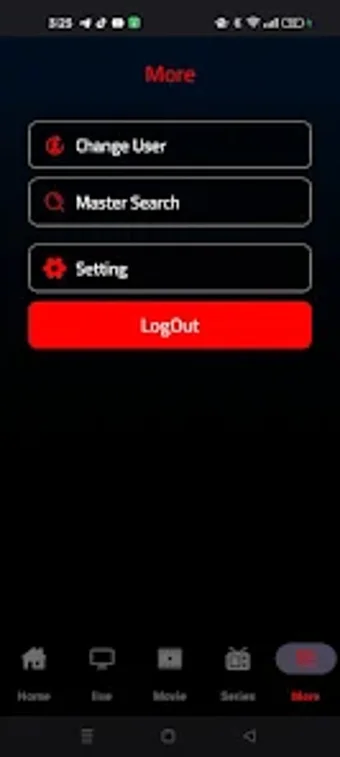
000Player is a multimedia player built around user-suppliedstreams and files, with an emphasis on TV-styleviewing. The listing highlights support for a broad range of formats, plus playback controls that aim to keep streaming smooth.
The most important detail is also the simplest one. 000Player does not include channels, movies, or shows, so the app only becomes useful when you bring your own streaming links or media sources. That setup can feel restrictive for first-time IPTV users, since nothing plays out of the box. Anyone who already manages playlists and legitimate streams gets a cleaner, more focused playback experience without a built-in catalog getting in the way.
How 000Player handles streaming and playback
000Player frames itself as an IPTV player for watching live TV, movies, and shows through your own sources, rather than as a content service. The upside is clarity and control, since the app stays focused on playback instead of pushing a catalog. The downside is immediate: anyone expecting built-in channels hits a dead end fast because the app explicitly provides no media.
Format flexibility is part of the pitch. The store description calls out support for a “wide range of formats” and a “smooth playback” experience, which fits users who juggle different files or stream types. Advanced playback options also get a mention, which can help fine-tune how video behaves during viewing. Specific codec support and real-world performance still depend on the content you feed it and the device running it.
Organization tools show up as a headline feature, including playlist management for keeping viewing sources in order. That can be useful for people who rotate between multiple links and libraries instead of relying on a single stream. The description also describes the app as lightweight and fast, which reads well for day-to-day use, although those claims are difficult to confirm from the store page alone.
Who this player fits best
000Player makes sense for viewers who already manage their own sources and want a focused video streaming app with advanced controls and playlist organization. The biggest limitation is the lack of included content, plus the lack of detailed compatibility info beyond broad format claims. If you want a general-purpose alternative, apps like VLC Media Player or Kodi are common picks for broader media playback needs.
Pros
Supports playlist management for organized viewing
Emphasizes smooth playback with advanced controls
Cons
Does not provide any channels or media content
Format support details stay high-level in the public description
Before downloading, you can take a quick look at the permissions this app may request on your device. App permissions allow certain features to work properly, such as accessing your camera to take photos, your location for maps, or your storage to save files.
In this section, you’ll find a clear and simple overview of the types of permissions the app uses, grouped by their level of sensitivity, along with a visual breakdown to help you understand them at a glance. This way, you can see how the app interacts with your device and decide to download with confidence.
Permissions types
Standard
60%
Non-standard
10%
Sensitive
30%
Permissions distribution
Privacy
40%
Data collected
30%
Data shared
30%
Data safety info
Privacy
4 permissions
Permissions that allow the app to access personal or sensitive information stored on your device, such as location, contacts, camera, or microphone.
android.permission.WRITE_SETTINGS
Non-standard
android.permission.WAKE_LOCK
Standard
android.permission.FOREGROUND_SERVICE
Standard
android.permission.RECEIVE_BOOT_COMPLETED
Standard
Data collected
3 permissions
Information the app may gather from your device or usage activity to enable features, personalize content, and improve overall performance.
android.permission.ACCESS_WIFI_STATE
Standard
android.permission.ACCESS_NETWORK_STATE
Standard
android.permission.READ_EXTERNAL_STORAGE
Sensitive
Data shared
3 permissions
Information that may be shared with trusted third parties to provide services, support app functionality, or deliver relevant content.
android.permission.INTERNET
Standard
android.permission.POST_NOTIFICATIONS
Sensitive
android.permission.WRITE_EXTERNAL_STORAGE
Sensitive
This report summarises the permissions declared by the app at the time of scanning and groups them into Privacy, Data collected and Data shared. A declared permission shows what the app can access, it does not necessarily mean personal data is collected or transmitted. For full details check the app’s privacy policy and the developer’s clarifications shown below. Softonic generates this report automatically from the package metadata; it is informational and not a substitute for a full security or privacy audit.
Laws concerning the use of this software vary from country to country. We do not encourage or condone the use of this program if it is in violation of these laws. Softonic may receive a referral fee if you click or buy any of the products featured here.