
Скачать 2Do – Мощный органайзер задач для macOS & iOS
Обзор
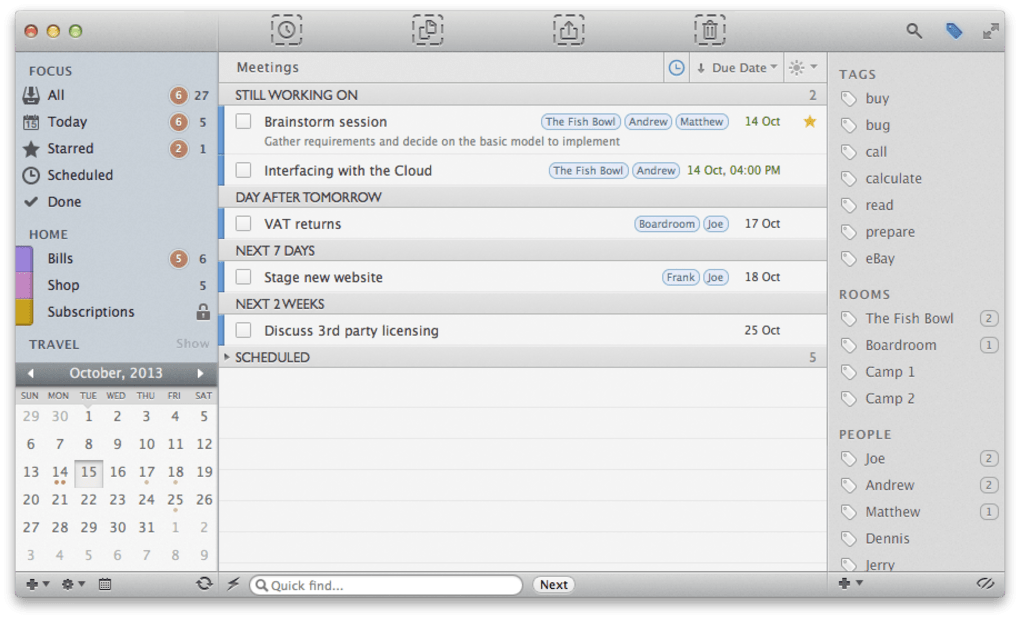
2Do — это стильное, насыщенное функциями приложение для повышения продуктивности, разработанное специально для пользователей Apple, которые используют несколько устройств и операционных систем. Будь вы фриланс‑дизайнер, занятый руководитель или студент, управляющий учебными заданиями, 2Do предлагает чистый, интуитивный интерфейс, который делает создание, организацию и отслеживание задач простыми. Приложение выделяется способностью создавать умные списки, применять мощные фильтры и даже перетаскивать ссылки из электронных писем прямо в менеджер задач — превращая разрозненную информацию в выполнимые пункты за секунды. Синхронизация осуществляется через различные облачные сервисы, включая Dropbox, Reminders (CalDAV), Toodledo и iCal CalDAV Server, обеспечивая актуальность вашего списка задач на каждом Mac и iOS‑устройстве. Хотя отсутствие нативной синхронизации с iCloud может разочаровать некоторых активных пользователей iCloud, 2Do компенсирует это быстрыми, надёжными вариантами синхронизации, которые уважают конфиденциальность и дают вам контроль над тем, где хранятся данные. Вкратце, 2Do сочетает простоту и глубину, предоставляя безопасное решение с бесплатным пробным периодом, которое масштабируется от повседневных мелочей до сложного управления проектами.
Ключевые функции
- Smart Lists & Filters: Create dynamic lists that automatically update based on tags, priorities, or due dates.
- Drag‑and‑Drop Email Integration: Drop email messages directly into 2Do to turn them into tasks without leaving your inbox.
- Multiple Sync Options: Sync via Dropbox, Reminders (CalDAV), Toodledo, or iCal CalDAV Server for seamless cross‑device updates.
- Customizable Themes & Layouts: Choose from light, dark, or custom color schemes to match your workflow aesthetic.
- Recurring Tasks & Reminders: Set daily, weekly, or monthly recurrence patterns with optional notification alerts.
- Keyboard Shortcuts & Quick Entry: Speed up task entry with Cmd‑Enter and other macOS shortcuts.
- Secure Local Storage: All data can be stored locally on your Mac, giving you full control over privacy.
- Export & Import: Export tasks to CSV or import from other task managers for easy migration.
Установка и первое использование
Getting started with 2Do is straightforward. Begin by visiting the official 2Do website or the Mac App Store and click the “Download” button. The installer package (a .dmg file) will mount automatically; drag the 2Do icon into your Applications folder, then launch the app. On first launch, you’ll be greeted with a brief onboarding wizard that walks you through creating your first project, adding tags, and setting up a preferred sync method. If you choose Dropbox, simply sign in with your Dropbox credentials and authorize 2Do to access a dedicated folder for task data. For Reminders (CalDAV) or iCal CalDAV Server, enter your server address, username, and password; the app validates the connection and begins synchronizing existing reminders.
Once synced, you can start adding tasks by clicking the “+” button or using the Cmd‑Enter shortcut. Each task can include a title, notes, due date, priority level, and optional email attachment. To create a smart list, click the “Lists” sidebar, select “New Smart List,” and define filter rules (e.g., all tasks tagged “Work” and due within the next 7 days). The interface supports drag‑and‑drop reordering, and you can swipe left on a task to reveal quick actions such as “Complete,” “Postpone”, or “Delete.” The app also offers a “Focus Mode” that hides completed items and shows only high‑priority tasks, helping you stay on track during intense work sessions.
Regular updates are delivered through the Mac App Store, ensuring you receive security patches, bug fixes, and new features automatically. For iOS users, the same process applies via the Apple App Store, and all changes sync in real time across devices.
Совместимость, синхронизация и поддержка платформ
2Do is engineered primarily for Apple ecosystems. It runs natively on macOS 10.13 (High Sierra) and later, and on iOS 12.0+ for iPhone, iPad, and iPod Touch. The application takes advantage of macOS’s native notifications, Touch Bar, and Spotlight integration, while the iOS version leverages widgets and Siri shortcuts for quick task entry. Although a Windows or Android client does not exist, the robust sync options (Dropbox, Reminders, Toodledo, iCal CalDAV) enable you to access your tasks from any platform that supports those services, albeit through a web interface or third‑party apps.
Sync reliability is a core strength of 2Do. Dropbox provides near‑instant file sync across all linked devices, while CalDAV services keep tasks consistent with Apple’s native Reminders app. Toodledo adds a cloud‑based option for users who prefer a dedicated task‑management server. The app also supports manual export/import, allowing you to back up your data locally or move it to another task manager if needed. However, the omission of iCloud as a direct sync target means users heavily invested in Apple’s cloud ecosystem must rely on the alternative CalDAV route, which may require extra configuration steps.
Security is handled with care: all data transmitted to Dropbox or CalDAV servers is encrypted via HTTPS, and local storage is sandboxed within macOS. For users concerned about privacy, disabling cloud sync and opting for local-only storage is possible, though it eliminates cross‑device convenience. Overall, 2Do delivers a balanced mix of compatibility, performance, and data protection for macOS and iOS power users.
Плюсы, минусы и часто задаваемые вопросы
Плюсы
- Intuitive, clutter‑free interface that speeds up task entry.
- Powerful smart lists and filters for dynamic organization.
- Multiple sync options give flexibility beyond iCloud.
- Drag‑and‑drop email integration streamlines workflow.
- Robust keyboard shortcuts and Touch Bar support for macOS power users.
- Secure local storage and encrypted cloud sync.
Минусы
- No native iCloud sync, which may inconvenience heavy iCloud users.
- Limited to Apple platforms; no Windows or Android client.
- Advanced features (e.g., recurring tasks) are locked behind the paid Pro license.
- Initial sync setup can be confusing for non‑technical users.
FAQ
Can I use 2Do without an internet connection?
Yes. All tasks are stored locally on your device, allowing you to create and edit items offline. Changes sync automatically once you reconnect to the internet.
Is there a free version of 2Do?
2Do offers a free tier with basic task‑management features. The Pro upgrade unlocks recurring tasks, advanced filters, and priority tagging.
How does 2Do handle task reminders on iOS?
Reminders are delivered through iOS’s native notification system. You can set custom alert times, repeat intervals, and choose whether alerts appear on lock screen or as banners.
Can I import tasks from other apps like Todoist or Things?
Yes. 2Do supports CSV import, which you can generate from most major task managers. Once imported, you can map tags and priorities to 2Do’s system.
Is my data encrypted when using Dropbox sync?
All data transferred to Dropbox is encrypted via HTTPS. However, the files stored in your Dropbox are not end‑to‑end encrypted by 2Do, so ensure your Dropbox account is secured with a strong password and two‑factor authentication.
2Do delivers a polished, highly functional experience for macOS and iOS power users. Its smart lists and email‑drag‑drop feature set it apart from many generic to‑do apps. While the lack of iCloud sync may be a drawback for some, the alternative sync methods are reliable and secure. Overall, 2Do earns a solid 4.5‑star rating for usability, flexibility, and depth.
Заключение и призыв к действию
If you’re looking for a secure, feature‑rich organizer that bridges your Mac and iPhone without overwhelming you with complexity, 2Do is a compelling choice. Its blend of smart lists, email integration, and flexible sync options makes it suitable for both personal task tracking and professional project management. Even though iCloud sync is missing, the app’s support for Dropbox, Reminders, and CalDAV ensures your data stays accessible wherever you need it. Download 2Do today, try the free version, and decide if the Pro upgrade’s advanced capabilities are worth the investment for your workflow.
Click here to download 2Do now and start organizing your tasks securely and efficiently.








