Every week, another organization makes headlines for the wrong reason — a misconfigured storage bucket, a stolen credential, or an API left wide open to the internet. What makes these incidents frustrating is not that they were technically sophisticated. Most were entirely preventable.
Cloud adoption continues to accelerate at a remarkable pace. By 2026, 88% of organizations now operate in hybrid or multi-cloud environments, according to Fortinet research. AWS, Microsoft Azure, and Google Cloud have become the operational backbone of modern business — hosting customer data, financial records, healthcare systems, and mission-critical applications that organizations could not function without.
Yet despite massive security spending — global cloud security budgets are projected to cross $40 billion in 2025 — breaches continue at an alarming rate. An estimated 80% of organizations experienced at least one cloud-related security breach in the past 12 months. The problem is rarely that organizations lack security tools. The problem is how they configure, manage, and govern those tools.
The Shared Responsibility Misconception
One of the most persistent and costly misunderstandings in cloud security is the belief that cloud providers are responsible for protecting your data. They are not — at least, not entirely.
Every major cloud provider operates under a shared responsibility model. AWS, Azure, and Google Cloud are responsible for the physical security of their data centers, the underlying hardware, and the core cloud infrastructure. You are responsible for securing your data, your configurations, your access controls, and your applications running on that infrastructure.
Gartner estimates that through 2026, 99% of cloud security failures will be the customer’s fault, primarily due to misconfigurations. That is not an indictment of cloud technology — it is a clarion call to take operational security seriously.
Why This Guide Is Different
Most cloud security articles give you the same recycled advice: “use strong passwords,” “enable MFA,” “patch your systems.” You already know that. This guide goes deeper.
What follows are 30 practical, actionable cloud security tips that reflect the real-world challenges security consultants encounter when assessing AWS, Azure, and Google Cloud environments. Each tip explains not just what to do, but why it matters and what the actual consequences of ignoring it look like.
Whether you are a CISO, a cloud architect, an IT manager, or a developer who has inherited a cloud environment built by someone else, this guide will help you reduce your risk, fix the mistakes most organizations still make, and prioritize the security investments that deliver real ROI.
Understanding Cloud Security Risks Before Applying Solutions
Before jumping into fixes, it helps to understand what you are actually protecting against. Cloud environments fail in predictable ways. Here are the most common risk categories organizations face today:
1. Misconfigured Cloud Storage
An S3 bucket left publicly accessible. An Azure Blob storage container set to allow anonymous reads. A Google Cloud Storage bucket with overly permissive IAM bindings. These mistakes happen constantly — and they expose sensitive data directly to the internet without requiring an attacker to do anything sophisticated.
23% of all cloud security incidents in 2025 stem from misconfigurations, with 70% of cloud environments containing at least one publicly exposed resource. The average detection time for a configuration issue is over 180 days — meaning organizations often have exposed data for months before discovering the problem.
2. Weak Access Controls
Excessive permissions are epidemic in cloud environments. Developers grant admin-level access because it is faster. Service accounts accumulate permissions they no longer need. Nobody reviews access rights after projects end.
70% of cloud breaches originate from compromised identities, according to SentinelOne research. The identity layer is where most cloud attacks begin — not through zero-day exploits, but through stolen credentials and overpermissioned accounts.
3. Credential Theft
Static access keys embedded in application code. API credentials stored in public GitHub repositories. Service account keys left in configuration files. These are not hypothetical risks — 61% of breaches are linked to compromised credentials or phishing-based credential theft.
4. Insider Threats
Not all threats come from external attackers. A disgruntled employee with database access can exfiltrate records. A developer with write access to production can cause significant damage, intentionally or not. Insider threats are harder to detect and require monitoring, behavioral analytics, and strict access controls.
5. Insecure APIs
Cloud-native applications depend heavily on APIs — and APIs represent a significant attack surface. Unauthenticated API endpoints, APIs returning more data than required, and APIs without rate limiting are common entry points for attackers.
6. Third-Party and Supply Chain Risks
Third-party integrations, SaaS tools, and vendor connections that access your cloud environment extend your attack surface beyond your direct control. A breach at a vendor can become your breach if their access permissions are not carefully scoped and monitored.
7. Compliance and Regulatory Challenges
Healthcare organizations must comply with HIPAA. Financial institutions face PCI-DSS requirements. Companies operating in the EU must satisfy GDPR obligations. Cloud environments introduce compliance complexity that on-premises infrastructure never had — configurations drift, data moves across regions, and audit trails get overlooked.
8. Shadow IT
Employees spin up their own cloud resources — development environments, storage buckets, test databases — without involving the security team. These unauthorized assets often lack the controls applied to official infrastructure, creating hidden entry points that security teams do not even know to monitor.
Understanding these risks is not about creating anxiety — it is about knowing where to focus. The following 30 tips address each of these risk categories directly.
Part 1: Identity & Access Management Tips — The First Line of Defense

The identity layer is where cloud security either holds or fails. More cloud breaches begin with compromised or overpermissioned accounts than with any other attack vector. Getting IAM right is the single most impactful area to address.
Tip #1: Enforce Multi-Factor Authentication Everywhere
Multi-factor authentication (MFA) is not optional in 2026 — it is a baseline requirement. Yet a surprising number of organizations still have cloud accounts protected only by passwords.
MFA requires users to verify their identity with a second factor — an authenticator app, hardware token, or biometric — in addition to their password. Even if an attacker steals a password, they cannot access the account without the second factor.
AWS recommends enforcing MFA on root accounts using a hardware token stored securely, and using AWS IAM Identity Center with your identity provider rather than creating individual IAM users. On Azure, configure Conditional Access policies to require MFA for all users — with FIDO2 security keys for global admin accounts. On GCP, enforce 2-Step Verification at the Workspace level and use Titan Security Keys for super admin accounts.
The consequence of ignoring this tip: Phishing campaigns targeting cloud credentials succeed when MFA is absent. One stolen password becomes a full account compromise, which often becomes a full environment compromise.
Tip #2: Implement Role-Based Access Control (RBAC)
Role-Based Access Control assigns permissions based on job function rather than granting access on an individual, ad hoc basis. An analyst gets read access to the dashboards they need. A developer gets write access to their own service’s resources. An administrator gets elevated access only for specific administrative tasks.
RBAC reduces the attack surface by ensuring that even a compromised account can only access what that role specifically requires. It also makes access governance easier — when someone changes jobs or leaves, you update their role rather than manually hunting down individual permissions.
For organizations running containers on AWS, IAM Roles for Service Accounts (IRSA) in Amazon EKS bind Kubernetes service accounts directly to fine-grained AWS IAM roles, eliminating the need for long-lived access keys for pods — a common and exploitable vulnerability.
Tip #3: Follow the Principle of Least Privilege
The principle of least privilege means granting users and systems only the permissions they absolutely need to do their job — nothing more. A service that reads from a database should have read-only permissions. A deployment pipeline should not have permissions to delete production resources.
This principle sounds obvious, but it is violated constantly in practice. Developers find it faster to assign broad permissions and move on. The result is an environment where a single compromised account can cause catastrophic damage.
Misconfigured identity policies are responsible for one in three cloud breaches. Least privilege is not bureaucratic overhead — it is your blast radius limiter.
Practically, this means auditing existing permissions regularly, removing what is not used, and using tools like AWS IAM Access Analyzer, Azure Access Review, or GCP Policy Analyzer to identify overpermissioned principals automatically.
Tip #4: Remove Dormant Accounts Regularly
When an employee leaves, their cloud access should be revoked immediately. When a project ends, the service accounts associated with it should be disabled or deleted. When a contractor finishes their engagement, their credentials should be removed.
This sounds obvious, but audit after audit reveals dormant accounts — sometimes from employees who left years ago — still active and accessible in cloud environments. These accounts represent a risk that costs nothing to eliminate.
Build a quarterly access review process. Identify accounts that have not been active for 90 days. Verify whether they are still needed. Revoke what is not. This single practice has prevented countless breaches.
Tip #5: Review Privileged Accounts Every Quarter
Privileged accounts — those with administrator, owner, or root access — are the highest-value targets for attackers. Root and global admin accounts should not be used for everyday work, and the permissions associated with these accounts should be reviewed at least quarterly.
Questions to ask during a privileged account review:
- Who currently has admin-level access, and do they still need it?
- Are any privileged accounts shared between multiple users?
- Are all privileged actions being logged?
- Is just-in-time (JIT) access elevation available to reduce permanent privileged access?
Implement JIT elevation where possible — users request elevated access for a specific task, it is granted for a limited time window, and then automatically expires. This significantly reduces the window of exposure from privileged credentials.
Tip #6: Eliminate Shared User Accounts
Shared credentials — one username and password used by multiple team members — are a security anti-pattern that makes investigation nearly impossible and accountability nonexistent.
When an incident occurs, the forensic question “who did this?” cannot be answered if everyone was logging in as the same account. Shared accounts also make credential rotation difficult, since you have to coordinate with every person using them.
Every human user should have their own uniquely identifiable account. Every automated process should run under its own dedicated service account. This is not just good security hygiene — it is a requirement for meaningful audit trails and incident response.
Part 2: Data Protection & Encryption Tips — Protecting Sensitive Information

Data protection is not just about preventing unauthorized access — it is about limiting the damage when access does occur. Encryption, key management, and data governance determine whether a breach becomes a contained incident or a catastrophic data loss.
Tip #7: Encrypt Data at Rest
All sensitive data stored in cloud environments should be encrypted at rest. This includes databases, object storage (S3, Azure Blob, Google Cloud Storage), disk volumes, and backups.
Use AES-256 for databases, storage buckets, and backups, and leverage your cloud provider’s native encryption capabilities. AWS, Azure, and Google Cloud all offer server-side encryption that can be enabled with minimal configuration effort.
Why does this matter? If an attacker gains access to a storage bucket or exfiltrates a database backup, encrypted data is useless without the encryption keys. Encryption does not prevent access — it makes what attackers find unusable.
The common mistake is enabling encryption selectively — for production databases but not development environments, or for structured data but not log archives. Treat encryption as a default, not an exception.
Tip #8: Encrypt Data in Transit
Any data moving between services, users, or regions should be encrypted in transit using TLS 1.2 or 1.3. This prevents man-in-the-middle attacks and credential interception on network paths.
Audit your environments for services communicating over HTTP rather than HTTPS, internal microservice communication that lacks TLS, and load balancers configured to allow unencrypted traffic. These are common findings in cloud security assessments.
On AWS, use AWS Certificate Manager to provision and manage TLS certificates. Azure provides similar functionality through Azure App Service managed certificates. On GCP, Google-managed SSL certificates are available for load balancers.
Tip #9: Manage Encryption Keys Securely
Encryption is only as strong as your key management. Storing encryption keys alongside the data they protect — or embedding them in application code — defeats the purpose of encryption entirely.
Use dedicated key management services: AWS KMS, Azure Key Vault, or Google Cloud KMS. These services provide centralized key management, automatic key rotation, access logging, and hardware security module (HSM) backing.
Establish a key rotation policy. Define maximum key lifetimes. Revoke any key that may have been exposed immediately. For secrets like API keys, database passwords, and service credentials, use dedicated secrets management tools like AWS Secrets Manager or HashiCorp Vault.
Tip #10: Classify Your Sensitive Data
Not all data requires the same level of protection. Customer financial records require different handling than internal documentation. Personally identifiable information (PII) has regulatory implications that publicly available marketing content does not.
Implementing a data classification policy — typically tiers like Public, Internal, Confidential, and Restricted — allows you to apply proportionate security controls. This prevents two common failures: under-protecting sensitive data by treating it like general content, and over-investing in security for data that genuinely does not need it.
Many organizations find significant shadow data during classification exercises — data they did not know they had, stored in places they did not expect, with permissions they never intended to grant. Classification is the foundation of sensible data governance.
Tip #11: Define Data Retention Policies
Keeping data longer than you need it is a liability, not an asset. Data you retain is data that can be stolen, subpoenaed, or misused. A clear data retention policy defines how long different categories of data are kept, where they are stored, and how they are securely deleted when no longer needed.
Many organizations run cloud environments full of years-old data with no clear owner and no deletion schedule. That data represents both a security risk and a compliance exposure. Implement lifecycle policies on cloud storage to automatically delete or archive data based on age and classification.
Regulatory frameworks including GDPR explicitly require that organizations do not keep personal data longer than necessary for its original purpose — making retention policies both a security practice and a legal obligation.
Tip #12: Secure Your Backups
Backups are only valuable if they are usable when needed — and only safe if they are as well-protected as the data they back up. A common ransomware tactic is to target and destroy cloud backups before triggering an encryption attack, ensuring victims have no recovery option.
Best practices for backup security:
- Store backups in a separate account or subscription from production workloads, so a compromised production environment cannot reach them
- Encrypt all backups using separately managed keys
- Test restoration procedures regularly — an untested backup is an assumption, not a guarantee
- Implement immutable backup storage (AWS S3 Object Lock, Azure Immutable Blob Storage) to prevent backup deletion during an attack
- Monitor backup success and failure as part of your overall security monitoring
Part 3: Cloud Configuration & Infrastructure Security Tips — Preventing Misconfiguration

Misconfiguration is the leading cause of cloud breaches. Each misconfiguration-driven breach carries an average price tag of around $3.86 million, and takes an average of 186 days to identify and another 65 days to contain. Getting your infrastructure configuration right is where preventive security delivers the most direct return on investment.
Tip #13: Audit Cloud Configurations Frequently
Your cloud configuration is not a set-it-and-forget-it decision. As developers provision resources, configurations drift from intended baselines. New services get added without security review. Permissions get escalated temporarily and never reverted.
Implement a Cloud Security Posture Management (CSPM) tool — AWS Security Hub, Microsoft Defender for Cloud, Google Security Command Center, or third-party tools like Prisma Cloud, Orca Security, or Wiz — to continuously audit your environment against security benchmarks and identify deviations.
Schedule formal configuration audits at least quarterly. After any major infrastructure change, run a targeted audit of affected resources. Large enterprises experience an average of 3,000+ configuration alerts per month — automation is not optional for managing this volume.
Tip #14: Disable Unused Services and Endpoints
Every enabled service in your cloud environment is a potential attack surface. Cloud accounts accumulate services that were enabled experimentally and never disabled. Legacy workloads leave behind listening ports, database instances, and network services that no current application needs.
Conduct a regular inventory of enabled services. Identify anything that is not actively being used by a known workload. Disable or terminate unused services, close unnecessary ports, and remove network rules that permit traffic to services nobody is using.
Pay particular attention to management interfaces — remote administration ports, database management tools, and administrative consoles that are internet-accessible. These should be accessible only through VPN or other controlled access mechanisms, never directly exposed to the public internet.
Tip #15: Integrate Infrastructure as Code Security Scanning
Infrastructure as Code (IaC) tools — Terraform, AWS CloudFormation, Azure Bicep, Google Deployment Manager — allow teams to define cloud infrastructure in version-controlled code files. This is a significant security improvement over manual configuration, but it introduces its own risks: misconfigured IaC templates propagate the same mistake to every environment where they are deployed.
Scanning Terraform and CloudFormation files before deployment catches overly permissive IAM roles, open security groups, and disabled logging before they become incidents. Integrate IaC security scanning tools like Checkov, tfsec, or Snyk IaC into your CI/CD pipeline. Every infrastructure change should pass a security policy check before being applied to any environment.
This is among the highest-ROI security investments for teams deploying at scale. Catching a misconfiguration in code costs minutes to fix. Discovering it after deployment to production — often months later — can cost millions.
Tip #16: Establish and Enforce Security Baselines
A security baseline defines the minimum acceptable security configuration for each resource type in your environment. An EC2 instance baseline might specify that SSH access is restricted to specific source IP ranges, that IMDSv2 is enforced, and that the instance has an IAM role with minimal permissions. A storage bucket baseline might specify that public access is blocked, versioning is enabled, and server-side encryption is active.
Security baselines, often expressed as policies in your CSPM tool, serve as guardrails that flag deviations automatically. Rather than reviewing hundreds of resources manually, you define what “good” looks like and let automation identify anything that does not meet the standard.
AWS Service Control Policies, Azure Policy, and GCP Organization Policy enable you to enforce baseline configurations across your entire organization at scale.
Tip #17: Segment Critical Workloads
Not all workloads should be on the same network. Payment processing systems, customer data stores, and administrative infrastructure should be isolated from development environments, logging systems, and general-purpose services.
Network segmentation using VPCs (Virtual Private Clouds), subnets, and security groups limits lateral movement if an attacker gains a foothold. If a development environment is compromised, proper segmentation prevents the attacker from reaching production systems on the same account.
Implement micro-segmentation for high-value workloads: define security groups and network ACLs that explicitly deny traffic between segments that have no business reason to communicate. Follow a default-deny posture — only traffic that is explicitly permitted should flow; everything else should be blocked.
Tip #18: Restrict and Monitor Public Exposure
Any cloud resource accessible from the public internet deserves deliberate attention. Public-facing resources should be public because they need to be — not because a developer did not think about the access setting.
Conduct regular scans of your cloud environment for publicly accessible resources: open storage buckets, database instances with public endpoints, EC2 instances with security group rules allowing unrestricted inbound traffic (0.0.0.0/0), and APIs without authentication.
Egress filtering — controlling what goes out — is equally important and regularly overlooked. Attackers who establish a foothold need to reach command-and-control infrastructure or exfiltrate data. Restricting outbound traffic to explicitly permitted destinations makes this significantly harder.
Part 4: Monitoring, Logging & Detection Tips — Visibility Reduces Risk
You cannot defend what you cannot see. Many organizations invest heavily in security controls and neglect the monitoring and detection layer that would tell them when those controls are being bypassed or tested. Without centralized visibility, even well-configured environments can be compromised for months before discovery.
Tip #19: Enable Centralized Logging
Cloud environments generate enormous amounts of log data — API calls, authentication events, network flows, resource changes, and application logs. The value of this data is entirely dependent on whether it is collected, centralized, and searchable.
Enable cloud-native logging services: AWS CloudTrail for API activity, AWS Config for resource change history, Azure Monitor and Azure Activity Log, and Google Cloud Audit Logs. Route all logs to a centralized SIEM (Security Information and Event Management) system such as Microsoft Sentinel, Splunk, or AWS Security Lake.
Centralization matters because attacks span multiple services. An attacker stealing credentials may show up in identity logs, make suspicious API calls visible in CloudTrail, and modify resources visible in Config — but if these logs are in separate silos, the complete attack chain is invisible.
Tip #20: Monitor Authentication and Login Activity
Suspicious authentication patterns are often the earliest indicator of a security incident. Failed login attempts from unusual geographic locations, successful logins at unusual hours, authentication events from IP addresses not previously seen, and multiple account lockouts in a short timeframe are all signals worth investigating.
Set up baseline authentication behavior monitoring. Alert on logins from new countries or IP addresses never previously seen for a given account. Alert on brute force patterns — multiple failed attempts followed by a successful login. Alert on privileged account activity outside of business hours.
This does not require sophisticated technology — AWS CloudTrail and Azure Sign-in Logs capture this information natively. The gap is usually not data collection; it is the configuration of meaningful alerts on top of the data.
Tip #21: Deploy Automated Threat Detection
Modern cloud environments generate more security events than any team can review manually. Automated threat detection tools use machine learning and behavioral analysis to identify anomalous activity that would be invisible in manual log review.
Enable cloud-native threat detection: AWS GuardDuty continuously monitors for malicious activity including reconnaissance, compromised instances, and unauthorized data access. Microsoft Defender for Cloud provides threat protection across Azure and multi-cloud workloads. Google Security Command Center Premium includes event threat detection for GCP environments.
These tools typically cost a fraction of the damage they prevent and require minimal operational overhead once configured. There is very little justification for running a cloud environment without at least the native threat detection service enabled.
Tip #22: Configure Alerts for High-Risk Security Events
Not all security alerts warrant immediate response. But specific events should always generate an immediate notification to your security team:
- Root account or global admin login
- IAM policy changes (permissions granted or modified)
- Security group rules modified to allow unrestricted inbound traffic
- S3 bucket permissions changed to public
- CloudTrail logging disabled
- New access keys created for a root account
- Console logins without MFA from unfamiliar locations
Define a clear alert policy for each of these event types. Ensure alerts route to a channel that is monitored — not just a mailbox that someone checks weekly. Consider on-call rotations for critical alerts that require immediate investigation.
Tip #23: Retain Logs Long Enough for Investigations
Security incidents often require tracing activity back weeks or months. If your logs are only retained for 7 days, you cannot investigate what happened before you noticed something was wrong.
Industry standards typically recommend retaining security logs for a minimum of 12 months, with 6 months in hot storage for immediate query access and the remaining 6 months in cold storage for archival. Compliance frameworks like PCI-DSS require 12 months of audit log retention. HIPAA requires 6 years for certain records.
Archive logs to cost-effective storage — AWS S3 Glacier, Azure Archive Storage, or Google Cloud Archive — where they are inexpensive to retain but available when needed. Apply immutability policies so logs cannot be deleted or modified, even by administrators.
Tip #24: Continuously Monitor Cloud Assets for Changes
Your cloud environment is not static. Resources are created and deleted constantly. New accounts are provisioned. Configurations are changed by developers who do not realize the security implications of what they are doing.
Implement continuous asset discovery and change monitoring. Know what is in your environment at all times. AWS Config, Azure Resource Graph, and GCP Asset Inventory provide near-real-time visibility into resource state. Configure change detection to alert when new resources are created outside of your standard deployment processes, or when existing resources are modified in ways that affect their security posture.
The organizations that discover breaches quickly are those with continuous visibility. Automation reduces detection time by more than 40% in mature security environments.
Part 5: Cloud Compliance & Governance Tips — Security Requires Oversight
Technical controls alone are insufficient. Security requires governance structures, clear policies, trained employees, and regular evaluation processes to remain effective over time. Organizations that treat cloud security as purely a technical problem consistently underperform those that treat it as an organizational capability.
Tip #25: Establish Formal Cloud Security Policies
A security policy is not bureaucratic overhead — it is a written decision about what your organization considers acceptable and unacceptable behavior in cloud environments. Without policy, individuals make inconsistent decisions, and nobody has a clear standard to measure against.
Effective cloud security policies cover:
- Data classification and handling requirements
- Access management standards (who can provision accounts, approve permissions)
- Acceptable use of cloud services
- Incident reporting procedures
- Approved and prohibited configurations
- Vendor and third-party access requirements
Keep policies practical and specific. A policy that says “use strong security practices” is not actionable. A policy that says “all cloud storage buckets must have public access blocked, encryption enabled, and versioning enabled before deployment to production” is.
Review and update policies annually, or when significant changes to your cloud environment or threat landscape make existing policies inadequate.
Tip #26: Conduct Regular Compliance Reviews
Compliance frameworks — SOC 2, ISO 27001, NIST CSF, PCI-DSS, HIPAA, GDPR — provide structured frameworks for assessing your security posture. Regular compliance reviews against these frameworks identify gaps before they become incidents.
Even if your organization is not formally required to comply with a specific framework, conducting reviews against established standards provides a useful structure for systematic security assessment. The NIST Cybersecurity Framework is a widely respected baseline that applies to organizations of any size or industry.
Schedule compliance reviews at least annually, with more frequent spot checks on high-risk areas. Use automated compliance scanning tools to continuously assess your environment against compliance controls. Enforce compliance monitoring continuously, not annually.
Tip #27: Develop and Test an Incident Response Plan
An incident response plan defines what happens when a security event occurs. Who is notified? Who has authority to shut down systems? How is the incident documented? How are regulators and customers informed if data is compromised?
Organizations that discover breaches and do not have a pre-defined response process waste critical time making decisions that should have been made in advance — often while evidence is disappearing and damage is spreading.
A cloud-specific incident response plan should address:
- Contact list for key personnel (security team, legal, PR, executives)
- Escalation thresholds (what warrants 2am notification)
- Steps for containing common incident types (compromised credential, data exposure, ransomware)
- Evidence preservation procedures for cloud environments
- Communication templates for customer and regulator notification
- Post-incident review process
Test the plan with tabletop exercises at least annually. Discover the gaps in the plan before you need to use it under pressure.
Tip #28: Train Employees on Cloud Security
Technology controls fail against human behavior. Phishing remains the most common identity security incident, impacting 69% of organizations in 2024. Employees who click on phishing links, reuse passwords, or misconfigure resources they have provisioned are security vulnerabilities that no technical control fully addresses.
Cloud security training should be:
- Role-specific: Developers need different training than executives. Cloud administrators need different training than sales staff.
- Practical: Teach people what phishing emails actually look like, how to recognize suspicious account activity, and what to do when they think something is wrong.
- Regular: One annual training session is insufficient. Quarterly micro-training, phishing simulations, and just-in-time security reminders (when someone tries to perform a risky action) are more effective.
- Measured: Track completion rates, phishing simulation click rates, and security incident reports to measure whether training is working.
Security awareness training consistently delivers among the highest ROI of any security investment.
Tip #29: Vet Third-Party Integrations and Vendors Thoroughly
Every SaaS tool, vendor integration, and third-party connection that accesses your cloud environment is a potential entry point. Before granting a vendor or integration access to your cloud environment, conduct a security review.
Questions to ask when evaluating third-party integrations:
- What specific permissions does this integration require? (Reject excessive permissions requests)
- Does the vendor have relevant security certifications (SOC 2 Type II, ISO 27001)?
- What is the vendor’s incident notification and response process?
- How is vendor access logged and monitored?
- What is the off-boarding process when the relationship ends?
Grant the minimum permissions necessary for the integration to function. Monitor vendor access activity through your SIEM. Establish contractual security requirements in vendor agreements.
Tip #30: Perform Annual Security Assessments
A thorough annual security assessment provides an outside perspective on your cloud security posture. This can take the form of a formal penetration test, a cloud security architecture review, a red team exercise, or a comprehensive vulnerability assessment.
External assessments matter because internal teams develop blind spots. Security professionals who work in an environment daily stop seeing the assumptions baked into its design. A qualified external assessor brings fresh eyes, different techniques, and an attacker’s perspective that internal reviews rarely replicate.
After each assessment, produce a prioritized remediation plan. Track findings through closure. Do not treat the assessment report as a compliance checkbox — treat it as a roadmap for meaningful security improvement.
Which Cloud Security Tips Deliver the Biggest ROI?
Security resources are finite. If you cannot implement all 30 of these tips immediately — and most organizations cannot — here is how to prioritize based on risk reduction per dollar invested:
Tier 1: Highest Impact, Lowest Implementation Cost
Multi-Factor Authentication is the single highest-return security investment available. It stops credential-based attacks — the most common cloud attack vector — dead in its tracks. Most cloud platforms include MFA at no additional cost. Implementation time is days, not months.
Least Privilege Access Review costs no money. It requires time and process discipline. But removing excessive permissions from existing accounts — especially those accumulated over years of configuration drift — immediately reduces your blast radius from any future compromise.
Enable Native Threat Detection services (GuardDuty, Defender for Cloud, Security Command Center) costs pennies per resource per day and provides 24/7 automated monitoring that no human team can match at that price point.
Centralized Logging from cloud-native services (CloudTrail, Azure Monitor, GCP Audit Logs) is often free or very low cost and is the foundation of every security investigation and compliance audit.
Tier 2: High Impact, Moderate Investment
Security Awareness Training consistently delivers outsized returns given the role of human error in cloud breaches. Purpose-built platforms are affordable for organizations of any size.
IaC Security Scanning stops misconfiguration problems before deployment, where they cost minutes to fix rather than millions after a breach.
Encryption at Rest and in Transit is largely a configuration exercise on modern cloud platforms — the capability is built in and often enabled by default. The primary investment is auditing where it is not yet active.
Backup Security — particularly immutable backups stored in separate accounts — is inexpensive insurance against ransomware and accidental deletion.
Tier 3: Strategic Investment for Mature Programs
Formal Penetration Testing and Security Assessments require meaningful budget but provide visibility that no automated tool delivers. For organizations handling sensitive data or operating in regulated industries, this investment is not optional.
Zero Trust Network Architecture is a significant redesign investment but dramatically reduces the impact of perimeter breaches and is the direction the industry is unambiguously moving.
Common Cloud Security Mistakes Organizations Still Make
Despite increased security awareness, the same mistakes appear in cloud security assessments year after year.
Treating Cloud Providers as Fully Responsible
The shared responsibility model is clear, but many organizations still behave as if AWS or Azure will catch everything. The cloud provider secures the infrastructure. You secure everything on top of it. “The cloud provider should have caught it” is not a defensible position after a breach.
Granting Excessive Permissions
Admin access is granted because it is faster. Developers receive production write access because it is convenient. Service accounts accumulate permissions nobody remembers granting. This is how a single compromised account becomes a full environment compromise.
Ignoring Monitoring Until Something Goes Wrong
Many organizations have monitoring tools available and configured. They just never look at what those tools are reporting until an incident forces them to. By that point, the attacker may have been present for months. Security monitoring is only valuable when someone is actually watching.
Treating Password Practices as Solved
Password reuse, weak passwords, and passwords stored in plaintext in code repositories remain common. Enforce password policies through your identity provider. Use secrets management tools for application credentials. Scan your code repositories for accidentally committed credentials using tools like Trufflehog or GitGuardian.
Skipping Security Reviews for “Small” Changes
“It’s just a small config change” precedes a significant proportion of security incidents. Define a security review process that is proportionate to risk, not just to change size. A small change to a security group rule or IAM policy can have large consequences.
Forgetting About Unused Assets
Cloud environments accumulate abandoned resources — old AMIs, unused EC2 instances, forgotten development databases, expired certificates. These assets often lack the security controls applied to active resources and can be targeted precisely because nobody is monitoring them. Implement regular asset discovery and cleanup processes.
Misconfigured Storage Buckets (Still)
Despite years of high-profile incidents involving publicly accessible S3 buckets, open storage configurations remain a common finding. Implement organizational policy controls that prevent public bucket creation, and run continuous CSPM scanning to detect any that slip through.
Inadequate Vendor Management
Third-party tools and integrations are trusted with access they do not always deserve, monitored less carefully than direct employees, and often not properly off-boarded when the relationship ends. Treat vendor access with the same rigor as privileged employee access.
Cloud Security Trends to Watch in 2026
The threat landscape does not stand still. Here are the trends shaping cloud security strategy this year and into the near future:
AI-Powered Threat Detection
AI is transforming what is possible in threat detection. Machine learning models can identify subtle behavioral anomalies — unusual API call sequences, atypical data access patterns — that would never trigger rule-based alerting. AI-driven detection reduces breach cost by an average of $1.7 million per incident compared to environments without it. Attackers are also using AI — to generate more convincing phishing campaigns, automate credential stuffing, and identify misconfigured resources at scale. AI-powered defense is increasingly a necessity, not a differentiator.
Zero Trust Architecture
Zero Trust operates on the principle that no user, device, or network connection should be trusted by default — regardless of whether they are inside or outside the corporate perimeter. Every access request is verified continuously based on identity, device health, location, and behavioral context.
Azure Active Directory Conditional Access policies — which can enforce MFA or device compliance before granting access to sensitive applications — represent a practical implementation of Zero Trust principles. The adoption of Zero Trust is accelerating as organizations recognize that perimeter-based security models are inadequate for cloud and remote work environments.
Cloud-Native Security Platforms (CNAPP)
Cloud-Native Application Protection Platforms (CNAPPs) consolidate multiple security capabilities — CSPM, workload protection, container security, API security — into unified platforms. This reduces tool sprawl, improves cross-domain visibility, and simplifies security operations for teams managing complex multi-cloud environments.
Identity-Centric Security
Given that 70% of cloud breaches originate from compromised identities, the industry is increasingly moving toward identity as the primary security boundary. Identity threat detection and response (ITDR) tools specifically focused on detecting identity attacks — account takeover, privilege escalation, impossible travel — are emerging as a distinct security category.
Automated Compliance Monitoring
Manual compliance reviews are giving way to continuous automated monitoring. Tools that continuously assess cloud environments against HIPAA, PCI-DSS, SOC 2, and other frameworks and flag deviations in real time are making compliance an operational discipline rather than an annual exercise.
Secure Multi-Cloud Management
88% of organizations operate across multiple cloud providers, each with different security models, IAM systems, and tooling. Unified security management across AWS, Azure, and GCP — including consistent policy enforcement, centralized visibility, and coordinated incident response — is emerging as an essential capability for mature cloud security programs.
Cloud Security Checklist
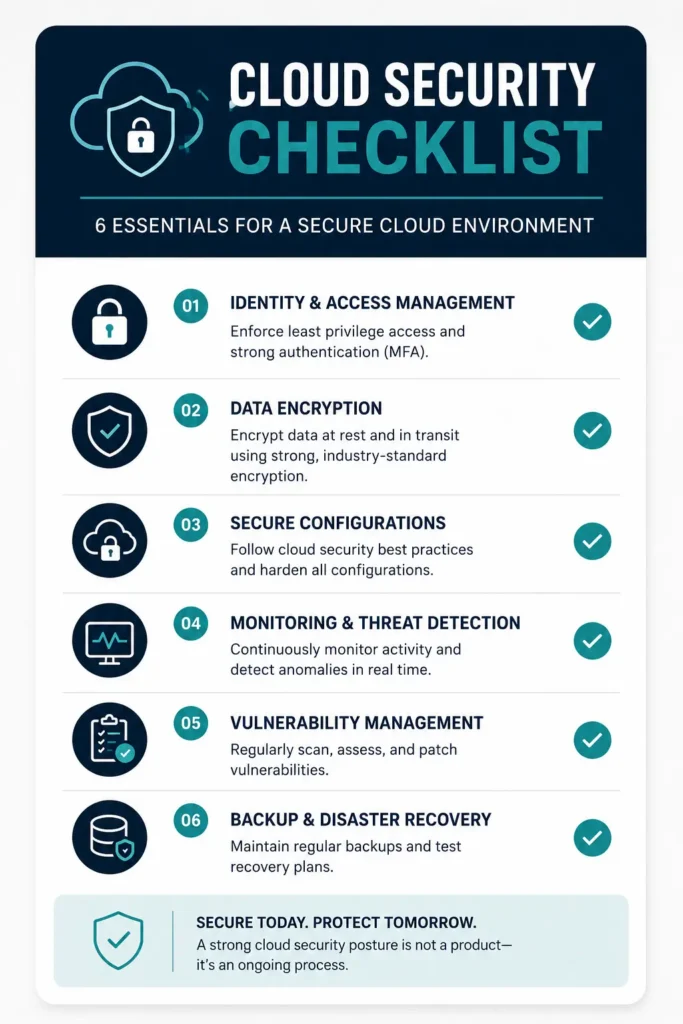
Use this checklist to assess your current cloud security posture:
Identity & Access Management
- [ ] MFA enforced for all users, especially privileged accounts
- [ ] RBAC implemented with role definitions aligned to job functions
- [ ] Least privilege principle applied and audited regularly
- [ ] Dormant accounts reviewed and removed quarterly
- [ ] Privileged accounts reviewed quarterly
- [ ] No shared user accounts in use
Data Protection
- [ ] Encryption at rest enabled for all sensitive data stores
- [ ] TLS 1.2 or 1.3 enforced for all data in transit
- [ ] Encryption keys managed through KMS or equivalent
- [ ] Data classification policy defined and enforced
- [ ] Data retention policies implemented with automated lifecycle management
- [ ] Backups encrypted, isolated, tested, and immutable
Infrastructure & Configuration
- [ ] CSPM tool active and monitoring all cloud accounts
- [ ] Unused services and open ports disabled
- [ ] IaC security scanning integrated into CI/CD pipeline
- [ ] Security baselines defined and enforced via policy
- [ ] Network segmentation implemented for critical workloads
- [ ] No cloud resources with unnecessary public exposure
Monitoring & Detection
- [ ] Centralized logging enabled across all cloud accounts
- [ ] Authentication anomaly detection configured
- [ ] Native threat detection service enabled (GuardDuty, Defender, SCC)
- [ ] High-risk event alerts configured and routed to monitored channels
- [ ] Log retention meets compliance requirements (minimum 12 months)
- [ ] Continuous asset inventory monitoring active
Governance & Compliance
- [ ] Cloud security policies documented and communicated
- [ ] Compliance review conducted within the last 12 months
- [ ] Incident response plan documented and tested
- [ ] Security awareness training completed by all staff
- [ ] Third-party integrations reviewed and access monitored
- [ ] Annual security assessment completed within last 12 months
Frequently Asked Questions
What is cloud security?
Cloud security refers to the technologies, policies, controls, and services that protect cloud-based systems, data, and infrastructure. It encompasses data protection, identity and access management, network security, threat detection, and compliance management across cloud environments including AWS, Azure, Google Cloud, and hybrid setups. Cloud security operates under a shared responsibility model — the cloud provider secures the underlying infrastructure, while your organization is responsible for securing data, configurations, access controls, and applications.
What are the biggest cloud security risks?
The most significant cloud security risks in 2026 include misconfigured cloud resources (storage buckets, databases, security groups), compromised credentials and weak identity controls, insecure APIs, third-party and supply chain vulnerabilities, insider threats, and non-compliance with regulatory frameworks. Misconfiguration and identity-related issues are consistently the top two root causes of cloud breaches, accounting for the majority of incidents organizations experience.
How does MFA improve cloud security?
Multi-factor authentication adds a verification step beyond passwords. Even if an attacker steals or phishes a user’s password, they cannot access the account without the second factor (authenticator app, SMS code, hardware token). Given that the majority of cloud breaches begin with compromised credentials, MFA eliminates the most common entry point attackers use. Organizations with MFA enforced organization-wide are dramatically less exposed to credential-based attacks than those relying on passwords alone.
Why are cloud misconfigurations so dangerous?
Cloud misconfigurations are dangerous because they are silent. A publicly accessible storage bucket containing customer records looks exactly like an intentionally public bucket — until someone (an attacker or a security scanner) notices. Misconfiguration issues have an average detection time of 186 days, meaning sensitive data can be exposed publicly for months before anyone realizes there is a problem. The consequences range from data breaches and regulatory fines to ransomware attacks and complete environment compromise.
What is the principle of least privilege?
The principle of least privilege means granting users, applications, and services only the permissions they need to perform their specific function — nothing more. A read-only reporting service should not have write access to databases. A developer should not have administrator access to production systems. This principle limits the damage that can occur from a compromised account, since the attacker can only do what the compromised account was allowed to do. It is one of the most widely recommended and most frequently violated cloud security principles.
How often should cloud security audits be performed?
At minimum, a comprehensive cloud security audit should be conducted annually. However, best practice involves more frequent touchpoints: continuous automated CSPM scanning for configuration compliance, quarterly access reviews for privileged accounts and dormant users, and security assessments after major infrastructure changes. Organizations in regulated industries or handling sensitive data should consider semi-annual external penetration testing or architecture reviews.
Is cloud storage secure?
Cloud storage platforms from major providers are technically robust — with encryption capabilities, redundancy, and physical security that most organizations could not replicate on-premises. However, cloud storage is only as secure as how you configure it. The provider secures the storage infrastructure; you control the access permissions and encryption settings. Publicly accessible S3 buckets and Azure Blob containers are a persistent source of data breaches — not because the storage technology failed, but because the configuration permitted unauthorized access.
Which cloud security practice should organizations prioritize first?
For most organizations, the highest-impact first step is a thorough identity and access review: enforce MFA for all accounts, remove dormant accounts, revoke excessive permissions, and disable shared credentials. These actions address the most common attack vectors, cost little to implement, and can be completed quickly. From there, enabling cloud-native threat detection services and centralizing logging provide visibility that supports all other security improvements.
Conclusion: Security Is a Journey, Not a Destination
Reading through 30 cloud security tips can feel overwhelming. The instinct is to imagine that effective cloud security requires implementing everything at once, maintaining perfect configurations indefinitely, and staying ahead of every emerging threat simultaneously.
That is not how real-world security programs work. The organizations with the strongest cloud security postures got there through consistent, incremental improvement — not through a single comprehensive transformation.
Start where you have the most risk. For most organizations, that is identity and access management. Enforce MFA. Review permissions. Remove dormant accounts. These steps reduce your exposure to the most common attack vectors significantly.
Then build outward — add monitoring, improve encryption practices, implement security baselines, train your team. Each improvement compounds on the ones before it. A small number of well-implemented controls is more effective than a large number of partially implemented ones.
Cloud security requires ongoing vigilance. Configurations drift. New services get added. Threats evolve. Attackers get more sophisticated. The goal is not to achieve a static state of perfect security — it is to build an organization that continuously identifies gaps, addresses them systematically, and improves its posture over time.
Most cloud breaches in 2026 are not technical inevitabilities — they are the result of mismanaged configurations, unmonitored assets, and fragmented tooling. The good news is that this means most cloud breaches are preventable. Not with expensive tools or heroic security teams, but with disciplined application of the fundamentals this guide covers.
Review this checklist against your current environment. Identify your three highest-risk gaps. Build a 90-day plan to address them. Then repeat. That is how cloud security actually improves.
Looking to go deeper on specific topics covered in this guide? Explore our related coverage on AI security tools, cloud compliance frameworks, and cybersecurity best practices at AIToolMapper.
Disclaimer:
This guide was written with reference to research from IBM, Gartner, CrowdStrike, Fortinet, SentinelOne, Orca Security, and other leading security research organizations. Statistics cited reflect the most current available data as of mid-2026. Cloud provider feature references are current as of publication and may change as platforms evolve. Organizations should assess their specific requirements and engage qualified security professionals for implementation guidance.