-
-
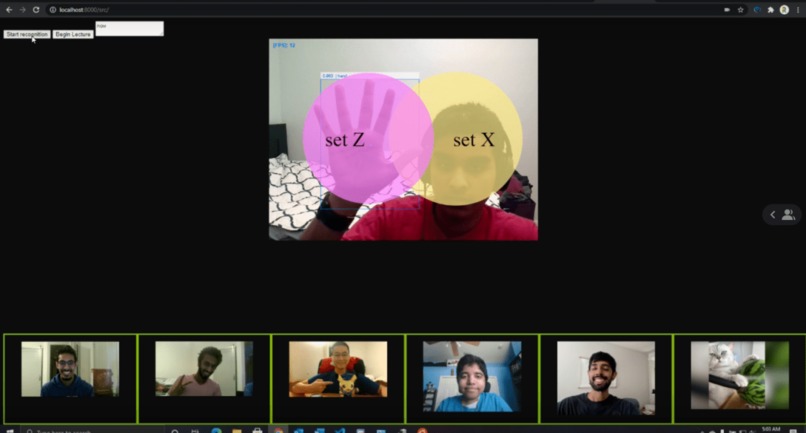
Creating a Venn Diagram with Canvas Board
-
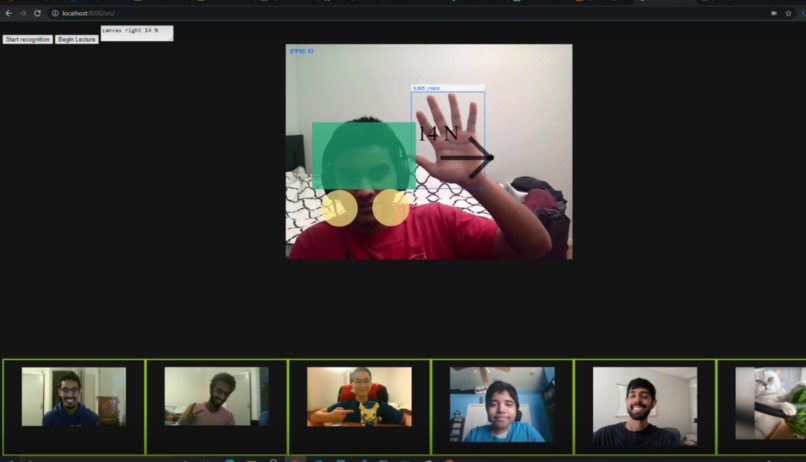
Creating a Free Body Diagram


Inspiration
Reimagining virtual education, providing educators a virtual whiteboard to make teaching easier. This idea is an alternative for educators who screen share paint applications when drawing out concepts in classes such as physics, linear algebra, database modeling and more. With this convenient whiteboard, educators can optimize class time for teaching concepts instead of dealing with the inconveniences of drawing via their mouse while streaming to their class.
What it does
Canvas Board uses Microsoft speech-to-text to accept verbal commands for drawing. The users, the educator, can say basic commands such as "Canvas write ", to render a textbox with the input, and Canvas , to render a specific shape, to the scree. NLP through Microsoft LUIS converts inputs into actions for Canvas Boards to run> Using handtrtack.js, Canvas Board allows the user to drag and resize these visual elements across their screen and build diagrams using the "Place" voice command to anchor the element. There are additional commands for color input, angle orientation, and opacity for personalization.
Challenges we ran into
Configuring handtrack.js, speech-to-text query handling, and rendering canvas elements to overlay over an active video element proved to be quite difficult.
What we learned
Throughout this project, we learned how to integrate various technologies such as Azure and Handtrack.js. Furthermore, we learned to work as a team to integrate version control and manage tasks.
What's next for Canvas Board
- Optimizations to improve framerate
- Frontend redesigns
- Integration with online streaming services such as Zoom,
- Integrate finger tracking for more accurate interactions
- Expand feature set to incorporate more math and physics concepts
Built With
- azure
- cognitive-services
- github
- handtrack.js
- html5
- javascript
- luis-ai
- speech-to-text


Log in or sign up for Devpost to join the conversation.