-
-
Entire Thing
-
Query


Inspiration Instruction manuals are often dense diagrams and tiny type—easy to misread and hard to connect to what you should actually do with your hands. We wanted something that meets people where they are: their own language, their own photo of the page, and a plain story that turns “Step 3” into something you can follow without decoding the manual like a textbook.
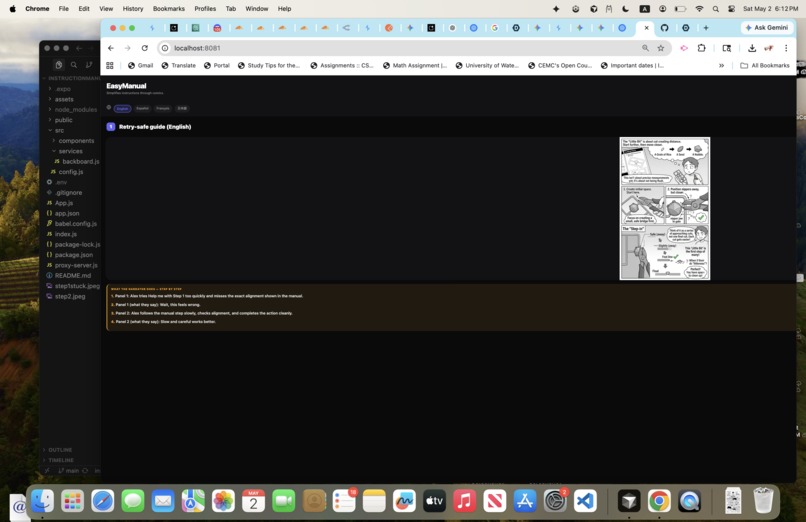
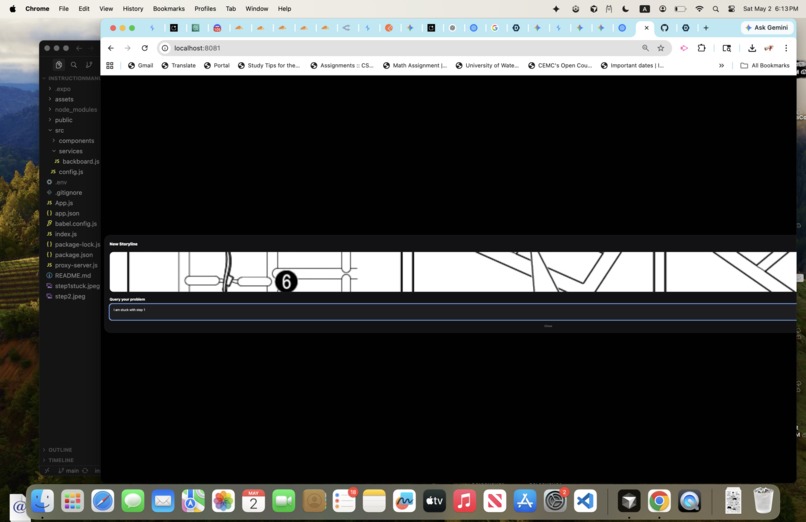
What it does EasyManual lets users pick a language (English, Spanish, French, or Japanese), upload a photo of a manual page like IKEA furniture, and describe where they’re stuck for visual learner who are reading something that is non-native to their native language. The app uses vision-capable AI to read the page, runs a targeted “stuck solver” with step-by-step guidance. Results include short narrator-style comic strip and explains what is happening in each comic strip to better understand how to go through with tackling with specific steps in the manual for individual to move forward in continuing to setup product given from IKEA manuals.
How we built it We built a cross-platform React Native (Expo) app backed by a Backboard-powered service layer. The app supports threaded messaging, image uploads for visual instructions, and structured JSON outputs (e.g., panels and step-by-step breakdowns) that are rendered directly in the client.
For image understanding, the backend runs a multi-model vision pipeline: Google Gemini flash-lite-2.5 and OpenAI vision models used for extraction. The extracted content is converted into structured JSON, which is then refined in a second pass using AWS Bedrock, with Gemini flash-lite-2.5 as a fallback to improve clarity and ensure consistent output formatting across languages.
On the web side, a lightweight Node.js proxy adds CORS support and forwards /api/threads/messages requests to Backboard, preventing direct exposure of backend credentials in browser environments. The same proxy also supports optional routes for Cloudflare-based image generation services.
Gemini-flashlite-2.5 is specifically used in the vision pipeline to extract and interpret information from uploaded images, helping convert user-submitted visual content into structured, query-ready data for downstream processing.
Challenges we ran into Web vs native: Browsers need fetch + FormData for multipart vision calls; native can use different file APIs—keeping one backboard client consistent took care around base64, MIME types, and payload size (including downscaling large images on web). Reliability upstream: Vision and refine calls can fail or return non-JSON; the codebase uses retries, normalization prompts, and structured fallbacks so the UI doesn’t dead-end on one bad response. Security and dev ergonomics: Running locally means the web app must target a localhost proxy whose URL and port stay in sync with .env—easy to misconfigure if the proxy isn’t started or the port changes. Image Generation and Backboard Challenges: Throughout the process, backboard.io had lots of issues so I had to use inspect and paste into prompt engineer to debug this specific problem. This is especially true when I used model that is not compatible to backboard for image generation. It was due to lack of knowledge of Backboard.io. Backboard.io does not support image generation, but it more so supports the AI memory of the data being passed. The comic strip I had to resort to prebuilt comic from Gemini chat. Accomplishments that we're proud of A full loop from photo + natural-language “where I’m stuck” to structured, multilingual explanations—not just a single chat blob. A deliberate narrative model (wrong way vs right way) that stays tied to what the manual actually shows. Operational glue that makes web development workable: local proxy, health check, and clear separation between EXPO_PUBLIC_* client config and server-side forwarding. What we learned Vision + strict JSON is powerful but brittle; investing in parse strategies, normalization, and fallbacks pays off more than hoping the model always formats perfectly. Platform differences (Expo web vs iOS/Android) show up immediately in anything involving files, images, and keys—design the API client for the lowest common denominator and special-case where needed. Explainability matters as much as generation: users trust the app when they get both what to do and why that matches the manual. What's next for EasyManual Surface generated panel art (or a true two-panel strip UI) everywhere results appear, not only narrative text anchored on the uploaded photo. Smarter cropping / multi-page manuals and optional PDF upload. Offline or cached runs for demos, and tighter accessibility (screen readers, larger type, high contrast). Hardening production deployment of the proxy (or a small backend) so web users don’t depend on a local Node server. Connect AWS Bedrock and additionally try it test it on any mobile phone. Incorporate Google Vision API to accurately extract information instead of relying on Gemini model. Use Image-generation model like Stable-Diffusion diconnected from Backboard.io to generate comic scenes.
Built With
- awsbedrock
- backboard
- expo.io
- gemini
- javascript
- reactnative


Log in or sign up for Devpost to join the conversation.