Use keywords to launch your favorite apps and websites
The Start menu is supposed to give you quick access to programs and files, but it often ends up being a real mess. This is the time when you need some alternative like Executor.

View an ad to download for free
The Start menu is supposed to give you quick access to programs and files, but it often ends up being a real mess. This is the time when you need some alternative like Executor.
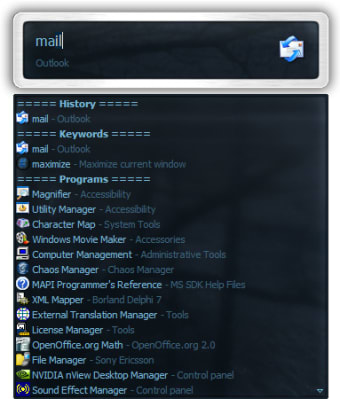
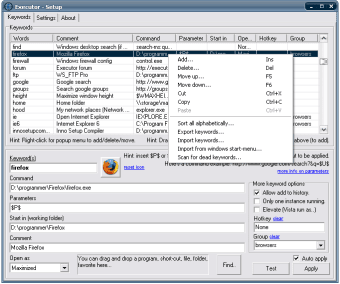
Despite its scary name, Executor is a nice, useful application that enables you to open files and launch your favorite applications and websites just by typing the keywords you have previously assigned to them. What's more, as the program auto-completes each entry, the first few letters are usually enough. The program also includes some built-in keywords for the most common tasks, such as performing a Google search or opening the Control Panel.
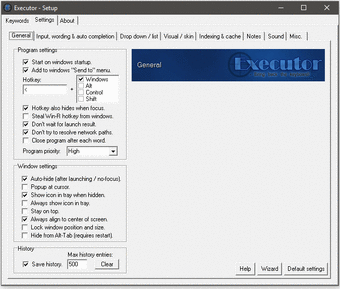
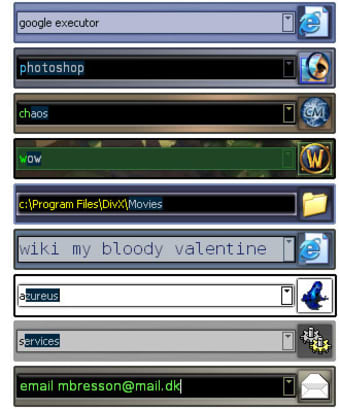
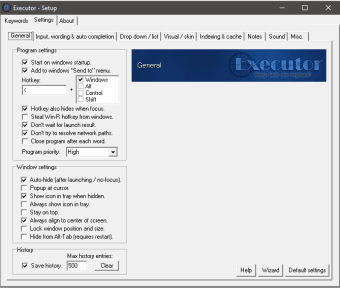
Executor features an extensive configuration menu that enables you to customize every single detail. It also has support for skins, but the included skins are generally very dark and hard to read. Luckily enough, you can create your own personal color combination and save it as skin.
Added ability to add custom scan paths for indexing/scanning. Added that the icon for each keyword can now be customized. Added a new more organized settings interface with more options (some where previously hidden). Added list can now also contain large items, where each item has a 32x32 pixel icon. Added optional "Group" as a new keyword property. Added index settings now tell the amount of index items, and "scan now" button gives a bit more feedback. Added the keyword "apps" to the default keywords. This will list (and option to open) current running applications. Also each can be right-clicked for a number of options. Added the keyword "clipboard" to the default keywords. This will list previous clipboard text. Also each can be right-clicked for a number of options. Added the keyword "recent" to the default keywords. This will list (and option to open) most recent documents. Added lastfm to the default keywords. Added an option to run keywords/commands on startup. Found in settings (under misc.) Added setting "Always align to center of screen" to "General" settings. Added setting "Lock window position and size". The setting can be found in "General" settings, and in the context menu if you right-click Executor and select "More...". Added setting "Only auto-complete when cursor is at end of text, or at start of suggestion." Added "Quick launch" and "Desktop" items are now scanned for short-cuts too. Added Auto-completion in drop-down (by typing something while focus is on drop-down). Added a setting to "Drop down / list" called "Auto size to fit number of items". If enabled this will trim down (auto size) the height of the list, if list contains less than the max number of visible items.
Open programs by entering a few characters from their names

Krento: A Versatile Desktop Utility for Windows

A Practical and Efficient Digital Logic Circuit Simulator Tool
This is launcher and a more powerful and customizable version of windows run. The program originated as I was sick of spending too much time searching for programs through my ever growing windows start-menu and also found myself using windows run more and more frequently. There was of course already programs like this available, but each had it's annoyance or missing features or too(!) geeky. So I decide to code my own app to rid me of using the windows start-menu and windows run.
Take a look at what this program has for you:
Free
Windows
Other platforms (1)Windows 10
English
30.2K
6.45 MB
View an ad to download for free
Have you tried Executor? Be the first to leave your opinion!
Add reviewOpen programs by entering a few characters from their names
Krento: A Versatile Desktop Utility for Windows
A Practical and Efficient Digital Logic Circuit Simulator Tool
System monitoring and desktop enhancement engine for Microsoft Windows

Streamline Your Typing with PhraseExpress
A multimedia viewer/converter supporting multiple of formats

Delete files that refuse to let you delete them
Efficient Utility for Windows Management

A free equalizer APO for your Windows device

Install the latest driver for HP pro webcam

A powerful and light map
Free trackpad correction software

Create Electrical Diagrams Easily with QElectroTech

Infix PDF Editor - Edit PDF documents easy and quickly!

Efficient Remote Printing with TSPrint Client
Comprehensive Media Downloader for Windows
Minimalist Web GUI for Coding Agents
A free app for Windows, by Team CharLS.
Explore the TON Network with TON Browser
Efficient Remote Debugging for Windows Devices