
Download FlexCal – Quick iCal Event Entry Tool for Mac
Overview & Core Features
FlexCal (formerly FlexTD) is a lightweight preference pane designed for macOS users who rely heavily on Apple’s iCal (now called Calendar) for managing tasks, appointments, and reminders. The primary goal of FlexCal is to eliminate the friction of opening the full Calendar app every time a new to‑do or event pops into your mind. By assigning a custom hotkey, you can summon a compact input window that sits on top of any application, letting you type a note, pick the target calendar, set a priority level, and define start/end dates—all in a matter of seconds. The interface follows Apple’s design language, offering a clear, uncluttered layout that feels native to macOS. FlexCal runs as a System Preference pane, which means it occupies almost no screen real estate and integrates seamlessly with your existing workflow. Recent updates have moved the pane to 64‑bit, added Finnish and Dutch localizations, and fixed several edge‑case bugs related to all‑day events and auto‑start behavior. Whether you’re a busy executive, a project manager, or a student juggling multiple class schedules, FlexCal can shave minutes off your daily routine, turning spontaneous ideas into concrete calendar entries without breaking concentration.
Key Feature List
- Custom Hotkey Activation: Define any keyboard shortcut to bring up the entry pane instantly.
- Instant Calendar Selection: Choose from any iCal calendar you own with a single click.
- Priority Tagging: Assign low, medium, or high priority to each entry for quick visual sorting.
- Flexible Date Input: Supports single dates, date ranges, and all‑day events.
- Lightweight Preference Pane: Runs in the background without consuming noticeable system resources.
- 64‑Bit Compatibility: Fully optimized for modern macOS versions and Intel/Apple Silicon Macs.
- Multilingual Support: Includes English, Finnish, and Dutch localizations.
- Auto‑Start Option: Option to launch FlexCal automatically at login.
- Secure Integration: Communicates directly with the native Calendar database, ensuring data privacy.
Installation & Step‑by‑Step Usage Guide
Getting FlexCal up and running is intentionally straightforward. First, download the latest .dmg file from the official FlexCal website. Once the disk image mounts, simply drag the FlexCal.prefPane file into your /Library/PreferencePanes folder (or your personal ~/Library/PreferencePanes if you prefer a per‑user install). macOS will automatically recognize the new pane and add it to System Preferences. Open System Preferences, click on the FlexCal icon, and you’ll be presented with a short configuration screen where you can set your preferred hotkey, default calendar, and whether the app should launch at login.
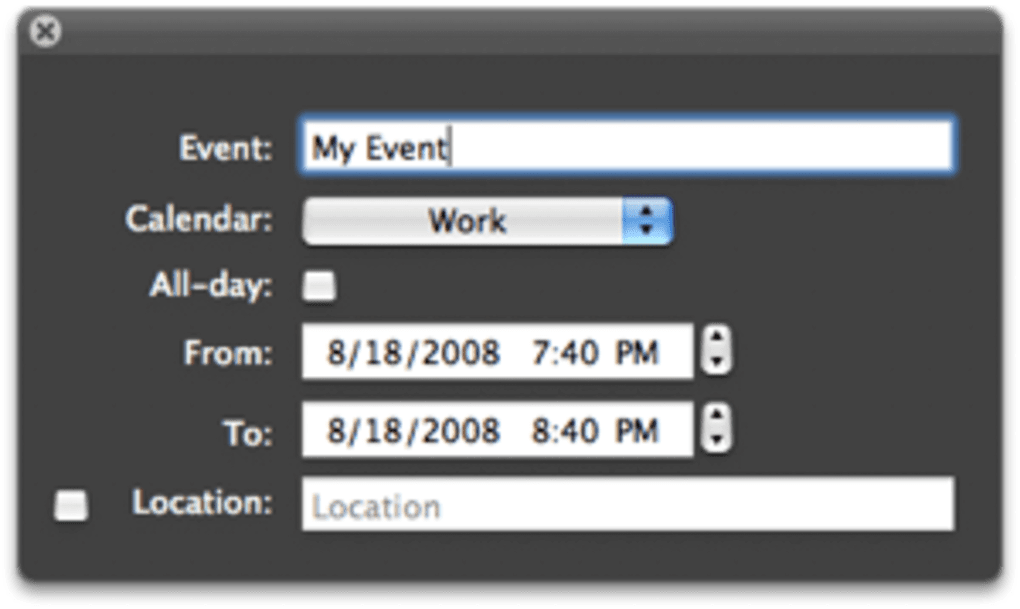
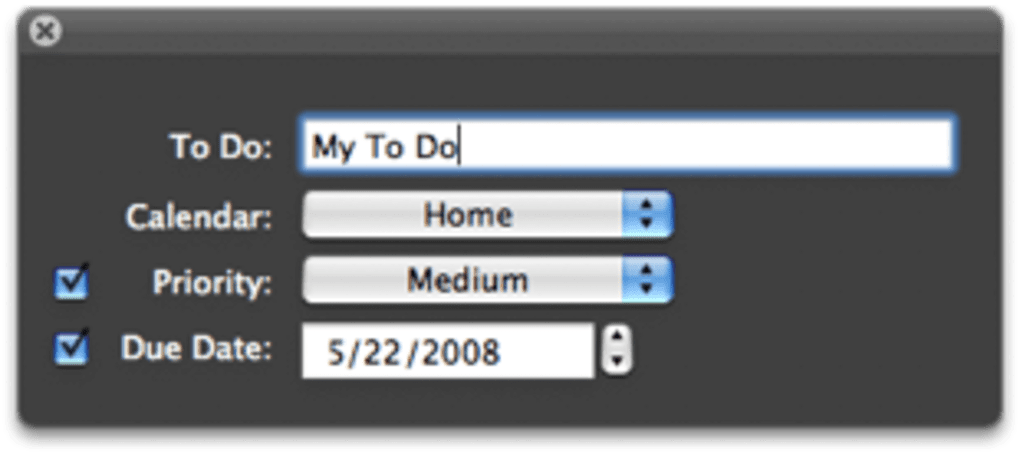
After the initial setup, using FlexCal is as simple as pressing the hotkey you defined. A compact overlay appears, prompting you for the following fields:
- Event Title: Type a concise description of the task or meeting.
- Calendar: Click the dropdown to select the calendar you want the entry to belong to.
- Priority: Choose Low, Medium, or High. This tag is stored as a custom property that you can later filter within iCal.
- Start / End Dates: Either type dates in natural language (e.g., “tomorrow 3 pm”) or use the calendar picker that appears when you click the date fields.
- All‑Day Toggle: For events that span an entire day, enable the all‑day switch to avoid time‑specific entries.
Once you hit Enter or click the “Add” button, FlexCal writes the entry directly into Calendar’s database, and the overlay disappears instantly. Because the pane runs in the background, you can summon it from any application—whether you’re drafting an email, reviewing a document, or browsing the web—without ever leaving your current context. The process typically takes under ten seconds, making it ideal for capturing fleeting ideas before they evaporate.
Updating FlexCal is equally painless. The app checks for new releases each time it launches, and a discreet notification appears in the menu bar when a newer version is available. Clicking the notification redirects you to the download page, where you can replace the old .prefPane file with the new one. All your previous settings, including hotkey assignments and default calendar choices, are preserved because they are stored in the standard macOS preferences system.
Compatibility, System Requirements & Security
FlexCal is built exclusively for macOS, supporting versions from macOS 10.13 High Sierra up through macOS 14 Sonoma. The recent 64‑bit migration ensures full compatibility with both Intel‑based Macs and Apple Silicon (M1, M2, and later) devices. Because FlexCal runs as a System Preference pane, it leverages native macOS APIs for calendar access, which means you won’t encounter the “App not trusted” warnings that sometimes accompany third‑party utilities.
In terms of hardware, FlexCal has a negligible footprint. The preference pane occupies less than 5 MB on disk and uses under 10 MB of RAM when idle. Even on older MacBook Air models from 2015, you’ll notice no performance degradation. The application does not require any additional frameworks or third‑party runtimes, which reduces the attack surface and simplifies troubleshooting.
Security‑wise, FlexCal adheres to Apple’s sandboxing guidelines where possible. It reads and writes directly to the Calendar database via the EventKit framework, a trusted component of macOS. When you first launch FlexCal, macOS will ask for permission to access your Calendar data—this is the same prompt you receive from any legitimate calendar app. Once granted, FlexCal never transmits data outside of your machine, and no analytics or telemetry are sent without explicit opt‑in.
For users concerned about localization, FlexCal now includes Finnish and Dutch language packs, with English as the default. The interface automatically switches based on your macOS language settings, making the tool accessible to a broader international audience. Finally, the auto‑start feature can be toggled in the preferences pane, allowing you to decide whether FlexCal should launch automatically when you log in—a useful option for power users who want the hotkey ready at all times.
Pros & Cons – A Balanced Assessment
Advantages
- Speed: Capture events in seconds without opening Calendar.
- Minimalist Design: The overlay is unobtrusive and follows macOS aesthetics.
- Custom Hotkey: Full control over the activation shortcut.
- Low Resource Usage: Runs in the background with negligible RAM/CPU impact.
- 64‑Bit Ready: Works flawlessly on modern Intel and Apple Silicon Macs.
- Multilingual Support: English, Finnish, and Dutch out of the box.
- Free of Charge: No hidden fees; the app is distributed as a free download.
- Secure Integration: Uses native EventKit, keeping data local.
Drawbacks
- Mac‑Only: No Windows, Android, or iOS version currently exists.
- Limited Calendar Features: Advanced recurring event options must be edited later in Calendar.
- Preference Pane Installation: Users unfamiliar with macOS system folders may find the install step confusing.
- No Cloud Sync Built‑In: Relies on Calendar’s own iCloud sync; no independent backup feature.
- Basic UI Customization: No themes or color options beyond macOS defaults.
FlexCal delivers exactly what its tagline promises—a faster way to add events to iCal. The trade‑offs are reasonable for a free utility, and the speed gains outweigh the minor limitations.
Frequently Asked Questions (FAQ)
How do I set or change the hotkey for FlexCal?
Open System Preferences, click the FlexCal pane, and locate the “Hotkey” field. Press the desired key combination, and FlexCal will automatically save the new shortcut.
Is FlexCal compatible with Apple Silicon Macs?
Yes. The 64‑bit update ensures full compatibility with M1, M2, and later Apple Silicon processors, as well as Intel‑based Macs.
Can FlexCal create recurring events?
FlexCal creates a single event entry. If you need a recurring series, you can edit the event in Calendar after it’s been added and set the recurrence pattern there.
Do I need an internet connection for FlexCal to work?
No. FlexCal writes directly to the local Calendar database. An internet connection is only required for iCloud sync, which is handled by Calendar itself.
Is there a paid version with extra features?
Currently FlexCal is offered completely free. The developer has indicated that future enhancements will also be released at no cost, though donations are accepted.
Conclusion & Call to Action
If you spend a significant portion of your day juggling appointments, to‑dos, and reminders inside Apple Calendar, FlexCal is a game‑changer. By reducing the friction of opening the full Calendar app, it lets you capture ideas instantly, keeping your workflow smooth and uninterrupted. The free, 64‑bit, and low‑impact design makes it an ideal addition for anyone who values speed and simplicity on macOS. Ready to boost your productivity? Download FlexCal now and start entering events faster than ever before.








