Bug Report
Ionic version:
[x] 4.x
Current behavior:
I set whole app in ios mode,
and set mode="md" in pickerOptions of ion-datetime
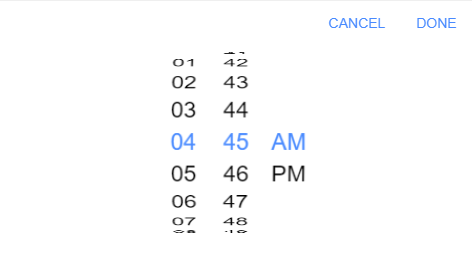
but only buttons have md's style, columns still have ios's style like image:
Expected behavior:
When set mode="md" in pickerOptions of ion-datetime, whole picker should display in md's style
Steps to reproduce:
Insert code bellow to reproduce
Related code:
In app.module.ts:
IonicModule.forRoot({
     mode: 'ios',
}),
in home.page.html:
<ion-item no-lines mode="md">
	<ion-label class="">Select Time</ion-label>
	<ion-datetime displayFormat="hh:mm A" [(ngModel)]="selectTime"[pickerOptions]="pickerOptions"></ion-datetime>
</ion-item>
in home.page.ts
pickerOptions: any = {
	mode: "md",
};
insert short code snippets here
Ionic info:
Ionic:

   ionic (Ionic CLI)             : 4.5.0 (C:\Users\naugh\AppData\Roaming\npm\node_modules\ionic)
   Ionic Framework               : @ionic/angular 4.0.0-beta.16
   @angular-devkit/build-angular : 0.10.5
   @angular-devkit/schematics    : 0.7.5
   @angular/cli                  : 7.0.3
   @ionic/angular-toolkit        : 1.1.0

Cordova:

   cordova (Cordova CLI) : 8.1.2 (cordova-lib@8.1.1)
   Cordova Platforms     : android 7.1.4
   Cordova Plugins       : cordova-plugin-ionic-keyboard 2.1.3, cordova-plugin-ionic-webview 2.2.5, (and 13 other plugins)

System:

   NodeJS : v10.13.0 (C:\Program Files\nodejs\node.exe)
   npm    : 6.4.1
   OS     : Windows 10


Bug Report
Ionic version:
[x] 4.x
Current behavior:
I set whole app in ios mode,
and set mode="md" in pickerOptions of ion-datetime
but only buttons have md's style, columns still have ios's style like image:
Expected behavior:
When set mode="md" in pickerOptions of ion-datetime, whole picker should display in md's style
Steps to reproduce:
Insert code bellow to reproduce
Related code:
In app.module.ts:
in home.page.html:
in home.page.ts
Ionic info: