Depending on how my cursor arrives at line of code determines which way the editor indents the line. Let me start by showing what the correct indent spacing looks like:

- If I am on a line of code and there is already a space on the line, which is invisible if the line is selected, indents to the first indent spot encountered.

- If I am on a line of code, lose focus of VS Code, and then come back to VS Code the indent spacing is incorrect and its a combination of tabs and spaces.
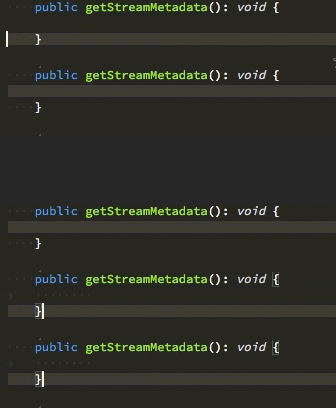
- If you enable to show invisible spaces, they are still not visible on the current line selected. I think it would be useful to be able to see them as well.
It may be useful stating that this weird spacing is occurring while working with typescript. I am not sure if it occurs for any other languages. And please let me know if I am missing a configuration item.
Thanks!


Depending on how my cursor arrives at line of code determines which way the editor indents the line. Let me start by showing what the correct indent spacing looks like:

It may be useful stating that this weird spacing is occurring while working with typescript. I am not sure if it occurs for any other languages. And please let me know if I am missing a configuration item.
Thanks!