A free multimedia player
GOM Player is a free alternative desktop multimedia tool. The program offers support for a vast range of file types, customizable skins, a library of subtitles, and 360 degree VR video.

View an ad to download for free

Updated last month
GOM Player is a free alternative desktop multimedia tool. The program offers support for a vast range of file types, customizable skins, a library of subtitles, and 360 degree VR video.
Get 10 images or 1 video with a free trial
This player was built with a mind on the future. It has many neat features and a focus on global accessibility. There is a slight learning curve when you first start with this multimedia tool, and users that download it should beware of third-party add-ons during the installation.
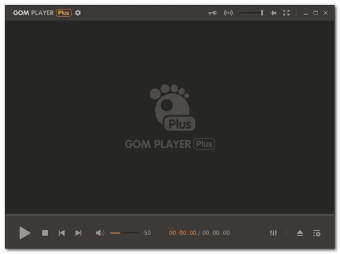
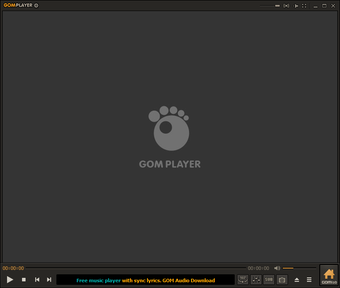
GOM Player has a clean interface. While it is minimalist in design, it isn’t very intuitive. There are very few on-screen buttons aside from the necessary playback control. If you want to change the sound or any other settings, you’ll have to navigate to the player’s menu. It is hard to find tools like graphic and sound equalizer, which is frustrating for new users. Once you get used to it, it becomes easier to navigate.
If you don’t like the default appearance of this player, you can change the way it looks by applying a new skin. All of the themes are purely cosmetic, and they don’t alter much regarding user experience.
GOM Player for Windows supports a wide range of file types including common video formats such as the common AVI, MOV and MP4. You can also play less used file-types such as Matroska, Ogg, OGM, and more. If the player cannot find the codec, it will automatically search for it online. Once it locates the relevant one, you’ll be directed to a site to download it.
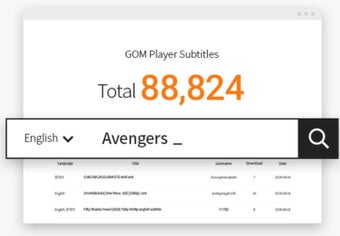
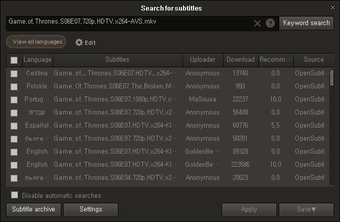
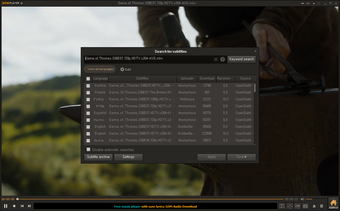
GOM is most popular in South Korea, but it is making its way to the native English-speaking market. It is designed for a global audience and supports a host of subtitle formats. The software will automatically search and sync subtitles for the movie that is being played. You can also customize the appearance of subtitles to maximize or minimize their visibility.
Once you have this player installed, you can choose which file types are automatically opened and through which platform you want to view them on default, this does not have to be GOM.
This software also takes an interesting approach to multitasking. If you are enjoying a video and you want to take a still image from what you are watching, the screen capture feature is simple to use. You can work on your computer while viewing multimedia content at the same time, you can adjust the screen transparency so that you can see the video and your screen simultaneously.
This feature is especially handy if you’re watching a how-to video. Instead of having to work in split windows, you can view in full screen while following the steps of the tutorial. Users can also download the mobile version for and control their PC GOM player through their phone or tablet.
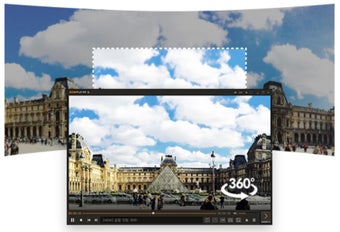
One feature that makes GOM media player stand out amongst other players is its Virtual Reality technology. You can play 360 video with this player. It supports preview with views from the back front, right, and left, that you control using your arrow keys. There are search and play functions so you can find VR content from YouTube.
Beware when you are downloading this software, as it might try to sneak in some unwanted programs and make some changes. It is easy to miss unless you reach through the GOM Player installer with a critical eye. Make sure you read what is available, and select the Custom Installation. If you don’t, you might find yourself with some bothersome extras.
While GOM is currently growing in popularity, alternatives like VLC media player offer all of the same features and everything else that you could need, aside from 360 VR.
This multimedia tool is good for users who want access to VR content, or who want access to a vast library of subtitles. The program is functional, but it takes some getting used to. Anyone who prefers a standard multimedia player would be better off downloading an alternative like VLC. For those who are going to download the program, make sure you pay close attention to the prompts of the installer.
For the most recent version of GOM Player, developers have added the New Preference Mode (beta), fixed an error with HEVC contents as well as incorrect DVD chapter markings and an action handling the margins for messages.
With extensive experience in gaming and creative writing, he has authored novels and contributed articles and reviews on the latest titles. His career spans both publishing and content creation, combining knowledge of storytelling with hands-on analysis of games and digital media.
GOM Player is a completely FREE video player, with its built-in support for all the most popular video and Media Player formats, tons of advanced features, extreme customizability, and the Codec Finder service, GOM Player is sure to fulfill all of your playback needs. With millions of users in hundreds of countries, GOM Player is one of the world`s most popular video players.
Strong Subtitle FunctionalityYou can share and download a large number of subtitles through our own library and also by linking with OpenSubtitles.org. You can freely adjust the placement, size, and sync settings of your subtitles.Play 360 degrees VR video- Able to watch from up, down, left, and right, 360 degrees around, by just using the keyboard or mouse - Supports preview with side views from front, back, left, and right as well as screen transition - Provides search and play functions for 360 YouTube videos Connect with GOM RemoteYou can control GOM Player with GOM Remote. This includes all basic functions, such as moving forward/back, play, and pause. This also includes advanced functions, such as opening files, searching, and PC power control.
Comprehensive File SupportGOM Player can play all the most popular video formats by default: AVI, MP4, MKV, FLV, WMV, MOV, and more!Advanced FeaturesWith a wide variety of advanced features like A-B repeat, screen capture, Media Player capture, playback speed control, and video effects, GOM Player allows you do much more than simply play your videos.Codec FinderSome uncommon video types aren't supported by GOM Player by default. When you try to watch these videos, GOM Player's Codec Finder service will search for the one you're missing and direct you to a place where you can read more and/or download the missing codec.CustomizationGOM Player's skinable interface and advanced filter controls make it highly customizable, allowing users to personalize their experience to fit their needs. Download new skins and logos from the GOM Player website!
Free
Windows
Other platforms (3)Windows 11
14.9M
215.80 MB
View an ad to download for free
26 reviews

Review.

Comment.

The best. real good im happy about itand im hoping it continue to woke good Pros: how easy it is to use

Go GOM - steal our privacy. Really good palyer.Latest update features only playing every secod of your own clips - instead you get advertising...Oh - and then it changes your settings, startpage, serach engine and installs Chrome, withoutpout asking and without permission.So - I'd suspect it of spying on what else you do, as well...As I said - IMHO probable the best player around, but it will steal your privacy...

Pleace take immediate action... the lates update doesn't work.. sorry, i need to uninstall it... please overcome the problem quickly...

It's awesome.. It is very versatile video player that does not require codecs because it searches for additional codecs on it's own if necessary. The size of the program is very small compare to other video programs. I love it.
Lousy software. Installs software not requested.. Installs other software with it. Illegal where i live. They should tell you that there will be other software loaded onto your computer, and you should have a chance to decline.Very very poor.Not recommended.

Gom player does not play Gom video files in windows 7 64bit computer.. then what is the player of choice for gom files? RealPlayer. I also have windows 7 home premium 64 bit not playing any gom videos.

The all-in-one solution for media playback

Free powerful video and audio editing software

Robust media downloader utility

The industry standard for professional motion design

The software that marked a golden era within the Internet.

Get high-quality video downloads from many sources
The all-in-one solution for media playback

Free all-in-one video editor for everyone
Free powerful video and audio editing software

Download Adobe Premiere Pro for Windows – Professional Video Editing at Your Fingertips

Free
Advanced and HD-Compatible Multimedia Player

Free
Free, lightweight and easy to use audio player

Free
A media player with more features than you can imagine
Free
Enhance Your GOM Player with 11 Inspirat Skin

Free
A media player that will be good enough in a pinch

An amazing tool for downloading videos

Free music and video player for Windows 10

Fast, user-friendly photo viewer


Superb video downloader app

Polished and powerful media experience

Stunning slideshows with music and transition effects for Windows

The Ultimate Screen Recorder for Your Screen Recording

Repair and enhance corrupted media files

A simple software for better video quality

Quickly convert videos into any file type

Thousands of creative assets at your fingertips