Coherence Plus Sensor
The emWave Pro software now supports a wireless connection with the Inner Balance Coherence Plus sensor. This allows you to run your sessions without being tethered to your computer by a USB cable.
Before You Begin
- Update Your Software: Ensure you are running emWave Pro version 3.7 or newer.
- Enable Bluetooth: Make sure Bluetooth is turned on in your computer’s system settings (Windows or Mac).
- Check Other Apps: Ensure the sensor is not currently connected to the Inner Balance app on your phone or tablet, as it can only connect to one device at a time.
Step-by-Step Instructions
1. Power on your Sensor Press the power button on your Coherence Plus sensor once. You should see a blinking blue light, indicating it is in pairing mode and ready to connect.
2. Open emWave Pro Launch the emWave Pro application on your computer.
3. Set the Sensor Preference You need to tell the software to look for a Bluetooth device instead of a USB hardware key.
- On Windows: Go to Edit > Preferences.
- On Mac: Go to emWave Pro (in the top menu bar) > Preferences.
- In the Preferences window, locate the Sensor tab and select Bluetooth / Coherence Plus from the dropdown menu. Click OK.
4. Start a Session Click the Start (play) button in the main emWave Pro window. A “Bluetooth Device Discovery” window will pop up and begin searching for your sensor.
5. Pair the Device Select your Coherence Plus sensor from the list when it appears and click Connect.
- Note: You do not need to pair the sensor through your computer’s Bluetooth settings menu; the software handles the connection directly.
6. Start Breathing Once connected, the light on your sensor will change to a solid blue or green (depending on your settings), and you will see your pulse wave appear on the screen. Clip the sensor to your earlobe and begin your session.
Quick Troubleshooting Tips
- Not appearing in the list? Ensure the sensor is close to your computer and hasn’t timed out (the light should still be blinking before you hit Start).
- Battery Life: If the connection drops, check that your sensor is fully charged.
- Range: For the best performance, stay within 10–15 feet of your computer during your session.
The Coherence Plus Sensor uses intuitive light indicators to help you understand its status at a glance—whether you’re pairing, charging, or in the middle of a session. Since the original help article is in an image format, I have recreated the details here in a clear, easy-to-read guide.
The sensor features two primary light zones: the Ring Light (Power & Battery) and the Heart Light (Bluetooth & Connectivity).
1. Power and Connectivity (The Heart Light)
This light tells you if your sensor is ready to connect or is successfully synced with your device.
- Blinking White: The sensor is powered on and searching for a known device.
- Rapidly Flashing Blue: The sensor is in Pairing Mode and is ready to be discovered by your phone, tablet, or computer.
- Solid Blue: Your sensor is successfully Connected and paired via Bluetooth.
- No Light: The sensor is either powered off or the battery has been completely depleted.
2. Charging and Battery Status (The Ring Light)
Keep an eye on these signals to ensure your practice isn’t interrupted by a low battery.
- Blinking Red: Low Battery. It’s time to plug in your sensor soon.
- Pulsing Amber/Orange: The sensor is currently Charging.
- Solid Green: The battery is Fully Charged and ready for use.
3. During a Session
Once you have started a session in the Inner Balance or emWave app:
- Pulsing Blue/Green: This indicates an Active Session. The sensor is successfully transmitting your heart rhythm data to the app.
Quick Tips for Smooth Use
- One Connection at a Time: Remember that the Coherence Plus can only connect to one app or device at a time. If it isn’t appearing in your Bluetooth list, make sure it isn’t already “grabbed” by a nearby tablet or computer.
- Pairing via App: For the best experience, always pair the sensor directly through the Inner Balance or emWave Pro app settings rather than your phone’s standard Bluetooth menu.
- Battery Longevity: To preserve the battery, the sensor will typically power off automatically if it remains disconnected for several minutes.
HeartMath App
Overview
When you subscribe to the HeartMath App, your transaction is processed through your Apple or Google account. To maintain your privacy, these stores do not share billing or credit card information with HeartMath. Consequently, all subscription management—including cancellations and refund requests—must be performed through your device’s store settings.
How to Cancel a HeartMath App Subscription
For Google Play Store (Android)
- Open the Google Play Store app.
- Tap the Menu icon (three horizontal lines) or your Profile icon, then select Subscriptions.
- Locate the HeartMath App subscription in your list.
- Tap Cancel subscription and follow the on-screen instructions to confirm.
For Apple App Store (iOS)
- Open the Settings app on your iPhone or iPad.
- Tap your Name at the top of the screen, then tap Subscriptions.
- Select the HeartMath App from your active subscriptions.
- Tap Cancel Subscription. (If the button is not visible, the subscription has already been canceled).
Refund Requests for the HeartMath App
If you need to request a refund for a HeartMath App charge, you must contact the platform providers directly:
- Apple App Store Users: Visit reportaproblem.apple.com to submit a request.
- Helpful Resource: Video Guide: How to Request a Refund on the App Store
- Google Play Store Users: Visit the Google Play Support page to initiate a refund request.
Deleting a Session in the HeartMath App
The HeartMath app allows you to manage your session history by deleting individual sessions directly from the app.
Follow the steps below to delete a specific session.
Step-by-Step Instructions
- Open the HeartMath app on your iPhone.
- Scroll to the bottom of the screen and tap My Progress.
- Select View Session History.
- Switch to List View (if not already selected).
- Locate the session you want to remove.
- Swipe from right to left on the session.
- Tap Delete to confirm removal.
Inner Balance
This article offers troubleshooting steps for the Apple USB-C to Lightning Adapter if your new adapter isn’t working with your Lightning Sensor on your iPhone 15, 16 and 17.
If you are using the new iPhone 15 (or a USB-C iPad) with your Inner Balance Lightning Sensor, you may need to ensure your adapter’s firmware is up to date to maintain a stable connection.
Following is the recreated guide from the HeartMath help center, formatted with clear, professional instructions to help you get your sessions running smoothly.
Overview: Troubleshooting the USB-C to Lightning Adapter
When using the Apple-original USB-C to Lightning Adapter with the iPhone 15, some users may experience connectivity issues. This is often resolved by a firmware update for the adapter itself.
I. Preliminary Setup
Before attempting a firmware update, ensure you have followed the basic setup requirements:
- Requirement: Use only the Apple Original USB-C to Lightning Adapter. Third-party adapters are often incompatible with the high-speed data requirements of the HeartMath PulsePod.
- iOS Version: Ensure your iPhone is running iOS 17.4.1 or a more recent version.
II. How to Update Adapter Firmware (Using a Mac)
If your adapter is not being recognized by the Inner Balance app, you can update its internal software using an Apple Mac computer.
Step 1: Connect the Hardware
Plug your USB-C to Lightning Adapter into a USB-C port on your Mac. You do not need to have the sensor attached to the adapter for the update process, but it is recommended to keep it connected to ensure the system recognizes the full path.
Step 2: Access System Information
- On your Mac, click the Apple Menu () in the top-left corner.
- Select System Settings (or System Preferences on older macOS versions).
- Navigate to General > About.
Step 3: Locate the Adapter
Scroll to the very bottom of the “About” page. You should see a section titled USB-C to Lightning Adapter. Click on this entry to view the device details.
Step 4: Initiate the Update
If a firmware update is required, your Mac will typically handle this automatically in the background while the adapter is connected.
- Tip: Stay on the “About” screen for 1–2 minutes. If an update is pending, the firmware version number will eventually refresh to the latest version.
III. Reconnecting to Your iPhone
Once the firmware is updated, return to your iPhone 15:
- Connect the adapter and sensor to the phone.
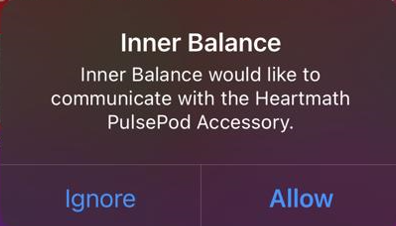
- A pop-up should appear: “Inner Balance would like to communicate with the HeartMath PulsePod Accessory.”
- Tap Allow.
Quick Troubleshooting Tips
- The “Allow” Pop-up: If you do not see the permission pop-up, try unplugging the adapter, flipping the USB-C connector, and plugging it back in.
- Firmware Verification: If the adapter still doesn’t work after the Mac update, try connecting it to a USB-C iPad for a few minutes, as iPads can also trigger these silent firmware updates.
- Sensor Check: Ensure the sensor’s Lightning plug is seated firmly into the adapter’s female Lightning port. Even a small gap can prevent the “PulsePod” from being detected.
With Apple’s transition from Lightning to USB-C ports starting with the iPhone 15 series, users with existing Inner Balance Lightning hardware can still use their sensors on newer devices by following these compatibility requirements.
1. Supported Devices
The Inner Balance Lightning sensor is compatible with the following USB-C Apple devices:
- iPhone: iPhone 15, iPhone 16, and iPhone 17 (all models).
- iPad: All iPad Pro, iPad Air, and iPad mini models that feature a USB-C port.
2. Required Hardware: The Apple Adapter
You cannot plug the Lightning sensor directly into these devices. You must use the Apple USB-C to Lightning Adapter.
- Important: Third-party or “knock-off” adapters often do not support the data transfer protocols required for HRV sensors. We strictly recommend using the official Apple brand adapter to ensure a consistent signal.
3. Software Requirements
To ensure the adapter and sensor communicate correctly with the Inner Balance app, your device must be updated to iOS or iPadOS 17.4.1 or later.
4. Troubleshooting the Connection
If your app does not recognize the sensor when using the adapter:
- Firmware: Occasionally, the Apple adapter itself may require a firmware update, which typically happens automatically when connected to an internet-enabled iPhone or iPad.
- Seating: Ensure the adapter is pushed firmly into the phone’s USB-C port (some thick phone cases may prevent a full connection).
- Restart: If the sensor isn’t detected, close the Inner Balance app, unplug the adapter, wait 5 seconds, and reconnect.
5. Alternative: Inner Balance Coherence Plus
If you frequently upgrade your devices, consider the Inner Balance Coherence Plus. This is our latest universal sensor that connects via Bluetooth (compatible with both iOS and Android) or via a direct USB-C cable, eliminating the need for adapters.
Need more help? If you are still having trouble connecting your Lightning sensor to a USB-C device, please contact HeartMath Technical Support.
If you are upgrading to an iPhone 15 or a newer iPad with a USB-C port, you can still use your wired Inner Balance Lightning Sensor. To ensure a successful connection, please follow the compatibility requirements and setup steps below.
iPhone 15 & USB-C Compatibility Guide
To use a Lightning-based sensor with a USB-C device, a specific adapter and software version are required to ensure the data from the sensor is read correctly.
Hardware & Software Requirements
- The Required Adapter: You must use the official Apple USB-C to Lightning Adapter.
- Purchase Link: Apple USB-C to Lightning Adapter
- Note: HeartMath testing indicates that third-party adapters generally do not support the data connection required for the PulsePod sensor.
- Operating System: Your iPhone 15 or iPad must be running iOS/iPadOS 17.4.1 or later.
II. Connection Steps
- Plug in the Hardware: Connect your Inner Balance Lightning Sensor to the Apple USB-C to Lightning Adapter, then plug the adapter into your phone or tablet.
- Grant Permission: A pop-up message will appear on your screen:“Inner Balance would like to communicate with the HeartMath PulsePod Accessory”
- Finalize: Tap Allow. The Inner Balance app will automatically recognize the sensor, allowing you to begin your session.
Troubleshooting Tips
- No Pop-up? If the message does not appear, try unplugging the adapter from the phone, flipping the USB-C connector 180 degrees, and plugging it back in.
- Software Updates: If you are on an older version of iOS 17, the adapter may not be recognized. Please update your device via Settings > General > Software Update.
- Adapter Firmware: If the connection is still not established, connecting the adapter to a Mac for a few minutes can sometimes trigger a necessary background firmware update for the adapter itself.
emWave Pro
The emWave Pro software now supports a wireless connection with the Inner Balance Coherence Plus sensor. This allows you to run your sessions without being tethered to your computer by a USB cable.
Before You Begin
- Update Your Software: Ensure you are running emWave Pro version 3.7 or newer.
- Enable Bluetooth: Make sure Bluetooth is turned on in your computer’s system settings (Windows or Mac).
- Check Other Apps: Ensure the sensor is not currently connected to the Inner Balance app on your phone or tablet, as it can only connect to one device at a time.
Step-by-Step Instructions
1. Power on your Sensor Press the power button on your Coherence Plus sensor once. You should see a blinking blue light, indicating it is in pairing mode and ready to connect.
2. Open emWave Pro Launch the emWave Pro application on your computer.
3. Set the Sensor Preference You need to tell the software to look for a Bluetooth device instead of a USB hardware key.
- On Windows: Go to Edit > Preferences.
- On Mac: Go to emWave Pro (in the top menu bar) > Preferences.
- In the Preferences window, locate the Sensor tab and select Bluetooth / Coherence Plus from the dropdown menu. Click OK.
4. Start a Session Click the Start (play) button in the main emWave Pro window. A “Bluetooth Device Discovery” window will pop up and begin searching for your sensor.
5. Pair the Device Select your Coherence Plus sensor from the list when it appears and click Connect.
- Note: You do not need to pair the sensor through your computer’s Bluetooth settings menu; the software handles the connection directly.
6. Start Breathing Once connected, the light on your sensor will change to a solid blue or green (depending on your settings), and you will see your pulse wave appear on the screen. Clip the sensor to your earlobe and begin your session.
Quick Troubleshooting Tips
- Not appearing in the list? Ensure the sensor is close to your computer and hasn’t timed out (the light should still be blinking before you hit Start).
- Battery Life: If the connection drops, check that your sensor is fully charged.
- Range: For the best performance, stay within 10–15 feet of your computer during your session.
In the emWave2 software you export session data one session at a time.
Go to the Review Progress screen, and double-click on the session you want to export.
Do a Copy, then Paste into a blank Excel worksheet.
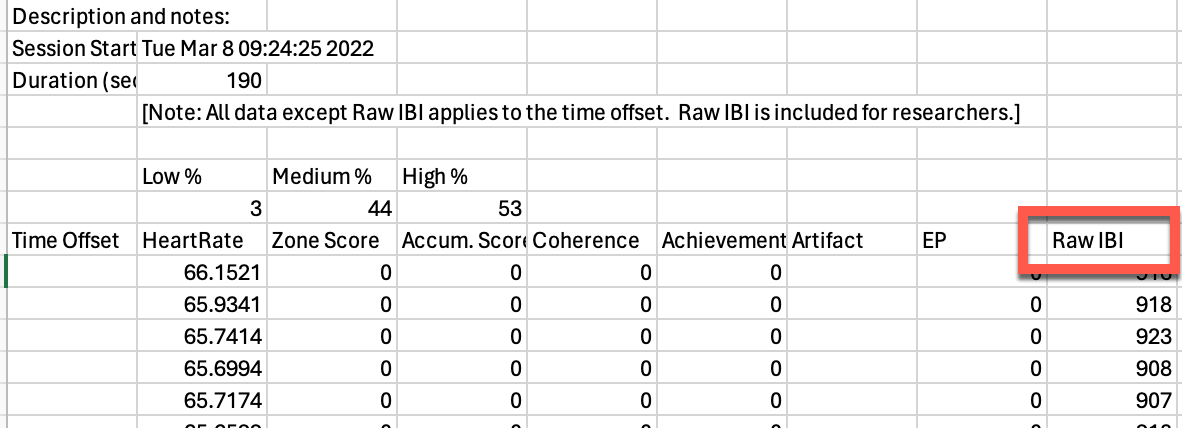
Delete everything except the Raw IBI column, then save as a .TXT file.
Import this file into Kubios for HRV analysis,
Get the free version of the program here: Free Kubios Software Download
The emWave Pro software has a better export function, and you can purchase the software upgrade here: emWave Pro Software
- Introduce the emWave program by doing a classroom demonstration. Begin the class by asking a student volunteer to connect themselves to the emWave hardware. Ask the student to shift focus by doing deep heart breathing (in for 4-5 seconds out for 4-5 seconds) and generating a feeling of appreciation. After several minutes ask the rest of the class to comment on what they observe on the computer screen. Explain how the emWave program is a new technology that helps people deal with stress and perform better. It is currently being used by thousands of people including Health professionals and athletes.
- Suggest classroom etiquette when using the emWave program. Ask students to respect each other’s privacy by refraining from talking, touching or interrupting one another when in session. Add that no one is expected to get a high score right away. Also, ask students to turn the sound off on each computer. The chimes are a distraction for students. Note: Discourage score comparisons or competition among students in advance.
- Have students practice the quick coherence tool. Before moving in to the emWave program, guide the class over several sessions to practice deep slow breathing through the area around the heart (in for 4-5 seconds out for 4-5 seconds) and generating a positive emotional state. Practicing the Quick Coherence tool for around 2 minutes each time (depending on age appropriateness) is optimal because it helps students perform better on the emWave program. Note: Age appropriateness means that some children especially, under 8 or 9, will have difficulty maintaining a sustained focus past 30 seconds to one minute. Some kids have different temperaments that make using the emWave program challenging for any sustained period of time which is a requisite to doing well in the games. As a rule of thumb, we recommend that children under 8 are not skilled enough to maintain long periods of focused attention to do well in the emWave program. But of course, there are plenty of exceptions.
- State that the goal of the emWave program is to transfer the skills they learned on this technology to real-life situations where they may be feeling too much stress conflict or a need to perform better in some area of their life.
- Identifying a personal goal. Before using the emWave program, students must first identify and write down a specific goal that is immediately do-able and concrete. Some students will need guidance in arriving at the specific goal(s) they wish to accomplish at home or school.
- Begin practice of the emWave program with the students. Instruct students to first begin using the Heart Rhythm Coherence Skill Building section. During their first few sessions they should not practice much longer than 2 minutes each time to become comfortable with the technology. Have them record their results on a scoring sheet or on the computer itself.
- Move onto the Software Games. When a student has lowered the coherence score to 50% or less in the red color (low coherence entrainment) they are ready to begin playing the software games. The software games progress from 3 to 5 to 7 minutes long. To stay focused for 7 minutes will be challenging for a number of students. So the idea of students building towards increased level of sustained focus over time is an important benchmark to communicate early on so they have the confidence to succeed.
- Check regularly with students on their progress. Monitor student use of the emWave program, frequently checking on their individual scores and the relative success of meeting their goals. Students should use the emWave program a minimum of 6 to 10 times to best internalize the skill sets learned from this technology. It takes practice. The first few sessions in the emWave program should last only about two minutes, so they become more familiar with the technology. Reinforce the fact that even low coherence is still coherence and not to be discouraged by that.
STATEMENT:
The emWave products were developed specifically for educational purposes only and are not intended for use as diagnostic tools. Before using emWave Products in an educational setting with minors, HeartMath recommends always consulting with your school and/or district about all guidelines that may pertain to the types of classroom educational programs and tools they support. HeartMath assumes no liability or responsibility for how educators and/or educational staff choose to use emWave educational programs.
emWave Pro Plus
The emWave Pro software now supports a wireless connection with the Inner Balance Coherence Plus sensor. This allows you to run your sessions without being tethered to your computer by a USB cable.
Before You Begin
- Update Your Software: Ensure you are running emWave Pro version 3.7 or newer.
- Enable Bluetooth: Make sure Bluetooth is turned on in your computer’s system settings (Windows or Mac).
- Check Other Apps: Ensure the sensor is not currently connected to the Inner Balance app on your phone or tablet, as it can only connect to one device at a time.
Step-by-Step Instructions
1. Power on your Sensor Press the power button on your Coherence Plus sensor once. You should see a blinking blue light, indicating it is in pairing mode and ready to connect.
2. Open emWave Pro Launch the emWave Pro application on your computer.
3. Set the Sensor Preference You need to tell the software to look for a Bluetooth device instead of a USB hardware key.
- On Windows: Go to Edit > Preferences.
- On Mac: Go to emWave Pro (in the top menu bar) > Preferences.
- In the Preferences window, locate the Sensor tab and select Bluetooth / Coherence Plus from the dropdown menu. Click OK.
4. Start a Session Click the Start (play) button in the main emWave Pro window. A “Bluetooth Device Discovery” window will pop up and begin searching for your sensor.
5. Pair the Device Select your Coherence Plus sensor from the list when it appears and click Connect.
- Note: You do not need to pair the sensor through your computer’s Bluetooth settings menu; the software handles the connection directly.
6. Start Breathing Once connected, the light on your sensor will change to a solid blue or green (depending on your settings), and you will see your pulse wave appear on the screen. Clip the sensor to your earlobe and begin your session.
Quick Troubleshooting Tips
- Not appearing in the list? Ensure the sensor is close to your computer and hasn’t timed out (the light should still be blinking before you hit Start).
- Battery Life: If the connection drops, check that your sensor is fully charged.
- Range: For the best performance, stay within 10–15 feet of your computer during your session.
- Introduce the emWave program by doing a classroom demonstration. Begin the class by asking a student volunteer to connect themselves to the emWave hardware. Ask the student to shift focus by doing deep heart breathing (in for 4-5 seconds out for 4-5 seconds) and generating a feeling of appreciation. After several minutes ask the rest of the class to comment on what they observe on the computer screen. Explain how the emWave program is a new technology that helps people deal with stress and perform better. It is currently being used by thousands of people including Health professionals and athletes.
- Suggest classroom etiquette when using the emWave program. Ask students to respect each other’s privacy by refraining from talking, touching or interrupting one another when in session. Add that no one is expected to get a high score right away. Also, ask students to turn the sound off on each computer. The chimes are a distraction for students. Note: Discourage score comparisons or competition among students in advance.
- Have students practice the quick coherence tool. Before moving in to the emWave program, guide the class over several sessions to practice deep slow breathing through the area around the heart (in for 4-5 seconds out for 4-5 seconds) and generating a positive emotional state. Practicing the Quick Coherence tool for around 2 minutes each time (depending on age appropriateness) is optimal because it helps students perform better on the emWave program. Note: Age appropriateness means that some children especially, under 8 or 9, will have difficulty maintaining a sustained focus past 30 seconds to one minute. Some kids have different temperaments that make using the emWave program challenging for any sustained period of time which is a requisite to doing well in the games. As a rule of thumb, we recommend that children under 8 are not skilled enough to maintain long periods of focused attention to do well in the emWave program. But of course, there are plenty of exceptions.
- State that the goal of the emWave program is to transfer the skills they learned on this technology to real-life situations where they may be feeling too much stress conflict or a need to perform better in some area of their life.
- Identifying a personal goal. Before using the emWave program, students must first identify and write down a specific goal that is immediately do-able and concrete. Some students will need guidance in arriving at the specific goal(s) they wish to accomplish at home or school.
- Begin practice of the emWave program with the students. Instruct students to first begin using the Heart Rhythm Coherence Skill Building section. During their first few sessions they should not practice much longer than 2 minutes each time to become comfortable with the technology. Have them record their results on a scoring sheet or on the computer itself.
- Move onto the Software Games. When a student has lowered the coherence score to 50% or less in the red color (low coherence entrainment) they are ready to begin playing the software games. The software games progress from 3 to 5 to 7 minutes long. To stay focused for 7 minutes will be challenging for a number of students. So the idea of students building towards increased level of sustained focus over time is an important benchmark to communicate early on so they have the confidence to succeed.
- Check regularly with students on their progress. Monitor student use of the emWave program, frequently checking on their individual scores and the relative success of meeting their goals. Students should use the emWave program a minimum of 6 to 10 times to best internalize the skill sets learned from this technology. It takes practice. The first few sessions in the emWave program should last only about two minutes, so they become more familiar with the technology. Reinforce the fact that even low coherence is still coherence and not to be discouraged by that.
STATEMENT:
The emWave products were developed specifically for educational purposes only and are not intended for use as diagnostic tools. Before using emWave Products in an educational setting with minors, HeartMath recommends always consulting with your school and/or district about all guidelines that may pertain to the types of classroom educational programs and tools they support. HeartMath assumes no liability or responsibility for how educators and/or educational staff choose to use emWave educational programs.
Setting up a HeartCloud account allows you to sync your sessions, track your progress over time, and access your data across different devices. The process for creating a new account is the same whether you are using emWave Pro or emWave2.
Here is the step-by-step guide to getting your account started.
Start by opening the emWave software program.
Click the User tab, located in the upper left corner of the screen.
Enter a new User or choose the User that you would like to create an account for.
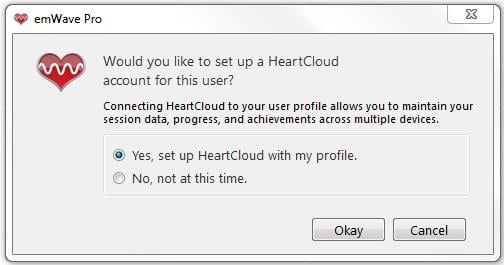
Now, Click the User tab and click Edit to see the screen below.
Click Okay to proceed.
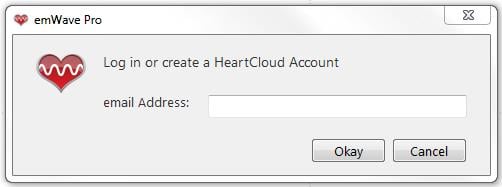
Enter an email address for the User.
Please Note: Only one email address can be used per User. If you will be syncing with other devices, such as an iPhone with Inner Balance, be sure to use the same email account on all devices.
Enter a password for the account.
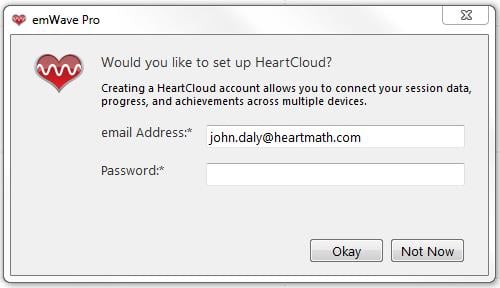
You have now successfully created a new Heart Cloud account!
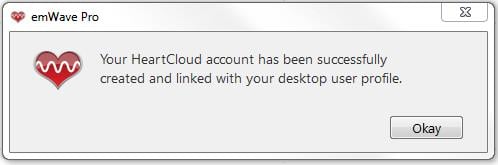
You can repeat this procedure for every User that has been entered into emWave Pro.
(Remember: emWave2 is a single user only program)
Each User account is separate and session data or User information is never shared between accounts.
Please Note: For Inner Balance users, there is only one User available per Mobile Device.
emWave2®
The emWave Pro software now supports a wireless connection with the Inner Balance Coherence Plus sensor. This allows you to run your sessions without being tethered to your computer by a USB cable.
Before You Begin
- Update Your Software: Ensure you are running emWave Pro version 3.7 or newer.
- Enable Bluetooth: Make sure Bluetooth is turned on in your computer’s system settings (Windows or Mac).
- Check Other Apps: Ensure the sensor is not currently connected to the Inner Balance app on your phone or tablet, as it can only connect to one device at a time.
Step-by-Step Instructions
1. Power on your Sensor Press the power button on your Coherence Plus sensor once. You should see a blinking blue light, indicating it is in pairing mode and ready to connect.
2. Open emWave Pro Launch the emWave Pro application on your computer.
3. Set the Sensor Preference You need to tell the software to look for a Bluetooth device instead of a USB hardware key.
- On Windows: Go to Edit > Preferences.
- On Mac: Go to emWave Pro (in the top menu bar) > Preferences.
- In the Preferences window, locate the Sensor tab and select Bluetooth / Coherence Plus from the dropdown menu. Click OK.
4. Start a Session Click the Start (play) button in the main emWave Pro window. A “Bluetooth Device Discovery” window will pop up and begin searching for your sensor.
5. Pair the Device Select your Coherence Plus sensor from the list when it appears and click Connect.
- Note: You do not need to pair the sensor through your computer’s Bluetooth settings menu; the software handles the connection directly.
6. Start Breathing Once connected, the light on your sensor will change to a solid blue or green (depending on your settings), and you will see your pulse wave appear on the screen. Clip the sensor to your earlobe and begin your session.
Quick Troubleshooting Tips
- Not appearing in the list? Ensure the sensor is close to your computer and hasn’t timed out (the light should still be blinking before you hit Start).
- Battery Life: If the connection drops, check that your sensor is fully charged.
- Range: For the best performance, stay within 10–15 feet of your computer during your session.
Setting up a HeartCloud account allows you to sync your sessions, track your progress over time, and access your data across different devices. The process for creating a new account is the same whether you are using emWave Pro or emWave2.
Here is the step-by-step guide to getting your account started.
Start by opening the emWave software program.
Click the User tab, located in the upper left corner of the screen.
Enter a new User or choose the User that you would like to create an account for.
Now, Click the User tab and click Edit to see the screen below.
Click Okay to proceed.
Enter an email address for the User.
Please Note: Only one email address can be used per User. If you will be syncing with other devices, such as an iPhone with Inner Balance, be sure to use the same email account on all devices.
Enter a password for the account.
You have now successfully created a new Heart Cloud account!
You can repeat this procedure for every User that has been entered into emWave Pro.
(Remember: emWave2 is a single user only program)
Each User account is separate and session data or User information is never shared between accounts.
Please Note: For Inner Balance users, there is only one User available per Mobile Device.
It is common to encounter situations where your emWave2 or PSR device does not immediately show charging lights when plugged in. This is typically due to a deep battery discharge or a connection issue.
Below is the recreated Knowledge Base article with detailed troubleshooting steps to help you restore your device to full power.
Troubleshooting: No Lights Showing During emWave2/PSR Charging
When you connect your emWave2 or PSR to a USB charging cable (either through a computer or a USB wall adapter), a green light should normally appear immediately in the pulse sensor area to indicate that charging has begun. If your device remains dark, please follow these steps.
1. Handling Deep Discharge
If the battery has been completely depleted (deep discharge), the unit may not show any lights at first.
-
The Solution: Leave the device plugged in and wait 15–20 minutes.
-
What to Expect: At some point during this window, the charging indicator light should activate. Once the light appears, continue charging the unit for an additional 2 hours to reach a full charge.
2. Resolving Incomplete Connections
In some cases, you may see a quick flash of two solid lights at the bottom of the breath pacer, but the pulse area remains dark and the unit then goes completely silent.
-
The Cause: This usually indicates an incomplete electrical connection, often occurring when using a specific wall socket.
-
The Solution: Unplug the charger and try a different wall socket or a different USB port on your computer to establish a more stable connection.
3. Proper Charging Maintenance
To ensure the longevity of your device’s battery, follow these best practices:
-
Charging Time: A full charge typically takes 2 hours once the indicator light is active.
-
Usage: Always disconnect the emWave2/PSR from the battery charger before you begin a session.
-
Avoid Overcharging: It is not recommended to leave the emWave unit on the charger for more than 2 hours at a time.
Important Notes
-
Device Versions: Please note that the two earliest versions of the emWave PSR (models PD200605 and PD200608) do not feature the immediate green charging light indicator.
-
Still no lights? If the device has been plugged in for over 30 minutes and remains completely unresponsive, try using a different USB charging cable to rule out a faulty cord.
HeartCloud
Setting up a HeartCloud account allows you to sync your sessions, track your progress over time, and access your data across different devices. The process for creating a new account is the same whether you are using emWave Pro or emWave2.
Here is the step-by-step guide to getting your account started.
Start by opening the emWave software program.
Click the User tab, located in the upper left corner of the screen.
Enter a new User or choose the User that you would like to create an account for.
Now, Click the User tab and click Edit to see the screen below.
Click Okay to proceed.
Enter an email address for the User.
Please Note: Only one email address can be used per User. If you will be syncing with other devices, such as an iPhone with Inner Balance, be sure to use the same email account on all devices.
Enter a password for the account.
You have now successfully created a new Heart Cloud account!
You can repeat this procedure for every User that has been entered into emWave Pro.
(Remember: emWave2 is a single user only program)
Each User account is separate and session data or User information is never shared between accounts.
Please Note: For Inner Balance users, there is only one User available per Mobile Device.
To ensure the best experience with HeartMath’s professional and personal training software, please verify that your system meets or exceeds the following requirements.
1. Windows Operating Systems
-
OS: Microsoft Windows® 10 or Windows® 11. (Note: 64-bit versions are required for the most stable performance).
-
Processor: 2.0 GHz or faster. We recommend an Intel® Core™ i3/i5/i7 or AMD equivalent for faster data processing.
-
RAM: 4GB minimum; 8GB or more is recommended for running secondary applications (like games or visualizers) simultaneously.
-
Connectivity: One available USB port for the Sensor Module. If your computer only has USB-C ports, a high-quality adapter or the HeartMath USB-C sensor is required.
2. macOS Operating Systems
-
OS: macOS® 11 (Big Sur) through the most recent releases, including macOS 14 (Sonoma) and macOS 15 (Sequoia).
-
Processor: Intel-based Mac or Apple Silicon (M1, M2, M3, M4 chips) using Rosetta 2 or native support where applicable.
-
RAM: 4GB minimum; 8GB recommended.
-
Connectivity: One available USB or USB-C port.
3. Hardware & Sensor Compatibility
The emWave software is designed to work with the following HeartMath hardware:
-
Inner Balance Coherence Plus: Connects via Bluetooth or USB-C.
-
Inner Balance USB-C Sensor: Direct connection for modern laptops and tablets.
-
emWave USB Sensor Module: Traditional USB-A connection (Pro/Pro Plus).
-
emWave2 Handheld: Connects via USB for data syncing and charging.
4. Internet & Software Updates
-
HeartCloud: An active internet connection is required to sync your session data across devices and to access the HeartCloud dashboard.
-
Updates: We recommend enabling the “Auto-Updater” within the emWave preferences to ensure compatibility with the latest OS security patches.
emWave Pro is a hardware and software system that tracks your heart rhythms (HRV) in real-time. It helps you reduce stress, build resilience, and improve mental clarity by teaching you how to shift into a state of “coherence.”
-
What it does: Translates pulse data into easy-to-read graphics so you can see how your emotions affect your heart.
-
Key Features: Includes the Coherence Coach® tutorial, interactive games, emotion visualizers, and detailed progress tracking.
-
Compatibility: Works on both Mac and Windows with a required USB/USB-C sensor module.
-
Support: Comes with a 60-day satisfaction guarantee and free technical support.
Detailed Guide (Knowledge Base)
1. What is emWave Pro?
emWave Pro is HeartMath’s professional-grade software and hardware system. It uses a pulse sensor (ear clip or optional finger sensor) to collect heart rhythm data, which is then translated into real-time graphics on your computer. It is used globally by health professionals, athletes, and individuals to manage stress and optimize performance through Heart Rate Variability (HRV) training.
2. Key Benefits and Uses
emWave Pro is designed to help you:
-
Reduce Stress: Quickly re-balance mind and body to avoid burnout.
-
Build Resilience: Improve health, stamina, and emotional well-being.
-
Boost Performance: Increase mental clarity, memory, and focus under pressure.
-
Improve Relationships: Become less reactive and more poised in social and work environments.
3. What’s Included in the Box?
When you purchase emWave Pro, you receive:
-
The emWave Pro software (downloadable for PC and Mac).
-
The USB Hardware Module (the data interpretation device).
-
An Ear Pulse Sensor (finger sensors are sold separately).
-
The Coherence Coach® tutorial and embedded games/visualizers.
-
Access to HeartCloud™ for online data storage and syncing.
-
Free technical support and an introductory telephone training class.
4. Minimum System Requirements
-
Windows: 2.0 GHz processor (Intel Core™2 Duo at 3.0GHz recommended), 2GB RAM (4GB recommended), and an available USB/USB-C port.
-
Mac: Core™2 Duo at 1.8GHz or faster, one available USB/USB-C port.
-
General: Internet connectivity is required for software updates and HeartCloud™ access.
5. Core Software Features
-
Multi-User Support: Easily switch between different users via a drop-down menu.
-
Interactive Learning: One-click access to the Coherence Coach®, Games (like Dual Drive), and Emotion Visualizers®.
-
Data Analysis: Automatically saves every session over 30 seconds for long-term progress review.
-
Customization: Mix and match different display screens to suit your training style.
-
Export/Import: Enhanced database options for professional HRV research and data management.
6. Purchase and Guarantee
HeartMath offers a 60-day money-back guarantee (excluding shipping) if you are not satisfied with your results. emWave Pro can be shipped internationally to most countries.
Interested in sharing emWave Pro? If you are a health professional or reseller interested in offering emWave Pro to your clients, please contact our sales team at (800) 450-9111 or email jwhite@heartmath.com
Resources
The Global Coherence Initiative is a science-based initiative uniting millions of people in heart-focused care and intention, to shift global consciousness from instability and discord to balance, cooperation and enduring peace.
For more information please visit: Global Coherence Initiative on the HeartMath Institute website.
HeartMath offers a comprehensive range of training resources designed to help you get the most out of your technology and deepen your practice of coherence.
1. Technology & Product Tutorials
If you are new to the emWave Pro, emWave2, or the Inner Balance Trainer, we recommend starting with our free video tutorials. these short guides walk you through the setup, features, and basic operation of your device.
-
Access here: HeartMath Product Training
2. Educational Webinars
We host a variety of free webinars led by HeartMath experts. These sessions cover everything from the science of the heart to practical applications of coherence in daily life.
-
Access here: HeartMath Webinars
3. Books and Self-Study Materials
For those who prefer a deeper dive into specific topics like stress, anxiety, or performance, the HeartMath Store offers a wide selection of print and digital books.
-
Featured Titles: Transforming Stress, Transforming Anxiety, and The HeartMath Solution.
-
Shop here: HeartMath Store – Books
4. Facilitator Programs and Professional Certification
If you are interested in teaching others how to use HeartMath tools, the Add Heart Facilitator program is an excellent entry point. It provides the foundation needed to share simple techniques within your community or workplace.
-
Learn more: Add Heart Facilitator Program
5. Licensed Coaching and Mentoring
For a personalized experience, you can work directly with a Licensed HeartMath Coach or Mentor. They can provide tailored guidance to help you reach your specific health, emotional, or performance goals.
-
Find a Coach: Licensed Coach / Mentor Directory
HeartMath technology (emWave and Inner Balance) is designed for stress reduction and resilience training, not as a medical device.
-
Key Benefits: Improves mental clarity, creativity, and athletic performance (“The Zone”).
-
Medical Considerations:
-
Pacemakers: Generally compatible, but if the pacemaker is always pacing the heart, HRV changes won’t be visible.
-
Beta Blockers: Do not interfere and may actually make the sensor reading easier.
-
Arrhythmias: May cause “Artifacts” (red lines); persistent irregularities can make coherence scoring difficult.
-
-
Safety: Sensors are completely safe with no risk of shock. The Bluetooth version uses Low Energy (BTLE) with significantly less EMF than a mobile phone.
Important: Always consult your healthcare professional before using HeartMath as an adjunct to any medical treatment.
1. Purpose and Scope of HeartMath Technology
HeartMath products are intended for stress education and resilience training. They are not medical devices and are not marketed to treat, cure, or diagnose specific conditions. However, many users find that reducing stress levels provides significant support for their overall wellbeing. We recommend consulting with your physician to see how HeartMath might fit into your current health program.
2. Performance and Lifestyle Benefits
Beyond basic stress management, achieving high coherence offers several advantages:
-
Mental Clarity: Enhances focus, business communication, and creative problem-solving.
-
Athletic Excellence: Helps athletes enter “The Zone”—a high-performance state characterized by poised, alert calmness.
-
Daily Resilience: Improves the ability to stay balanced during chaotic or changing environments.
3. Compatibility with Heart Conditions & Devices
-
Pacemakers & Vagal Stimulators: Most users can use the system. However, if your device is programmed to pace your heart constantly, the software will only reflect that fixed pacing and won’t show the natural Heart Rate Variability (HRV) driven by your nervous system.
-
Arrhythmias (AFib, PVCs, etc.): Irregularities appear as Red Lines (Artifacts). While the system can handle occasional skipped or extra beats, persistent arrhythmias may prevent the software from calculating an accurate coherence score. In these cases, users should focus on the heart rhythm graph itself to look for “sine-wave-like” patterns.
-
Beta Blockers & Calcium Channel Blockers: These medications do not interfere with the technology. Because they relax blood vessels, they often make it easier for the sensor to read your pulse.
-
Vasoconstrictors: These will likely interfere with the sensor’s ability to get an accurate reading.
4. Safety, Electricity, and EMF
-
Electric Shock: There is zero risk of electric shock. The sensors are completely isolated in plastic enclosures and use extremely low voltage (max 3.3V). For comparison, this is a fraction of the power in a standard 9V smoke alarm battery.
-
EMF Radiation: The Inner Balance Bluetooth sensor uses Bluetooth Low Energy (BTLE). Its output power is 0.5 mW or less—roughly 500 to 4,000 times lower than a typical mobile phone. Furthermore, the Bluetooth transmitter is located in the garment-attached module, not the ear clip itself.
5. Usage Limitations
The technology may be difficult to use for:
-
Children who are unable to sit still for the duration of a session.
-
Individuals with intense, persistent heart irregularities that prevent a consistent pulse lock.
Professional Use
Once you’ve registered for a series, we are happy to refund the registration fee based on the following schedule:
- Before Class 1: Full payment will be refunded, minus a $50 processing fee, when we receive your returned materials
- After attending Class 1: Full payment will be refunded, minus a $100 fee, when we receive your returned materials
- After attending Class 2: Full payment will be refunded, minus a $150 fee, when we receive your returned materials
- After attending Class 3: There will be no refund.
HeartMath is often asked whether practitioners who are not certified by the organization are permitted to teach exercises that are similar to HeartMath techniques (such as the Heart Lock-In® or Quick Coherence® techniques) and if they can cite HeartMath research to support their work.
Using HeartMath Research
We have deep respect for any practice that teaches individuals to focus on the heart and send love to others. While we encourage you to read, study, and recommend our research to others in your practice, please keep the following guidelines in mind:
-
Scientific Accuracy: HeartMath has not conducted comparative studies between our proprietary techniques and other heart-centering practices. Therefore, we cannot say whether substituting a different technique would yield the same scientific results found in our studies.
-
Claims: You may cite HeartMath research to show the physiological effects of heart-focused techniques, but you should not claim that this specific research applies directly to non-HeartMath techniques.
Technique Structure
The HeartMath techniques were intentionally designed with a specific word structure and sequence of steps to provide maximum benefit to the user.
-
Complementary Use: We do not attempt to compare HeartMath techniques to the benefits of other practices. Instead, our techniques are widely used as a valuable add-on to whatever existing practices a person or practitioner already finds beneficial.
-
Citing Sources: If you are teaching a heart-centering exercise that is essentially the same as a HeartMath technique, you must not claim to be “HeartMath Certified” unless you have officially completed a certification program.
HeartMath offers these techniques in a spirit of cooperation, aiming to provide tools that enhance any person’s journey toward greater coherence and well-being.
How to Use the emWave® System
Reaching the next level of athletic performance depends upon the ability to regulate emotions and manage stress. Athletes who combine mental and emotional training with their physical training have a competitive advantage and are better equipped to enter into the peak performance zone more consistently.
Thoughts and emotions have a profound effect on the heart’s rhythm and this rhythm impacts performance. Under pressure, stressful thoughts and emotions cause the heart’s rhythm to become irregular and jagged. This incoherent pattern inhibits brain function and diminishes the visual field, reduces reaction speed and impairs decision making.
“The [emWave] software gives golfers the ability to identify when their heart is racing and do something about it. It gives them techniques to control themselves while under pressure and in tense situations so they can use those situations to their best advantage, both athletically and in life.”
— Laird Small, 2003 National PGA Teacher of the Year
Conversely, a positive mental and emotional state, not unlike being in the zone, creates a smooth, wave-like, coherent pattern that facilitates brain function and improves mental focus and physical coordination.
The emWave system is a training system for athletes who want to master their emotions. Athletes will see how thoughts and emotions affect the heart’s rhythm in real time and learn how to ‘get coherent’ on demand. By associating the changes on the screen with a more focused, calm internal state, athletes are better equipped to maintain a state of physiological coherence and balance — the Zone — anytime, in any situation, in or out of the game!
You can learn more about heart rhythms and coherence in the Science Section.
Who can benefit from the emWave system:
- Coaches and trainers wanting to bring out the best in athletes.
- Serious athletes looking for that competitive edge.
- Casual athletes wanting to improve their game.
- Young athletes wanting to get more consistent results.
- Any individual looking to improve athletic and sports performance.
A tool for success!:
- The Quick Coherence® technique can be consistently applied in many athletic and training situations.
- Real time heart rhythm and coherence feedback.
- Easily incorporated into a training schedule.
- Easy to use and takes just minutes a day.
- Results are immediate, measurable and sustained.
- Utilization of the techniques can be transferred to other areas of your life.
Whether using emWave system for yourself or as a coach, it is strongly recommended that you go through the Tutorial and the Coherence Coach® to have full understanding of the emWave system including the science behind the technology and the Quick Coherence technique.
When’s the Best Time to Practice?
Just like any skill, it takes practice to achieve and sustain coherence. Whether you use your emWave system once a day or once a week, it’s most effective when used on a regular basis. Consistent practice, especially when first learning how to build coherence is important. Unlike the physical training, the emWave system requires no recovery time. You can’t ‘over train’!
Most athletes find that adding emWave practice sessions into their training schedule accelerates their ability to shift into a positive emotional state and coherence on demand. You’ll want to use the Quick Coherence technique often. Especially anytime you’re stressed at work, at school or at home. The more you practice, the greater your ability to get into the peak performance zone.
Practice Tips:
- Use your emWave system regularly, at least once a week.
- Use it before practice for added focus and balance.
- Use it after practice as a way to reflect on what went well and leave emotionally charged.
- Track your sessions to measure and evaluate your progress.
- Increase your challenge level once you consistently reach 100% high coherence.
- Play the games for added fun and enjoyment.
- Use the emWave system as part of your ‘game’ preparation along with stretching and other warm up exercises.
- Track your performance improvements. For example, did your drive distance or fairway accuracy improve? Has your free throw percentage improved? What happened to your serving accuracy on the tennis court?
- When using the emWave system prior to training or a competitive event, notice the relationship between performance and coherence scores.
For Coaches and Trainers — How to Use the emWave system with your Athletes:
Begin by explaining why the emWave system can play a vital role in a training regimen. Ask your athletes if they’ve ever experienced being in the “Zone”, the experience of having mind, body, and heart in alignment resulting in a seemingly effortless and near perfect performance. Most athletes have had an experience similar to this and can relate. Relay to the athletes that the emWave system will train them to have more control in getting into the peak performance zone.
Points to Note:
- Physical training provides athletes with increased strength, muscle memory, increased flexibility, and faster reaction times. However, the physical part of athletics is just one component. Mental and emotional training is a component that some athletes dismiss, but is crucial in maintaining composure under stress and to improving athletic performance.
- The emWave system provides a simple and effective technology that gives athletes a real time training facility with the ability to increase emotional muscle, reaction speed and accurate decision making.
When your athlete first sits down in front of the software, you should take them through a few of the features in the emWave system before starting a session.
- Take them through the Quick Coherence technique by using the Coherence Coach. Have them practice the Quick Coherence technique for a few minutes and make sure they understand it.
- Take them through the science section of the Tutorial. This is a brief overview of the basis for the technology and will give them increased assurance in the effectiveness of the system.
- Start a session. Show them their heart rhythms and explain to them what the various charts and graphs mean as explained in the Tutorial.
- After a couple of minutes have them practice the Quick Coherence technique. You can coach them through this if you think they need it. You can paraphrase the Quick Coherence technique. For step 3, suggest they remember a time when they performed at their peak or won an event, etc. and relive the experience.
Enjoy using your emWave system and building your new emotional muscle!
Related Links:
Sports Performance: Results
The HeartMath techniques and emWave® heart rhythm coherence training system have been used with great effectiveness to improve athletic performance in a wide range of sports, both professional and amateur. There are numerous case studies illustrating how these tools are being used to improve performance and endurance by individual sports people, teams, coaches and sports psychologists.
“Using HeartMath techniques and the [emWave] system are so effective because you can get immediate feedback on your internal state. Having real-time physiological feedback with the [emWave system] takes the guess work out of whether I’m in the right frame of mind and attitude and gives me something to hang onto—a concrete, internal reference point instead of just guessing at intuition.”
— Marlo Stil, professional golfer
For example, the emWave system is being used extensively in the professional golfing community, as well as by a number of Olympic athletes and teams. A coach with the U.S. Olympic ski team requires his skiers to attain a certain level of heart-rhythm coherence before heading down the slopes. The sports psychologist for the Canadian Olympic teams attended a training program at the HeartMath Institute. He later reported that several of his previous medal-winning athletes on the swim team had cut 0.2 seconds off their swim times after learning how to sustain coherence. And, after coaching a female gold-medalist swimmer in the HeartMath techniques, she went on to set a world record.
In this section, you will find a few examples of the type of results athletes in various sports are achieving.
Attaining the Zone: Focus, Control, Flow, and Rhythm Through Resistance
At the height of competition, the ability to manage emotional responses often is the difference between winning and losing. The emWave system provides objective, real-time feedback and allows athletes to better self-regulate their tension and emotional responses, especially in challenging situations. In addition, being able to enter the heart coherence state maximizes many aspects of optimal performance such as eye – hand coordination, reaction times and discrimination.
Entering the Zone
People have talked about “getting into the zone” for years, and “the zone” has become a popular buzzword. Dozens of books have been written on it, but what the zone actually is has been hard to pin down. An air of mystery surrounds it. HeartMath’s research suggests people have within them a place of higher consciousness where life and all sorts of experiences can be processed from another level of intelligence. It’s a state of heart–brain synchronization that is within all people. The zone is not a place you can go to by pushing a button. Rather it is a state of consciousness where your higher motor faculties and intuition merge in liquid coordination.
As people come to understand that the zone is not a one-shot place where they experience some magical peak, but a progressive state of connecting with their intuitive heart, reaching it – over and over – gradually becomes easier.
The emWave system can be used as a preparation before playing or competing in sports, similar to stretching and other exercises. It will help prevent “choking” by adding rhythm to your brain-muscle coordination and providing faster energy recuperation under pressure.
Jimmy Roberts of NBC Sports once asked Tiger Woods: “In the closing holes, as we watch the conclusion of this championship today, what should we look out for? Is there one trouble spot, something that is going to be particular dicey situation for the competitors today?” Tiger Woods’ response: “No, not really. There’s some accessible pins, but I think the guys who are really controlling their emotions are going to win; the guy who is controlling his emotions is going to win.”
With a little practice on the emWave system prior to a game or workout or during timeouts to recoup spent energy, players learn to stay in the flow. They develop “rhythm through resistance” or the power to focus, shift and flex when they feel pressing energies, without overreacting or draining their energy. They are able to better focus and direct emotional energy to summon more firepower when they need it on the playing field or during workouts. Learning how to put emotional overreaction in check gives you more power to redirect that emotional energy to a specific goal. This is one of the prime benefits of using HeartMath tools like the emWave system.
Golf
“Feeling has a direct correlation to ease of play, or as I call it, ‘instinctive golf.’ Insecurity and self-doubt can immediately skew your motor skills. The fact is that mental and golf-swing training is often not enough to maintain a consistent emotional balance. You have to address the emotions directly. HeartMath techniques show you how to take control of your emotions, enabling you to make dramatic improvements in your game. I put my students, from top-level professionals and collegians to amateurs, on the launch monitor before and after their HeartMath practice, and most see their club-head speed increase and ball-flight control improve. We also use the software outdoors before hitting real-time golf shots. Again, distance and ball-flight control improve with remarkable consistency. But it wasn’t until I used HeartMath with my family and friends and saw the emotional benefits outside of golf did, it sink in for me that something incredible was happening.”
—Joe Thiel, PGA Master Professional; Golf Magazine Top 100 Teacher; Golf Range Magazine Top 50 Teacher; Director of The PGA Golf and Learning Center in Olympia, WA; and certified HeartMath golf instructor.

Ian Woosnam, 2006 European Ryder Cup Team Captain and 1991 Masters Winner, used the emWave along with HeartMath stress-reduction techniques as a way to prepare himself and his team for the Ryder Cup tournament. Golf is what he knows, but he noted, “Captaincy, however, was a bit daunting.”
“Using the emWave Personal Stress Reliever® enabled me to recognize the effects of stress on my body at any given time. Now I can take the pressure out. It helps you ‘get into the zone’ as we players say, and sustain the right frame of mind. My recent tournament performances were helped by the use of HeartMath. It amazed me. emWave can recognize stress levels not otherwise detectable. I wish I had known about HeartMath earlier in my career.”
—Ian Woosnam

Lynn Marriott, a PGA and LPGA Class A professional golfer and co-owner of the prestigious golf school Vision 54, explains why more pros are using HeartMath to improve their golf game. “At the elite level, poor performance is often a result of indecision. These players all have the technical skill, so that’s not what determines the winner. What’s critical is the ability to make a clear decision about the shot, to be able to sort through all the details and stressors about the course and each particular shot. When a player is grounded and trusts (his or her) intuition about the shot, there is no indecision. Using (HeartMath tools) to shift from your head to your heart throughout your game increases the clarity about your golf shot.
“For instance, use (Quick Coherence® technique) in your pre-shot routine, just before your last look at the target. You get grounded, center in the heart and the feeling comes, ‘Yes, go.’ Sometimes you stand over a putt and you know the ball is going in; other times you stand over a putt and can’t access that same confidence and clarity. (Quick Coherence) helps you access your ‘go’ signals more easily.
—Lynn Marriott

Many athletes speak of “choking” during play. A phenomenon in golf known as “the yips” – it’s an acquired problem of sudden tremors, jerking or freezing while putting – may have both physical and psychological causes, according to a summary of current Mayo Clinic research published in Sports Medicine. Preliminary research indicates more than 25 percent of avid golfers develop the yips, which adds an estimated 4.7 strokes to the average 18-hole score of an affected player. Professional golfers have successfully used the emWave system to manage the yips, stay emotionally balanced during high-pressure putting and lower their scores.
“I learned the (HeartMath techniques) prior to the release of the software/sensor program. Since the [emWave system] came out I’ve had more fun practicing the techniques and challenging myself. Practicing with the program has helped me improve my ability to quickly shift into the zone. If you’re a golfer and haven’t learned (HeartMath), you need to and make it fun. Learn it with the [emWave system]! I highly recommend it.”
— Peter Fox, Professional Golf Coach and Author of Natural Golf: A Lifetime of Better Golf
Coaches are using the emWave system to accelerate the results of relaxation, visualization and other mental exercises and to help athletes sustain emotional balance on the field. Health and fitness professionals are recommending the emWave system and using the coherence-building technique because of its performance benefits and ease of use.
“I have found in my life, using the skills of HeartMath and the emWave system, that I am able to get into the zone and stay in the zone,” 2003 PGA Teacher of the Year Laird Small says. “I have also discovered when my students use the emWave system how they are able to control their breathing, mindset and heart rate and get in the zone.”
“HeartMath is the next step in golf,” says Sweden’s premier golf coach, Pia Nilsson, who was responsible for bringing Sweden’s golfers into world-class competition and is the former coach of Anikka Sorenstam as well as the author of Be Your Own Best. Nilsson firmly believes that once golfers have mastered the mechanics of the game, it then becomes a mental/emotional game and HeartMath techniques and emWave technology are the way to lower their scores.
Tennis
A president of a high-tech corporation who would always underperform at a Palm Springs annual tennis tournament, said, “Once I started practicing HeartMath techniques before and during each game, I was able to hit the sweet spot more often and for the first time reached the finals – and won in straight sets!”

National Junior Tennis Players Use emWave system at Tennis Tournaments and See Results
Mike Kennedy, the Tennis High Performance Manager for the Middle States Section had the job of helping to develop professional-level tennis players. To do so, he wanted to help the region’s junior players get a competitive edge by enhancing their ability to relax and focus. Being a former competitive player, Mike knew the importance of self regulation and that most players did not have well-honed skills to do this. One of the obstacles he needed to overcome was figuring out how to provide training for this skill in the players’ already busy schedules. Collaborating with Angelika Sadar, licensed psychologist specializing in sports, he developed a program in which players would have access to the emWave system technology at selected National Tennis Tournaments.

Several computers with emWave system programs were set up at the tournaments, which were available for players to use between matches. Players quickly learned the coherence techniques and, before long, there were lines of players waiting to train with Angelika and her assistants. Players even began teaching each other the coherence techniques. Being competitors, players also developed ways of challenging each other on side-by-side computers. They raced to see who could get 100% “green” first; or who could get the most points on the pot of gold. They even challenged each other to see who could finish the games with the most seconds remaining! Many players saw benefits of this training during their subsequent match play on the same day. Here are some of the comments they made throughout the day of their match play: “This is a way for me to relax while I am playing,” “I don’t worry when I serve,” “I know the breathing helped me win my match,” “I had so much more fun playing.”
Thanks to Mike Kennedy’s progressive thinking, this training has been included as part of the eight Competitive Training Center programs in his section, and workshops in the coherence techniques have been offered at several national junior tennis tournaments.
Martial Arts
“It’s been largely because of using the emWave technology that I have been able to accomplish all I’m doing. During my championship season, it was essential to relax when I needed to and handle the stress associated with competing and frequent travel to tournaments. Add to this the need to overcome setbacks from injuries and keeping the edge needed to fight in the younger category I competed in. In addition to winning the world championship, I wrote a book and I used (HeartMath techniques) to spark creativity and stay focused on the project.”
—Dennis Kelly, World Martial Arts Champion Master Kelly was inducted into the Martial Arts Hall of Fame in January 2001.

Kelly, author of Six Steps to the Fountain of Youth, writes about how a simple shift in perspective can affect vitality.
“In my 30s, I entered tournaments and won awards in the martial arts, but my life had taken a turn for the worse. Drastic financial problems and having my very ill parents come to live with me had left me devoid of hope and filled with bitterness. Then one day a friend introduced me to emWave® PC. I recognized that it was in tune with the martial arts centering techniques I’d practiced for years, but it went several steps further! The master trainers had always spoken about the heart, but not in the clear how-to-get-there-and-use-it kind of way. After practicing the techniques, my whole attitude changed. I realized that there is no reason to let life’s obstacles prevent me from doing the things I loved. I wouldn’t let it get me down. In January 1997, I came out of retirement and entered competition again. I’m pleased to say that, at 59, I’m the oldest man ever to win a world championship in the sparring division with NASKA (North American Sport Karate Association.) The curious thing is that when I was 20 years younger the competition was far less intense. I won awards then, but I was mainly fighting with amateurs. Nowadays, pros and masters can compete in the 40+ division. It was a much more difficult challenge to win. Yet, with the focus I gained from this technique, my performance was far better at 59 years old than it had been in my ’30s!”
Team Synchronization
In many sports, success comes from teamwork. “We were on the same wavelength” is a common expression from team players who experienced being in sync with each other and performing at unusually high levels. What they are describing is a type of collective coherence or resonance in which a shared sense of energy, rhythm and intuitive knowing occurs and has a positive effect on how they interact to achieve a successful outcome.
The achievement of successful teamwork or collective coherence is often less then optimal because of individual team members’ personal stress, lack of emotional energy management and ultimately their drain on the collective team energy. When teams use the emWave system before and during practices and before games and use the Quick Coherence® technique during timeouts, they can create personal and team coherence more quickly and this increases intuitive synchronization with each other so they can play “in sync.”
Basketball
“Great results are happening for my basketball team,” high school teacher and sports coach Beth McNamee recalled.
“I had the good fortune to coach an eighth-grade girl’s basketball team. I had watched this group of girls play together as seventh-graders, where they had achieved the record of 6 wins, 7 losses. I noticed their lack of focus, inability to manage their emotions, and limited skill level. As their new coach, my main goal was to help them achieve, individually and collectively, at their highest level of ability. To meet this goal, I expanded their basketball skills and knowledge and taught them HeartMath tools so they could better manage their thoughts and emotions while practicing and competing. Each girl had the opportunity to use the emWave throughout the season.

“The number of turnovers dropped significantly and their shooting percentage increased. Most importantly, they are having fun and are more deeply enjoying the game of basketball as well as each other. They know it’s because of the tools. The smiles on their faces and their increased sense of exhilaration made my heart sing. Boy is this fun!
“The girls were able to step onto the basketball floor with confidence, inner balance and focus. Through practice, they had become more self-aware of their thoughts and emotions and were able to employ the Quick Coherence® technique at any time on the court when they needed to. During the game, each timeout and half-time talk began with a team Quick Coherence. The girls were then prepared to listen and understand with greater clarity. This transferred onto the court, where they were able to execute and perform with great success. This success translated into wins on the basketball court as we ended the season with a record of 15 wins, 1 loss.”
Before each game, the team met in the locker room for a group Heart Lock-In®.
Pre-game Heart Lock-In
Pause thoughts, shift focus away from racing mind to the area around your heart, imagine breathing through the center of the heart, bring in a positive feeling, appreciation for someone or something, feel sense of calm, self security, strength.
Stay with the focus on the heart and positive feeling.
See yourself on the basketball court during warm-ups, feel yourself being focused, energetically balanced, confident, strong, enjoying and appreciating the opportunity to be part of this team and part of this game. See and feel yourself preparing for the game, accurately passing, catching the ball, going strong to the basket, making your lay-ups, swishing your foul shots and moving your feet defensively.
If you make a mistake, a turnover, or an unnecessary foul, feel yourself recognizing the old tape loop of self-judgment, frustration, anger. Pause that feeling and focus on the area around your heart, bringing yourself back into balance physiologically and emotionally. Feel yourself successfully moving back into sync, focused on the action of the moment and not on the error.
Remember, you have the power to manage your emotions and your thoughts. Use Quick Coherence to stop and transform the frustration, nervousness and anger. Use Quick Coherence to transform the negative thoughts, like “I can’t,” to “I can.” Use Quick Coherence to create the biological state of peak performance. Use Quick Coherence to create balance and focus!
Ice Hockey
Ice hockey is an aggressive and fast sport that normally triggers a lot of emotions, including anger, fear and happiness. Our partners at HeartMath Scandinavia AB have been using HeartMath techniques and technology to improve the performance of one of VIK, Sweden’s elite, professional hockey teams. Players find themselves in two positions during a game: sometimes they are on ice playing, but often they are off in what’s called “the box” waiting for their next play on the ice. The players often feel anxious and frustrated and can have a hard time trying to change their emotional state, especially when they are in the game. In some cases this can be devastating to the team’s overall performance.

Anders Nilsson, CEO of HeartMath Scandinavia AB says, “We started to look at the possibilities of using HeartMath off ice, to transform the players’ emotional states from chaotic to coherent. We first used one-on-one coaching with a group of the players while having them on the emWave system. We asked them to experience the negative emotions they experience during games. This helped them to see how these feelings created incoherence, which affects their play. Then we trained them in the Quick Coherence technique and used the emWave system to demonstrate the profound difference in their coherence levels. Next we instructed them to use the time in the box to apply what they had learned to trigger a coherent emotional state. In some cases many players are now using the portable emWave Personal Stress Reliever® during the game to assist them. Now, every time one of these players sits in the box, they will immediately make a sincere effort to switch to a coherent emotional state. The results have helped them to be one of the top teams of our professional league Hockey Allsvenskan in Sweden. By practicing HeartMath techniques and using coherence-building technology, the trained players have reported noticing a significant difference in being able to see what’s happening in the game. They also have reported that they have more physical stamina, their legs are fresher, when they have been maintaining a good level of coherence instead of expending a lot of negative emotional energy. Overall the team unity has improved and they are performing at a much higher level than in their previous season.”
Related Links:
Sports Performance: Resources
HeartMath has many other products and services available to help you get the most from your emWave® system. Follow the links below to obtain additional resources.
To play great sports you want to be in a coherent state, physically, mentally, and emotionally. In the coherent state you will be in sync and able to manage yourself emotionally, be present, think clearly, and react intuitively.
Free Orientation Call
Several times each month a HeartMath emWave system specialist conducts phone and/or web sessions on how to use the emWave system and to answer your questions. To find the schedule for these calls, click here.
emWave2®
This system includes a portable handheld unit that can enhance your life through its scientifically validated technology, helping you to reduce stress and gain a new sense of inner control anytime anywhere.
Whatever your game, emWave2 can help you improve it quickly by coaching you through steps to gain control over your nerves, so that you can focus with greater intensity, re-energize, feel more self-assured, and be in peak performance.
Through colorful LED displays, emWave2 shows you when stress is affecting your body by responding to the subtle changes in your heart rhythms. emWave2 gives you the power to transform stress by guiding you to create more coherence — a high performance state that occurs when emotions, mind and body are synchronized.
Managing Emotions: Golf’s Next Frontier Booklet
If you are a passionate golfer, you can appreciate the pleasurable emotional state associated with playing at the peak of your game. You also understand how emotional blowups or meltdowns can quickly override and undo the results of countless hours of practice. A 60-page book explains how you can achieve and maintain optimal emotional states for extended periods of time-even in the heat of intense competition. Click Here.
Transforming Stress: The HeartMath Solution for Relieving Worry, Fatigue, and Tension, by Doc Childre and Deborah Rozman, Ph.D.
This book teaches readers to use the HeartMath method to reduce stress. It teaches you how to engage your heart, bringing emotions, body, and mind into balance. This balance helps them stay in a zone of focused clarity, optimal health, and high performance. Click Here.
Transforming Anger: The HeartMath Solution for Letting go of Rage, Frustration, and Irritation, by Doc Childre and Deborah Rozman, Ph.D.
If you are dealing with anger that is difficult to manage, this book can give you hope, as well as practical tools to successfully handle this emotion.
This book will help you to better understand:
- how and why anger occurs in your daily life
- how your body triggers anger
- why your body responds to anger
Additionally you will learn to use fast-acting tools and techniques to get in sync and release anger. Click Here.
Transforming Anxiety: The HeartMath Solution to Overcoming Fear and Worry and Creating Serenity, by Doc Childre and Deborah Rozman, Ph.D.
Nothing can destroy health and quality of life faster than chronic anxiety, that vague feeling of unease and distress that something, somehow, is hopelessly wrong. Unfortunately, problems as a result of anxiety are steadily on the rise. Anxiety disorders have always been the most common of psychological problems. In fact, new reports suggest that nearly 25 percent of Americans at any given time suffer from some form of anxiety. In response to this growing problem, the scientists at the HeartMath Institute have adapted their revolutionary techniques into a fast and simple program that anyone can use to break free from anxiety once and for all. Click Here.
Transforming Depression: The HeartMath® Solution to Feeling Overwhelmed, Sad, and Stressed, by Doc Childre and Deborah Rozman, Ph.D. Foreword by Frank Lawlis, Ph.D., Clinical and Counseling Psychologist
Could your life be any crazier and more overwhelming? You’re bombarded all day, every day by deadlines, demands, and news, much of it bad, from across the street and around the world. After awhile, this constant sense of being overwhelmed, fatigued, and stretched to the limit can leave you feeling hopeless and uninterested in things that you used to enjoy. In other words, you have become depressed. By using the HeartMath techniques in this book, you’ll learn how to tap into new resources of energy and creativity and find new ways to connect with the people in your life. In no time, your feelings of depression will lessen and dramatic changes will take place in your mind and body that will result in better health and greater peace of mind. Click Here.
The HeartMath Approach to Managing Hypertension: The Proven, Natural Way to Lower Your Blood Pressure, by Bruce C. Wilson, MD and Doc Childre
High blood pressure is a national epidemic. It’s a condition that affects one in four Americans, most of whom have no idea they are at high risk for heart disease, stroke, and other life threatening conditions. The conventional treatment for hypertension are prescription drugs, (most can have serious side effects) and may not ultimately succeed in reducing your blood pressure. Fortunately, the HeartMath Institute has researched techniques for managing stress and hypertension for more than fifteen years. Now, at last, these highly effective strategies for regulating blood pressure safely and effectively are available to you.
The HeartMath Program, described in this book, offers a unique opportunity in the arena of stress management. Recognizing a stressful situation and taking a quick timeout to begin a simple HeartMath technique to shift your emotional attitude has a profound effect on the nervous system.
It changes your physiology from a “fight-or-flight” stimulated state to one of calm and clarity. The simple end result is a decrease in stress hormone production with a resultant decrease in blood pressure and heart rate. Click Here.
Related Links:
Science
Question: I just started two weeks ago. So far I’m really liking it but I’m confused by when I should go to a higher level? It says at 90% in coherence but I’m way far from that. How long does it usually take to advance levels?
It’s perfectly normal not to be close to 90% coherence in your first few weeks—most people start much lower as they get used to the tool and techniques. The coherence score works as a training tool, and early benchmarks are quite a bit below 90%: a score of 0.5 is a good beginner level, 1.0 is considered “good,” and 2.0 or above is “very good.” Experienced practitioners can sustain scores between 3 and 5.
When deciding to go to a higher level, aim to spend about 80% of your session in the “green zone” (high coherence) before increasing the difficulty. The app recommends practising for about 5 minutes a day for 6 weeks to start seeing meaningful improvements, but everyone progresses at their own pace.
Remember, it’s about consistent daily practice rather than hitting a particular percentage quickly.
Heart Coherence is a high performance and healthy state — physically, emotionally, mentally and spiritually— that brings out the very best in us. The physiological state called heart coherence is a type of coherence that occurs when our body’s systems, our breathing, heart rhythms, brain rhythms and hormonal response, are in sync with each other.
Learn More
How to Increase Heart Coherence
HRV Data Interpretation Programs
While emWave Pro and emWave Pro Plus provide robust internal tools for viewing coherence and heart rate variability, researchers and advanced users may require external software for deeper data interpretation and specialized analysis.
Data Export Capabilities
To utilize external analysis programs, you must first export your session data from the emWave software.
-
emWave Pro Plus: Specifically supports exporting data in .json format or as raw .rr values.
-
Compatibility: These formats are widely accepted by third-party research and mathematical analysis tools.
Third-Party HRV Analysis Software
The following programs are known to exist for research purposes and are often used to interpret HRV data extracted from emWave systems.
Free Research Programs:
-
Kubios HRV: http://kubios.uef.fi
-
HRVAS (HRV Analysis Software): http://sourceforge.net/projects/hrvas
Important Disclaimer
HeartMath has no official affiliation with the programs listed above. Use of these third-party research tools is at the user’s own discretion. HeartMath does not share any responsibility for data management issues, technical support, or interpretation results that may occur when using these external programs.
Games
How Do I Access the Games, Coherence Coach, or Visualizers?
Overview
The HeartMath app includes interactive Games, the Coherence Coach, and a variety of Visualizers designed to support and enhance your coherence practice. Follow the steps below to access them.
Step-by-Step Instructions
-
From the main screen of the app, look toward the top-right center.
-
Click on the Hot Air Balloon icon.
-
Once selected, a menu will open displaying:
-
Coherence Coach
-
Games
-
Visualizers
-
Available Games
Within the Games section, you can choose from:
-
Balloon Game
-
Garden Game
-
Rainbow Game
Each game responds to your coherence level and helps make practice engaging and interactive.
Available Visualizers
You will also see:
-
Mandala Visualizer
-
Four Legacy Visualizers
These visual tools respond dynamically to your heart rhythm patterns and coherence levels.
My Inspiration Visualizer
My Inspiration is a unique and fully customizable visualizer that allows you to:
-
Upload your own images
-
Add personal music
-
Create a deeply personal and meaningful coherence experience
We highly encourage you to explore this feature and make it your own.
Summary
-
Tap the Hot Air Balloon icon on the main screen
-
Access Coherence Coach, Games, and Visualizers
-
Explore interactive games and dynamic visual tools
-
Customize your experience with My Inspiration
I
If your HeartMath games are not detecting your emWave software, follow these steps to enable the necessary communication settings.
1. Enable External Communication
For Windows Users:
- Open the emWave program.
- Click the Edit tab (top-left) and select Preferences.
- Click the Advanced tab.
- Check the boxes for External Game Communication and Send Pulse Data (Note: emWave2 users will only see “External Game Communication”).
- Click OK, then exit and restart emWave to apply changes.
For Mac Users:
- Open the emWave program.
- Click emWave Pro or emWave2 in the top-left menu bar and select Preferences.
- Click the Advanced tab.
- Check the boxes for External Game Communication and Send Pulse Data (Note: emWave2 users will only see “External Game Communication”).
- Click OK, then exit and restart emWave to apply changes.
2. Check for Software Updates
To ensure compatibility between your games and the emWave software, it is important to be running the most current versions.
Please check for updates or get the latest update from the links given below:
3. Firewall and Security Settings
If the games still do not connect, your firewall may be blocking the communication between the applications. Ensure your security software allows full access to the following files:
DualDriveEngine.exeSomaticVisionServer.exeemwavepc.exe
Need further assistance? If these steps do not resolve the connection issue, please contact HeartMath Technical Support.
Dual Drive and Tropical Heat are interactive “coherence-powered” games. Instead of a standard controller, your internal state (coherence) determines your speed and success in the game.
1. Universal Connection Steps
Because both games use the same communication protocol, follow these steps for either title:
-
Open Preferences: In emWave Pro, go to the Edit menu (Windows) or the emWave Pro menu (Mac) and select Preferences.
-
Enable Data Sharing: Navigate to the Advanced tab.
-
Toggle Settings: Check the boxes for External Game Communication and Send Pulse Data.
-
Note: emWave2 users will only see the “External Game Communication” option.
-
-
Restart Software: Close and restart the emWave software to lock in these changes.
2. Game-Specific Behavior
While the connection steps are the same, the games react to your coherence differently:
-
In Dual Drive: Your coherence level acts as the “accelerator.” High coherence increases your speed; low coherence causes the vehicle to slow down or stop.
-
In Tropical Heat: Coherence often controls environmental factors or speed. Maintaining high coherence keeps the “heat” or energy moving, allowing you to progress through the levels.
3. Troubleshooting (Both Games)
If you receive a “Connection Error” or the game does not see emWave:
-
Firewall: Ensure your antivirus or firewall is not blocking
DualDriveEngine.exeorTropicalHeat.exe. -
Update Software: Both games perform best when your emWave software is at the latest version. You can check for updates at help.heartmath.com/downloads.
-
Sequence: Always start your emWave session first and ensure you have a solid pulse (no red lines) before launching the game.
Introduction
Question: I just started two weeks ago. So far I’m really liking it but I’m confused by when I should go to a higher level? It says at 90% in coherence but I’m way far from that. How long does it usually take to advance levels?
It’s perfectly normal not to be close to 90% coherence in your first few weeks—most people start much lower as they get used to the tool and techniques. The coherence score works as a training tool, and early benchmarks are quite a bit below 90%: a score of 0.5 is a good beginner level, 1.0 is considered “good,” and 2.0 or above is “very good.” Experienced practitioners can sustain scores between 3 and 5.
When deciding to go to a higher level, aim to spend about 80% of your session in the “green zone” (high coherence) before increasing the difficulty. The app recommends practising for about 5 minutes a day for 6 weeks to start seeing meaningful improvements, but everyone progresses at their own pace.
Remember, it’s about consistent daily practice rather than hitting a particular percentage quickly.
HeartMath technology (emWave and Inner Balance) is designed for stress reduction and resilience training, not as a medical device.
-
Key Benefits: Improves mental clarity, creativity, and athletic performance (“The Zone”).
-
Medical Considerations:
-
Pacemakers: Generally compatible, but if the pacemaker is always pacing the heart, HRV changes won’t be visible.
-
Beta Blockers: Do not interfere and may actually make the sensor reading easier.
-
Arrhythmias: May cause “Artifacts” (red lines); persistent irregularities can make coherence scoring difficult.
-
-
Safety: Sensors are completely safe with no risk of shock. The Bluetooth version uses Low Energy (BTLE) with significantly less EMF than a mobile phone.
Important: Always consult your healthcare professional before using HeartMath as an adjunct to any medical treatment.
1. Purpose and Scope of HeartMath Technology
HeartMath products are intended for stress education and resilience training. They are not medical devices and are not marketed to treat, cure, or diagnose specific conditions. However, many users find that reducing stress levels provides significant support for their overall wellbeing. We recommend consulting with your physician to see how HeartMath might fit into your current health program.
2. Performance and Lifestyle Benefits
Beyond basic stress management, achieving high coherence offers several advantages:
-
Mental Clarity: Enhances focus, business communication, and creative problem-solving.
-
Athletic Excellence: Helps athletes enter “The Zone”—a high-performance state characterized by poised, alert calmness.
-
Daily Resilience: Improves the ability to stay balanced during chaotic or changing environments.
3. Compatibility with Heart Conditions & Devices
-
Pacemakers & Vagal Stimulators: Most users can use the system. However, if your device is programmed to pace your heart constantly, the software will only reflect that fixed pacing and won’t show the natural Heart Rate Variability (HRV) driven by your nervous system.
-
Arrhythmias (AFib, PVCs, etc.): Irregularities appear as Red Lines (Artifacts). While the system can handle occasional skipped or extra beats, persistent arrhythmias may prevent the software from calculating an accurate coherence score. In these cases, users should focus on the heart rhythm graph itself to look for “sine-wave-like” patterns.
-
Beta Blockers & Calcium Channel Blockers: These medications do not interfere with the technology. Because they relax blood vessels, they often make it easier for the sensor to read your pulse.
-
Vasoconstrictors: These will likely interfere with the sensor’s ability to get an accurate reading.
4. Safety, Electricity, and EMF
-
Electric Shock: There is zero risk of electric shock. The sensors are completely isolated in plastic enclosures and use extremely low voltage (max 3.3V). For comparison, this is a fraction of the power in a standard 9V smoke alarm battery.
-
EMF Radiation: The Inner Balance Bluetooth sensor uses Bluetooth Low Energy (BTLE). Its output power is 0.5 mW or less—roughly 500 to 4,000 times lower than a typical mobile phone. Furthermore, the Bluetooth transmitter is located in the garment-attached module, not the ear clip itself.
5. Usage Limitations
The technology may be difficult to use for:
-
Children who are unable to sit still for the duration of a session.
-
Individuals with intense, persistent heart irregularities that prevent a consistent pulse lock.
Understanding the Physiological Nature of Coherence
It is a common misconception that high coherence requires a feeling of intense happiness, elation, or deep relaxation. In reality, coherence is a technical, physiological measurement of the order and stability in your heart rhythm patterns. It reflects a state of “synergy” where your nervous system, cardiovascular system, and hormonal systems are working in harmony.
Because this is a physiological state, it can occur across a broad spectrum of emotions.
Coherence vs. Happiness
While positive emotions like appreciation, care, and love are the quickest ways to trigger high coherence, you do not need to feel “ecstatic” to be coherent. Many users find that they reach high coherence while in a neutral state.
Neutrality is a powerful state for the body. It is characterized by a lack of strong “depleting” emotions (like frustration or anxiety) and a focus on calm, steady breathing. If you are focused, quiet, and balanced, your heart rhythms will likely smooth out into a coherent pattern, even if you wouldn’t describe your current mood as “happy.”
Coherence vs. Relaxation
It is also important to distinguish coherence from relaxation:
-
Relaxation: This is generally a low-energy state where you are trying to “dial down” the nervous system (increasing parasympathetic activity).
-
Coherence: This is an active state of synchronization. You can be highly coherent while running a race, giving a presentation, or being in a state of “relaxed alertness.”
Because coherence involves a balance between the sympathetic (stimulating) and parasympathetic (calming) branches of your nervous system, you can feel quite alert and “ready for action” while maintaining a high coherence score.
The “Neutral” Sweet Spot
For many people, trying too hard to feel “happy” can actually create a subtle form of performance anxiety that lowers coherence. If you find yourself in high coherence while feeling simply calm or neutral, you are actually practicing a very useful skill: Inner Ease.
Maintaining coherence in a neutral state is often more practical for daily life than trying to maintain a state of high joy. It allows you to stay composed and physiologically efficient while answering emails, driving, or engaged in conversation.
Summary Key Points
-
Physiology First: Coherence is about the rhythm of your heart, not the intensity of your mood.
-
The Power of Calm: A calm, neutral, and clear-headed state is a valid and high-performing state of coherence.
-
Efficiency: High coherence indicates that your body is not wasting energy. It is your “efficiency mode,” regardless of whether you feel “relaxed” or “excited.”
If the lights are green and the score is high, your body is reaping the benefits of synchronization—even if your mind just feels “quiet.”
General Information
Overview
HeartMath has partnered with TrueMed to make it easier for you to use your HSA/FSA funds for our products. Because HeartMath tools are often used to manage stress-related health conditions, they frequently qualify as medical expenses under IRS guidelines.
Step-by-Step Reimbursement Process
- Verify Eligibility: Check with your employer or plan administrator to ensure your specific FSA or HSA account allows for the reimbursement of biofeedback and wellness technology.
- Complete Your Purchase: Purchase your HeartMath equipment (such as the Inner Balance or emWave) using your regular personal credit or debit card.
- Obtain a Letter of Medical Necessity (LMN): * Immediately after your purchase, look for a prompt on the Order Confirmation page to access the HSA/FSA evaluation form.
- Complete the brief health evaluation.
- If approved, TrueMed will email you your Letter of Medical Necessity (LMN) within 24–48 hours, including detailed instructions on your next steps.
- Submit Your Claim: Log in to your FSA/HSA administrator’s portal. Submit your HeartMath receipt along with the LMN provided by TrueMed. Once approved by your administrator, you will receive a refund directly to your bank account.
Helpful Resources & FAQs
For detailed information on eligibility and the TrueMed process, please refer to the following links:
If you are upgrading to an iPhone 15 or a newer iPad with a USB-C port, you can still use your wired Inner Balance Lightning Sensor. To ensure a successful connection, please follow the compatibility requirements and setup steps below.
iPhone 15 & USB-C Compatibility Guide
To use a Lightning-based sensor with a USB-C device, a specific adapter and software version are required to ensure the data from the sensor is read correctly.
Hardware & Software Requirements
- The Required Adapter: You must use the official Apple USB-C to Lightning Adapter.
- Purchase Link: Apple USB-C to Lightning Adapter
- Note: HeartMath testing indicates that third-party adapters generally do not support the data connection required for the PulsePod sensor.
- Operating System: Your iPhone 15 or iPad must be running iOS/iPadOS 17.4.1 or later.
II. Connection Steps
- Plug in the Hardware: Connect your Inner Balance Lightning Sensor to the Apple USB-C to Lightning Adapter, then plug the adapter into your phone or tablet.
- Grant Permission: A pop-up message will appear on your screen:“Inner Balance would like to communicate with the HeartMath PulsePod Accessory”
- Finalize: Tap Allow. The Inner Balance app will automatically recognize the sensor, allowing you to begin your session.
Troubleshooting Tips
- No Pop-up? If the message does not appear, try unplugging the adapter from the phone, flipping the USB-C connector 180 degrees, and plugging it back in.
- Software Updates: If you are on an older version of iOS 17, the adapter may not be recognized. Please update your device via Settings > General > Software Update.
- Adapter Firmware: If the connection is still not established, connecting the adapter to a Mac for a few minutes can sometimes trigger a necessary background firmware update for the adapter itself.
To manage your security settings and keep your account protected, you can easily update your password through the HeartMath website. Here is a clear, step-by-step guide to help you through the process.
How to Change Your Password at HeartMath.com
Follow these steps to update your account credentials:
1. Sign In
Visit www.heartmath.com and log in to your account.
2. Access Your Dashboard
Once you have logged in, you will be directed to your Dashboard.
3. Navigate to Security Settings
In the upper left-hand corner of the Dashboard, click on the Security tab. From the dropdown menu, select Change Password.
4. Provide Current Credentials
Enter your Current Password in the first field to verify your identity.
5. Set Your New Password
Enter your New Password.
- Note: Be sure to review the specific password requirements displayed on that screen to ensure your new password is secure.
6. Confirm and Save
Re-enter your new password in the Confirm New Password field, then click the Change button.
7. Verify the Change
To ensure everything is working correctly, log out of your account and then sign back in using your new credentials.
Quick Tips
- Forgotten Passwords: If you are unable to log in to reach your dashboard, use the “Forgot Password?” link on the main sign-in page to receive a reset link via email.
- Requirements: Secure passwords typically require a combination of uppercase and lowercase letters, numbers, and symbols.
