

설명
Forumax is the ultimate standalone community forum solution for WordPress. Designed for forum administrators, content creators, and community managers, Forumax provides a complete suite of powerful features to create professional, engaging forums with minimal effort—no external forum dependencies required.
What is Forumax?
Forumax provides a complete, self-contained platform for building support forums, knowledge bases, or discussion communities. It includes everything you need to foster engagement, manage content effectively, and create an exceptional user experience right out of the box.
Key Features of Forumax
🎯 Unified Forum Builder
Take complete control of your forums with our intuitive, built-in builder. View all forums and topics in one organized dashboard, filter by status (open, closed, pending, spam), and manage discussions efficiently without navigating multiple pages.
🔐 비공개 및 기밀 답글
사용자가 포럼 소유자와 중재자만 볼 수 있는 비공개 응답을 게시할 수 있도록 활성화하세요. 민감한 논의, 지원 티켓, 기밀 조언에 적합하며 필요한 경우 완전한 투명성을 유지합니다.
✅ 해결된 토픽 시스템
도움말 커뮤니티 구성원이 답변된 질문을 빠르게 식별할 수 있도록 합니다. 토픽을 해결됨으로 표시하여 눈에 띄는 ‘해결됨’ 배지를 표시하고 중복 질문을 줄이며 사용자 경험을 개선합니다. 방문자는 어떤 토픽에 해결책이 있는지 즉시 알 수 있습니다.
⭐ Smart Voting & Reputation System
Empower your community with a built-in AJAX-powered voting system. Users vote on the most helpful replies, automatically elevating quality answers to the top. Build reputation-based authority and encourage quality contributions.
📎 Media Attachments & File Sharing
Allow users to attach files, documents, images, and media directly to replies. Organized attachment sections make it easy for community members to share resources, code snippets, documents, and collaborate effectively.
💡 고급 포럼 통계 위젯
실시간 포럼 정보를 표시하여 토픽 수, 댓글 수, 최근 활동 및 가장 활발한 사용자를 보입니다. ‘현재 포럼 정보’ 위젯은 방문자에게 포럼의 활력과 참여도를 빠르게 보여줍니다.
🎨 Elementor Page Builder Integration
Create stunning forum layouts using Elementor’s drag-and-drop builder. Use specialized Forumax widgets to display forums, topics, and replies on any page with full customization control. No coding required.
⚡ Lightweight & Performance-Optimized
Forumax is built for speed. It loads assets intelligently—CSS and JavaScript only when needed. Minimal footprint ensures your forum runs fast without bloat.
🔧 Intuitive Admin Interface
Create, edit, and delete forums and topics directly from the Forumax admin dashboard. Streamlined interface eliminates confusion and reduces admin overhead.
PRO 기능 – 고급 커뮤니티 관리를 위한 모든 것
Upgrade to Forumax Pro for enterprise-grade forum management:
-
실시간 관리자 알림 – 새 게시물, 검토 요청 및 커뮤니티 활동에 대한 즉각적인 대시보드 알림으로 최신 상태 유지.
-
스마트 사용자 알림 – 사용자가 관심 있는 포럼, 토픽 및 댓글의 구독된 항목에 대한 실시간 업데이트로 참여를 유지합니다.
-
미니 사용자 프로필 – 활동 요약, 팔로워 수 및 빠른 보기 평판이 포함된 간단한 사용자 프로필 카드를 표시합니다.
-
사전 제작된 Elementor 템플릿 – 클릭 한 번으로 전문가 수준의 포럼 레이아웃을 가져오세요. 포럼, 지식 베이스, 지원 센터용으로 완전히 커스터마이즈 가능한 템플릿입니다.
-
“나도 같은 질문 있어요” 기능 – 사용자가 유사한 질문임을 표시할 수 있게 하여 중복 게시물을 줄이고 포럼 정리를 개선합니다.
-
익명 게시 – 사용자 신원을 드러내지 않고 민감한 논의를 허용합니다. 지원 포럼과 기밀 상담에 적합합니다.
-
동적 사용자 프로필 링크 – 로그인한 사용자에게 맞춤형 프로필 URL을 생성합니다. 사용자 소개와 기여자 페이지에 적합합니다.
-
주제 승인 워크플로 – 새 주제에 대해 관리자 승인으로 콘텐츠 품질을 관리합니다. 스팸을 방지하고 포럼 기준을 유지합니다.
-
고급 파일 관리 – 파일 크기 제한을 늘려 여러 파일 업로드를 지원합니다. 첨부파일을 콘텐츠와 별도로 또는 함께 삭제할 수 있습니다.
-
강력한 투표 제어 – 게스트 투표 제한, 폐쇄된 주제에 대한 투표 방지, 자기 투표 비활성화, 관리자 투표 권한, 투표 기반 정렬.
-
외부 이미지 삽입 – URL 또는 미디어 라이브러리 선택기를 통해 이미지를 삽입하세요. 시각적 콘텐츠로 답변을 손쉽게 강화합니다.
-
자동 승인 시스템 – 답글을 자동으로 즉시 공개합니다. 검토 작업 흐름을 간소화하고 대화 흐름을 유지합니다.
-
첨부파일 검토 – 강화된 콘텐츠 보안 및 규정 준수를 위해 파일이 포함된 답글을 승인/승인 취소합니다.
AI Integration (via Our AI Plugin)
Forumax can be extended with powerful AI capabilities using the AI Tools, designed to automate support workflows, improve engagement, and transform forum discussions into valuable long-term content.
Important: AI features require the Antimanual AI Plugin and an active AI provider connection.
AI-Powered Forum Replies
Instantly generate intelligent, context-aware replies to forum topics. Improve response time, reduce moderator workload, and maintain consistent support quality across your community.
Ideal for:
- Support forums
- Product discussions
- Knowledge-sharing communities
Convert Solved Topics into Posts
Automatically convert resolved forum topics into structured WordPress posts.
Each generated post can include:
- Problem summary
- Accepted solution
- Key insights and takeaways
This feature turns your forum into a living knowledge base while improving SEO and long-term content value.
Smarter Community Management
By combining Forumax core features with AI automation, moderators can:
- Reduce repetitive replies
- Scale support without increasing team size
- Keep forums clean, searchable, and helpful
Forumax + AI transforms discussions into long-term assets.
동영상 개요
Note: We have renamed our plugin from BBP Core to Forumax. All features previously available in BBP Core are still here and fully supported.
Important: After updating to version 2.0.0, the plugin will be renamed to
forumax. This may cause WordPress to deactivate the plugin. If deactivated, please simply reactivate it.
중요 링크
WHAT’S NEXT?
If you like Forumax, then consider checking out our other WordPress Plugins:
EazyDocs – Powerful knowledge base plugin to easily create and manage professional documentation, wikis, and helpdesk sections.
Antimanual – AI-powered assistant that automates content creation, documentation, and support, transforming static sites into dynamic experiences.
Advanced Accordion Block – Lightweight Gutenberg block for creating visually appealing, organized accordion sections with extensive styling options.
Changeloger – Transform plain text changelogs into visually stunning, organized representations with pagination and version links.
Jobus – Comprehensive job board solution transforming your site into a recruitment platform with dashboards and ATS.
Spider Elements – Versatile library of 20+ creative widgets to enhance Elementor and build professional websites.
Why Choose Forumax?
✨ The Trusted Choice for Communities
- ⭐ 1000+ Active Users – Join thousands of community managers using Forumax
- 🚀 적극적으로 유지 관리됨 – 새로운 기능과 보안 패치가 포함된 정기적인 업데이트
- 🛡️ 보안 우선 – 워드프레스 보안 권장 사항을 기반으로 구축됨
- 📈 확장 가능한 솔루션 – 소규모 커뮤니티부터 대기업 포럼까지 처리합니다
- 🎓 초보자 친화적 – 직관적인 UI로 기술 지식 불필요
- 💬 전문가 지원 – 성공을 돕는 반응형 팀이 준비되어 있습니다
- 🔗 오픈 소스 – GitHub에서 커뮤니티 기여를 환영합니다
포럼을 변화시킬 준비가 되셨나요?
Start with Forumax Free today and upgrade to Pro when you’re ready for advanced features.
Get Started | View Pricing | Read Documentation
지원 및 커뮤니티
- 📖 Complete Documentation
- 🐛 Report Issues & Suggest Features
- 🌐 Visit Official Website
- 📧 Contact: spiderthemes247@gmail.com
스크린샷
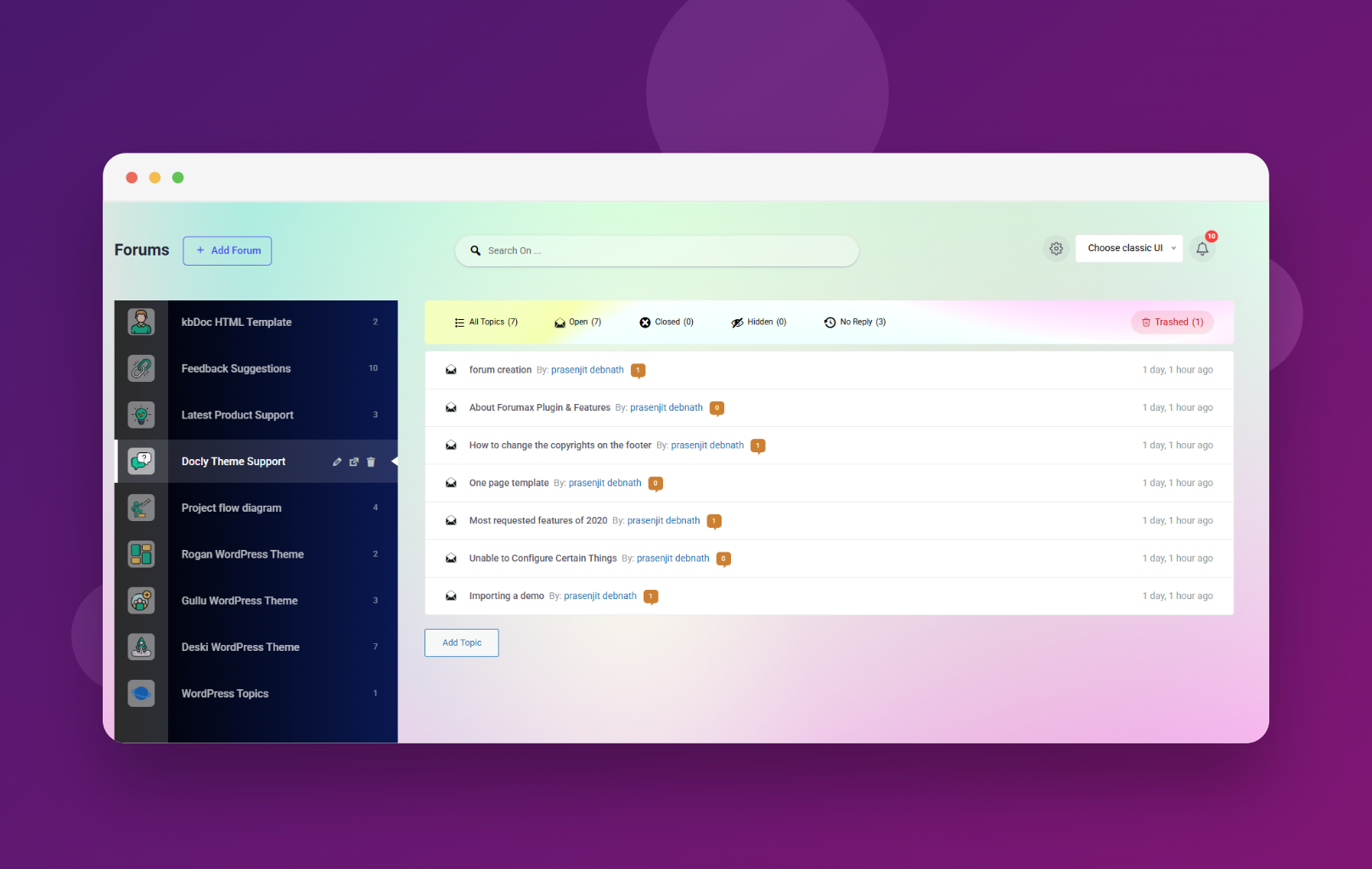
Advanced Forum Builder 대시보드 – 포럼, 주제 및 토론 관리를 위한 통합 인터페이스 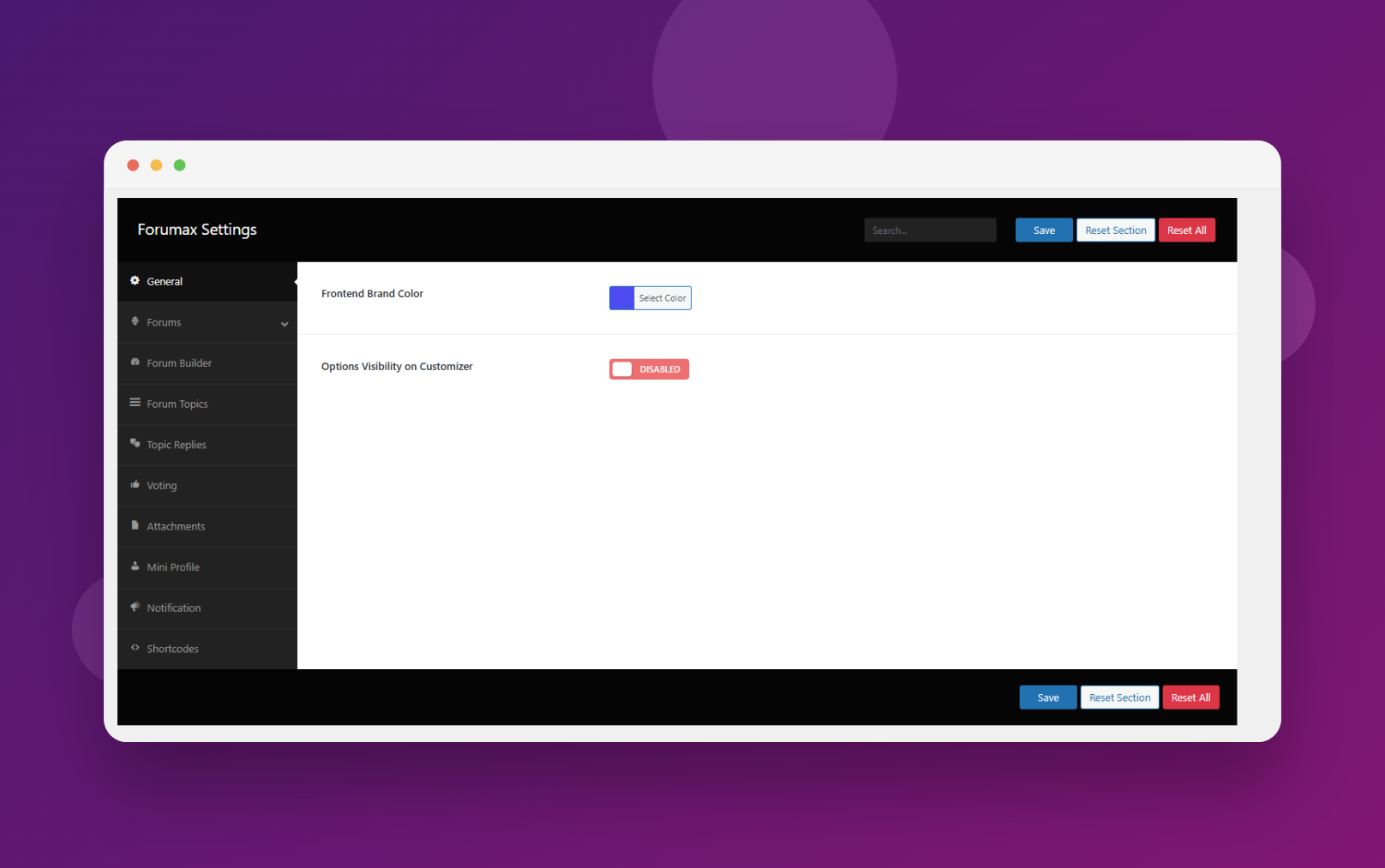
Intuitive Forumax Settings Panel – Configure all features from one organized dashboard 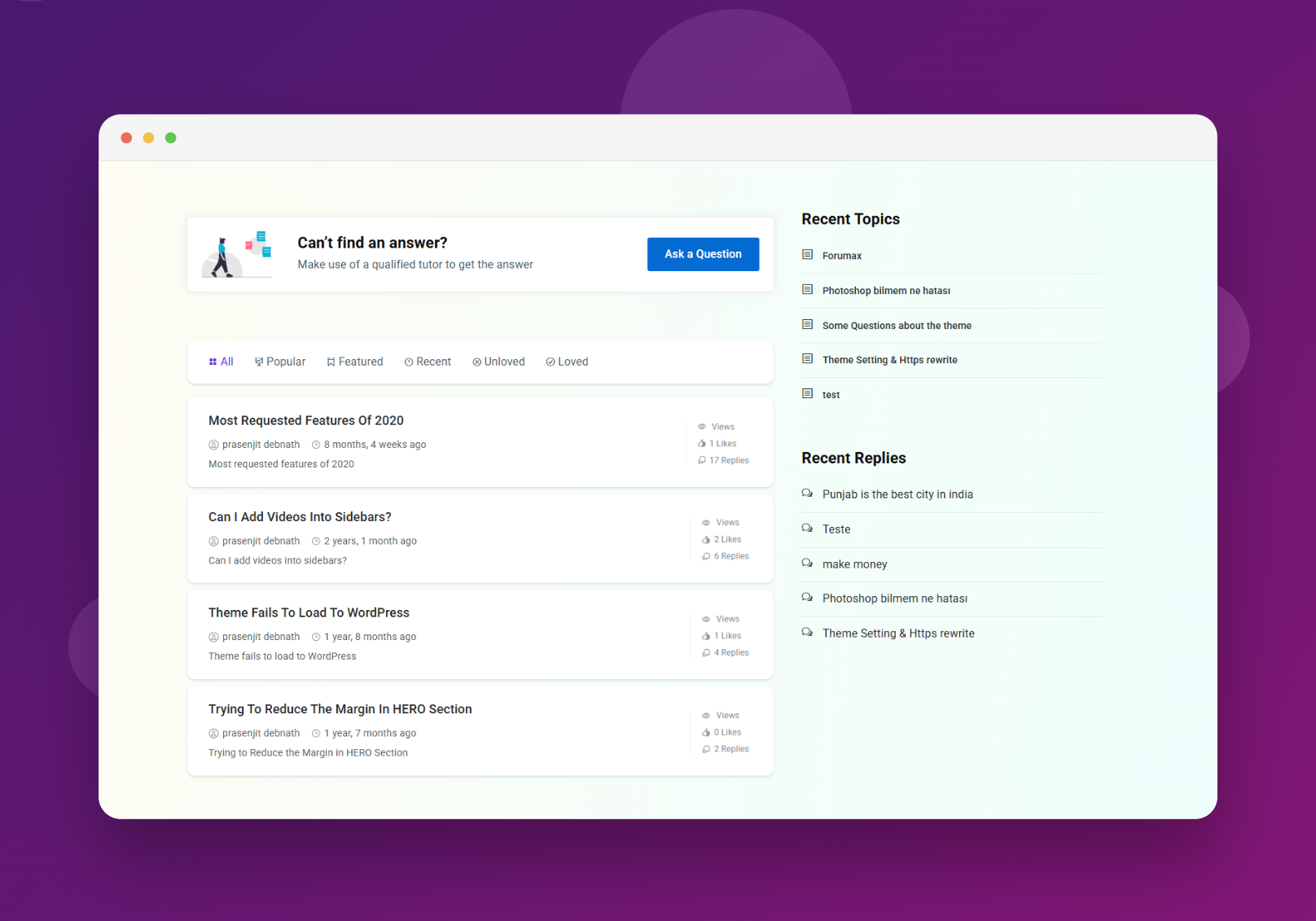
Forum Root Page – Clean and modern forum interface 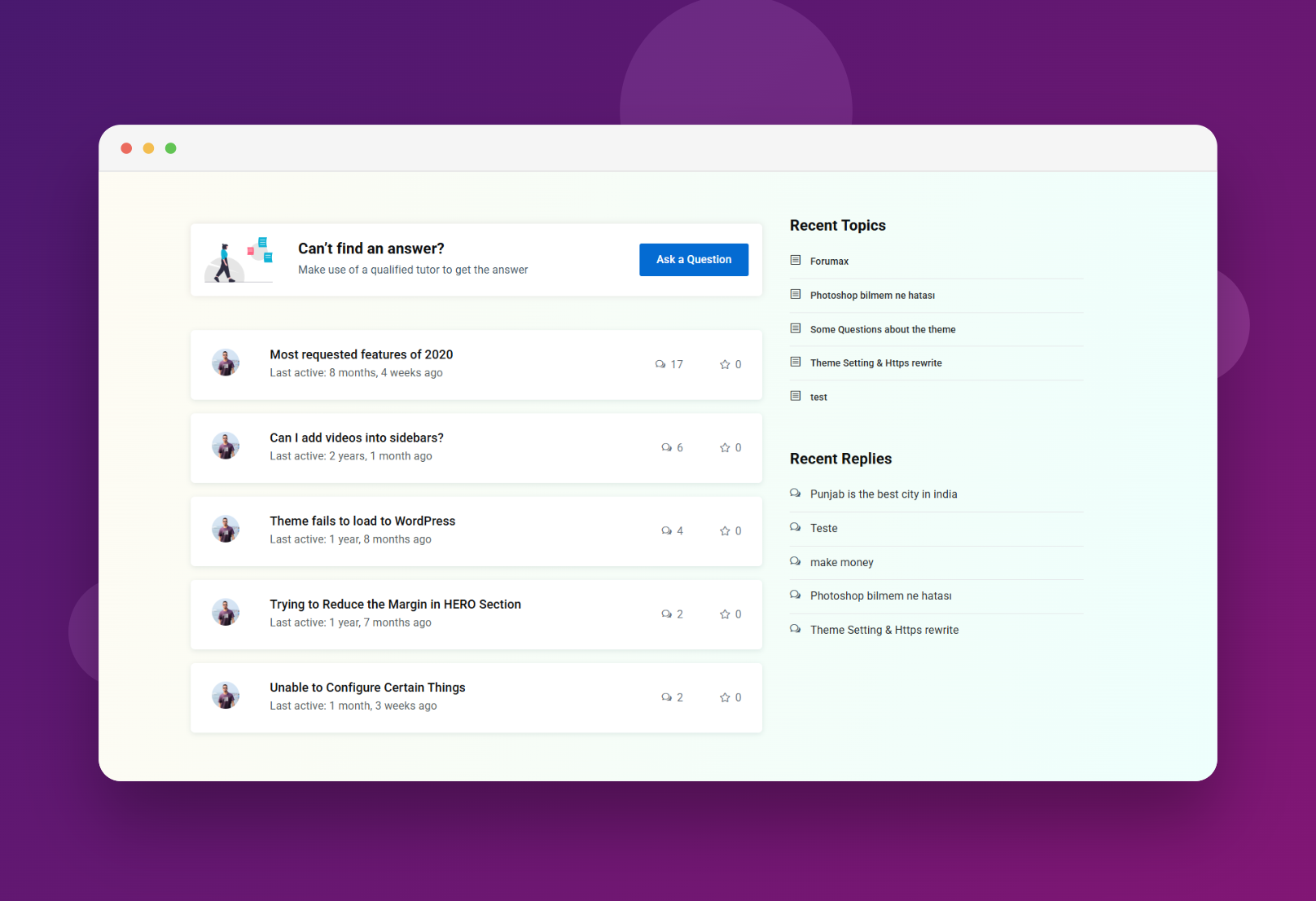
Topic Page – Clean and modern topic interface 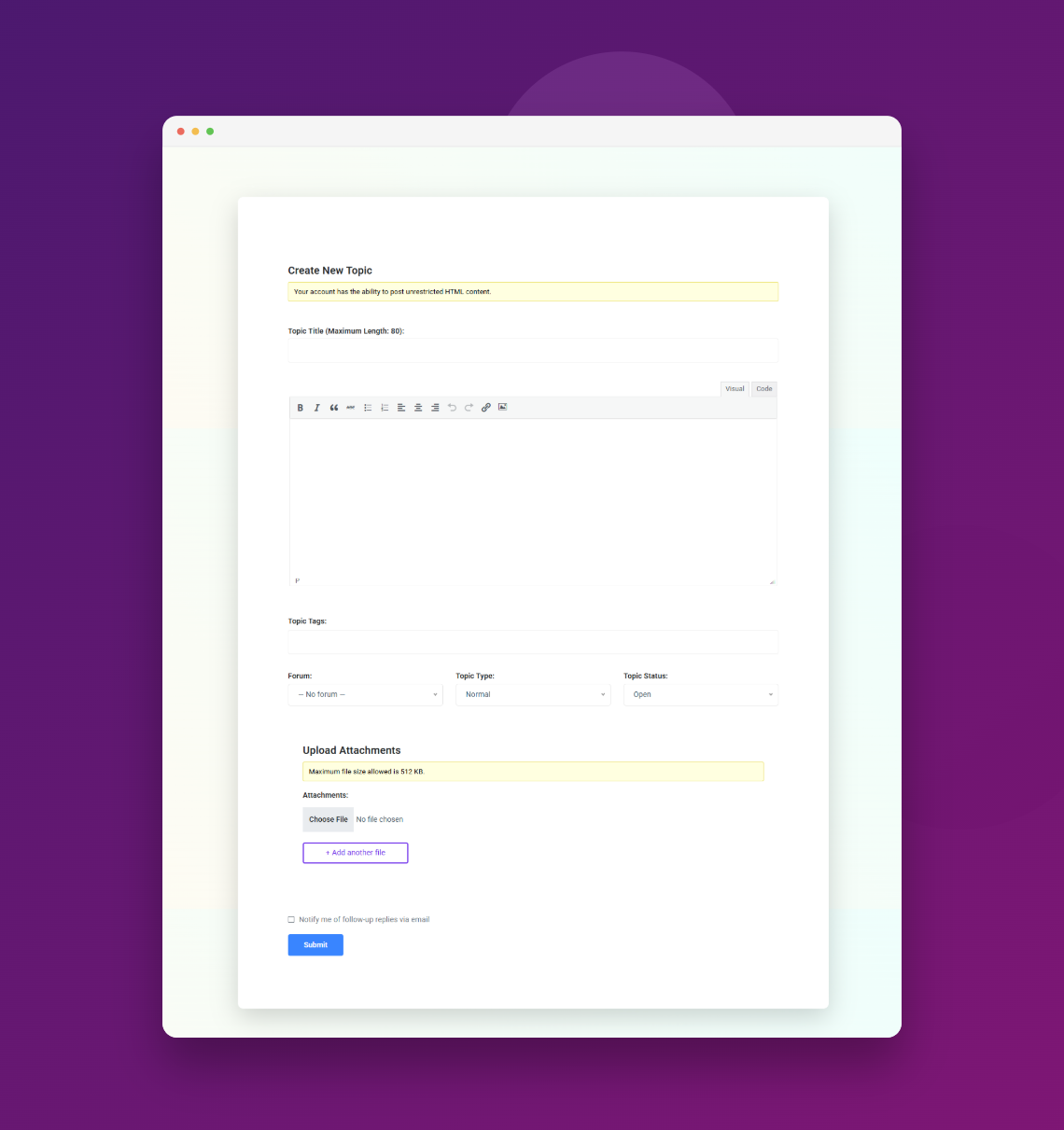
Ask Question Form – Clean and modern ask question form


블록
이 플러그인은 6개의 블록을 제공합니다.
- Forumax Forums Grid Displays a list of bbPress forums with a 'load more' option.
- Forumax Search Displays a search form with optional keywords.
- Forumax Forum & Topics Tabs Displays forums and topics in tabs.
- Forumax Forum Topics Displays a list of bbPress topics.
- Forumax Forums With Ajax Filters Displays a list of bbPress topics with filtering options.
- Forumax Single Forum Displays a single forum with two style variations.
설치
Getting started with Forumax is quick and easy. Follow these simple steps:
사전 요구 사항
Before installing Forumax, ensure you have:
* WordPress 5.0 or higher
* PHP 7.4 or greater
* MySQL 5.6 or greater
설치 방법 1: 워드프레스 관리자 대시보드에서 설치 (권장)
- 워드프레스 대시보드에서 플러그인 새로 추가로 이동하세요.
- Search for “Forumax” in the plugin search box
- 지금 설치 버튼을 클릭하세요
- 설치가 완료되면 플러그인 활성화를 클릭하세요.
- Navigate to Forumax Settings to configure features (optional but recommended)
- Start building your community!
설치 방법 2: FTP/cPanel을 통한 수동 업로드
- Download the
forumax.zipfile from the plugin page - 컴퓨터에서 ZIP 파일을 압축 해제하세요
- Upload the extracted
forumaxfolder to/wp-content/plugins/directory via FTP or cPanel File Manager - Go to Plugins in your WordPress admin and locate Forumax
- 플러그인 활성화를 클릭하세요
- Configure settings in Forumax Settings
설치 방법 3: 워드프레스 관리자에서 ZIP 업로드
- Download the
forumax.zipfile - 플러그인 새로 추가 플러그인 업로드로 이동하세요.
- 다운로드한 ZIP 파일을 선택한 다음 지금 설치를 클릭하세요.
- 설치 후 플러그인 활성화를 클릭하세요
- 포럼 설정을 구성하세요
문제 해결 설치
PHP 오류가 발생하나요?
PHP 버전이 7.4 이상인지 확인하세요. 필요하면 업그레이드를 위해 호스팅 공급업체에 연락하세요.
Still need help?
Visit our Documentation or check our Support Repository
FAQ
-
🎯 Who Should Use Forumax?
-
Forumax is perfect for WordPress site owners, community managers, support teams, and anyone who wants a professional forum solution without custom coding.
-
🔄 Is Forumax Compatible with My Theme?
-
Yes! Forumax works seamlessly with any WordPress theme.
-
💻 코딩 기술이 필요할까요?
-
Absolutely not! Forumax is designed for non-technical users. All features are accessible through intuitive admin interfaces and visual builders. No coding required.
-
🎨 포럼 레이아웃을 사용자 정의할 수 있나요?
-
물론입니다! Elementor 통합을 통해 드래그 앤 드롭으로 포럼 레이아웃을 사용자 정의할 수 있습니다. 미리 준비된 템플릿과 전체 스타일링 옵션은 무한한 디자인 유연성을 제공합니다.
-
📦 어떤 버전의 워드프레스가 필요하나요?
-
Forumax requires WordPress 5.0 or higher and PHP 7.4 or greater.
-
⚙️ Is Forumax Performance Optimized?
-
Yes. Forumax only loads necessary assets when needed, ensuring minimal impact on site performance and fast loading times.
-
🐛 버그를 신고하거나 지원을 받으려면 어떻게 하나요?
-
Found an issue? Report it on our GitHub repository. For detailed help, visit our Documentation.
-
💪 프로 버전에 어떤 기능이 있나요?
-
Forumax Pro adds advanced features like real-time notifications, pre-built templates, anonymous posting, advanced attachments, topic approval workflow, and more. Check Pro pricing
-
🤖 Does Forumax include AI features?
-
Forumax supports AI-powered features through the our AI Plugin. This allows AI-generated replies, Convert Resolved Topics into Posts etc.
후기


기여자 & 개발자
“Forumax – AI Powered Advanced Community Forum Plugin”(은)는 오픈 소스 소프트웨어입니다. 다음의 사람들이 이 플러그인에 기여하였습니다.
기여자


변경이력
2.0.0 (01 January 2026)
New:
* Complete rebranding to Forumax
* Removed bbPress dependency – now a standalone plugin
1.4.1 (23 September 2025)
Fixes:
* Resolved issue with installer
* is_attachment_icon error to prevent display inconsistencies
향상됨:
* 테마 전반에서 매끄러운 모양을 위한 Docy 다크 모드와의 호환성
개선:
* 이전에 번역할 수 없던 문자열들을 완전하게 번역 가능하도록 하여 로컬라이제이션 지원을 향상시켰습니다
업데이트:
* Freemius SDK가 버전 2.13.0으로 업데이트되었습니다.
1.4.0 (23 September 2025)
새로운 기능:
* 포럼 빌더에 작성자 및 주제 새로 고침 기능 추가
* 향상된 포럼 내비게이션을 위한 페이지 매김 지원 추가
* 향상된 포럼 가시성 및 관리 기능 강화
개선 사항:
* 포럼 빌더 UI 디자인을 사용성 향상을 위해 개선
* 보안 강화 및 취약점 수정
업데이트:
* Freemius SDK가 버전 2.12.2로 업데이트되었습니다.
1.3.3 (23 August 2025)
수정 사항:
* 포럼 빌더 탭 콘텐츠 활성 상태 문제 해결
* 브랜드 색상 변수 기능 수정
개선사항:
* 액티브 리액션 디자인이 향상되어 더 나은 사용자 피드백 제공
* 첨부파일 미리보기 디자인 개선
1.3.2 (15 August 2025)
수정 사항:
* 첨부파일 입력란 표시 문제 해결
* 자산(assets) 로드 충돌 수정
개선 사항:
* 포럼 탭 위젯 디자인 개선
* 에셋 폴더 구조 재정비(관리자 CSS/JS 정리)
* 불필요한 의존성 제거(normalize.js, fontawesome.css)
* CSF 설정 일관성을 위한 “bbpc_get_opt()” 함수 추가
* 플러그인 충돌 방지용 함수 접두사 개선
* Docy 테마 다크 모드 호환성 향상
* 번역 불가능했던 문자열들을 번역 가능하도록 변경
업데이트:
* Freemius SDK가 버전 2.12.1로 업데이트되었습니다
1.3.1 (16 June 2025)
수정사항:
* 첨부파일 관련 사용 중단 경고 해결
* 서드파티 플러그인과의 탭 CSS 충돌 해결
* 다크 모드 호환성 개선
개선 사항:
* 사이드바가 이제 가변 너비를 지원합니다
* 포럼 빌더용 대표 이미지 크기 최적화
* 플러그인 전반의 안정성 향상
업데이트:
* Freemius SDK가 버전 2.12.0으로 업데이트되었습니다.
1.3.0 (22 April 2025)
새로운 기능:
* 명확성을 위해 “Forums” 페이지 이름을 “Forum Builder”로 변경
* 첫 번째 포럼 항목의 기본값 열림 상태
개선사항:
* 토픽 오픈 아이콘 새로 고침으로 더 나은 UX 제공
* 토픽에 상태 아이콘 추가로 빠른 식별 가능
* 검색 입력 반응 개선 — 키프레스 지연 최적화
* 현재 포럼 정보 위젯 재설계 (기본값으로 모든 정보 표시)
* 설정 페이지 재구성 — 직관적인 탭 아이콘 적용
* 토픽 세부 페이지 UI 향상 (답글, 즐겨찾기, 첨부파일 디자인)
* 포럼 빌더 UX 크게 개선
* FontAwesome 대신 Dashicons 구현 (더 나은 성능)
* BBPC 포럼 정보 위젯은 이제 포럼 페이지에서만 표시
Fixes:
* Resolved conflicts with Dukan and Job Manager plugins
1.2.9 (24 February 2025)
새 소식:
* Loco Translate 플러그인에서 다중 텍스트 도메인 매핑을 위한 Loco.xml 구성 추가
* 기존 고객을 위한 특별 할인 안내
수정:
* 영숫자 문자가 아닌 문자열 증가에 대한 사용 중단 경고 해결
