
Aprašymas
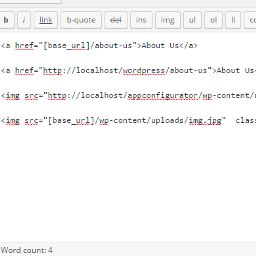
Now its easy to change domains and move your wordpress blog from subdomain to parent domain like from localhost to live domain you just need to use this shortcode [base_url] as your base url and images So now all links and images are fine after transfer site from localhost to live you don’t need to adjust links after change domain.
ShortCode
[base_url]
Ekrano nuotraukos

Diegimas
** From your WordPress dashboard **
Visit ‘Plugins > Add New’ Search for ‘Relative URL ShortCode’ Activate ‘Relative URL ShortCode’ from your Plugins page.
** From WordPress.org **
Download ‘Relative URL ShortCode’. Upload the ‘Relative URL ShortCode’ directory to your ‘/wp-content/plugins/’ directory, using your favorite method (ftp, sftp, scp, etc…) Activate ‘Relative URL ShortCode’ from your Plugins page.
DUK
-
I need to change something after change domain?
-
No. we always use your site base url so you do not need any configuration for change domain.
-
I need to change any configuration after activate?
-
No. we always use your site base url so you do not need any configuration after activate.
Atsiliepimai


Programuotojai ir komandos nariai
“Relative URL ShortCode” yra atviro kodo programa. Prie jos sukūrimo prisidėję žmonės surašyti toliau.
Autoriai
Išverskite “Relative URL ShortCode” į savo kalbą.
Domina programavimas?
Peržiūrėkite kodą, naršykite SVN repozitorijoje, arba užsiprenumeruokite kodo pakeitimų žurnalą per RSS.
Pakeitimų istorija
1.0
- it is a first version.
