
Go to Windows platform Display platforms icon
Go to Windows platform Go to Mac platform Go to Android platform Go to iOS platform
Notes icon

Notes

2.3.1
Image 5 1 reviews
3.6 k downloads
security security

Much more than just a notepad

Advertisement
Remove ads and more with Turbo
Advertisement
Remove ads and more with Turbo
Andrés López icon
Reviewed by
Andrés López
Content Editor
Andrés López is part of Uptodown's in-house Editorial Team. Translated by Uptodown Localization Team

Notes is an app that, as its name suggests, lets you take notes on your PC. But, despite the simplicity implied by its name, this app is much more than a simple notepad. In terms of features, in fact, the app is more similar to OneNote than to the traditional Windows notepad.

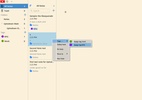
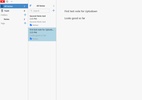
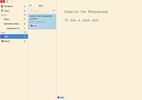
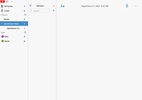
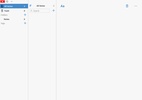
The first feature that stands out when you open Notes is its folder and label organization system. In the left column, you will find a complete list with all the folders and labels you have created, so all your notes are well organized. This layout, in fact, is very similar to the default OneNote structure.

Advertisement
Remove ads and more with Turbo

You can also create subfolders within each folder you create. And of course, within each subfolder, you can create as many notes as you want and add any tag. Thanks to the tag system, you will also be able to find any of your notes much faster, regardless of the folder you put them in.

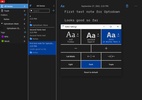
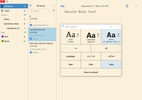
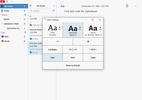
Presentation is also a very important aspect for those who take notes on a regular basis. And it's for this reason that Notes has several different fonts, several different sizes and, most importantly, three visual themes. There are the usual light and dark modes, but there is also a very elegant sepia mode, which is perfect for taking classy notes.

Notes is a great, 100% free and open-source notes app that will help you to organize all your notes well. Thanks to its folder and label system, you will never lose a note again.

Information about Notes 2.3.1

Basic information

Image Developer Ruby Mamistvalove
Image License Free
Image Category Notes / Appointments
Image Rating Not specified
Image Languages English
47 more

Security and privacy

Image Required permissions Not applicable
Image Advertising Not specified
Image
See security and antivirus report
Image Why is this app published on Uptodown? (More information)

Download info

Image Downloads 3,627
Image Date Jan 26, 2026
Image File type EXE
Image Size 45.57 MB
Image SHA256 59a90515e6f961746eeb983dc61e64f23cc1dd882f2cda156186948e5a28eda7
Advertisement
Remove ads and more with Turbo

Older versions

exe 2.2.1 Aug 31, 2023
exe 2.1.0 Apr 25, 2023
exe 2.0.0 Sep 27, 2022
Available for other platforms

Rate this App

Review the app
Notes icon
Image Image Image Image Image

Rating

5.0
5
4
3
2
1
Image 1 reviews

Comments

There are no opinions about Notes yet. Be the first! Comment

Advertisement
Remove ads and more with Turbo
Freenote icon
Add small notes on your desktop
Windows Notepad icon
Official Windows Notepad app
Microsoft To Do icon
Plan your day-to-day with this Microsoft tool
Microsoft Sticky Notes icon
Quickly make notes in Windows
Microsoft OneNote icon
Take customized notes and sync them on all your devices
Task Scheduler icon
A simple app that reminds you of your tasks
Simple Sticky Notes icon
Fill your desktop with reminder notes
Citrus Alarm Clock icon
Finally an alarm clock that sounds well
Kindle icon
The best way to read your Kindle books on a computer
ChatGPT icon
Windows desktop version of ChatGPT
Codex icon
OpenAI's official companion for programming with ChatGPT
3uTools icon
The best way to manage your iOS device
Claude icon
An AI-based chatbot that respects your privacy
OP Auto Clicker icon
Automate mouse clicks on your computer
Proteus icon
Comprehensive solution for electronic circuit design
Manus icon
Create images, summarize texts, and get answers to your questions