
PixelWave: Creative Wavetable Synth with Retro Pixel Design
Overview
PixelWave is a desktop synthesizer designed for music creators seeking a unique blend of retro aesthetics and modern sound design capabilities. Built with a pixel-art interface, the software offers an immersive audiovisual experience that stands out in the digital music production landscape. The core functionality revolves around drawing custom waveforms, which users can then play in real time, enabling a hands-on approach to sound generation. This feature makes it particularly appealing to both beginners exploring synthesis and experienced producers experimenting with unconventional timbres.
The software supports MIDI keyboard input, allowing seamless integration with external controllers and enhancing live performance workflows. Predefined waveforms—nine in total—provide a starting point for rapid sound creation, while the adjustable octave range from 2 to 6 offers flexibility in pitch design. Creations can be exported directly to WAV format, ensuring compatibility with major DAWs and distribution platforms. The integration of Audiobus and IAA support further extends its utility by enabling connectivity with other audio applications, especially in mobile or hybrid environments.
Target users include electronic music producers, sound designers, and hobbyists interested in experimental audio. The software’s lightweight nature and free pricing model make it accessible for a broad audience. While the developer, PixelWave Studio, is not detailed beyond its name, the product’s focus on creative expression and visual feedback suggests a strong emphasis on user engagement and artistic exploration.
Key Features & Capabilities
- Custom Waveform Drawing – Users can manually draw waveforms using the pixel interface, enabling precise control over sound shape and character. This feature supports real-time playback, allowing immediate auditory feedback during creation.
- Predefined Waveforms – Nine built-in waveforms provide instant access to classic synth sounds, reducing setup time and serving as a foundation for further customization.
- Octave Range Adjustment – The ability to set the number of octaves from 2 to 6 allows users to tailor the pitch range to specific musical contexts, from deep bass tones to high-frequency textures.
- MIDI Keyboard Support – Full compatibility with MIDI controllers enables expressive live performance and integration into existing music production setups.
- WAV Export Functionality – Projects can be exported as standard WAV files, ensuring broad compatibility with audio editing software and distribution platforms.
- Audiobus and IAA Integration – These protocols enhance connectivity with other audio applications, expanding the software’s role in multi-app workflows, especially on mobile or hybrid systems.
These features collectively support a creative workflow that emphasizes visual and sonic experimentation. For example, a sound designer might use the waveform editor to craft a unique pulse shape for a video game sound effect, then export it directly as a WAV file for use in a project. A beginner composer could start with one of the predefined waveforms, adjust the octave range, and play melodies using a MIDI keyboard to learn synthesis fundamentals.
User Interface, Workflow & Performance
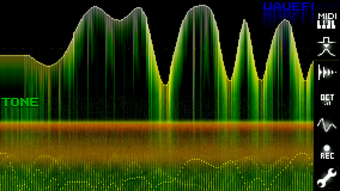
The user interface of PixelWave is centered around a retro pixel art aesthetic, offering a distinctive visual identity that enhances the creative experience. The layout is minimalistic, with the waveform editor occupying the main workspace, flanked by controls for octave settings, playback, and export. Navigation is straightforward, relying on intuitive mouse interactions and keyboard shortcuts, which likely contribute to a smooth workflow for users familiar with digital audio tools.
Workflow efficiency is supported by the real-time playback of drawn waveforms, allowing immediate testing of sonic ideas without the need for complex parameter adjustments. The integration of MIDI input further streamlines performance and composition. However, exact performance details were not specified by the developer. General observations suggest that the software operates efficiently given its 12.4 MB size, but resource usage such as CPU and RAM consumption remains undocumented.
Stability and responsiveness are expected to be consistent with lightweight desktop applications, especially on systems meeting standard requirements. The developer did not provide additional system requirements, so users should ensure their environment supports basic audio processing. No reported crashes or bugs were mentioned in the available information.
Compatibility & System Requirements
PixelWave is available for both Windows and Mac operating systems, making it accessible to a wide range of users across major desktop platforms. The software version is 1.2.0, released on April 15, 2024. The installation size is 12.4 MB, indicating a compact footprint that requires minimal disk space.
Exact system requirements were not listed by the developer. Compatibility information is limited to the supported platforms. Users should verify that their system meets the baseline requirements for running audio applications, including proper audio drivers and MIDI support. The software’s lightweight nature suggests it can function on older or less powerful machines, but specific hardware specifications were not provided.
Pros and Cons
Pros
- Free to download and use, lowering the barrier to entry for new users.
- Unique retro pixel interface enhances visual appeal and creative engagement.
- Real-time waveform drawing with immediate playback supports rapid experimentation.
- Supports MIDI input for expressive performance and integration with external gear.
- WAV export functionality ensures compatibility with other audio tools and platforms.
- Lightweight at just 12.4 MB, ideal for systems with limited storage.
Cons
- Exact system requirements were not specified, which may cause uncertainty for some users.
- Limited information on audio latency or performance under load.
- Only nine predefined waveforms may restrict advanced users seeking extensive presets.
- Pixel interface, while distinctive, may not appeal to users preferring modern UIs.
- No mention of advanced synthesis features like filters, envelopes, or modulation options.
FAQ Section
Is PixelWave compatible with Windows and Mac?
Yes, PixelWave is available for both Windows and Mac operating systems.
Can I use a MIDI keyboard with PixelWave?
Yes, the software supports MIDI keyboard input, enabling real-time performance and integration with external controllers.
Is PixelWave safe to download and use?
As a free desktop application developed by PixelWave Studio, it is designed for secure use. Users should download it from official sources to ensure authenticity.
Does PixelWave require an internet connection?
No, the software operates offline. It does not require an internet connection for core functionality, although updates may need connectivity.
What file format can I export my creations in?
PixelWave allows users to export their sound designs as WAV files, ensuring compatibility with most audio software and distribution platforms.
Final Thoughts
PixelWave stands out as a creative and accessible wavetable synthesizer that combines visual artistry with functional sound design. Its retro pixel interface offers a refreshing departure from conventional synth aesthetics, appealing to users who value both form and function. The ability to draw waveforms in real time, combined with MIDI support and WAV export, makes it a versatile tool for music production and sound experimentation.
While it lacks advanced synthesis features and detailed system specifications, its lightweight design and free pricing make it an excellent choice for beginners and hobbyists. Advanced users may find limitations in the feature set, but the software’s simplicity and visual engagement offer a compelling alternative for quick prototyping and creative exploration.
For those seeking a unique, no-cost entry into audio synthesis with a distinctive visual identity, PixelWave delivers a satisfying experience. Its blend of retro charm and practical functionality positions it as a standout option in the music software space.
Download PixelWave now








