

Specify PIXIE with confidence.
A single home for the documents that take a PIXIE project from concept to commissioning: written specifications and system drawings for smart homes and smart spaces, ready to drop into your project documentation.
More than a downloads page. A reference you can specify from.
These documents describe how PIXIE delivers lighting control and automation across new and retrofit projects. They give designers and contractors the control logic, device selection and integration detail needed to specify PIXIE correctly the first time, whether the project is a single home or a multi-zone commercial fit-out.
Written for builders, architects, electrical engineers, interior designers, consulting engineers, developers, electricians and homeowners planning a PIXIE project.
Two documents. The same system, two levels of detail.
Start with the reference if you are getting to know the system, or go straight to the formal specification if you are writing it into project documents. Both cover the same PIXIE solution.
PIXIE Engineering Specification Reference
A readable reference that explains how PIXIE works and the detail behind it: device taxonomy, control method selection, dimming technologies, fans, blinds, larger loads, system limits and integration. Written for end users, consulting engineers and electricians alike.
View PDF →PIXIE Smart Home Engineering Specification
The same system written as a formal, clause-by-clause specification: system overview, commissioning scope, device types, mesh design, lighting control, integration and more. Ready to reference or lift directly into a project specification.
View PDF →See how it fits together.
Concept and topology drawings that show how PIXIE devices, gateways, touch panels and accounts relate across a project.
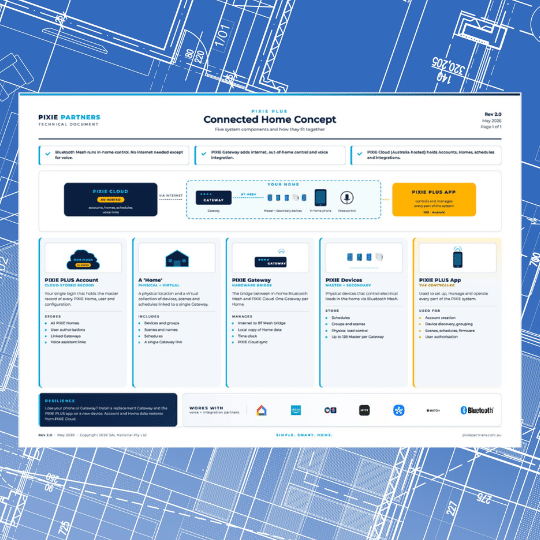
How a connected PIXIE home fits together end to end.
View PDF →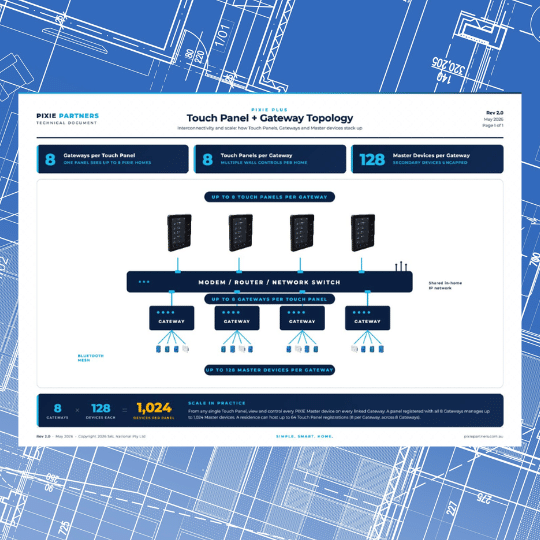
Touch Panel and Gateway network layout and ratios.
View PDF →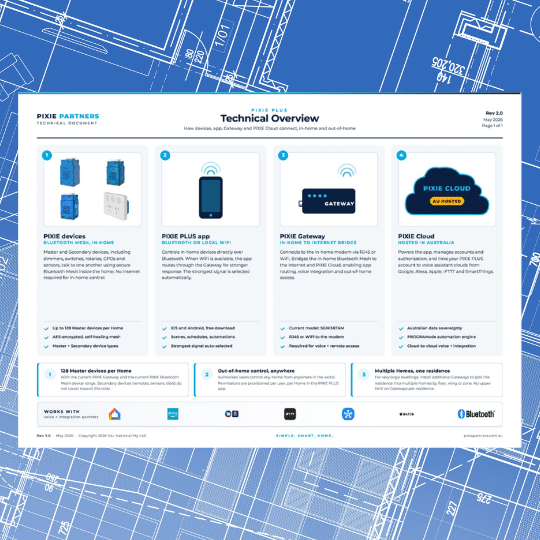
The system architecture at a glance.
View PDF →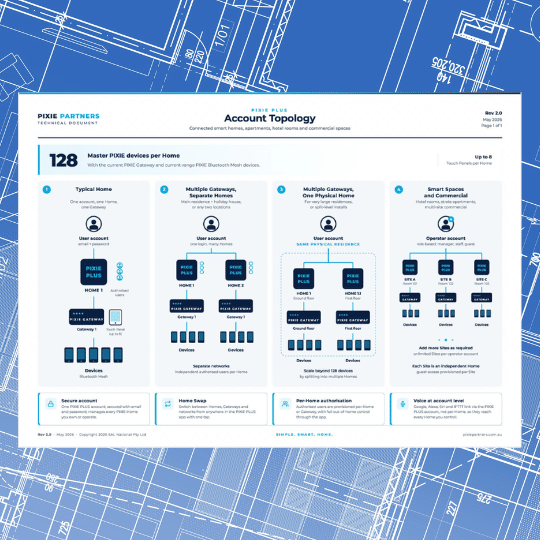
How accounts, homes and gateways relate.
View PDF →Specifying a project? Send us your plans.
The PIXIE team will review your drawings and help you specify the right devices, control method and integration for the project. Get it right on paper before anyone picks up a tool.
Talk to the PIXIE team →