

Raise the IQ of your smart home.
PIXIE goes beyond lights and switches. This is the range of devices that integrates PIXIE with other systems, extends your wireless mesh to every corner of a property, and puts wireless control anywhere you need it.
Two devices. Very different jobs.
Both connect PIXIE to devices and systems outside your smart home. But one sends you alerts and makes your home react. The other listens for a signal and quietly does whatever you've asked PIXIE to do.
Your home tells you the moment something happens. Anywhere in the world.
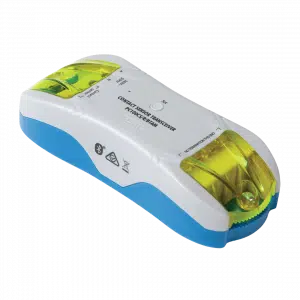
Connect your smoke alarm's dry contact output and receive a push notification the instant it triggers, anywhere in the world. No subscription fee. No third-party app. Just a direct alert from PIXIE the moment it matters most.
Connect a gate sensor, door contact, or motion detector. Get a customisable push notification whenever something triggers. Name each device and write your own alert messages so you always know exactly what happened and where.
When the smoke alarm triggers, PIXIE can turn every light in the house to full brightness automatically. Flash the outside lights if you're away. Trigger a scene. Your home responds the moment something happens, without you needing to do a thing.
The Transceiver has an armed and disarmed mode. Arm it when you leave home, disarm it when you're back. Set it on a schedule, trigger it from a PIXIE scene, or control it with a wall switch. A "Do Not Disturb" window means alerts won't wake you at 2am. For smoke detectors, you may want to leave it active around the clock.
Also used for: intercom and doorbell alerts, security alarm notifications, remote monitoring of any device with a dry contact output, from a generator status to a water level sensor.
One dry contact input (2 wire). Push notifications require a PIXIE Gateway and internet connection. Works standalone for local PIXIE automations without a gateway.
When something happens in your alarm or automated system, PIXIE responds.
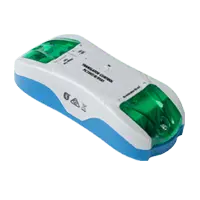
Connect your security system's dry contact output to the Translator. When the alarm activates, PIXIE turns everything off and closes down. When it disarms, the lights come on and the home wakes up. Automatically, every time.
Connect any device with a dry contact output: AV systems, legacy home automation, occupancy sensors, gate intercoms, or a bell press. When that device does something, PIXIE responds. One input, endless possibilities.
Works completely standalone. When the signal comes in, PIXIE responds immediately over Bluetooth Mesh. No internet required, no cloud dependency, no delay. Reliable by design.
The Translator understands LATCH and UNLATCH: the moment something activates, and the moment it deactivates. Assign a different PIXIE action to each. Alarm arms (LATCH): dim the lights and turn off the TV. Alarm disarms (UNLATCH): lights come on, the home comes alive. One device. Two commands. Two completely different outcomes.
Also used for: triggering a PIXIE scene when an AV system switches on, responding to a legacy home automation or BMS output signal, activating lighting from a third-party occupancy sensor, or wiring a bell press into PIXIE without replacing the existing hardware.
Single dry contact input. No push notifications (use the Transceiver if you need alerts). Gateway not required. Compatible with any volt-free dry contact output. Cannot accept mains-rated signals.
When the building you need to control isn't the building you're standing in.
PIXIE Portal isn't about extending mesh inside a building. It's about connecting geographically separate structures to a single PIXIE installation, without digging cable trenches, without setting up IT infrastructure, and without a second internet connection at the remote location.
Main residence plus a separate guest cottage, studio, garage, or pool house on the same property. One PIXIE system covers all of them, with no cable between buildings.
Sheds, workshops, machinery stores, and outbuildings spread across large blocks. Bring them all under one PIXIE installation across open ground, without laying data cable or running conduit.
Separate structures at the far end of a property. Add full PIXIE control without underground conduit, without a dedicated router, and without adding to the monthly comms bill.
Clubhouse control extended to field lighting poles, courts, and facilities spread across the grounds. Schedule, control, and automate everything from one system, with no network at each pole.
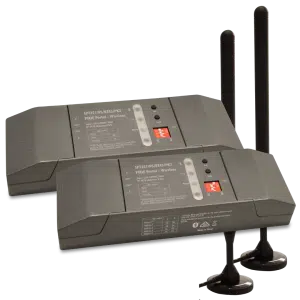
Each Portal pair has a Main Station at your primary PIXIE installation and a Satellite Station at the remote building. Both connect to their local mesh normally. The Portal creates a dedicated directional wireless link between them, up to 120 metres open-air.
Control is fully bidirectional. A switch in the boat shed can control lights back in the main house, and vice versa. The two locations behave as one continuous mesh.
Each Portal includes IP65-rated external antennas on 3-metre cables, so the stations can sit protected indoors while the antennas mount outside for clear line of sight between buildings.
Works with SAL PIXIE and PIXIE PLUS apps.
No Wi-Fi or internet connection required.
Building Main Station
Building Satellite Station
- Sold as a pair (SPT321WS-BTAS PK2); components are not sold separately
- Directional bridge: line of sight between antennas is required; antenna placement matters
- When using more than one pair, antennas must be at least 2 metres apart to avoid interference
- Heavy rain can attenuate signal by up to 20%; factor this in when speccing near the 120m limit
- Maximum of 4 Portal pairs per PIXIE Gateway or home installation
- Gateway is not required for the Portal to operate
Four more ways to go further. Each one with a specific job.
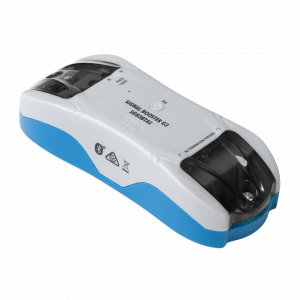
Fills coverage gaps in existing PIXIE installations. Install in areas where devices are intermittently unreliable due to distance or obstruction. No configuration required. The booster joins the mesh automatically. Ideal mid-point between mesh clusters, elevated position, away from metal-dense walls.
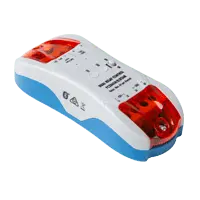
Two independently controllable 6A relays for large load switching. No minimum load requirement. The right choice for garden lighting with iron core transformers, constant voltage LED drivers, inline with outdoor GPOs, 3-wire sensor configurations, and switching contactors for high-current loads. Includes built-in Bluetooth Mesh Booster and power outage memory.

Battery-operated wireless push button. No wiring required. Control any PIXIE device, group, or scene from anywhere. Ideal for nightstands, under desks, on furniture, or any location where running cable is impractical. Doesn't require a wall plate.
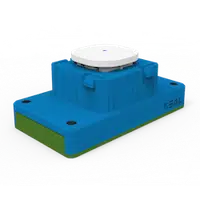
Battery-operated wireless switch mechanism that mounts in any standard Australian wall plate. Control without new wiring, but with the permanence and feel of a hard-wired switch. Ideal for windows, door frames, outbuildings, and retrofits where chasing cable would be cost-prohibitive.
Not sure which accessories your home needs? We'll figure it out together.
Upload your floor plans and our team will spec out the right combination of PIXIE accessories for your home: coverage, interfacing, load control, and control points.
Submit your plans. It's free. Free design service covers accessories, switches, dimmers, and the full PIXIE ecosystem.