
Download ScreenAudit – free screenshot and webcam capture tool for Windows & macOS
Overview
ScreenAudit is a lightweight utility designed to capture desktop screenshots and webcam images at user‑defined intervals. Unlike traditional surveillance software, ScreenAudit focuses on business‑activity tracking, making it an ideal companion for remote‑team managers, freelancers, or anyone who wants transparent proof of work effort. The app lets you schedule captures, choose custom output folders, and receive audible alerts (or even a spoken phrase) right before each shot is taken. Whether you need a full‑screen grab, a specific window, or a cropped portion of the monitor, ScreenAudit gives you granular control over size and region. The built‑in ArtenView browser simplifies image navigation, while multi‑monitor support ensures that every screen in a dual‑display setup is covered. Export options include a simple slideshow or a QuickTime movie, letting you turn a day’s worth of captures into a quick review video. Though it isn’t a security‑grade system, its reliability and ease of use make it a valuable productivity aid for tracking progress, preparing time‑sheet evidence, or simply keeping a visual log of daily activities.
Key Features
- Customizable capture intervals – from seconds to hours.
- Separate controls for desktop screenshots and webcam images.
- Audio notification or custom spoken phrase before each capture.
- Region‑specific captures – select exact dimensions or capture the full screen.
- Multiple‑monitor awareness – captures work seamlessly across dual or triple displays.
- Automatic saving to user‑defined folders with sequential naming.
- Integrated ArtenView image browser for quick preview and organization.
- Export to slideshow or QuickTime movie for easy sharing.
- Lightweight footprint – runs silently in the background without hogging CPU.
- Free download with optional paid upgrades for advanced scheduling.
Installation & Usage Guide
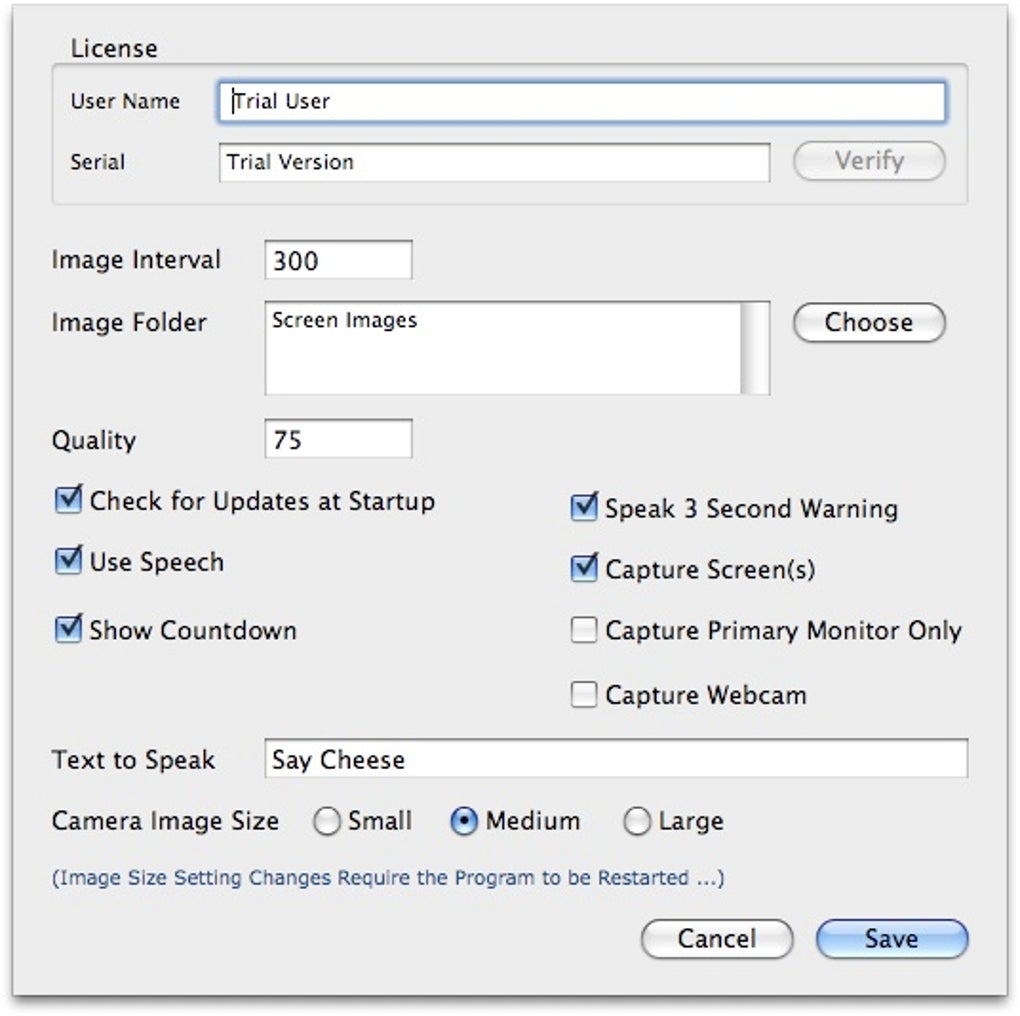
Getting started with ScreenAudit is straightforward. Begin by downloading the installer from the official website; the file is a small .exe for Windows or a .dmg for macOS. Run the installer and follow the on‑screen prompts – the default options work for most users, but you can customize the install location if desired. Once installed, launch ScreenAudit from the desktop shortcut or the start menu. The main window presents a clean dashboard where you set the capture interval, choose between screen or webcam mode, and specify the target folder. To define a custom region, click the “Select Area” button and drag a rectangle over the preview screen; the dimensions are saved automatically.
For audible alerts, enable the “Play Sound” toggle and optionally enter a short phrase in the “Speech Prompt” field – ScreenAudit will use the system’s text‑to‑speech engine to announce the phrase before snapping a picture. To start monitoring, hit the “Start” button; the app will begin capturing according to your schedule. All images appear instantly in the designated folder and can be browsed via ArtenView, which launches with a double‑click on any thumbnail. If you need to pause or stop the process, the “Pause” and “Stop” controls are readily accessible. The program also offers a “Export” menu where you can compile the day's captures into a slideshow or a QuickTime movie, perfect for quick reviews or client presentations.
Compatibility, Pros & Cons
ScreenAudit runs natively on both Windows 10/11 and macOS 10.14 (Mojave) or later. The application is built on a cross‑platform framework, ensuring consistent performance across the two major desktop operating systems. While there is no official Linux version, many users report successful operation under Wine, though official support is not provided.
Pros
- Highly customizable capture intervals and regions.
- Free core version with essential features.
- Low system impact – ideal for continuous background use.
- Built‑in image viewer (ArtenView) streamlines file management.
- Supports multi‑monitor setups without extra configuration.
Cons
- No native Linux build.
- Advanced scheduling (e.g., calendar integration) requires paid upgrade.
- Limited post‑capture editing; images must be edited in external software.
- Audio alerts may be disruptive in quiet office environments.
- Export options are limited to slideshow or QuickTime – no PDF or GIF support.
Frequently Asked Questions
Can ScreenAudit run automatically at Windows startup?
Yes. During installation you can enable the “Start with Windows” option, or add a shortcut to the app in the Startup folder manually.
Is the webcam capture secure and private?
ScreenAudit stores webcam images locally in the folder you specify; no data is uploaded to the cloud unless you choose to share it manually.
Can I set different intervals for screen and webcam captures?
Absolutely. The settings panel lets you define separate timers for each source, so you could capture the screen every minute and the webcam every five minutes.
Does ScreenAudit support high‑resolution monitors?
Yes. The application captures screenshots at the native resolution of each monitor, preserving detail even on 4K displays.
How can I pause the capture schedule without closing the program?
Use the “Pause” button on the main dashboard. All timers stop, and you can resume instantly by clicking “Start” again.
Conclusion & Call to Action
ScreenAudit delivers a focused, no‑frills solution for anyone who needs to log desktop activity or webcam footage on a regular basis. Its blend of customizable intervals, multi‑monitor support, and simple export options make it a practical choice for remote managers, freelancers, and educators alike. While it lacks some advanced scheduling and cross‑platform depth, the free version offers more than enough functionality for everyday tracking without compromising system performance. Ready to bring transparent productivity monitoring to your workflow? Free download is just a click away – install ScreenAudit today and start capturing with confidence.
Pros: Custom intervals, lightweight, multi‑monitor, free core version.
Cons: No native Linux, limited export formats, paid upgrade needed for advanced scheduling.








