Posts Tagged ‘WordPress’

Limit comments moderation

Thursday, August 4th, 2011

Limit comments moderation

Limit comments moderation
Who can moderate post comments in WordPress? There are: post author, editors, administrators, that is all users who can edit post for which the comment is sent. Let’s suppose you don’t wish that your authors and editors have ability to moderate comments. How to achieve that? If you look at WordPress capabilities list you find fast the ‘moderate_comments’ capability. So quick decision is to turn off ‘moderate_comments’ capability for the ‘Author’ and ‘Editor’ roles. It’s simple task with the help of User Role Editor WordPress plugin. But you will discover soon that it’s not enough. Why?

Read the rest of this entry

Hide draft and pending posts from other authors

Friday, July 29th, 2011

Hide drafts and pending posts

Hide drafts and pending posts

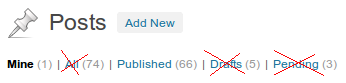
You don’t like that contributors and authors of your multi-authored WordPress blog see not published post titles of other users. You wish to hide from user all posts in the ‘draft’ or ‘pending’ states. You are in the right place. Let’s see how to achieve this.
WordPress has filter ‘views_edit_post’ where you can modify the list of views available to the user when he clicks ‘Posts” or ‘All Posts’ links at his dashboard.

Read the rest of this entry

User Role Editor WordPress plugin 3.2 is published

Monday, July 25th, 2011

User Role Editor 3.2

User Role Editor 3.2

New feature is added to version 3.2: if you run multi-site WordPress network, User Role Editor will automatically duplicate all roles from the main blog (blog with mininal ID) to every new created blog.
Some fixes, refactoring and logic change were applied to code to enhance its productivity. There were some complaints for PHP timeout error after trying to open plugin Settings page.
Thanks to Grant Norwood for code fix to hide PHP warnings he met during plugin usage.

Read the rest of this entry

Matt asks to fill the WordPress Survey

Wednesday, July 13th, 2011

WordPress team asks to fill the survey

WordPress Survey

Today I received email from Matt :). Do you? No, I’m not personally acquainted with Matt. I just subscribed to WordPress news at wordpress.org. Email from wordpress.org, signed by Matt, contains this text:
"We’re doing a census of the WordPress World, if you have 5 minutes take this survey.
We’re going to tally up the results and present them in my State of the Word talk next month in San Francisco, so send it to everyone you know who uses WordPress so we get the most representative sample".

I clicked the link at once and complete the survey. It’s quite short and will not take much time from you. Just tell the world how do you use WordPress, what do you do for WordPress, what’s the best thing with WordPress, what’s the worst one. Help Matt to get fresh and really big numbers

Read the rest of this entry

WordPress 3.2 – it’s time to update

Tuesday, July 5th, 2011

Welcome WordPress 3.2

Welcome WordPress 3.2

July 4th, 2011 WordPress official site announced that WordPress version 3.2 is available for downloads and automatic update directly from older WordPress installations. If you hear somewhere “George Gershwin”, it is not only famous composer and pianist name now. It is name of person whom WordPress 3.2 release is devoted :). What new features can we find in WordPress 3.2? There are a lot of posts on the Net about it already. WordPress 3.2 was available for public preview in betas and release candidates about a month and we have enough time to become familiar with it already. But one deal to test something somewhere and fully another deal to have it working in production. Amazing thing! In short new features of WordPress 3.2 are: performance improvements, distraction-free writing (full screen post editor regime), admin UI refresh, new default Twenty Eleven theme, WordPress said goodbye to old browsers, e.g. IE 6.0, you can find more links in the admin toolbar.

Read the rest of this entry

Security Warning From WordPress Team

Wednesday, June 22nd, 2011

Security Warning From WordPress Team

Security Warning


Hello, dear readers!
Let me to spread the word of WordPress team in case you don’t read the WordPress development blog. June 21th, 2011, Matt Mullenweg published at WordPress development blog post with “Reset Password” title. You can read full copy below or visit its original page.

“Earlier today the WordPress team noticed suspicious commits to several popular plugins (AddThis, WPtouch, and W3 Total Cache) containing cleverly disguised backdoors. We determined the commits were not from the authors, rolled them back, pushed updates to the plugins, and shut down access to the plugin repository while we looked for anything else unsavory.

Read the rest of this entry

edit_dashboard WordPress capability

Sunday, June 19th, 2011

Edit Dashboard WordPress capability

Edit Dashboard

Since version 2.5 WordPress has “edit_dashboard” (Edit Dashboard) capability in its capabilities system. What is the purpose of this capability? Does it forbid logged-in user to remove some widget from the dashboard if he decides that such widget is unneeded to him and wish to hide it using the “Screen Options” link at the top of dashboard screen? Definitely “No”.
If user has “edit_dashboard” capability he has access to the configuration parameters of widgets which included to his dashboard. If widget has some parameters to tune its work, such user is able to change them. Let’s see. Go to WordPress dashboard and move your mouse pointer to the right top corner of the widget box. Let’s take for example a “WordPress Development Blog” widget which is accessible to all logged-in users. Do you look a small down headed arrow? As you may know already it serves to collapse/expand widget box. Move your mouse to the left of that arrow. If you have “edit_dashboard” capability you will see that “Configure” link appears there.

Read the rest of this entry