Get There with the TransLoc App
All the tools you need to get where you need to go.
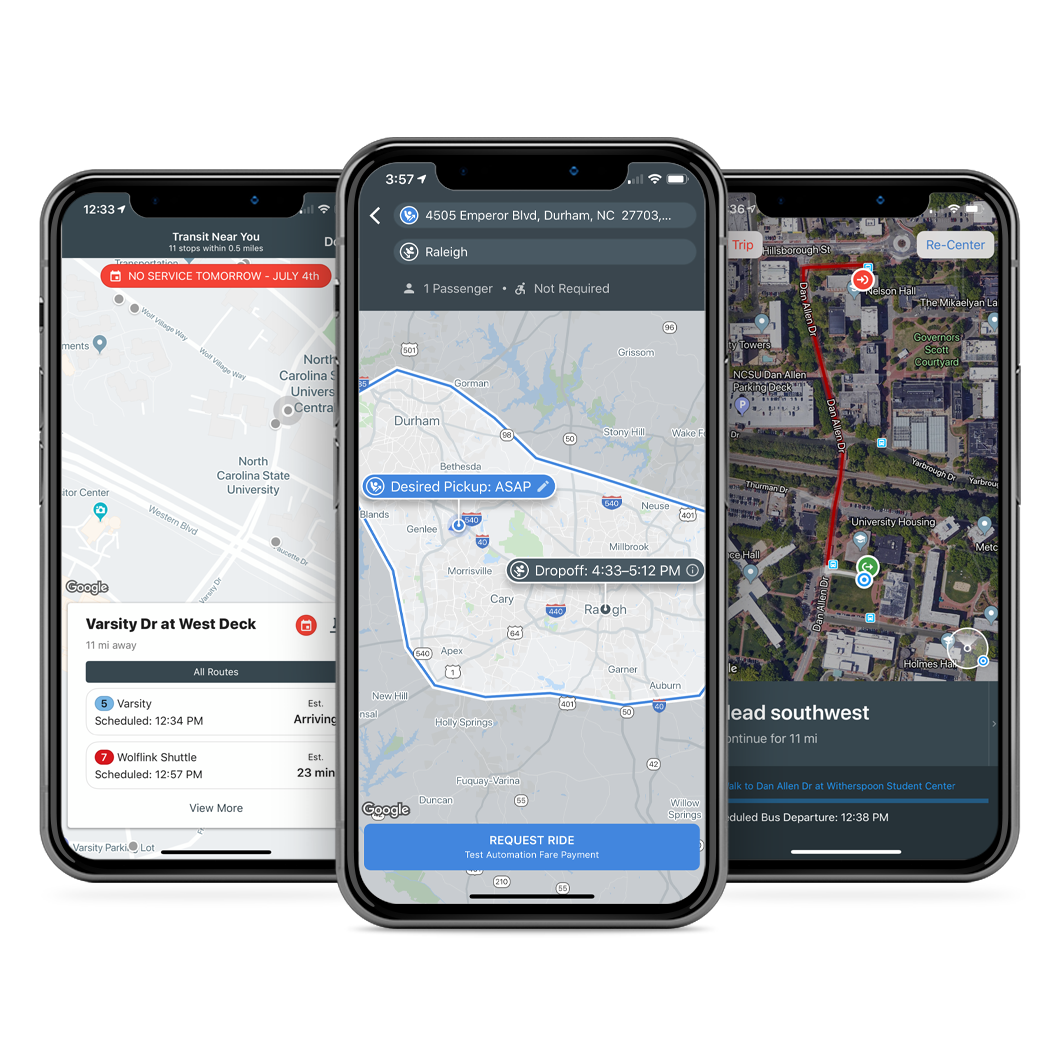
- Explore bus transit stops and services around you
- Know when the bus is running with service alerts
- Stay up to date with both scheduled and estimated arrival times
- Bookmark your favorite stops for quick access, delays, and more
- Browse locations and plan trips
- Book on-demand rides across town or campus

Try the TransLoc app today (it's free!)


Transit Made Clear for Every Rider
The TransLoc Rider App helps riders move with confidence by providing clear, real-time visibility into transit service. Whether following a Fixed Route or requesting an OnDemand Microtransit trip, riders can plan, track, and adjust their journey in one place.
Designed to support both structured and flexible service models, the app reduces uncertainty and makes it easier to understand when and how to travel. With consistent access to real-time information, riders can make better decisions, reduce wait times, and stay connected to their transit system throughout the trip.
TransLoc Rider App:
- TransLoc app provides both Fixed Route and OnDemand Microtransit to improve overall rider experience
- Fixed Route in the app provides scheduled routes, stops, and real-time vehicle tracking
- OnDemand Microtransit allows riders to request trips based on real-time availability
- Riders can choose between predictability or flexibility depending on their needs
- The rider app shows available service types based on location
- Riders can plan, track, or request trips in one place
- Real-time updates help reduce wait time and uncertainty
- Notifications keep riders informed about service changes and delays

Fixed Route vs OnDemand: What Riders Experience in the App
The TransLoc rider app supports both Fixed Route and OnDemand Microtransit services. Each option is designed to match different travel needs, giving riders flexibility and clarity when planning trips.
Fixed Route: Plan Around a Schedule
Fixed Route service provides a structured, predictable experience for riders.
In the app, riders can:
- View routes, stops, and schedules
- Track vehicle location in real time
- See estimated arrival times (ETAs)
- Plan trips along established routes
Best for:
- Daily commuting
- Campus loops
- High-demand routes with consistent schedules
OnDemand Microtransit: Request a Trip When Needed
OnDemand service offers a flexible, request-based experience directly within the app.
In the app, riders can:
- Request a ride in real time
- Select pickup and drop-off locations
- Receive dynamic routing and trip updates
- Track assigned vehicle arrival
Best for:
- Late-night or Safe Ride programs
- Low-demand or flexible service areas
- First-mile and last-mile connections
Choosing the Right Option in the App
The rider app makes it easy to switch between service types:
- Use Fixed Route when traveling along familiar routes with set stops
- Use OnDemand when flexibility or direct pickup is needed
Many systems offer both, allowing riders to choose the option that best fits their trip.

Frequently Asked Questions for TransLoc Rider App:
Have questions about using the TransLoc app? Download a complete guide for a comprehensive overview, or explore the FAQs below for quick help.
- Select on the OnDemand Tab
- Use the arrows to scroll through service offerings
- Enter your destination address and then click Request Ride
If requested, you may need to login or create a new account.
- If creating a new account, complete your profile, then cap Create Account.
- After creating your account, you will be assigned a ride with a pickup ETA.
- Once in the vehicle, you will get a dropoff ETA, with the ability to book a return rider of rebook a ride.
- Select the Search tab from the bottom menu of the app
- Toggle to Routes to search for a specific route near you
OR
- Select the Routes tab
- Tap on the compass icon to scan for a list of active routes in your area
- Tap the Routes tab from the bottom menu
- Select the route you are looking for
- The app will find the closest stop to you and will include a time estimate for the next bust arrival.
OR
- From the Routes tab, zoom in on the map to find a specific stop
- Tap on the stop to view ETAs (in blue) and schedule times (in black)
How to find bus ETAs or scheduled times
- After you have requested a ride from the OnDemand tab, select the Options button in the top-left corner
- Select Cancel Ride Request
OR
- Navigate to the Me tab
- Tap the three-dot menu button on the applicable ride card
- Select Cancel Ride Request
How to cancel an OnDemand ride after booking
- From the routes tab, select a route to find the stop nearest to you, or zoom in on a route to select a different stop.
- Once you've selected the stop you'd like to remember, tap the heart icon to add favorite it.
- Select the Settings tab from the bottom menu
- From there, select Agency Preferences find the agency or service that you'd like to hide
- Tap the Visible toggle to hide the selected service
- Select the search tab from the bottom menu
- Enter the address of your destination
- If neccessary, change your current location and departure time.
- Select an option from the results for directions.
While book a ride using OnDemand, you will be presented with two options to pay.
- If you'd like to pay onboard the vehicle, select Pay on Vehicle
- If you'd like to pay in advance, select Pay Now with Credit Card and follow the payment instructions
- If needed, iPhone users can save or add more than one card to their account
- From the Routes tab, select a route for the app to find the nearest stop to you, or zoom in on the map to find a different stop
- Select the stop for which would like notifications
- Tap the Bell icon to set up notifications 5-30 minutes before vehicle arrival
How to set up arrival notifications
The Me tab is where you'll find a number of personalized settings that are configurable within the TransLoc app. In this tab, you can:
- View and edit your favorited stops
- Access agency alerts and update your agency visibility settings
- View your OnDemand trip history and rebook a trip or book a return trip
- Provide app feedback to the TransLoc team
The settings tab in the TransLoc app contains information about your account, including Agency Preferences and Ride History and allows you to:
- Send feedback to TransLoc
- Access our Privacy Policy
- View app acknowledgements
- Manage your current account
The available service types depend on your transit system. In the app, riders can see whether Fixed Route, OnDemand, or both options are available based on their location and service area.
Yes. The app allows riders to view and interact with both Fixed Route and OnDemand services in one place, making it easier to plan trips based on availability, schedule, and flexibility.
If a shuttle is delayed, the app will typically reflect updated estimated arrival times (ETAs). If a vehicle is not visible, riders can check service alerts or wait for the next available update, as tracking depends on real-time data availability.
The app reduces wait time by providing real-time vehicle tracking and estimated arrival information. This allows riders to time their arrival at stops or pickup points more accurately.
Yes. Riders may receive notifications about service changes, delays, or updates depending on their transit system and app settings, helping them stay informed throughout their trip.
Yes. After requesting an OnDemand trip, riders can track their assigned vehicle, view updates, and see estimated arrival information directly within the app.
The app is designed to support a wide range of riders by providing clear information, real-time updates, and flexible trip options. This helps improve accessibility and usability across different service needs and environments.
Yes. Riders can use the app to explore available routes, view live vehicle locations, or request an OnDemand trip without needing prior knowledge of schedules or routes.
