
Screenshots
App details
- Version
- 1.8.5
- Size
- 5.82 MB
- Updated
- August 13, 2025
- Requires
- macOS 10.15
- Language
- French
- License
- Free
- Developer
- Superace Software
- Category
- Mac OS
About UPDF
Download UPDF – Free PDF Editor, Converter & OCR Tool
Comprehensive Overview of UPDF
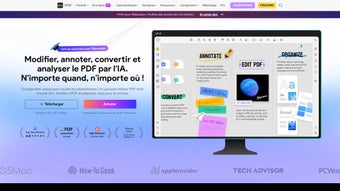
UPDF positions itself as a full‑featured PDF management suite built specifically for macOS, yet it also runs smoothly on Windows, Android, and iOS devices. The core promise of the application is to turn the traditionally clunky experience of handling PDFs into a streamlined workflow that feels as natural as editing a Word document. From annotating and commenting to reshaping entire pages, UPDF covers every stage of the document lifecycle. Security‑savvy users will appreciate the layered protection options, which include password encryption, permission restrictions, and digital signatures that comply with industry standards. The built‑in OCR engine converts scanned images into searchable, editable text, eliminating the need for third‑party converters. Additionally, UPDF offers batch conversion across a broad spectrum of file formats—such as DOCX, PPT, JPG, and EPUB—so users can share content without worrying about compatibility hurdles. Finally, the optimizer reduces file size without sacrificing visual fidelity, making large reports or e‑books easy to email or upload. In short, UPDF is more than a viewer; it’s a versatile toolbox that empowers professionals, students, and casual users alike to create, secure, and distribute PDF documents with confidence.
Key Features That Make UPDF Stand Out
- Rich Annotation Suite: Highlight text, add sticky notes, draw shapes, and insert stamps—all in real‑time collaboration mode.
- Full‑Scale Editing: Modify paragraphs, replace images, adjust fonts, and reorder sections without leaving the app.
- Advanced Security: Password protection, permission controls, and certified digital signatures keep sensitive data safe.
- Powerful OCR Engine: Convert scanned pages into searchable, editable text in over 30 languages.
- Multi‑Format Conversion: Export PDFs to DOCX, PPT, XLS, JPG, PNG, EPUB, and more; import these formats back into PDF.
- Page Management: Drag‑and‑drop page reordering, split, merge, extract, and rotate with a single click.
- File Optimizer: Reduce file size by up to 80 % while preserving image quality and layout integrity.
- Cloud Sync & Collaboration: Sync across devices via iCloud, Dropbox, or Google Drive; share annotated PDFs instantly.
- Customizable UI: Light and dark themes, adjustable toolbar, and keyboard shortcuts for a personalized workflow.
- Regular Updates & Support: Free updates for life, with a responsive support team reachable through chat or email.
Installation, Usage Instructions, and Compatibility
Getting started with UPDF is intentionally frictionless. For macOS users, simply visit the official website, click the “Download for Mac” button, and the .dmg installer will begin downloading. Once the file finishes, double‑click to mount the disk image, drag the UPDF icon into the Applications folder, and launch the program. Windows users follow an analogous process with a .exe installer that guides them through a standard wizard. Mobile users can find UPDF on the Apple App Store or Google Play Store; the app auto‑updates through the respective store mechanisms.
After installation, the first launch prompts you to create a free account or sign in with an existing Google or Apple ID. This step unlocks cloud sync and ensures your preferences travel with you across devices. The intuitive home screen displays recent files, a quick‑access toolbar, and a “Create New PDF” button. To edit a document, drag it onto the interface or use the “Open File” dialog. All annotation and editing tools appear on a floating panel that can be docked to the left, right, or top of the screen.
Supported Operating Systems: macOS 10.14 or later, Windows 10/11 (64‑bit), iOS 13 or later, Android 8 or later. The application also runs on Linux via a WebAssembly build, although the native desktop client is not officially released for Linux at this time.
Performance‑wise, UPDF is optimized for both Intel and Apple Silicon Macs, leveraging native code for fast rendering and low memory consumption. Windows users benefit from multi‑core processing, especially during OCR and batch conversion tasks. Mobile versions are lightweight, designed to run smoothly on smartphones with as little as 2 GB RAM.
Pros, Cons, and Frequently Asked Questions
Pros
- All‑in‑one solution eliminates the need for multiple PDF tools.
- Intuitive UI reduces learning curve for new users.
- Robust OCR supports many languages and preserves layout.
- Strong security options meet enterprise compliance standards.
- Free lifetime updates keep the software current without extra cost.
Cons
- Advanced batch processing features are hidden behind a “Pro” toggle.
- No native Linux desktop client (only web version).
- Some users report occasional lag when handling PDFs larger than 500 MB.
Frequently Asked Questions
Is UPDF completely free or does it have a paid tier?
UPDF offers a free version with core editing, annotation, and conversion tools. A Pro subscription unlocks advanced batch processing, premium OCR accuracy, and priority support.
Can I use UPDF to sign documents digitally?
Yes. UPDF includes a digital signature feature that complies with e‑signature regulations. Users can create a signature image or use a certificate‑based signing method.
How does the OCR function handle multi‑column layouts?
The OCR engine intelligently detects column breaks and preserves the original flow, delivering editable text that mirrors the source layout.
Is there a limit to the number of PDFs I can store in the cloud?
UPDF uses the user’s existing cloud storage (iCloud, Dropbox, Google Drive). There’s no internal storage quota imposed by UPDF.
What file formats can be converted to PDF with UPDF?
UPDF supports conversion from DOCX, PPTX, XLSX, JPG, PNG, BMP, TIFF, EPUB, and many others, both into and out of PDF.
Overall Rating: 4.5/5
Conclusion – Should You Download UPDF?
After examining the feature set, security capabilities, and cross‑platform availability, UPDF emerges as a highly competitive choice for anyone who works with PDFs on a daily basis. Its blend of powerful editing tools, reliable OCR, and robust conversion options eliminates the need to juggle multiple applications. While the free tier already covers most everyday tasks, power users will find the Pro upgrade worthwhile for its batch processing shortcuts and premium support. The only notable drawbacks are the lack of a native Linux desktop client and occasional performance hiccups with extremely large files—issues that the development team appears to be actively addressing through regular updates.
If you value a secure, all‑in‑one PDF solution that feels native on macOS and Windows, and you appreciate the flexibility of mobile apps for on‑the‑go edits, UPDF is definitely worth a download. Click the button below to start your free download, create an account, and experience a smoother PDF workflow today.
Guides & Tutorials
How to install UPDF
- Click the Download button above.
- Once redirected, accept the terms and click Install.
- Wait for the UPDF download to finish on your device.
How to use UPDF
This software is primarily used for its core features described above. Open the app after installation to explore its capabilities.
User Reviews
No reviews yet. Be the first to share your experience.
You may also like
more
DiffusionBee
Generate unique art with this app DiffusionBee is a free and accessible artifici...

Excire Foto Light
Organize your snapshots Excire Foto Light is a free-to-download AI -powered phot...

Topaz Photo AI
Photo enhancement tool with AI Topaz Photo AI is a premium AI image editor for P...

anonymoX
Surf anonymously with Firefox anonymoX for Firefox is an add-on that gives you f...

DownThemAll
Download Them All! Downloading anything or everything on a webpage can be a labo...
.webp)
DuckDuckGo Privacy Essentials
A free program for Mac, by DuckDuckGo, Inc.. DuckDuckGo Privacy Essentials is a...
