All Activity
- Past hour
-
With invoice immutability being pushed on us, we really need a way to properly calculate taxes before invoices are published and can't be changed any more. There are multiple areas in the world where WHMCS's tax rules are too limiting, but there is no tax calculation hook where addons can overwrite the incorrect tax calculations. A simple hook that we can use after WHMCS calculated its taxes (for orders and invoices) where we can overwrite the tax calculations is all that is needed so tax compliance is not limited as much by WHMCS any more. As a user, if you need to have taxes calculated differently, please vote at https://requests.whmcs.com/idea/hook-for-tax-calculation_1 to convince WHMCS to implement a way to have the option to have any taxes you need calculated by an addon at least. WHMCS: This shouldn't take too long to program and document, and if you only have one new subscriber because they can use your system now, it'll pay for itself.
-
18 years later and still not resolved. If you came here looking for a solution, please vote at https://requests.whmcs.com/idea/hook-for-tax-calculation_1 to convince WHMCS to implement a way to have any taxes you need calculated by an addon at least.
-
Hi Matt
WHMCS has problems with complex tax setups and I understand that you don't want to program solutions that work for everyone, but can you please have a tax calculation hook added into WHMCS so that everyone who has a complex tax scheme can get a solution programmed?Even one additional subscriber should be able to pay for the work time required to implement that.
It's a killer ROI.
Thanks
Mark - Today
-
 Kaba55 joined the community
 -
Clearly a need for a feature request. 😇
-

New Stripe Dynamic Gateway
Evolve Web Hosting replied to Evolve Web Hosting's topic in WHMCS 9.0 RC Discussion
The demand is there. This needs to be developed in your latest version. -
New Stripe Dynamic Gateway
Evolve Web Hosting replied to Evolve Web Hosting's topic in WHMCS 9.0 RC Discussion
@WHMCS John I agree. There has to be an upgrade process. Making it harder for customers and business owners is not the right answer. - Yesterday
-
 Wiles LLC changed their profile photo
 -
Wiles LLC joined the community
-
@WHMCS John If you want this to be the new default Stripe module, a migration path from the current default Stripe module will be necessary.
-
 1. Deal of the Week: Proxmox VE VPS & Cloud For WHMCS 4.3.0 Not every module gets to call itself a long-time #1 bestseller. Our Proxmox VE VPS & Cloud For WHMCS can, and it has just welcomed a fresh round of improvements! Among the highlights of version 4.3.0, you'll find: Change Password is now available as a service action button for VPS and Cloud services, making password updates much quicker for clients. You can now import virtual machines with the same VMID across different Proxmox nodes, giving you more flexibility when managing larger environments. New custom WHMCS hooks have been added for virtual machine reinstallation events, making it easier to build your own automations and integrations. We've also taken care of a number of smaller improvements that help make everyday work noticeably smoother. Client area graphs now load faster, firewall rules support colon-separated port ranges, and disk size validation messages during service creation are clearer and easier to understand. Need an excuse to give it a try? We didn't think so. But the current 7% Deal of the Week discount is there if you'd like one! Find out more about Proxmox VE VPS & Cloud For WHMCS 4.3.0! 2. A few more updates worth your attention In the last three weeks alone, we've rolled out several other solid updates, each packed with useful new features and improvements: Advanced Billing For WHMCS 4.6.0 expands its integration with SolusVM 2 VPS & Cloud For WHMCS by adding support for network traffic metrics. cPanel Extended For WHMCS 4.2.0 grows with the addition of a new Theme Management Tool built entirely around interface customization. DNS Manager For WHMCS 3.9.0 broadens its DNS integration options with support for ClouDNS, PowerDNS (Authoritative Server) V5, deSEC, and Bunny DNS. Payment Gateway Charges For WHMCS 3.0.1 arrives with long-awaited support for WHMCS 9.0.5. SMS Center For WHMCS 3.20.0 keeps expanding too, adding iSMS and BulkGate to a growing collection of nearly 90 supported SMS gateways. Wondering how to keep up when there's so much going on? The Recently Updated section is your shortcut to everything new, making it easy to keep track of fresh versions as soon as they go live. And lately, new releases have been arriving thick and fast: CRM For WHMCS - v2.11.5IP Manager For WHMCS - v3.2.4Plesk Extended For WHMCS - v4.0.5Products Reseller For WHMCS - v1.11.1 Not in the mood for setup and configuration? We've got you covered - our Installation Services are currently 50% OFF for both the updated modules and the rest of our marketplace too! 3. For everything that's not in the default package Most of you know us through our ready-made modules, and for good reason. After all, they've been a core part of what we do for years. But what many may not know is that we also spend a good deal of our time building custom software around platforms like cPanel, Plesk, DirectAdmin, Enhance, and HestiaCP. Why? Because every now and then, a business needs something that isn't quite there yet. Maybe it's an integration you've always wished existed, a process that's still more manual than it should be, or a feature that would make everyone's day just a bit easier. So if there's something you've been wishing your software could do, we'd be happy to discuss it. Our Software Advisors can help you explore the options and see whether a custom solution could be the right way forward. Let's make your custom idea happen! 4. We're in good company when it comes to staying busy MetricsCube with 100% rebuilt WHMCS reports What started as a full-scale reporting transformation has now officially reached its final stage with the completely rebuilt Performance Report back in place! has now officially reached its final stage with the completely rebuilt Performance Report back in place! 🔥SPECIAL BONUS: Make use of the WHMCS25%_MC promo code to receive 25% OFF all MetricsCube plans, including the recently introduced Starter plan. EasyDCIM v1.25.1 New installation templates for Ubuntu 26.04 LTS and Alpine Linux 3.23 plus the next-gen EasyDCIM Dedicated Servers For WHMCS 3.0. PanelAlpha v1.8.5 With the new 10Web.io integration, hosting providers can now offer Agentic Website Builder directly through their own onboarding flows and infrastructure.
 -
.thumb.png.5b91444d90930b9d60cf45032abea32a.png) connectinfosoftteach joined the community
connectinfosoftteach joined the community - Last week
-
Yep. That'll be it. These credit notes don't respect transaction actions.
-
 Melissa CPW joined the community
 -
@AbsoluteLocal You are in the wrong site. Send your issue at https://secure.5cloudhost.com/submitticket.php?step=2&deptid=1 or other offline option they got. This community (and WHMCS) will not assist you for a third-party provider.
-
 It's actually very easy to fix whmcs' importassist addon, but the addon is encrypted so I can't close the bug and fix the flow for importing from the blesta database which has lots of column and table relation name errors.
 -
Not as a transaction, but a credit note. Maybe that's the difference here. No transaction recorded for it.
-
They are. They rely on the domain's next due date in WHMCS - but they Domain Sync changes the next due date if the expiry date with the registry doesn't match the value in WHMCS.
-
Credits (including the new credit notes) have changed it seems. When you look at the invoice that was paid by the existing credit does the credit payment appear as a transaction at the very bottom of the invoice? Also checkout the Transaction tab for this client. It seems that the payment gets processed but the renewal 'action' remains pending.
-
Never once happened to us here, that the due date in domainsync was "changed" to the same date, nor that it was seemingly triggered to be correct by marking the renewal task as completed (it was delayed by investigating this time). Weird. I'd have assumed invoices are separate and didn't rely on registrar reporting.
-
This is not a result of upgrading to v9. It has always been like that. If client pays an invoice for domain renewal, the next due date and expiry date is updated automatically by WHMCS. When WHMCS runs the Domain Sync task, it queries the registrar for domain details and it finds the expiration date is now inconsistent, so it changes it. This also updates the next due date. It has been like that for as long as I can remember.
-
Hello everyone, We are pleased to share our new SumUp Payment Gateway for WHMCS. The module allows businesses to accept payments through SumUp Hosted Checkout directly from WHMCS invoices. Features: Native support for WHMCS 8.x Native support for WHMCS 9.x SumUp Hosted Checkout integration Credit and debit card payments Apple Pay support (where available) Google Pay support (where available) Automatic invoice payment recording SumUp webhook support Refund support through SumUp API Simple configuration using API Key and Merchant Code The module is distributed free of charge and can be downloaded from our website. More information and download: https://soluzioniphp.it/en/info/sumup-module-for-whmcs.html Feedback and suggestions are welcome.
-
 NiceNIC Team changed their profile photo
 -
NiceNIC Team joined the community
-
It wasn't until I marked the task of renewing it as completed did it update the next due date. That really should not be relying on domain renewal, if it's setting the next date to invoice. Way less reliable than "invoice paid, increment next due date".
-
It sounds like your Automation Settings include DomainSync and Sync Next Due Date, which query the registrar, if supported, to generate these values. If so, the registrar might have been reporting the expiration date incorrectly or the domain was not successfully renewed at registrar.
-
 annewilson211 joined the community
 -

Help!!! WHMCS Find My Shared Mailbox, Please! - M365 import
WHMCS JoshQ replied to BENELUX's topic in Troubleshooting Issues
Hi all, I just wanted to advise that we are currently aware of another issue with MS365 authentication, which we believe is caused by a recent change that was made on Microsoft's end. If you see a blank page after completing authentication with MS365 upon being redirected back to WHMCS's callback, it is most likely caused by the Cross-Origin-Opener-Policy (COOP) enforcement in your browser. It'll look like this: A case is open to get a solution implemented on our end, but in the meantime there is a workaround. Sadly, Chromium based browsers (Google Chrome, Brave, Edge, etc.) enforce COOP usage and do not provide a way to disable it. However, it is possible with Firefox, though you should only do this temporarily, as COOP is an important security feature. Open Firefox, navigate to about:config, search for browser.tabs.remote.useCrossOriginOpenerPolicy and set it to false. Once that's done, you should be able to complete the auth flow as expected. Once you've done that, make sure you re-enable COOP by setting that flag to true again. As always, feel free to reach out to our Support team via ticket if you continue to experience issues.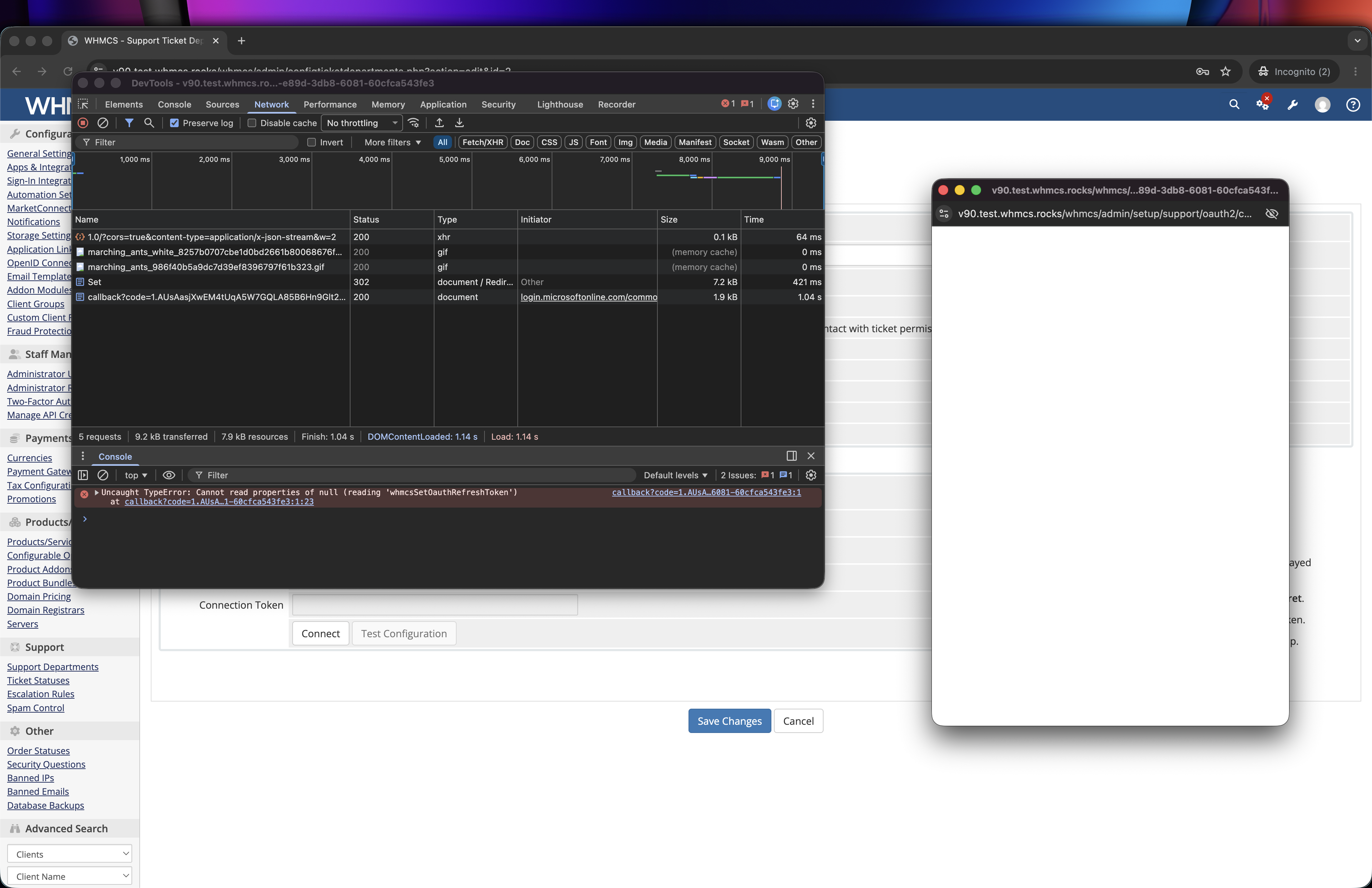
-
 apacer joined the community
 -
 VVIP FLIGHT changed their profile photo
 -
.thumb.jpg.219736d7094528ec5a59b1b519ce74d9.jpg) Emergency Plumbing Squad joined the community
Emergency Plumbing Squad joined the community -
 We've migrated from CentralNic to OpenProvider, and it's been mostly without issues. We've had to contact OP support a few times but have almost always gotten a quick reply. Their WHMCS module is fine. It needs work here and there but they're open to suggestions - and their entire module is open source so anyone can make PRs. I've submitted a few and got them approved. Their API can be slow from time to time, but this was also an issue with CentralNic. Unfortunately, OpenProvider's API has a few more stability issues than CentralNic's. Switching to OpenProvider won't necessarily release you entirely from the hands of CentralNic, though. OpenProvider use CentralNic for a lot of TLDs - but OpenProvider's pricing generally better, even for those TLDs.
 -
Marked the task as done, and on the domainsync that followed it updated correctly. One would have thought paying the invoice would be the trigger for updating the next invoice due date. Strange.
-
Moved to v9, we encountered an odd issue today. We manually process domain renewals after invoices are paid. Overnight, an invoice was generated for a domain, and fully paid by credit. A few hours later, the domain sync cron ran and gave me this: domain.tld: Next Due Date updated to 06/29/2026 (domain obscured for this post). That was the original due date, and having just been paid a few hours earlier, this should have been updated to next year. This is how it had always worked before v9, and system date is accurate. I've since manually renewed (which incremented the expiry correctly), and will monitor the next domain sync(s) to see if that changes, but it's really odd in that a paid invoice should trigger the due date, not renewal status, no?
-

Credit & Debit Notes not found in menu
WHMCS SamP replied to hmaddy's topic in Installation, Upgrade, and Import Support
Hi @hmaddy Have you opened an invoice? The added credit and debit notes should be displayed directly on the invoice. -

Does WHMCS support PHP 8.4?
hmaddy replied to Sudipto Mahmud's topic in Installation, Upgrade, and Import Support
No, php 84 will be available in future releases