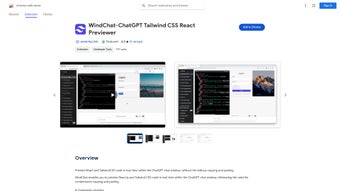

Download WindChat – Echtzeit‑HTML‑ und Tailwind‑CSS‑Vorschau für ChatGPT
Übersicht: Ein nahtloser Design‑Spielplatz im Chat
WindChat ist eine eigens für Chrome entwickelte Erweiterung, die ein Live‑HTML‑ und Tailwind‑CSS‑Vorschaufenster direkt in das ChatGPT‑Gesprächsfenster einfügt. Für Entwickler, Designer und Hobby‑Entwickler, die auf KI‑generierte Snippets angewiesen sind, besteht der klassische Arbeitsablauf darin, Code aus einer ChatGPT‑Antwort zu kopieren, ihn in einen lokalen Editor einzufügen, den Browser zu aktualisieren und dann zur KI zurückzukehren, um Anpassungen zu verlangen. Dieser Hin‑und‑Her‑Loop kann wertvolle Minuten verschwenden und führt häufig zu Kontextverlust. WindChat eliminiert diese Reibung, indem es jeden Code‑Block, der mit dreifachen Backticks formatiert ist, erfasst, das Markup parst und sofort neben der Chat‑Oberfläche rendert. Die Vorschau ist vollständig interaktiv: Sie können in die gerenderte Ansicht klicken, Klassen oder HTML‑Attribute bearbeiten und die Änderungen in Echtzeit sehen, ohne das Gespräch zu verlassen. Die Erweiterung fügt außerdem intelligent mehrere aufeinanderfolgende Antworten zusammen, sodass Sie komplexe Layouts bauen können, die ursprünglich über mehrere ChatGPT‑Blasen verteilt waren. Updates werden automatisch über den Chrome Web Store bereitgestellt und gewährleisten die Kompatibilität mit den neuesten ChatGPT‑UI‑Änderungen und Tailwind‑Veröffentlichungen. Während das Kern‑Feature‑Set kostenlos ist, schaltet ein Premium‑Tier Multi‑Panel‑Ansichten, Dark‑Theme‑Synchronisation und benutzerdefiniertes CSS‑Injection für Power‑User frei. Im Wesentlichen verwandelt WindChat die ChatGPT‑Umgebung von einem statischen Text‑Generator in eine dynamische Prototyp‑Leinwand, beschleunigt die Design‑zu‑Code‑Pipeline dramatisch und reduziert den mentalen Aufwand ständiger Tab‑Wechsel.
Wichtige Funktionen & Echtzeit‑Bearbeitungs‑Möglichkeiten
- Instant HTML Preview: Render any HTML snippet the moment it appears in ChatGPT, eliminating copy‑paste delays.
- Tailwind CSS Integration: Detects Tailwind utility classes and applies the exact styles, giving you a true‑to‑design preview.
- Multi‑Message Merging: Combines fragmented code across several ChatGPT responses into a single, coherent preview.
- Editable Preview Panel: Directly edit markup or utility classes within the preview; changes sync back to the original code block.
- Responsive Breakpoint Switcher: Toggle between desktop, tablet, and mobile viewports without leaving the chat.
- Auto‑Sync with ChatGPT UI Updates: Listens for interface changes and re‑initializes the preview automatically.
- One‑Click Export: Download the rendered HTML as a .html file or copy it to the clipboard for immediate reuse.
- Premium Enhancements: Multi‑panel sidebars, dark‑mode theming, and custom CSS injection are available via in‑app purchase.
Each of these capabilities was engineered to address a specific pain point in AI‑assisted development. The Instant HTML Preview removes the “context‑switch” penalty that slows down even experienced developers. Tailwind CSS Integration ensures that the utility‑first workflow—so popular among modern front‑end teams—remains faithful to the final design. By offering a Responsive Breakpoint Switcher, WindChat saves the extra step of opening separate browser windows or device simulators. The extension’s architecture runs entirely within Chrome’s sandbox, guaranteeing that no data ever leaves the user’s machine; this local‑only processing model reinforces security and privacy, especially for proprietary markup. Moreover, the lightweight footprint (under 5 MB) means the extension loads instantly and does not burden system resources, a crucial factor for developers who keep many tabs open during research or debugging sessions. Collectively, these features compress what traditionally takes several minutes of manual work into a fluid, seconds‑long interaction, making WindChat a compelling addition to any developer’s toolkit.
Installation, Einrichtung und täglicher Workflow
Installing WindChat is intentionally frictionless. Open the Chrome Web Store, search for “WindChat – HTML & Tailwind Preview,” and click Add to Chrome. After confirming the permission request (which only includes access to the active tab and the ability to read/modify page content), the extension’s icon appears next to the address bar. Navigate to ChatGPT; the WindChat pane automatically slides in on the right side of the conversation window. If it does not appear, simply click the extension icon and select “Enable on this site.” The extension injects a lightweight JavaScript bridge that monitors the DOM for code‑block elements wrapped in triple backticks.
Using the tool is equally straightforward. Whenever you receive an HTML or Tailwind snippet, the bridge captures it, parses the markup, and instantly renders the result in the side panel. You can then interact with the preview: click on any element, change a class name, or edit an attribute, and the underlying code block updates in real time. For layouts spread over multiple messages, click the “Merge Snippets” button at the top of the pane; WindChat concatenates the code while preserving indentation and hierarchy, producing a single, cohesive preview. Keyboard shortcuts further streamline the experience: Ctrl + Shift + Y toggles the preview panel on and off, while Ctrl + M opens the merge dialog. The extension respects Chrome’s dark‑mode setting, automatically adjusting its UI to reduce eye strain during long coding sessions.
Kompatibilität & Systemanforderungen
Because WindChat is delivered as a Chrome extension, it runs on any operating system that supports Google Chrome, including Windows 10/11, macOS Monterey and later, and major Linux distributions. The extension is also compatible with Chrome‑based browsers such as Edge and Brave, though the Chrome Web Store listing currently targets Chrome as the primary platform. No additional software or runtime is required; all processing happens locally in the browser, ensuring that your code never leaves your machine. Automatic background updates keep the extension aligned with both Chrome’s security patches and the evolving ChatGPT UI, so you can rely on a consistently stable experience without manual intervention.
For users who need the premium toolbox, the upgrade flow is handled securely through the Chrome Web Store’s payment system. Once purchased, the additional features unlock instantly, and the extension’s UI reflects the new capabilities without requiring a restart. Should you ever need to revert to the free tier, a simple toggle in the settings panel disables the premium modules while preserving your existing work.
Vor‑ und Nachteile sowie Experten‑Review
Vorteile
- Real‑time preview eliminates tedious copy‑paste cycles.
- Native Tailwind CSS support mirrors modern utility‑first workflows.
- Free core functionality with optional premium upgrades for power users.
- Lightweight installation (under 5 MB) and low memory footprint.
- Responsive breakpoint testing built directly into the preview pane.
- All processing occurs locally, guaranteeing privacy and security.
- Automatic updates keep the extension compatible with ChatGPT UI changes.
Nachteile
- Currently limited to the Chrome ecosystem; no native Firefox or Safari version.
- Premium features require an additional purchase, which may deter budget‑conscious users.
- Complex Tailwind configurations (custom @layer rules, plugins) may not render perfectly.
- Relies on proper code‑block formatting; malformed snippets can cause preview errors.
- Multi‑panel view, a highly requested feature, is only available in the paid tier.
Häufig gestellte Fragen & abschließendes Fazit
FAQ
Is WindChat compatible with the new ChatGPT UI?
Yes. The development team releases regular updates that keep WindChat synced with the latest ChatGPT interface changes. Users are automatically notified when an update is available.
Can I use WindChat on macOS, Windows, or Linux?
WindChat runs as a Chrome extension, so it works on any operating system that supports Google Chrome, including macOS, Windows, and Linux.
Does the free version include any usage limits?
The free version offers unlimited preview sessions but limits advanced features such as multi‑panel views and custom theme support to premium tiers.
How secure is the code that WindChat processes?
All processing happens locally in your browser. WindChat never sends your code to external servers, ensuring that proprietary or sensitive markup stays on your machine.
Can I export the previewed HTML for use in other projects?
Yes. The extension provides an “Export” button that lets you download the rendered HTML as a .html file or copy it directly to the clipboard.
Abschließendes Fazit & Handlungsaufruf
WindChat fills a noticeable gap in the AI‑assisted development workflow by turning the ChatGPT conversation into a live design sandbox. Its real‑time rendering, Tailwind‑aware styling, and ability to merge multi‑message snippets make it an indispensable sidekick for developers who value speed, visual feedback, and a low‑friction environment. While the Chrome‑only limitation and the optional paid upgrades may be drawbacks for some, the free core functionality already delivers enough value to justify a quick install for anyone who regularly crafts HTML with ChatGPT. By shaving minutes off the traditional copy‑paste loop, WindChat not only accelerates prototype creation but also reduces the chance of errors slipping into final code.
Ready to supercharge your ChatGPT‑driven design workflow? Download WindChat now from the Chrome Web Store, enable it on ChatGPT, and experience instant, interactive previews that keep you in the flow. If you later need multi‑panel views, dark‑theme syncing, or custom CSS injection, the premium upgrade is just a click away—making your next web prototype faster, cleaner, and more enjoyable to build.



.png)




