Log inSign up
Lickability
2,967 posts
Image
user avatar
Lickability
@lickability
People who make apps people love. ☁️ bsky.app/profile/lickab… 🐘 mastodon.social/@lickability
NYC
lickability.com
Joined May 2009
888
Following
3,930
Followers
  • Pinned
    user avatar
    Lickability
    @lickability
    Sep 11, 2024
    We make apps people love. Founders and Fortune 500s trust us to design, build, and ship delightful software. Let’s work together on your next project.
    7.5K
  • user avatar
    Lickability
    @lickability
    Feb 26, 2024
    🧵👇 Last week, Apple did a surprise announcement of Apple Sports, a new app for sports fans. We do internal design critiques quite often, but we noticed a few things worth mentioning for designers and developers thinking about modern iOS design practices.
    Screenshot of the Apple Sports app
    266K
  • user avatar
    Lickability
    @lickability
    Apr 3, 2024
    🧵 Well well well, if it isn’t another design critique thread! This week, we’re taking a look at the Quirks and Features™ of the Apple Journal app.
    Image
    327K
  • user avatar
    Lickability
    @lickability
    Oct 24, 2024
    Here’s our design critique of the Image Playgrounds icons 🧵👇
    user avatar
    Beta Profiles
    @BetaProfiles
    Oct 24, 2024
    There are two of them!? 🤨
    Image
    82K
  • user avatar
    Lickability
    @lickability
    Oct 24, 2024
    Replying to @lickability
    We hate them both. End of thread.
    3.7K
  • user avatar
    Lickability
    @lickability
    Aug 14, 2020
    Every week, one of our iOS devs shares a special tip in the engineering meeting. Here’s this week’s tip from @MLiberatore: Treat your Xcode search results as a to-do list and delete (⌫) results when you no longer need them. #iOSDevTips
    Image
    GIF
  • user avatar
    Lickability
    @lickability
    Jun 22, 2023
    shirt pocket not required
    A screenshot of Xcode running the visionOS simulator showing code and a preview of a humane-style phone call UI being projected on a developer’s hand.
    58K
  • user avatar
    Lickability
    @lickability
    Apr 18, 2024
    Welcome back! This is our fourth design critique thread. Today, we're taking a #ThrowbackThursday look at iPhoto for iOS, launched in 2012. Despite its short lifespan, it delivered visual design craftsmanship in spades.
    Three iPads (3rd generation) running iPhoto. One is displaying a photo journal with a virtual cotton texture background and images arranged in an asymmetric bento box grid. The middle iPad is in album view; each album is displayed as a linen-clad binder sitting on a green-tinted glass shelf. The third iPad is editing a photo, boosting its saturation.
    142K
  • user avatar
    Lickability
    @lickability
    Sep 24, 2024
    🧵📐 Let’s talk about optical centering and visual balance in UI design. This tweet has been making the rounds about iOS 18’s flashlight Live Activity, and it’s probably time we have The Talk. About precision vs perception in interface design, that is.
    36K
  • user avatar
    Lickability
    @lickability
    Mar 6, 2024
    🧵🎙️ Yesterday, Apple released the transcripts feature for Apple Podcasts. This reminded us to revisit the UI of the Podcasts app, and we’d love to share some of our findings. We’re just focusing on the player since there’s a ton to cover.
    A live-view transcript of a podcast episode titled “The Mystery of Beauty” from the podcast “Hidden Brain” is shown in Apple Podcasts on iPhone 15 Pro.
    38K
  • user avatar
    Lickability
    @lickability
    Jun 7, 2023
    Replying to @lickability
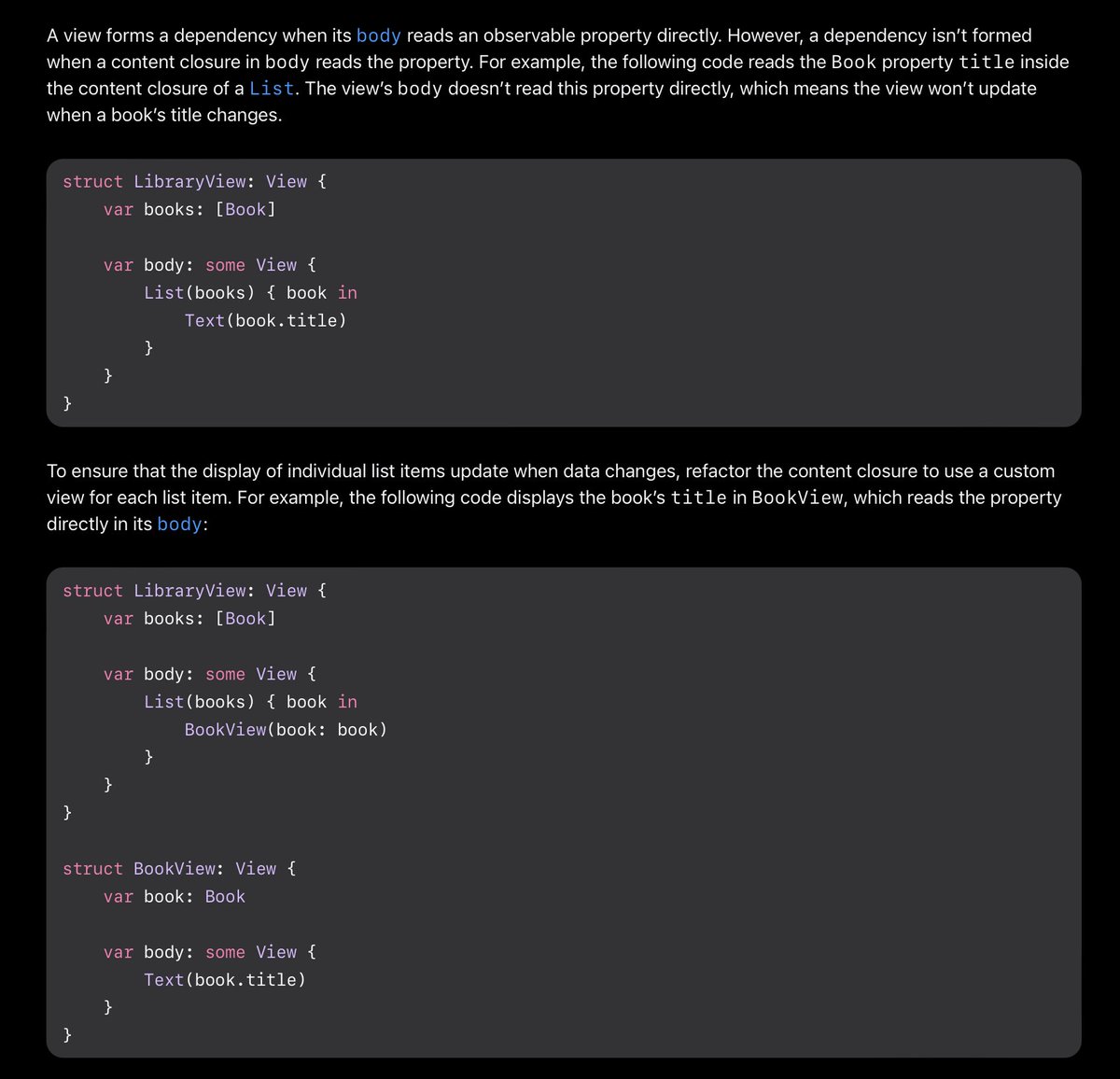
    🧠 The new Observable type greatly simplifies data flow and improves performance in SwiftUI, and our engineers are so excited to use it! #WWDC23 However, there’s a critical gotcha that Apple mentions briefly in their docs—if you use SwiftUI, you’ll NEED to know this.
    A view forms a dependency when its body reads an observable property directly. However, a dependency isn’t formed when a content closure in body reads the property. For example, the following code reads the Book property title inside the content closure of a List. The view’s body doesn’t read this property directly, which means the view won’t update when a book’s title changes.

To ensure that the display of individual list items update when data changes, refactor the content closure to use a custom view for each list item. For example, the following code displays the book’s title in BookView, which reads the property directly in its body.
    54K
  • user avatar
    Lickability
    @lickability
    Feb 26, 2024
    Replying to @lickability
    Apple has been playing with navigation bars a lot recently. We could probably write a whole thread about just the nav bar. Take a look at how it stretches during over-scroll and transitions to a squished state when collapsed.
    Image
    00:00
    14K
  • user avatar
    Lickability
    @lickability
    Feb 26, 2024
    Replying to @lickability
    Finally (and this is a big one): motion backgrounds. It’s easy for an app to feel lifeless when it’s just displaying static data, like the Weather and Sports apps. It’s really hard to get right, but they’ve implemented this animation quite well.
    Image
    00:00
    11K
  • user avatar
    Lickability
    @lickability
    Jul 26, 2019
    📙 We write a lot of Swift here at Lickability, so we documented our best practices in a guide to use internally. And now it’s public! Check it out here 👇 blog.lickability.com/our-swift-best…

New to X?

Sign up now to get your own personalized timeline!

Create account

By signing up, you agree to the Terms of Service and Privacy Policy, including Cookie Use.

Terms·Privacy·Cookies·Accessibility·Ads Info·© 2026 X Corp.
Don't miss what's happening
People on X are the first to know.
Log inSign up
Advertisement
Advertisement