


















Welcome to Software Development on Codidact!
Will you help us build our independent community of developers helping developers? We're small and trying to grow. We welcome questions about all aspects of software development, from design to code to QA and more. Got questions? Got answers? Got code you'd like someone to review? Please join us.
How does character/glyph replacements in fonts like "Caveat" work?
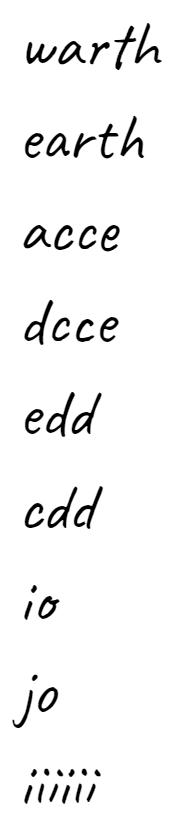
One of the fonts available (to me) on Google Docs is "Caveat". The following is in 18-point Caveat on Google Docs:
I found that Caveat is available at https://github.com/googlefonts/caveat/tree/master/fonts/TTF, from which I downloaded it. I then typed the same text in Microsoft Word and this resulted:
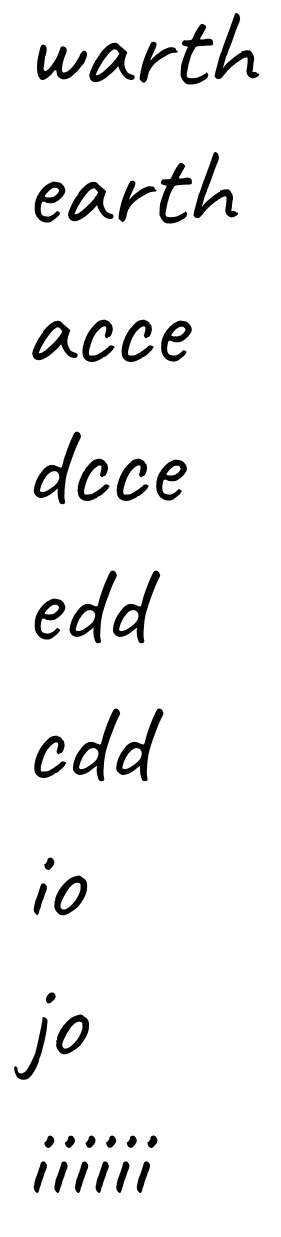
Notice that, in the latter screenshot, each letter has the same shape wherever it appears. In the former, however, there are multiple shapes for the same letter. My question, then, is twofold:
-
Why the difference? Why doesn't the font appear the same way in both places?
-
In the first screenshot, the same letter appears in very similar contexts but with different shapes. What determines the shape each time? In other words, what rules are applied for each letter to determine which shape it will have?

1 answer
OpenType stylistic alternates
What you see in your first application (google docs) is an enabled/activated OpenType substitution feature: Some »Handwriting« fonts support features to contextually replace certain sequences of characters and replacing subsequent instances of these with alternate glyph designs. This is mainly to achieve a more realistic handwriting look. See also Microsoft Typography/Registered Features
Why are substitutions missing in another application (e.g Word)?
It depends on 2 factors:
- does the downloaded (or loaded in case of web usage) version include these feature definitions and glyphs?
- are they applied by default? If not many applications provide extra settings for toggling certain OT features. Some features might be enabled by default e.g standard ligatures like »fi« or »ff«
OpenType formats: .ttf, .otf, woff, woff2
Responding to the previous comments: both .ttf and .otf font files are OpenType font formats supporting the aforementioned OT features equally well (such as contextual alternate substitution).
The confusion (whether truetypes are proper Open Types) stems from the fact, truetype already existed before the joint venture for the OT specification (and Adobe claimed the more self explanatory name for their file extension abbreviation. For more details see »Wikipedia entry about OpenType«. The core difference between these is the allowed Bézier structure concept: .ttf/truetype relies on quadratic Béziers strored in glyf table .otf is based on cubic Bézier desciption in CFF2/CFF
Google fonts
When you're using the GF eco system you most likely retrieve web formats like woff2 or woff. These are compressed container formats not introducing a new format structure.
Especially, google fonts frequently get updates or are provided in different versions.
Since, alternate glyph designs will inevitably increase file size significantly most features are simply dropped when requiring fonts via the API.
<link rel="stylesheet" href="https://fonts.googleapis.com/css2?family=Caveat:[email protected]">
When you download a .ttf from the Google font website via download button you should usually get the complete font including all features and language support – that's why these font files are significantly larger compared to the preferred more compact woff2 files loaded via API.

BTW: Newer OT font capabilities such as Variable fonts or colored fonts are also part of the OpenType specification. (Trivia: that's also why many font-parsing libraries have troubles covering all possible OT capabilities)

0 comment threads


1 comment thread