In order to keep you entertained while I work on a new edition of
The Book of PF, I dug deep in the archives for material you might enjoy reading. Here, for your weekend reading pleasure, is a minimally edited version of my malware article, originally written for a
BSDCan presentation (also presented at
BLUG and
UKUUG events):
A certain proprietary software marketer stated in 2004 that by 2006 the spam and malware problems would be solved. This article explores what really happened, and presents evidence that the free software world we are in fact getting there fast and having fun at the same time. We offer an overview of principles and tools with real life examples and data, and cover the almost-parallel evolution of malware and spam and effective counter-measures. We present recent empirical data interspersed with examples of practical approaches to ensuring a productive, malware and spam free environment for your colleagues and yourself, using free tools. The evolution of content scanning is described and contrasted with other methods based on miscreants' (and their robot helpers') behavior, concluding with a discussing of recent advances in greylisting and greytrapping with an emphasis on those methods' relatively modest resource demands.
(Updated 2016-12-13, see the addendum at the end)
Note: This piece is also available without trackers but classic formatting only here.
Malware, virus, spam - some definitions
In this article we will be talking about several varieties of the
mostly mass produced nuisances we as network admins need to deal with
every day. However, you only need to pick up an IT industry newspaper
or magazine or go to an IT subject web site to see that there is a lot of
confusion over terms such as virus,
malware and for that matter
spam. Even if a large segment of the so called
security industry does not appear to put a very
high value on precision, we will for the sake of clarity spend a few
moments defining the parameters of what we are talking about.
To that end, I've taken the time to look up the definitions of those
terms at Wikipedia and a few other sources, and since the Wikipedia
definitions agree pretty well with my own prejudices I will repeat
them here:
-
Malware or Malicious
Software is software designed to infiltrate or damage a
computer system without the owner's informed consent.
-
A computer virus is a self-replicating computer
program written to alter the way a computer operates, without the
permission or knowledge of the user.
-
Another common subspecies of malware is the
worm, commonly defined as “a program that
self-propagates across a network exploiting security or policy flaws
in widely-used services” (This definition is taken
from a 2003 paper, Weaver, Paxson, Staniford and Cunningham: “A Taxonomy of
Computer Worms”.)
-
The term zombie is frequently used to describe
computers which are under remote control after a successful malware or
manual attack by miscreants.
-
Spamming is the abuse of electronic messaging
systems to send unsolicited, undesired bulk messages. While the most
widely recognized form of spam is e-mail spam, the term is applied to
similar abuses in other media [ … ]
You will notice that I have left out some parts at the end here, but if
you're interested, you can look up the full versions at Wikipedia. And
of course, if you read on, much of the relevant information will be
presented here anyway, if possibly in a slightly different style and
supplemented with a few other items, some even of distinct practical
value. But first, we need to dive into the past in order to better
understand the background of the problems we are trying to solve or at
least keep reasonably contained on a daily basis.
A history of malware
The first virus: the Elk Cloner
According to the
Wikipedia 'Computer
Virus' article, the first computer virus to be found in the wild, outside of research laboratories, was the 1982 "elk cloner" written by Rich Skrenta, then a teenager in Southern California.
The virus was apparently non-destructive, its main purpose was to
annoy Skrenta's friends into returning borrowed floppy disks to him.
The code ran on Apple II machines and attached itself to the Apple DOS
system files.
Apple DOS and its single user successors such as MacOS up to System 9
saw occasional virus activity over the following years, much like the
other personal systems of the era which all had limited or no security
features built into the system.
The first PC virus: the (c)Brain
It took a few years for the PC world to catch up. The earliest virus
code for PCs to be found in the wild was a piece of software called
(c)Brain, which was written and spread all over the world in 1986.
(c)Brain attached itself to the boot sector on floppies. In contrast
to quite a number of PC malware variants to follow, this particular
virus was not particularly destructive beyond the damage done by
altering the boot sectors.
Like most of the popular personal computer systems of the era, MS-DOS
had essentially no security features whatsoever. In retrospect it was
probably inevitable that PC malware blossomed into a major problem.
With system vendors unable or unwilling to rewrite the operating
systems to eliminate the bugs which let the worms propagate, an entire
industry grew out of enumerating badness. (The origin of
the term
enumerating badness is uncertain, but
most frequently attributed to Marcus Ranum, in the must-read, often cited web accessible
article
“The
Six Dumbest Ideas in Computer Security”. It's
fun as well as useful and very readable.)
To this day a large part of the PC based IT sector remains dedicated
to writing malware and producing ever more elaborate workarounds for
the basic failures of the MS-DOS system and its descendants. Current
virus lists typically contain signatures for several hundred thousands of
variants of mainly PC malware.
The first Unix worm: The Morris Worm
Meanwhile in the Unix world, with its better connected and relatively
well educated user base, things were relatively peaceful, at least for
a while. The peace was more or less shattered on November 2, 1988
when the first Unix worm, dubbed the Morris worm
hit Unix machines on the early Internet. This was both the first
replicating worm in a Unix environment and the first example of a worm
which used the network to propagate.
More than 20 years later, there is still an amazing amount of information
on the worm available on the net, including what appears to be the
complete source code to the worm itself and a number of analyses by
highly competent people. It's all within easy reach from your
favourite search engine, so I'll limit myself to repeating the main
points. Some of the Morris worm's characteristics will be familiar.
-
It was system specific Even though there are indications
that the worm was intended to run on more architectures, it was in fact only
able to run successfully on VAXes and sun3 machines running BSD.
-
It exploited bugs and sloppiness Like pretty much
all of its successors, the Morris worm exploited bugs in common
programs, such as a buffer overflow in
fingerd, used the commonly enabled debug mode in
sendmail - which allowed remote execution of commands -
along with a short dictionary of likely passwords.
-
It replicated and spread Once the worm got in, it
started the process of spreading. Fortunately, the worm was designed
mainly to spread, not to do any damage.
-
It lead to denial of service Unfortunately, the
worm code itself had a bug which made it more efficient at spreading
itself than its author had anticipated, and caused a large increase
in network traffic, slowing down Internet traffic to a large number of
hosts. Some hosts worked around the problem by disconnecting
themselves from the Internet temporarily. In one sense, it may have
been one of the earliest Denial of Service incidents
recorded.
The worm was estimated to have reached rougly 10% of the hosts
connected to the Internet at the time, and the most commonly quoted
estimate of an absolute number is "around 6,000 hosts".
The event was quite stressful for, by today's standards, a very small
group of people. In retrospect, it is probably fair to say that the
episode mainly served to make Unixers in general aware that there was
a potential for security problems, and developers and sysadmins set
out to fix the problems.
Microsoft vs the internet
The final components to form the current mess arrived on the scene in
the second part of the 1990s when Microsoft introduced modern
networking components to the default setup of their PC system software
which came preinstalled on consumer grade computers. This happened at
roughly the same time that several office type applications started
shipping with their own fairly complete programming environments for
macro languages.
Riding on the coattails of the early 1990s commercialization of
the Internet, Microsoft started real efforts to interface with the
Internet in the mid 1990s. Up until some time in 1995, Internet
connectivity was an optional extra to Microsoft users, mainly through
third party stacks and frequently through hard to configure dial-up
connections.
Like the third party offerings, Microsoft's own TCP/IP stack was an
optional extra -- downloadable at no charge, but not installed by
default until late editions of Windows 3.11 started shipping with the
TCP/IP stack installed by default.
However, the all-out assault and their as good as claims to have
invented the whole thing came only after a largely failed attempt at
getting all Windows 95 users to sign up to the all-proprietary,
closed-spec, dial-in Microsoft Network, which was in fact the first to
use the name and the MSN abbreviation. The original Microsoft Network service did have some limited Internet
connectivity; anecdotal evidence indicates that simple email
transmissions to Internet users and back could take several days each
way.
As luck or misfortune would have it, by the time Microsoft's Internet
adventure started, several of their applications had been extended to
include application macro programming languages which were pretty
complete programming environments.
In retrospect we can confidently state that malware writers adapted
more quickly to the changed circumstances than Microsoft did. The
combination of network connectivity, powerful macro languages and
applications which were network aware on one level but had not really
incorporated any important security concepts and, of course, the sheer
number of targets available proved quite impossible to resist.
The late 1990s and early 2000s saw a steady stream of network enabled
malware on the Microsoft platform, sometimes with several new variants
each day, and never more than a few weeks apart. A semi-random
sampling of the more spectacular ones include Melissa, ILOVEYOU,
Sobig, Code red, Slammer and others; some were quite destructive,
while others were simply very efficient at spreading their payload.
They all exploited bugs and common misconfigurations much like the
Morris worm had done a decade or more earlier. Greg Lehey's June 2000
notes on one of the more pervasive worms is still worth
reading. (See Greg Lehey:
Seen it all before?, Daemon's Advocate, The Daemon News ezine, June 2000
edition) The description is one of many indications
that by 2000, malware writers had learned to mine the data in
their victims' mail boxes and contact lists for useful data.
During the same few years, Microsoft's stance also developed somewhat.
Their traditional response had been
We do not have
bugs, then moved gradually to releasing patches and 'hot
fixes' at an ever increasing rate, and finally moving to a regime of a
monthly “Patch Tuesday” in order introduce some
predictability to their customers' workday.
Characteristics of modern malware
Back in the day, the malicious and destructive software got all the
attention. From time to time a virus, worm or other malware would
grab headlines for destroying people's systems, in one case even
overwriting system BIOSes of a common variety of PCs. I have no real
numbers to back this up, but one likely theory is that during the
early years malware writers may have been mainly youthful pranksters
and the odd academic, and getting attention may have been the main
motivator.
In contrast, modern malware tries to take over your system without
doing any damage a user or less attentive system administrator would
notice. Typical malware today delivers its payload which then
proceeds to take control of your computer - turning it into a
zombie, usually to send spam, to infect other
computers, or to perform any function the malware writer's customer
needs to be done by remote control.
There is ample evidence that once machines are taken over, installed
malware is likely to record users' keystrokes, mine the file systems
for financial and identification data, and of course any sort of
remote controlled network activity such as participation in attacks on
specific networks. There is also anecdotal evidence to suggest that a
significant subset of online casino players are in fact remote
controlled game playing robots running on compromised computers.
Spam - the other annoyance
The first spam message sent is usually considered to be a message sent
via ARPANET email in 1978, from a marketing representative at the
Digital Equipment Corporation's Marlboro site. Acccording to much
repeated anecdotes the message was sent to "every Arpanet address on
the west coast" of the USA. (See
Reflections on the 25th Anniversary of Spam, by Brad Templeton). The message announced a demo of the then new and exciting DEC20 line of computers and the TOPS-20 operating system,
and like many of its successors showed signs of sender's incompetence
- the list of intended recipients was longer than the mail application
was able to accept, and the list overflowed into the message itself.
The message was well intended, but the reaction was overwhelmingly
negative, and unsolicited commercial messages appear to have been
close to non-existent, at least by modern standards, for quite a while
after this particular incident.
The spam problem remained more or less a dormant, potential problem
until the commercialization of the Internet started in the early
1990s. By then, email spam was still close to non-existent, but
unsolicited commercial messages had started appearing on the USENET
news discussion groups.
In 1994, there were several incidents involving messages posted to all
news groups the originators were able to reach. The first incident,
in January, involved a religious message, followed a few weeks later
by message hawking the services of a US law firm. At the time this
would have meant that several thousand unrelated discussion groups
received the same message, crossposted or repeated.
The spam problem is sometimes cited as a major part of the reason why
USENET declined in readership in favor of web forums, but in fact the
USENET spam problem was largely solved within an impressively short
time. Counter measures by USENET admins, including
USENET
Death Penalty (kicking a site off the USENET),
cancelbots (automatic cancelling of articles
which meet or exceed set criteria) and various semi-manual monitoring
schemes were largely, if not totally effective in eliminating the spam
problem.
However, with an increasing Internet user population, the number of
email users grew faster than the number of USENET users, and spammers
largely turned their attention back to email towards the end of the 1990s.
As we mentioned earlier, mass mailed messages were found to be effective
carriers of malware.
Spam: characteristics
The two main characteristics of spam messages have traditionally been
summed up as: A typical spam run consists of a large number
of identical messages, and the content of the messages tend
to form recognizable patterns. In addition, we
will be looking at some characteristics of spammer and malware writer
behavior.
Into the wild: the problem and principles for solutions
The ugly truth
In order to understand how malware propagates, we need to recognize a
few basic truths about people, programming and the code we produce and
consume. Some groups, such as the OpenBSD project, has turned to
code audits, motivated by what can be summed up
as the following two clauses:
-
All non-trivial software has bugs
-
Some of these bugs are exploitable
Even though we all wish we were perfect and never made any mistakes,
it is a fact of life that even highly intelligent, well educated,
mentally balanced and well disciplined people do occasionally make
mistakes.
The code audits, sometimes described as a process of
reading
the code like the Devil reads the Bible, concentrate on
finding not only individual errors, but also recognizing
patterns of the errors programmers make, and have
turned up and eliminated whole classes of bugs in the source code
audited.
For more information on the goals and
methods of these code audits, see the
OpenBSD Project's Security
page and Damien Miller's AsiaBSDCon 2007 presentation,
available from the
OpenBSD
project's Papers and presentations page.
The code audits also lead to the creation of a few
exploit
mitigation techniques, which are the subject of the next
section.
Fighting back, on the system internals level
The code audits spearheaded by the OpenBSD project lead to the
realization that even though we can become very good at eliminating
bugs, we should always consider the possibility that we will not catch
all bugs in time. We already know that some of the bugs in our code
can be used or exploited to make the system do things we did not
intend, so making it harder for a prospective attacker to exploit our
bugs may be worthwhile. The OpenBSD project coined the term
exploit mitigation for these techniques (The techniques described here are covered in far more detail in Theo de Raadt's OpenCON 2005 presentation
Exploit Mitigation techniques, as well as the more recent
Security Mitigation Techniques: An update after 10 years, also by Theo de Raadt.)
I will cover some of these techniqes briefly here:
-
Stack smashing/random stack gap:
In several types of buffer overflow bug exploits, the exploit depends
critically on the fact that in most architectures, the stack and
consequently the buffer under attack starts at a fixed position in
memory. Introducing a random-sized gap at the top of the stack means
that jumping to the fixed address the attackers 'know' contains their
code kills a large subset of these attacks. The buggy program is likely
to crash early and often.
-
W^X: memory can be eXecutable XOR Writable
Some bugs are possible to exploit because it is possible to have
writable memory which is also executable. Implementing a sharp
division involved some subtle surgery on how the binaries are constructed,
with a slight performance hit. However, the performance was optimized back,
and any attempts at writing to eXecutable memory will fail. Once again,
buggy software fails early and often.
-
Randomized mmap(), malloc()
One of the more ambitious bits of work in progress is to introduce
randomization in mmap() and malloc(). Like the other features we have
touched on here, it has been eminently useful in exposing bugs. Flaws
which just lead to random instabilities or odd behavior are much more
likely to break horribly with randomized memory allocation.
-
Privilege separation
One classic problem which has proved eminently exploitable is that
programs have tended to run effectively as root, with more privileges
than they actually need once they've bound themselves to the reserved
port. Some simple programs were easy to rewrite to drop privileges
and execute their main task with only the privileges actually needed.
Other, larger daemons such as sshd needed to be split into several
processes, some running in chroot, some bits retaining privileges,
others running at minimum privilege levels.
If it is not already obvious, one important effect of implementing
these restrictions has been that these changes in the system
environment has exposed bugs in a lot of software. For example,
Mozilla's Firefox was for some time known to crash a lot more often on OpenBSD
than almost anywhere else. However, the fixes for the exposed bugs
tend to make it back into the various projects' main code bases.
Content scan
Virus scanners One of the first ideas security
people hit upon when faced with files which could be carriers of
something undesirable was to scan the files for specific kinds of
content. Early content scanners were pure
virus
scanners which ran on MS-DOS and scanned local file
systems for
known bad content such as the byte
sequences equal to known malware.
Over time as the number of
known bad sequences
grew, the technology to do hashed lookups was introduced. At present
the total number of known types of malware is estimated to exceed
200,000 signatures. Makers of most malware scanning products issue
updates on an as needed basis, recently this means that they might
issue several signature updates per day.
Spam filters were at first close cousins to the
bruteforce signature or substring lookup based virus packages.
However, packages such as the freeware, Perl based
SpamAssassin soon introduced rule based
classification systems. The rule evaluation model
SpamAssassin uses assigns
weights to individual rules, allowing for site
specific adjustments. Modern evaluation tools typically contain rules
to evaluate both the message bodies and the message header information
in order to determine the probability that a message is spam.
Another feature of modern filtering systems is that they are either
built around or employ as optional modules various statistics based
classification methods such as Bayesian logic, the Chi-Square method,
Geometric and Markovian Discrimination. The statistics based methods are
generally customized via
training, based on a corpus
of spam and legitimate mail collected by the site or user.
As the lists of signatures have grown to include an ever larger number
of entries and have been supplemented with the more involved
statistical calculations, content scanning has developed into one of
the more resource intensive computations most of us will encounter.
The comedy of our errors: Content scanning measures and countermeasures
Even with such a formidable arsenal of tools at our disposal, it is
important to keep in mind that all the methods we have mentioned have
a nonzero error rate. Once you are done with setting up your
filtering solution, you will find that care and feeding will include
compensating for problems caused by various errors.
In a filtering context, our errors will fall into two categories,
either
false negatives or data which our system
fails to recognize as undesirable even when it is, or
false
positives, where the system mistakenly classifies data as
undesirable. Here is a sequence of events which illustrates some of
the problems we face when we rely on content evaluation:
Keyword lookup: Matching on specific words which
were known to be more common in unwanted messages than others was one
of the early successes of spam filtering software. The other side
soon hit on the obvious workaround - misspelling those keywords
slightly, for a short time shrouding the message behind the likes of
V1AGR4 or
pr0n. Again the
countermeasures were fairly obvious; soon all content filtering
products included regular expression substring match code to identify
variations on the key words.
Word frequency and similar statistics As the text
analysis tools grew ever more accurate thanks to statistical analysis,
the other side hit on the obvious countermeasure of including largish
chunks of unrelated text in order to make the message appear as close
as possible to ordinary communications to the content scanners. The
text could be either semi-random strings of words or fragments of web
accessible text, as illustrated by this example:
 |
| Spam message containing random text |
Hidden in there is a very short sequence of characters which describes
what they are trying to sell. At times we see messages which appear
not to have any such payload, just the random text. It is not clear
whether these messages are simply products of errors by inept spamware
operators or, as some observers have speculated, if they are part of a
larger scheme to distort the statistical basis for content scanners.
Text analysis vs graphics So it became rather
obvious that we are getting rather good at scanning text, and the
other side made their next move.
shows an
example of a stock scam, all text really, but promoted via an embedded
graphic, along with a semi-random chunk of text grabbed from somewhere
on the web:
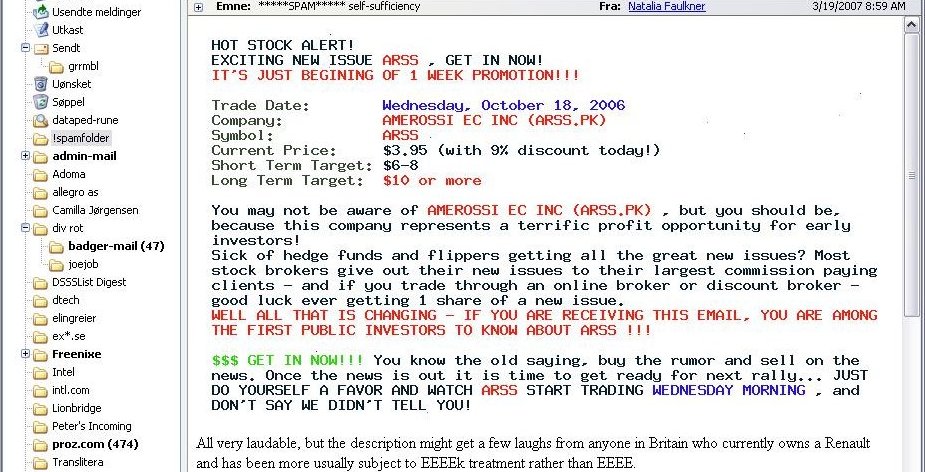 |
| This stock scam text is actually a picture |
The text-as-picture messages spurred the development of optical
character recognition (OCR) plugins for content scanning antispam
tools, and a few weeks later text-as-picture spams started coming with
distorted backgrounds, as seen in this example:
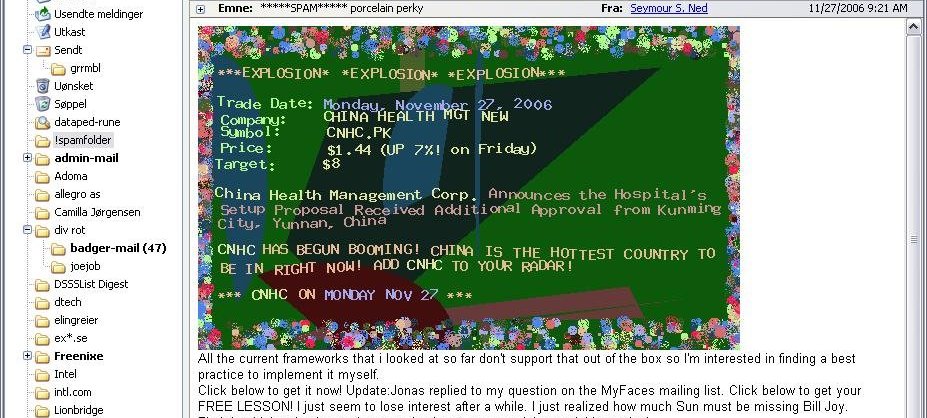 |
| This could make you think they're selling flowers |
All of these examples were taken from messages I have received, the
last one in November 2006 when the various tools were not yet
perfectly tuned to get rid of those specific nuisances. Newer
SpamAssassin plugins such as
FuzzyOcr are making good progress in
identifying these variants, at the cost of some processing power.
Recent innovations in spam content obfuscation includes carrying as
little content as possible such as a one-word subject line followed by
a message body with at most half a dozen words in addition to a URL as
well as the re-emergence of ASCII art, such as illustrated in here:
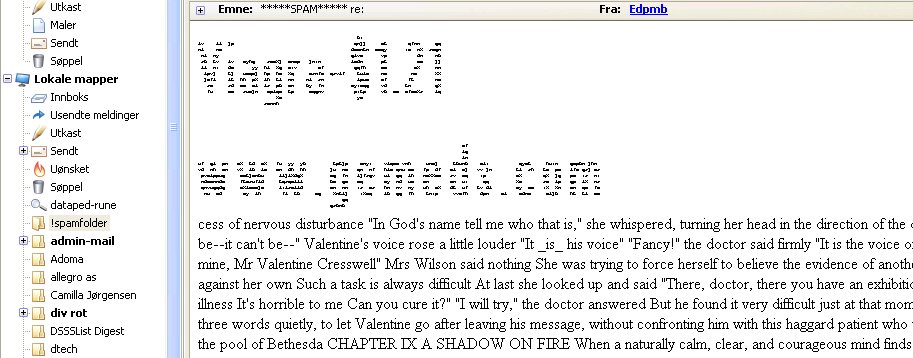 |
| Spam with ASCII art |
The figure displays the main message content. The main message as
well as the web site URL are rendered as ASCII art, followed by
apparently random text. The message came with enough spam
characteristics that filtering system awarded this particular message
a spamassassin score of 8.3, well into the 'likely but not definitely
spam' range.
The sequence is certainly not unique, and we should probably expect to
see similar mini arms races in the future. One obvious consequence of
the ever-increasing complexity in content filtering is that mail
handling, once a reasonably straightforward and undemanding activity,
now requires serious number crunching capability. And it bears
repeating that you should expect a non-zero error rate in content
classification.
Behavioral methods
Up to this point we have looked at what we can achieve first by making
any bugs in our operating system or applications harder to exploit,
and next what can be done by studying the content of the messages once
we've received them or while our mail transfer agent is processing the
DATA part. From what we have seen so far, it is fairly obvious that
the other side is trying to hide their tracks and avoid detection.
Spammers lie This shows even more clearly if we
study their behavior on the network level. The often repeated phrase
"Spammers lie, cheat and steal" at least to some
extent proves to be rooted in reality when we study spam and malware
traffic.
Forged headers Spammers may or may not be
truthful when describing the wares they are promoting, but we can be
more or less certain that they do their very best to hide their real
identities and use other people's equipment and resources whenever
possible. Studying the message headers in a typical spam message, we
can expect to find several classes of forged headers, including but
not limited to the
Received:,
From: and
X-Mailer: headers. Perhaps more often than not,
the apparent sender as taken from the
From:
header has no connection whatsoever to the actual sender.
Sender identification Some such discrepancies are
easy to detect, such as when a message arrives from an IP address
range radically different from the one you would expect when
performing a reverse DNS lookup based on the stated sender domain.
Traditional Internet standards do in fact not define a standard for
determining whether a given host is a valid mail sender for a given
domain.
However, by 2003 work started on extensions to the SMTP protocol
incorporating checks for domain versus IP address mismatches. After a
sometimes confusing process with attempts at formalizing workable
standards, these ideas were formalized into two competing and somewhat
incompatible methods, dubbed
Sender Policy
Framework (SPF) and
Sender ID
respectively, one championed by a group of independent engineers and
researchers, the other originating at Microsoft.
The initial hope that
the differences and incompatibilities would be resolved was further
dashed in April 2006 when the two groups chose to formulate separate
RFCs describing their experimental protocols (The
relevant RFCs are RFC 4406 and RFC 4407 for the Microsoft method,
which describe the Sender ID protocol and the
Purported
Responsible Address (PRA) algorithm it depends on
respectively, and RFC 4408 for SPF.).
The world fortunately chose SPF and moved on to further work involving signing outgoing messages (DKIM) and finally the umbrella specification
DMARC which builds on SPF and DKIM and adds its own wrapper, all to be stuffed into DNS TXT records for the sender domain. Expect more rants
along these lines from here to follow.
Blacklists Once a message has been classified as
spam, recording the IP address the message came from and adding the
address to a list of known spam senders is a relatively
straightforward operation. Such lists are commonly known as
blacklists, which may in turn be used in
blocking,
tarpitting or filtering.
Greylisting Possibly as a consequence of their
using other people's equipment for sending their unwanted traffic,
spam and malware sender software needs to be relatively lightweight,
and frequently the SMTP sending software does not interpret SMTP
status codes correctly.
This can be used to our advantage, via a technique which became known
as
greylisting. Greylisting as a
technique was presented in a 2003 paper by Evan Harris. The original
Harris paper and a number of other useful articles and resources can
be found at the
greylisting.org web
site. Even though Internet services are offered
with no guarantees, usually described as 'best effort' services, a
significant amount of effort has been put into making essential
services such as SMTP email transmission fault tolerant, making the
'best effort' one with as close as does not matter to having a perfect
record for delivering messages.
The current standard for Internet email transmission is defined in
RFC5321, which in section 4.5.4.1, "Sending Strategy", states
"In a typical system, the program that composes a message has some
method for requesting immediate attention for a new piece of
outgoing mail, while mail that cannot be transmitted immediately
MUST be queued and periodically retried by the sender."
and
"The sender MUST delay retrying a particular destination after one
attempt has failed. In general, the retry interval SHOULD be at
least 30 minutes; however, more sophisticated and variable
strategies will be beneficial when the SMTP client can determine
the reason for non-delivery."
RFC2821 goes on to state that
"Retries continue until the message is transmitted or the sender gives
up; the give-up time generally needs to be at least 4-5 days."
(unfortunately retaining the vague language in the sections relevant to greylisting unchanged from earlier versions. This means that validity of the practice is still a matter of interpretation according to the updated RFC. The event was not widely reported, my own column on the subject is available at
https://bsdly.blogspot.com/2008/10/ietf-failed-to-account-for-greylisting.html)
But the main points still stand: After all, delivering email is a collaborative, best effort thing, and
the RFC states clearly that if the site you are trying to send mail to
reports it can't receive anything at the moment, it is your DUTY (a
MUST requirement) to try again later, after an interval which is long
enough that your unfortunate communication partner has had a chance to
clear up whatever was the problem.
The short version is,
greylisting is the SMTP version of a
white lie. When we claim to have a temporary local
problem, the temporary local problem is really the equivalent of
“my admin told me not to talk to strangers”. Well
behaved senders with valid messages will come calling again later,
but spammers have no interest in waiting around for the retry, since
it would increase their cost of delivering the messages. This is the
essence of why greylisting still works. And since it's really a
matter of being slightly pedantic about following accepted standards,
false positives are very rare.
Greytrapping The so far final advance in spam
fighting is
greytrapping, a technique pioneered
by Bob Beck and the OpenBSD team as part of the
spamd almost-but-not-quite SMTP daemon.
This technique makes good use of the fact that the address lists
spammers routinely claim are verified as valid, deliverable addresses
are in fact anything but.
With a list of
greytrap addresses which are not
expected to receive valid mail,
spamd adds
IP addresses which try to deliver mail to the greytrap addresses to
its local blacklist for 24 hours. Blacklisted addresses are then
treated to the tarpit, where their SMTP dialog receives responses at a
rate of one byte per second.
The intention, and to a large extent the actual effect, is to shift
the load back to the sender, keeping them occupied with a very slow
SMTP dialogue. We will return to this in a later section.
Combined methods and some common pitfalls
It is worth noting that products frequently use some combination of
content scan and network behavior methods. For example,
spamassassin incorporates rules which
evaluate message header contents, using SPF data as a factor in
determining a message's validity, while at the same time using locally
generated bayesian token data to evaluate message contents.
We have already touched on the danger of false positives and the main
downside of content filtering, and it is worth noting the possible
downsides and pitfalls which come with the behavior based methods
too.
The inner workings of proprietary tools are
generally secret, but one particularly bizarre incident involving
Microsoft's Exchange Hosted Services reveals at least some of the
inner workings of that particular product. All available evidence
indicates that their system treats substring match based on a phishing
message to be a valid reason to block or “quarantine”
messages from a domain, and that their data do not expire. The
incident is chronicled by a still puzzled network administrator at
this
site.
Header mismatches While most simple header
mismatch checks are reliable, the one important criticism of SPF and
Sender ID is that the schemes are incompatible with several types of
valid message forwarding, another that the problem of roaming users on
dynamic IP adresses who still need to send mail has yet to be solved.
Blacklists The ways blacklists are generated,
maintained and used are almost too numerous to list here. The main
criticism and pitfalls lie in the way the lists are generated and
maintained. Some lists have tended to include entire ISP networks' IP
ranges as “know spam senders” in an attempt to force ISPs
to cancel spammers' contracts. Another recurring complaint is that
lists are less than actively maintained and may include out of date
data. Both can lead to false positives and legitimate mail lost.
Unfortunately, some popular blacklists have at times been abused and
employed as instruments in personal vendettas. For those reasons, it
always pays to check a list's maintenance policy and its reputation
for accuracy before using a list as sufficent reason to reject mail.
Greylisting Even valid senders will experience a
delay in delivery of the initial message. The length of the delay
varies according to a number of factors, some of which are not under
the greylister's control. A more serious issue is that some large
sites do not necessarily perform the delivery retries from the same IP
address as the one used for the initial attempt. A large enough pool
of possible sending hosts and a sufficiently random retry pattern
could lead to delivery timeout. Whitelisting the sites in question
may be a temporary workaround, however with greylisting entering the
mainstream it is expected that the problem of random redelivery will
decrease and hopefully disappear entirely.
Greytrapping The only known risk of using
greytrapping to date is that the
backscatter of
“message undeliverable” bounce messages resulting from
spam messages sent with one of your trap addresses as apparent sender
may cause mail servers configured to send nondelivery messages to
enter your blacklist.
This will cause loss or delayed delivery of
valid mail if the backscattering mail server needs to deliver valid
mail to your site. How often, if at all, this happens depends on
several semi-random factors, including the configuration policies of
the other sites' mail servers.
A working model
Where do we fit in?
Unix sysadmins find themselves in an inbetween position of sorts. We
can never totally rule out that our systems are vulnerable, but
malware which will actually manage to exploit a well run UNIX system
is rarely seen in the wild, if at all.
A
well run system means that best practice
procedures are applied to system administration: we do not run
unneccessary services, we install any security related updates, we
enforce password policies and so on.
However, we more likely than not run services for users who run their
main environment on vulnerable platforms. Malware for the vulnerable
platforms more likely than not spreads via email, which is quite likely
one of the services we handle.
We'll take a look at email handling, then move on to some productive uses of
packet filtering (aka firewalls) later.
Setting up a mail server
Back when SMTP email was designed, the main emphasis was on making as
sure as possible, without actually making hard guarantees, that mail
would get delivered to the intended recipient. As we have seen,
things get a little more complicated these days. The main steps to
configuring the mail service itself are as follows:
-
Choose your MTA
BSDs generally come with sendmail as part
of the base system. For our sites we have chosen to use
exim for several reasons. Despite its
human readable configuration files, it offers enormous flexibility,
and on FreeBSD users will find that the package message offers a
screenful of help to configure your mail service to do spam and
malware filtering during message receipt.
The main point is that your mail transfer agent needs to be able to
cooperate with external programs for filtering. Most modern MTAs do;
the other popular choices are postfix or
sendmail, and in recent times, OpenSMTPd which is developed as part of the OpenBSD project, is showing great promise.
-
Consider setting up your mailserver to do greylisting
All the early greylisting implementations and several of the options
in use today were written as optional modules for mail transfer
agents. If, for example, you will not be using PF anywhere, using
spamd (which we will be covering in more
detail later) is not really an option, and you may want to go for and
in-MTA option, such as a sendmail
milter such as
greylist-milter or a
postfix policy
server such as postgrey.
In some environments, the initial delay in delivery of the first
message may be undesirable or downright unacceptable; in such cases,
the option of greylisting is unfortunately off the table.
We feel your pain.
-
Choose your malware scanner
There are a number of malware scanners available, some free, some
proprietary. The favorite seems to be the one we chose,
clamav. clamav
is GPL licensed and conveniently available through the package system
on your favourite BSD.
The product appears to be actively maintained with frequent updates of
both the code itself and the malware signature database. Once it is
installed and configured, clamav takes care
of fetching the data it needs.
Signature database update frequency appears to be on par with
competing commercial and proprietary offerings.
-
Choose your spam filtering
Spam filtering is another well populated category in the BSD package
systems. Several of the free offerings such as
dspam and
spamassassin are very complete filtering
solutions, and with a little care it is even possible to combine
several different systems in a sort of cooperative whole.
We chose a slightly simpler approach and set up a configuration where
messages are evaluated by spamassassin
during message receipt. spamassassin is
written mainly in perl, shepherded by a very active development team
and is very flexible with all the customizability you could wish for.
Once all those bits have been configured and are running, any messages
with malware in them are silently discarded with a log entry of the
type
2007-04-08 23:39:17 1Haf6Q-000M6I-Cd => blackhole (DATA ACL discarded recipients):
This message contains malware (Trojan.Small-1604)
Messages which do not contain known malware are handed off to
spamassassin for evaluation.
spamassassin evaluates each message
according to its rule set, where each matching rule tallies up a
number of points or fractions of points, and in our configuration, the
very clear cases are discarded:
2007-04-08 02:39:35 1HaLRE-000Kq0-3P => blackhole (DATA ACL discarded recipients):
Your message scored 116.0 Spamassassin points and will not be delivered.
The messages which are not discarded outright fall into two categories:
Clearly not spam A large number of rules are in
play, and for various reasons valid messages may match one or several
of the rules. We chose a
definitely not spam
limit which means that messages which accumulate 5 spamassasin points
or less are passed with only a
X-Spam-Score:
header inserted.
The interval of reasonable doubt Messages which
match a slightly larger number of rules are quite likely to be spam,
but since they could still conceivably be valid, we change their
Subject: header by prepending the string
*****SPAM***** for easy filtering. The result
ends up looking like the illustration below to the end user:
 |
| Likely spam message, tagged for filtering |
Mainly for the administrator's benefit, a detailed report of which
rules were matched and the resulting scores is included in the message
headers.
Detailed spam scores for a likely spam message:
        Content analysis details:   (10.0 points, 5.0 required)
        pts rule name              description
        ---- ---------------------- --------------------------------------------------
        0.8 EXTRA_MPART_TYPE       Header has extraneous Content-type:...type= entry
        1.0 HTML_IMAGE_ONLY_28     BODY: HTML: images with 2400-2800 bytes of words
        0.0 HTML_MESSAGE           BODY: HTML included in message
        2.0 RCVD_IN_SORBS_DUL      RBL: SORBS: sent directly from dynamic IP address
        [62.31.124.248 listed in dnsbl.sorbs.net]
        1.3 RCVD_IN_BL_SPAMCOP_NET RBL: Received via a relay in bl.spamcop.net
        [Blocked - see <Mhttp://www.spamcop.net/bl.shtml?62.31.124.248>]
        3.1 RCVD_IN_XBL            RBL: Received via a relay in Spamhaus XBL
        [62.31.124.248 listed in sbl-xbl.spamhaus.org]
        1.7 RCVD_IN_NJABL_DUL      RBL: NJABL: dialup sender did non-local SMTP
        [62.31.124.248 listed in combined.njabl.org]
X-Spam-Flag: YES
Subject: *****SPAM***** conservatively enrichment
This means you have real data to work with for any fine tuning you
need to do in your local customization files, and for valid senders
who for some reason trigger too many spam characteristics, you may
even
whitelist using regular expression rules.
Optional
spamassassin plugins even offer
the possibility of automated feedback to hashlist sites such as
Razor, Pyzor and DCC - a few scripts will go a long way, and the
spamassassin documentation is in fact quite
usable.
Performing content scanning during message receipt means you run the
risk of having mail delivery to your users stop if one of your content
scanner services should happen to crash.
For that reason it can be argued that since content scanning, as
opposed to greylisting, does not have to be performed during message
receipt, it should be performed later. Server or end user processes
can for example be set up to do filtering on user mail boxes, using
tools such as
procmail or even filtering
features built into common mail clients such as Mozilla Thunderbird or
Evolution.
Now of course all of this content scanning adds up to rather extensive
calculations, well into what we until quite recently would have
considered “serious number crunching”. The next section
will present some recent advances which most likely will lighten the
load on your mail handlers.
Giving spammers a harder time: spamd
The early days of pure blacklisting
As content filtering grew ever more expensive, several groups started
looking into how to shift the burden from the recipient side back to
the spammers. The OpenBSD project's
spamd
is one such effort which is inteded to integrate with OpenBSD's PF
packet filter. Both PF and spamd have been ported to other BSDs, but
here we will focus on how spamd works on OpenBSD in the present version.
The initial version of
spamd was introduced
in OpenBSD 3.3, released in May 2003. The basic idea was to have a
basic tarpitting daemon which would produce extremely slow SMTP
replies to hosts in a blacklist of known spammers. Known spammers
would have their SMTP dialog dragged on for as long as possible, where
the
spamd at our end would serve its part
of the SMTP dialog at a rate of one byte per second.
spamd was designed to operate
independently, with no direct interactions with your real mail
service. Instead, it integrates with any PF based packet filtering
you have in place, and frequently runs on the packet filtering
gateway. Typical packet filtering rules to set up the redirection to
spamd looked something like this with the PF syntax of the time:
table <spamd> persist
table <spamd-white> persist
rdr pass on $ext_if inet proto tcp from <spamd> to { $ext_if, $int_if:network } \
            port smtp -> 127.0.0.1 port 8025
rdr pass on $ext_if inet proto tcp from !<spamd-white> to { $ext_if, $int_if:network } \
            port smtp -> 127.0.0.1 port 8025
Here the
table definitions denote lists of
addresses,
<spamd> to store the
blacklist, while the addresses in
<spamd-white> are not redirected. (See eg
this article -- also available
untracked -- for a more recent configuration example - details of how spamd works has changed over the years).
Note: Since this was originally written, the
uatraps list was unfortunately retired from service and is no longer available. See the update notes at the end of the article for some more information.
Blacklists and corresponding exceptions (whitelists) are defined in
the
spamd.conf configuration file, using a rather
straightforward syntax:
all:\
:uatraps:whitelist:
uatraps:\
        :black:\
        :msg="SPAM. Your address %A has sent spam within the last 24 hours":\
        :method=http:\
        :file=www.openbsd.org/spamd/traplist.gz
whitelist:\
        :white:\
        :method=file:\
        :file=/etc/mail/whitelist.txt
Updates to the lists are handled via the
spamd-setup program, run at intervals via
cron.
spamd in pure blacklisting mode was
apparently effective in wasting known spam senders' time, to the
extent that logs started showing a sharp increase in the number of
SMTP connections dropped during the first few seconds.
Introducing greylisting
Inspired by the early in-MTA greylisters (see the discussion of
greylisting earlier),
spamd was enhanced
to include greylisting functions in OpenBSD 3.5, which was released in
May 2004. The result was a further reduction in load on the content
filtering mail handlers, and OpenBSD users and developers have found
spamd's greylisting to be so effective that from OpenBSD 4.1 on,
spamd
greylists by default. Pure blacklisting mode is still available, but
requires specific configuration options to be set.
A typical sequence of log entries in verbose logging mode illustrates what greylisting
looks like in practice:
Oct  2 19:55:05 delilah spamd[26905]: (GREY) 83.23.213.115:
<gilbert@keyholes.net> -> <wkitp98zpu.fsf@datadok.no>
Oct  2 19:55:05 delilah spamd[26905]: 83.23.213.115: disconnected after 0 seconds.
Oct  2 19:55:05 delilah spamd[26905]: 83.23.213.115: connected (2/1)
Oct  2 19:55:06 delilah spamd[26905]: (GREY) 83.23.213.115: <gilbert@keyholes.net> ->
<wkitp98zpu.fsf@datadok.no>
Oct  2 19:55:06 delilah spamd[26905]: 83.23.213.115: disconnected after 1 seconds.
Oct  2 19:57:07 delilah spamd[26905]: (BLACK) 65.210.185.131:
<bounce-3C7E40A4B3@branch15.summer-bargainz.com> -> <adm@dataped.no>
Oct  2 19:58:50 delilah spamd[26905]: 65.210.185.131: From: Auto lnsurance Savings
<noreply@branch15.summer-bargainz.com>
Oct  2 19:58:50 delilah spamd[26905]: 65.210.185.131: Subject: Start SAVlNG M0NEY on
Auto lnsurance
Oct  2 19:58:50 delilah spamd[26905]: 65.210.185.131: To: adm@dataped.no
Oct  2 20:00:05 delilah spamd[26905]: 65.210.185.131: disconnected after 404 seconds.
lists: spews1
Oct  2 20:03:48 delilah spamd[26905]: 222.240.6.118: connected (1/0)
Oct  2 20:03:48 delilah spamd[26905]: 222.240.6.118: disconnected after 0 seconds.
Here we see how hosts connect for 0 or more seconds to be
greylisted, while the blacklisted host gets stuck for 404 seconds,
which is roughly the time it takes to exchange the typical SMTP dialog
one byte at the time up to the DATA part starts and the message is
rejected back to the sender's queue. It is worth noting that
spamd by default greets new correspondents
one byte at the time for the first ten seconds before sending the full
451 temporary failure message.
The graph below is based on data from one of our greylisting
spamd gateways, illustrating clearly that
the vast number of connection attempts are dropped within the first ten seconds.
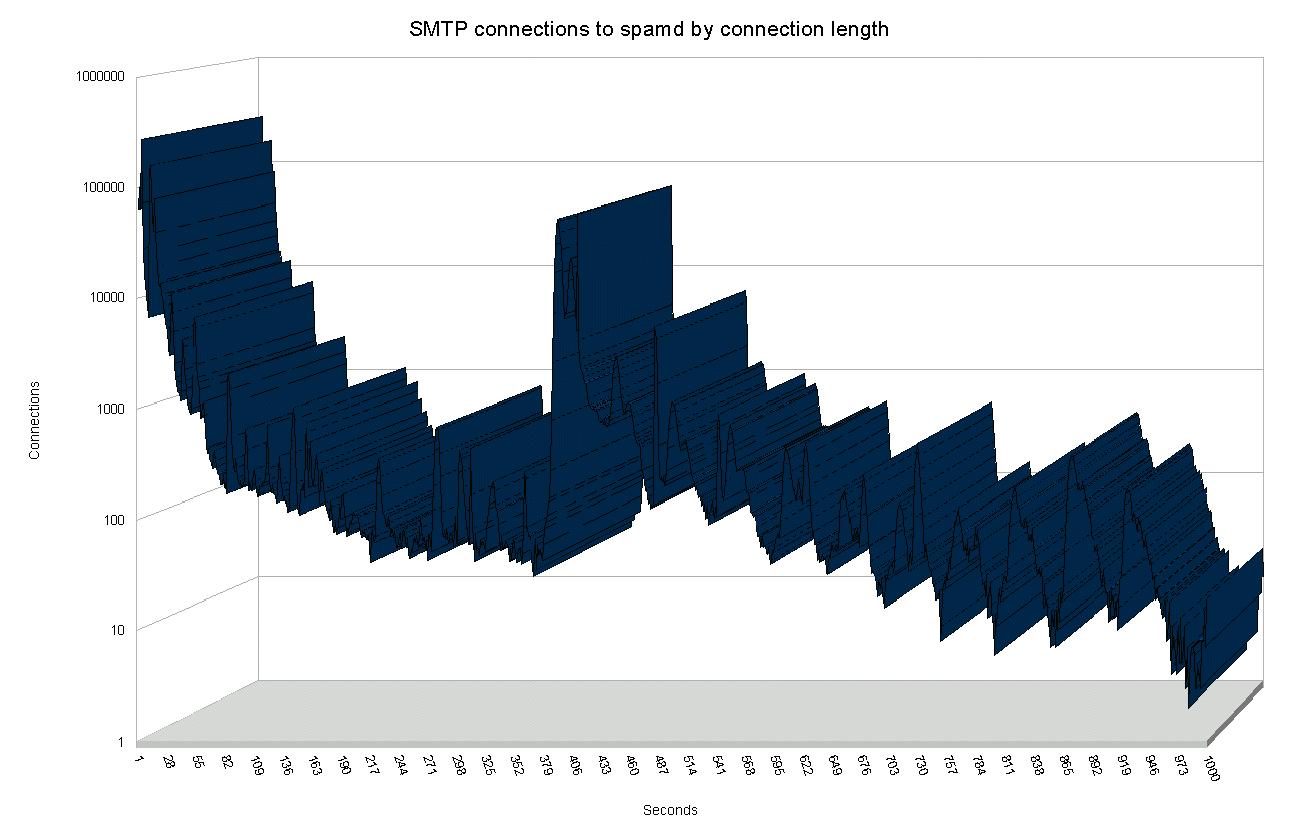 |
| Number of SMTP Connections by connection length |
The next peak, in the approximately 400 seconds range, represents
blacklisted hosts which get stuck in the one byte at the time tarpit.
The data in fact includes a wider range of connection lengths than
what is covered here, however, the frequency of any connection length
significantly longer than approximately 500 seconds is too low to
graph usefully. The extremes include hosts which appear to have been
stuck for several hours, with the outlier at 42,673 seconds, which is
very close to a full 12 hours.
Effects of implementation: Protecting the expensive appliance
Users and administrators at sites which implement greylisting tend to
agree that they get rid of most of their spam that way. However, real
world data which show with any reasonable accuracy the size of the effect
are very hard to come by. People tend to just move along, or maybe their
frame of reference changes.
For that reason it was very refreshing to see a message with new data
appear on the OpenBSD-misc mailing list on October 20, 2006 (See
Steve
Williams' October 20th, 2006 message to the OpenBSD-misc mailing
list).
In that message, Steve Williams describes a setting where the company
mail service runs on Microsoft Exchange, with the malware and spam
filtering handled by a Mcafee Webshield appliance. During a typical
day at the site, Williams states,
"If we received 10,000
emails, our Webshield would have trapped over 20,000 spam"
- roughly a two to one ratio in favor of unwanted messages. The
appliance was however handling spam and malware with a high degree of
accuracy.
That is, it was doing well until a new virus appeared, which the Webshield did not handle, and
Williams' users was once again flooded with unwanted messages.
Putting an OpenBSD machine with a purely greylisting
spamd configuration in front of the
Webshield appliance had dramatic effects.
Running overnight, the Webshield appliance had caught a total of
191 spam messages, all correctly classified. In
addition, approximately 4,200 legitimate email messages had been
processed, and the
spamd maintained
whitelist had reached a size of rougly 700 hosts.
By the metrics given at the start of Williams' message, he concludes
that under normal circumstances, the unprotected appliance would have
had to deal with approximately 9,000 spam or malware messages. In
turn this means that the greylisting eliminated approximately 95% of
the spam before it reached the content filtering appliance. This is
in itself a telling indicator of the relative merits of enumerating
badness versus behavior based detection.
spamdb and greytrapping
By the time the development cycle for OpenBSD 3.8 started during the
first half of 2005,
spamd users and developers had
accumulated significant amounts of data and experience on spammer
behaviour and spammer reactions to countermeasures.
We already know that spam senders rarely use a fully compliant SMTP
implementation to send their messages. That's why greylisting works.
Also, as we noted earlier, not only do spammers send large numbers of
messages, they rarely check that the addresses they feed to their
hijacked machines are actually deliverable. Combine these facts, and
you see that if a greylisted machine tries to send a message to an
invalid address in your domain, there is a significant probability
that the message is a spam, or for that matter, malware.
Consequently,
spamd had to learn
greytrapping. Greytrapping as implemented in
spamd puts offenders in a temporary blacklist,
dubbed
spamd-greytrap, for 24 hours. Twenty-four hours is
short enough to not cause serious disruption of legitimate traffic,
since real SMTP implementations will keep trying to deliver for a few
days at least. Experience from large scale implementations of the
technique shows that it rarely if ever produces false positives, and
machines which continue spamming after 24 hours will make it back to
the tarpit soon enough.
One prime example is Bob Beck's "ghosts of usenet postings past" based
traplist, which rarely contains less than 20,000 entries. The reason
we refer to it as a “traplist” is that the list is
generated by greytrapping at the University of Alberta. At frequent
intervals the content of the traplist is dumped to a file which is
made available for download and can be used as a blacklist by other
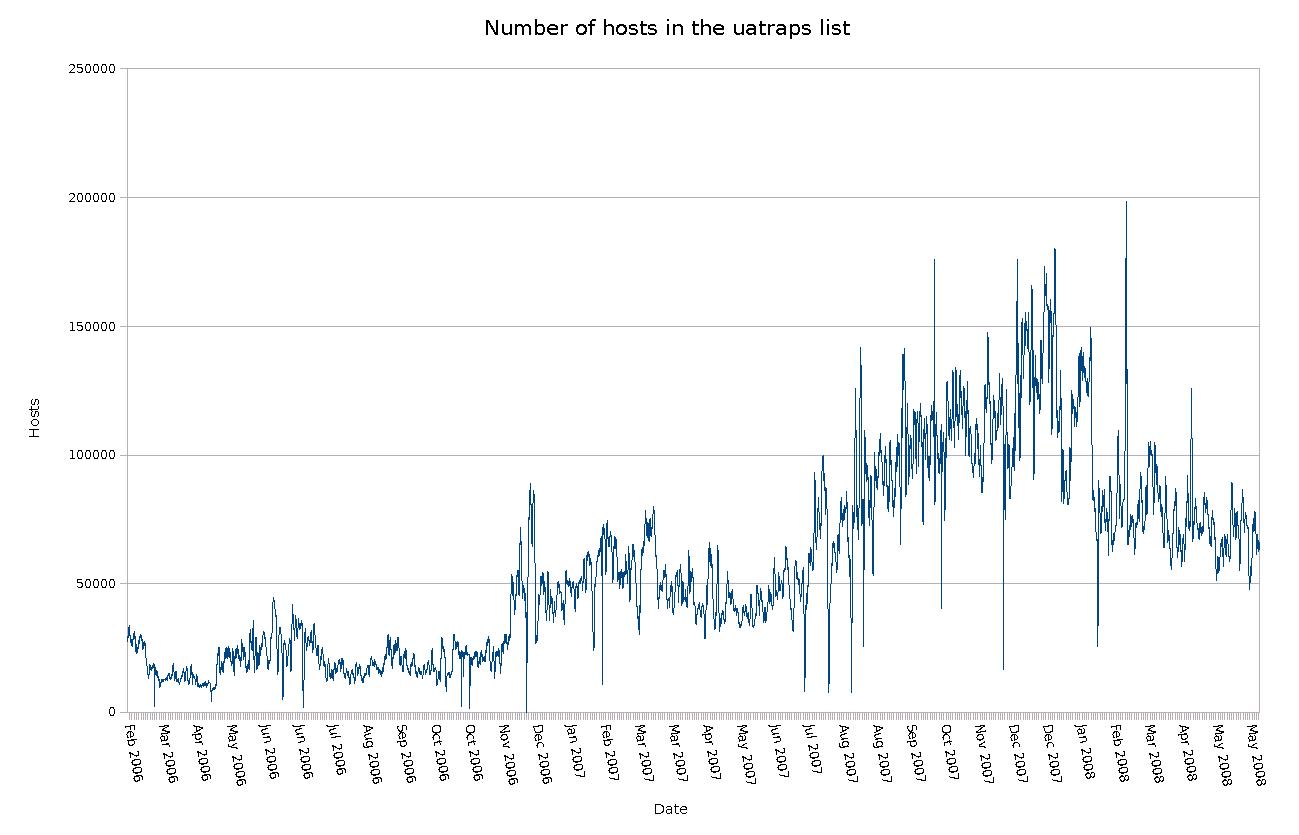
spamd users. The number of hosts varies widely and has been
as high as almost 200,000.
The peak number of 198,289
entries was registered on Monday, February 25th 2008, at 18:00
CET.
The diagram here illustrates the number of hosts
in the list over a period of a little more than two years.
 |
| Hosts in the uatraps list - active spam sending hosts |
At the time this article was originally written (mid March, 2008), the list typically contained
around 100,000 entries. While still officially in testing, the list
was made publicly available on January 30th, 2006. The list has to my
knowledge yet to produce any false positives and was available from
http://www.openbsd.org/spamd/traplist.gz.
Note: Since this was originally written, the
uatraps
list was unfortunately retired from service and is no longer available.
See the update notes at the end of the article for some more
information.
Setting up a local traplist to supplement your greylisting and other
blacklists is very easy, and is straightforwardly described in the
spamd and
spamdb
documentation.
Anecdotal evidence suggests that a limited number of obviously bogus
addresses such as those which have already been seen in
spamd's greylisting logs or picked from
Unknown user messages in your mail server logs
will make a measurable dent in the number of unwanted messages which
still make it through.
Some limited ongoing experiments started in July 2007 (See the blog post
http://bsdly.blogspot.com/2007/07/hey-spammer-heres-list-for-you.html and followups) indicate that publishing the list of
greytrap addresses on the web has interesting effects. After a spike
in undeliverable bounce messages to non-existent addresses, we began
adding backscatter addresses in our own domains to the local greytrap
list and publishing the greytrap addresses on a web page that was
referenced with a moderately visible link on the target domains' home
pages.
The greytrap list quickly grew to several thousand entries (The list, with some accompanying explanation, is maintained at
bsdly.net, fed by
what appears to be several different address generating operations
with slighly different algorithms and patterns). See the
field notes at
http://bsdly.blogspot.com/2007/11/i-must-be-living-in-parallel-universe.html
for some samples. Addresses would typically start to
appear in our greylist dumps (and occasionally in mail server logs) as
intended recipients for messages with
From:
addresses other than
<> within days of
being added to the published list.
The net effect of a sizeable list of published greytrap addresses is
both a higher probability of detecting spam senders early and further
worsening spammers' effective hit rate by lowering the quality of
their address lists.
Incremental spamd improvements
One of the main overall characteristics of the changes implemented in
the most recent OpenBSD release is that they tend to be what users and
developers see as sensible, best practice compliant defaults.
Typical of the sensible defaults theme is the decision to have
spamd run in greylisting mode by default.
This change was implemented in OpenBSD 4.1, released May 1st, 2007.
Sites with several mail exchangers and corresponding
spamd instances will appreciate the
synchronization feature for greylisting databases between hosts, also
an OpenBSD 4.1 improvement.
Sites and domains with several mail exhangers with different
priorities have seen that spammers frequently attempt to deliver to
secondary mail exchangers first. As a consequence, the greytrapping
feature was extended to detect and act on such out of order mail
exchanger use.
Conclusion
The main conclusions are that the free tools work, and that by using
them intelligently you can actually make a difference.
If our goal is to achieve relative peace and quiet in our own networks
so we get our real work done, there are real advantages in stopping
undesirable traffic as early as possible, and stopping most of it at
the perimeter is actually doable.
All the tools we have studied are open source. The open source model,
which is closely related to the peer review style of development seen
in academic research, produces effective, high quality tools which
truly make your life easier. The often repeated argument that
development in the open would make it easier for the other side to
develop countermeasures does not match our experience. If anything we
see that development in the open means that ideas get exposed to real
world conditions quickly, exposing the less robust approaches in ways
that closed development is apparently unable to match.
The data I presented earlier as graphs seem to indicate that our
efforts have some effect. There appears to be a trend which has the
number of greytrapped hosts seemingly stabilize at a higher level over
time. This could be taken as an indicator that the number of
compromised machines is rising, but could equally well be interpreted
to mean that spammers and malware senders need to try harder now that
effective countermeasures are becoming more widely deployed.
By studying our adversaries' behavior patterns we have trapped them,
and we may just be starting to win.
Resources
- Slides for this talk
-
Nicholas Weaver, Vern Paxson, Stuart
Staniford and Robert Cunningham: A Taxonomy of
Computer Worms
-
Marcus Ranum: The
Six Dumbest Ideas in Computer Security, September 1, 2005
-
Greg Lehey: Seen it all before?, Daemon's Advocate, The Daemon News ezine, June 2000 edition
-
Brad Templeton: Reflections on
the 25th Anniversary of Spam
-
The Morris Worm 18th anniversary site
-
Sender Policy Framework
-
Theo de Raadt: Exploit mitigation techniques and the update, Security Mitigation Techniques: An update after 10 years
-
Peter N. M. Hansteen: Firewalling with PF tutorial
Now largely superseded by Network Management with the OpenBSD Packet Filter toolset, by Peter N. M. Hansteen, Massimiliano Stucchi and Tom Smyth (A PF tutorial, this is the BSDCan 2024 edition). An earlier, even more extensive set of slides can be found in the 2016-vintage PF tutorial.
-
Peter N. M. Hansteen: The Book of PF, No Starch Press 2026 (first edition 2007, second edition 2010, third edition 2014)
-
Peter N. M. Hansteen: That Grumpy BSD Guy, blog posts (prettified, tracked). New entries as well as still-relevant pieces that started out over there and have warranted updating will also be findable, untracked other than my webserver log, at https://nxdomain.no/~peter/blogposts/. Please let me know if there are pieces you think would warrant liberation to that space.
-
Bob Beck: PF, it is not just for firewalls anymore and OpenBSD spamd - greylisting and beyond
-
Barbie: Understanding Malware
Update 2016-12-13: A
discussion on the OpenBSD-misc mailing list lead me to review this article, and I found a couple of points I would like to add:
The
uatraps greytrapping-based blacklist was unfortunately retired from service in May 2016 and is no longer available. My own
bsdly list, which is another greytrapping-generated list stabilized at a slightly higher number of entries after uatraps dispappeared, and for that reason I chose to replace the uatraps reference with that one in
a common example. Other good sources of information is the example
spamd.conf in your
/etc/mail directory if you're running OpenBSD. And if you want to explore a useful, if slightly unusual way to use routing protocols, take a look at Peter Hessler's
BGP-spamd initiative.
The OpenBSD-misc discussion also touched on expected connection lengths for the SMTP traffic spamd captures, and I realized I could possibly shed some further light on the issue. The graph earlier in the article was based on logs covering approximately 1 million connections.
Even with slightly different log rotation settings between them, the still existing logs on the three gateways described in the
Voicemail Scammers piece between them contained data on some 8,145,183 connections, graphed below.
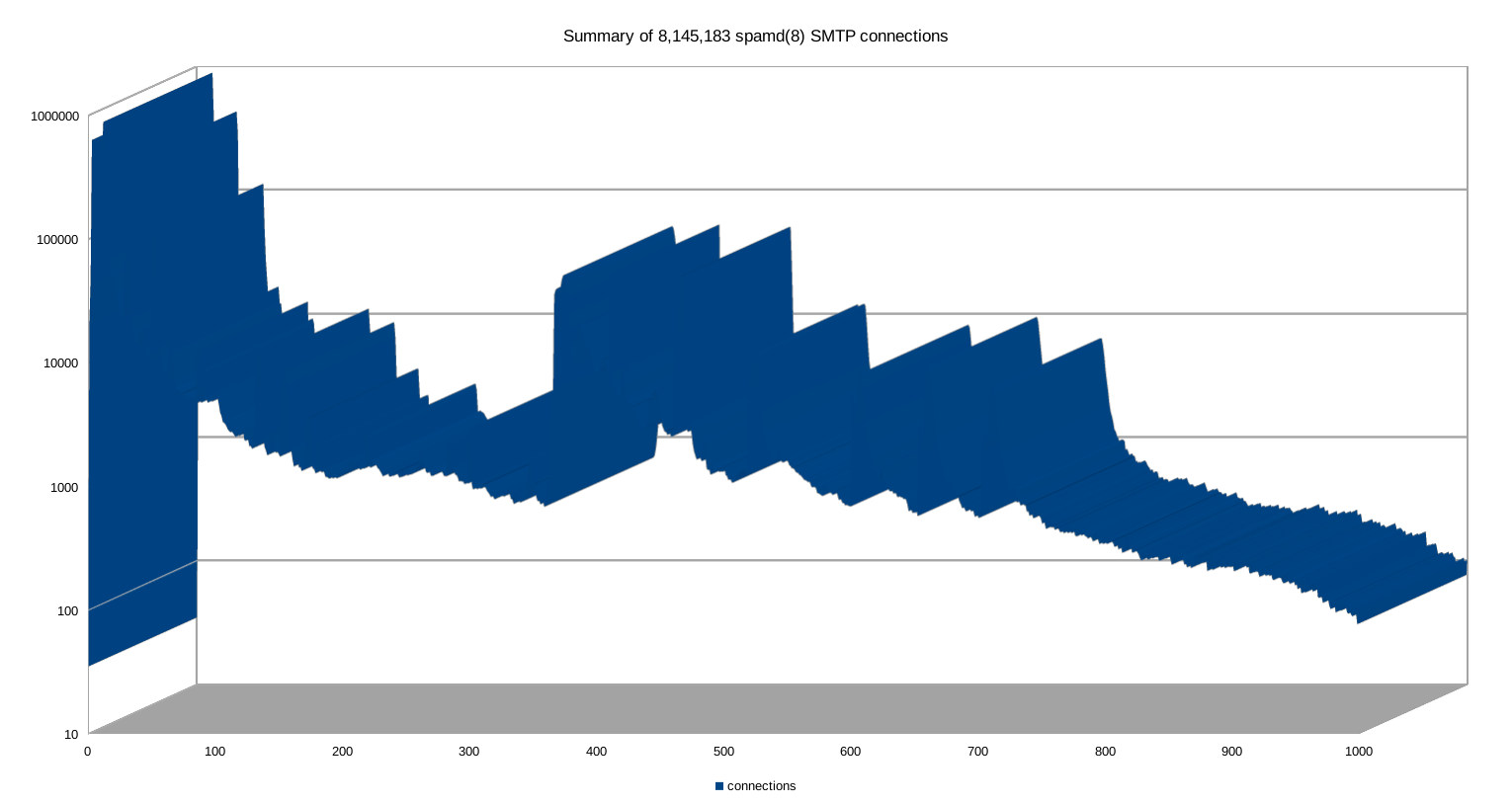
That is, like I did with the earlier graph I chose to limit the data to the 0 to 1,000 seconds interval. The general pattern seems to be unchanged: The vast majority of the connections drop during the first few seconds, but the data includes some outliers, all the way out to the one that hung on for a whole 63423 seconds (17 hours, 37 minutes and 3 seconds). Which of course makes the full data impossible to graph.
Click on the image to get the raw size, and if you like you can download the
spreadsheet or the
CSV version. The full data runs into the gigabytes, but if you want to take a peek for research purposes, please contact me via the various conventional means.
Update 2016-12-14: Added a paragraph mentioning DKIM and DMARC, which were either preliminary specifications or not yet thought up at the time this was originally written.


