All Activity
Past hour
-
Why? My USB-c SS port is USB 3.2 Gen 2x2 Type-C port (20 Gbps). SAS is roughly the same BW. This PC is always on. What is it about USB that is not recommended?
-
For Odoo 17 and Odoo 18 there are dockers now. https://forums.unraid.net/topic/150914-support-eurotimmy-odoo17-odoo18/
-
or the 20 !
-
Yes, I have done this many times, to no avail. The one think I've thought is I could delete all my users and create a new one after running dockersafe.
Today
-
I'm still waiting on a reply from Chuck PA on other forms, I will rework the docker once I get the OK form him. May rework how the docker works orginaly when made it was runing Chuck PA scirpt but had isseus with deplyment adn the script stalling... had to rework the entire setup then the FTS (Text Search) repairs and issues started comeing in as I esteal re wrote by coping out his repair work form the script... once i have dev done and comunication with how to procede in teh future... (may have a docker var tempatle and log do other things and acutal run the docker exec and script commands based on tempatle.. IDK yet... the point is I'm looking into it and waiting on more info be fore impelementation and execution..
-
hocusfocus joined the community
-
I'm getting the /var/log is getting full (currently 100 % used) error and after a reboot am still getting this error. Attached diagnostics. diagnostics-20261019-1924.zip
-
Did you create you user other than the built-in "root"? That's the ID you need to use to connect to your shares. After setting the share to "Private" or "Secure", are you scrolling to the bottom of the screen and setting the ID created in #1 as Read/Write? Go to Tools -> Docker Safe Permissions and run that.
-
Thank you JorgeB for the great answer and details! I will follow the recommendations and details. I will also save this detail for future use if needed.
-
I have tried (as far as I can tell) all other cominations of Security settings and user permissions, and cannot get full read/write access to SMB shares via Windows or Linux. I can get read access, but no write. If I set Security to "Public" I can get full acces sbut I don't really like this solution, for obvious reasons...
Yesterday
-
Confirmed. After restoring /mnt/medialib -> /media, the test as UID 99:100 reproduces the exact EPERM error when Node.js fs.promises.copyFile() copies from /cache to the NTFS-backed /media path. The test file is shown as owner 0:0, and the temporary files were cleaned up. I’ll use the application-side fix when available rather than changing the disk mount options for now. Mounting the NTFS disks with uid=99,gid=100 is the workaround; I'm not sure Unassigned Devices exposes that option per disk. Thanks for reproducing and addressing this. root@NAS:~# docker exec x265-butler stat -c '%u:%g' /proc/1 0:0 root@NAS:~# findmnt -T /mnt/disks/SG3_TV_Shows -o TARGET,FSTYPE,OPTIONS TARGET FSTYPE OPTIONS /mnt/disks/SG3_TV_Shows fuseblk rw,nosuid,nodev,relatime,user_id=0,group_id=0,default_permissions,allow_other,blksize=4096 root@NAS:~# docker exec -u 99:100 x265-butler sh -c 'head -c 16M /dev/zero > /cache/eperm-test.bin' root@NAS:~# docker exec -u 99:100 x265-butler node -e "require('fs').promises.copyFile('/cache/eperm-test.bin','/media/TV Shows/Columbo (1971)/Season 06/eperm-test.tmp').then(()=>console.log('ok'),e=>console.log(e.message))" EPERM: operation not permitted, copyfile '/cache/eperm-test.bin' -> '/media/TV Shows/Columbo (1971)/Season 06/eperm-test.tmp' root@NAS:~# docker exec x265-butler rm -f /cache/eperm-test.bin "/media/TV Shows/Columbo (1971)/Season 06/eperm-test.tmp"
-
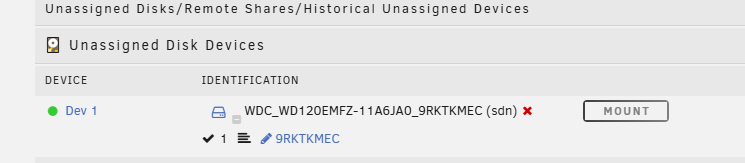
Hmm, I think I did something wrong. The parity rebuild finished a little earlier today. But now I'm typing the command and getting an error. I did: rsync -a --info=progress2 --exclude=lost+found /mnt/disks/9RKTKMEC/ /mnt/user/ and it returned an error. Cheking the Unassigned Devices on the Main tab it shows: And in Settings under Unassigned Drives it tells me So I'm pretty sure I have the mount point correct. Checking the disk log I see: So I'm assuming the "mount" button being grayed out isn't like that because I clicked it earlier, as I assumed. I'm attaching a fresh diagnostic as well, just in case. tardis-diagnostics-20261019-1924.zip


-
I'm a noob I don't know what you mean. Do you want me to check extra parameters to see if any say restart?
-
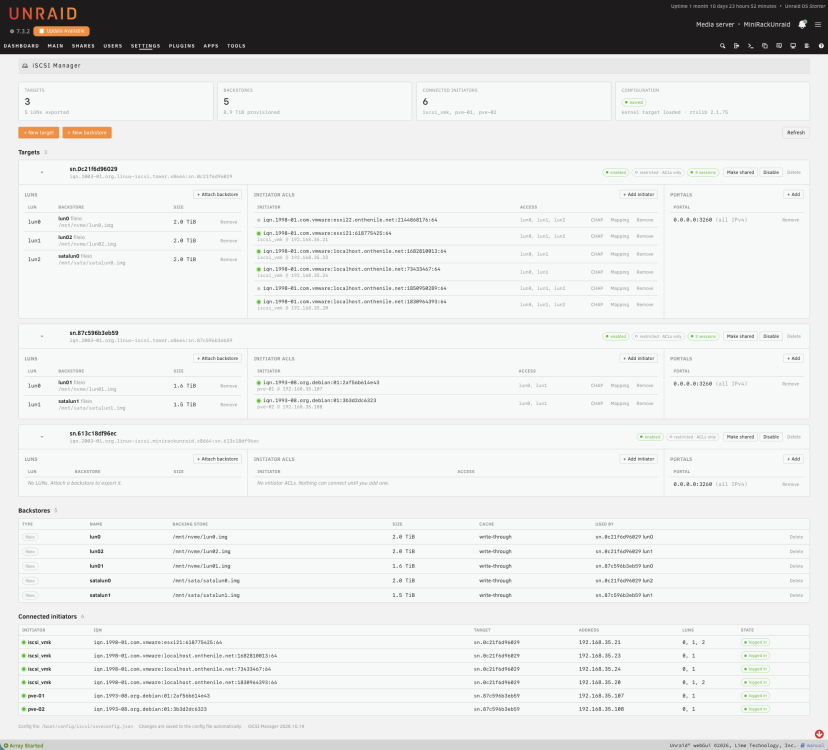
It's been almost four years since the current iscsi plugin has been updated in any meaningful way and the plugin in it's current state is kind of unpleasant to use in an Unraid world (at least for me) because it doesn't match any of the aesthetic of the existing tools since it's basically just a dump of the contents of the cli tools to the screen. I still used it with my cute little lincstation n2 minirack Unraid for quite a while because it was all that there was ... well I decided this week that I didn't want to use a gui tool that makes me just ingest cli output so I fixed it ... at least for me. Your mileage may vary, if you want to try it out great, if not ... I don't mind. It's right here on github for you to test it out and see what you think. It is running on my actual device as well as a handful of friends and I spun up a few unraid instances separately just to test fresh new installs etc ... If this isn't the right place to talk about this excuse me and I'm sorry ....
-
brainchill joined the community
-
Looks like Unraid 8 will have a backup solution like this built-in What the backup solution will look like exactly I have no idea. We will see when it comes out.
-
On the Docker page, check the runtimes of each of your containers to see if any are restarting.
-
Hi there, Thanks very much for this! I've created a base repo for you here: https://github.com/unraid/lang-el_GR Once your PR's are merged, they will show up in CA for all when I update the XML template. Please let me know if you have any questions and if I can do anything for you. -Spencer
-
I think I might have found the problem. I don't think the backup destination was set to automount. Plus, I had upgraded borg to 1.4.5. So I formatted the backup drive, set it to automount, recreated the borg repositories, and I'm now running a backup using my script. So far, so good. It'll take a while to complete plus it'll run overnight. It might not finish by the time cron calls the backup again but it'll skip it if it's running already. I didn't know that Unraid uses RAM if it doesn't find a disk in a script. Kinda weird. I'd expect it to error out. I'll check back in a few days to confirm all is well. Thanks again for the help!
-
Hello all, I had a weird problem on my NAS, I found two of my containers had been stopped with no apparent reason. When trying to restart them from the GUI it failed with an error "403". I then proceeded to restart them from the command line and this time I got a more descriptive error message from the docker daemon: "endpoint with name <name of the container> already exists in network". Each one of the two containers belong to a separate network, one is in a custom "lan" network and the other is connected to br0. I tried to manually disconnect the containers from their respective networks but it did not help. Disabling/enabling docker somehow solved the issue. I never had this problem before. Because I recently upgraded to 7.3.2 I think maybe it is something related to this release? Has anybody encountered the same issue before ?
-
@JorgeB I think I had a regression when upgrading to 7.3.3 but can't 100% confirm if the timing was coincidental? Anyway, my UnRAID server is MIA again in network browser.
-
Following on from the NUT config in this thread: I enabled it on a UGREEN DXP4800 Plus with the US3000, and a couple of days later the syslog was filling the log tmpfs. If left alone it would eventually have hung the server. Here is what I found and how I fixed it, in case it helps anyone else. Setup Unraid 7.3.3 NUT plugin (nut-dw) 2026.10.16, NUT 2.8.5 "Enable Manual Configuration" set to For UPS Driver, with the ups.conf from earlier in this thread (usbhid-ups, vendorid = 2b89, productid = ffff, subdriver = Arduino) Symptom /var/log (a tmpfs, 1 GB on my box) was growing at roughly 5 KB/s, about 430 MB a day. About 90% of /var/log/syslog was NUT lines like: Code block usbhid-ups: [D5:...:ugreenups] Exponent = 0 usbhid-ups: [D4:...:ugreenups] Entering libusb_get_report upsmon: [D3:...:mono] get_var: [email protected] / statusCause (in my case) I had NUT debug logging switched on, at level 6, in two places: debug_min = 6 in ups.conf. The plugin's upsmon debug level setting (DEBLEVELMON="6"), which writes DEBUG_MIN 6 into upsmon.conf. On most UPSes that would be noisy but tolerable. The US3000 exposes a large vendor-specific HID descriptor (hundreds of ffff00xx usages), and at debug level 5/6 the driver dumps it on every poll. That is where most of the volume came from. Why it eventually fills /var/log: Unraid's logrotate only runs from cron.daily, with rotate 2 and no compression. At that rate the live syslog plus two rotated copies can exceed the tmpfs. How to check yours: Code block ls -laS /var/log | head grep -E "usbhid-ups|upsmon|upsd" /var/log/syslog | grep -c "\[D[0-9]" sed -E 's/^[A-Z][a-z]{2} +[0-9]+ [0-9:]+ //; s/\[[0-9]+\]//g' /var/log/syslog | sort | uniq -c | sort -rn | headThe OL DISCHRG oddity The US3000 reports ups.status: OL DISCHRG all the time, even on mains. In the raw HID data I saw ACPresent = 1, Discharging = 1, Charging = 0, BelowRemainingCapacityLimit = 0, so the firmware itself sets those flags and NUT is not misreading them. My guess is that "Discharging" just means "not charging" on this firmware. battery.runtime is always 65535, which is a placeholder, so don't rely on it. NUT logs a warning for OL+DISCHRG, but only at startup and when battery.charge changes. It is not a flood on its own. I added onlinedischarge_log_throttle_hovercharge = 95 so 98/99 wobble doesn't trigger it. The fix, and where it has to be made to persist On Unraid, /etc is in RAM. The NUT plugin keeps its real config on the flash drive and regenerates parts of /etc/nut on every start, so where you edit matters: Setting Edit here Why upsmon debug off DEBLEVELMON="default" in /boot/config/plugins/nut-dw/nut-dw.cfg (or the "upsmon debug level" setting in the plugin GUI) rc.nut rewrites line 8 of upsmon.conf from this on every start. If you edit upsmon.conf directly, it is overwritten. driver debug off Remove debug_min = ... from ups.conf (NUT Editor, or edit the file) In "For UPS Driver" manual mode the GUI's driver debug setting is ignored, so the line lives in your own ups.conf. anti-spam filter SYSLOGFILTER="enable" in nut-dw.cfg The plugin recreates the rsyslog filter and its logrotate file on each start. The plugin copies /etc/nut/* to /boot/config/plugins/nut-dw/ups/ whenever it writes its config, so after editing ups.conf I restarted NUT via the plugin and checked the two copies matched: Code block cmp /etc/nut/ups.conf /boot/config/plugins/nut-dw/ups/ups.conf && echo identicalMy ups.conf now (the lowbatt / override lines are my own choices, not required): Code block [ugreenups] driver = usbhid-ups port = auto vendorid = 2b89 productid = ffff subdriver = Arduino desc = "Ugreen US3000 via USB" allow_killpower = 1 onlinedischarge_log_throttle_sec = -1 lowbatt=20 ignorelb override.battery.charge.low = 20 override.battery.runtime.low = 100 onlinedischarge_log_throttle_hovercharge = 95 pollinterval = 5Then restart NUT and clear the old flood with : > /var/log/syslog. Result Before: about 5 KB/s, thousands of NUT debug lines. After: 1 line in the first 60 seconds (my own test message), 0 debug lines, and /var/log at about 8 MB of 1 GB, almost all from an unrelated plugin log. Caveats, so you don't take this as gospel I verified this over a short period right after the change. (I'll update this post after 12+ hours with the log growth rate, whether any OL+DISCHRG warnings appeared, and confirmation after a reboot that the settings survived.) I have not tested a real power-loss shutdown with this setup. pollinterval = 5 is an optional tweak to reduce USB traffic; I haven't measured its effect on shutdown responsiveness. Debug level 6 was my own setting. If you didn't enable debug yourself and still see flooding, post your top repeated lines rather than assuming it's the same cause. Also worth doing: upsd listens on 0.0.0.0 with default NUT passwords. If only Unraid itself needs the UPS data, bind it to 127.0.0.1 and change the passwords. Possible extra hardening (not done yet) Because logrotate runs once a day, any future logging flood can still fill /var/log. An hourly logrotate run, for example from the User Scripts plugin, would cap that. I'll add it after the system has run clean for a while.
-
Hi Unraid Team, I'd like to raise awareness of the recently disclosed Linux kernel vulnerability CVE-2026-99999 (PwnEscape) and ask whether its potential impact on current Unraid OS releases has already been assessed. The vulnerability affects IPv4 checksum handling in the Linux kernel and may allow an attacker to escape from a KVM guest and potentially execute code on the host under certain conditions. According to the published release notes: Unraid OS 7.3.3 (stable, October 8) uses Linux kernel 6.18.54-Unraid. Unraid OS 7.4.0-rc1 also uses Linux kernel 6.18.54-Unraid. The upstream fix was integrated into the Linux 6.18 stable series with version 6.18.57, released on October 15. Since Unraid also relies on KVM for virtualization, this raises a few questions: Has the Unraid team already assessed CVE-2026-99999? Are current releases affected, or has the relevant fix already been backported into the Unraid kernel? If affected, is a security update planned for the current stable 7.3.x branch? Would a targeted kernel update or hotfix be possible without waiting for Unraid 7.4 or the upcoming Unraid 8? Are there any officially recommended temporary mitigations for users running virtual machines until a patched kernel becomes available? Could the team provide a security advisory or confirmation of the vulnerability status so users can assess the risk to their systems? I'm aware that Unraid 8 is expected to introduce a different underlying distribution and improvements to security update delivery. However, given the potential severity of this vulnerability, I believe it would be helpful to clarify the situation for current Unraid 7.x installations as well. This is not intended as criticism of the development or release schedule. I'm primarily interested in understanding the actual exposure and whether users need to take any immediate action. References: Research and technical analysis: https://www.pwn.ai/blog/pwnescape Upstream kernel fix: https://github.com/torvalds/linux/commit/6785011f8b16abf40b1e9d8b2e332232b3e68822 Linux 6.18.57 changelog: https://www.kernel.org/pub/linux/kernel/v6.x/ChangeLog-6.18.57 Red Hat vulnerability assessment: https://access.redhat.com/security/cve/cve-2026-99999 Thanks in advance for any clarification or guidance from the Unraid team
-
CBOne joined the community
-
It looks like ChuckPa's DBRepair has now been updated for the newer versions unless I have read it incorrectly?
-
Wow, this is awesome! 😄 I honestly didn't expect someone to actually turn my suggestion into a working plugin! Thank you so much for taking the time to develop and share this with the community. Really appreciate the effort! That being said, I still think this is something Unraid should address natively. Users shouldn't have to rely on a third-party plugin for something as basic as managing icons. Hopefully, the Unraid team will take notice and implement a proper built-in solution in the future. Great work, and thanks again! 🚀
-
Hi Schubi05, Thank you for this quick update. After disabling the script and installing version 0.23.0, the LED stays on continuously after a reboot and no longer flashes. The color is now orange; previously, it was always white. Best datarepos
-
Also ich kann nichts schlechtes zu meinem N6 sagen. Die Temperaturen bleiben der HDDs bleiben so bei 42 Grad wenn der Check gemacht wird Ich kann auch keine Störende geräusche wahrnemen.