You signed in with another tab or window. Reload to refresh your session.You signed out in another tab or window. Reload to refresh your session.You switched accounts on another tab or window. Reload to refresh your session.Dismiss alert
{{ message }}
Repository navigation
new network stack in 2.1 and authentication via internet explorer? #26832
Previous versions of netcore (pre 2.1) and the full framework allow us to access restricted URL's as long as the credentials have been saved in the internet explorer.
As I'm not really aware of what's going on under the hood. Here is what I see: My application/workflow works when the environment variable is set or it is published with netcore2.0/full framework.
My questions are: Can I get the same behavior with the new stack? Is there a way to automatically ask the user for credentials like in internet explorer? Is opting out from the new stack a long-term supported scenario? Is there an API to retrieve credentials from the IE stack and use them on the new one? Should it work as before out of the box?
Any insights or pointers to further documentation on how this works under the hood is appreciated as well.
I tried to search the issues list for existing issues but nothing exactly matches the above scenario. Therefore I'm unsure whether it is supported or not.
Previous versions of netcore (pre 2.1) and the full framework allow us to access restricted URL's as long as the credentials have been saved in the internet explorer.
What do you mean by "restricted" URL's? Please give an example. Thanks.
@davidsh Sorry I meant URLs where you need to be authenticated or get 401 otherwise (on-premise TFS for example). In our scenario we always get 401 with the new stack. Previously we told people to authenticate in internet explorer to "make it work".
Can you please show a full example with source code of what doesn't work? In general, .NET Core 2.1 supports authentication connections for both proxy (responding to 407) and server (responding to 401).
Perhaps there is some problem with how you are setting the credentials for that. You need to set them in the HttpClient.Credentials property.
Ok I can try to create a quick sample tomorrow, but really I think it is as simple as (simplified with the relevant code path from a real application -> some stuff probably doesn't make any sense):
classEmptyProxy:IWebProxy{publicICrendetialsCredentials{get{returnnull;}set{}}publicUriGetProxy(Uriuri)=>null;publicboolIsBypassed(Urihost)=>true;}publicvoidDoDownload(){varhandler=newHttpClientHandler();handler.UseProxy=true;varproxy=newEmptyProxy();proxy.Credentials=CredentialCache.DefaultCredentials;// note: does nothinghandler.Proxy=proxy;varclient=newHttpClient(handler);handler.UseProxy=true;handler.UseDefaultCredentials=true;// use client to access ressource, for example `GetAsync`}
So maybe the behavior has changed on what is happening when null is returned?
Thanks for posting this snippet of code. Looking at the code above, it sounds like the problem you're having is with proxy credentials/authentication and not server credentials/authentication? It also looks like you're trying to get "default credentials" to be passed automatically to the proxy?
If you're needing default logged-in credentials to be passed automatically to a proxy server, then you should be setting those in the HttpClientHandler.DefaultProxyCredentials property. That property is for setting credentials to a proxy server where the proxy settings are defined in the system (IE settings for Windows or environment variables for Linux). The proxy server is required to use Negotiate or NTLM schemes in order to transmit default logged-in credentials.
We don't use a proxy in this particular code-path I was testing (therefore we return null) but maybe using this code-path leads to this particular behavior in the new implementation?
To explain a bit further: This code developed into this to support proxy configuration (we use a different IWebProxy implementation in the proxy scenario)
It's still unclear what your scenario is. What sort of authentication is being used in your scenario? You mentioned "saving credentials in Internet Explorer" What kind of credentials are those? Are they to servers or proxies? Some of the issues you're citing that might be related are those involving the use of a proxy server that requires authentication.
I don't see how save credentials are ever used in .NET Framework or .NET Core 2.0 with HTTP requests since the HTTP stack doesn't read those credentials at all.
It's still unclear what your scenario is. What sort of authentication is being used in your scenario? You mentioned "saving credentials in Internet Explorer" What kind of credentials are those? Are they to servers or proxies? Some of the issues you're citing that might be related are those involving the use of a proxy server that requires authentication.
I don't see how save credentials are ever used in .NET Framework or .NET Core 2.0 with HTTP requests since the HTTP stack doesn't read those credentials at all.
TFS http (not https) with ntlm/domain authentication (I'd assume)
Initially the code above errors out with 401 on full framework/netcore2.0 and 2.1
After opening internet explorer and logging in to the TFS (via windows login popup as my current user account is not the domain login) it works in full framework and netcore2.0 but not in 2.1 (only with the environment variable to switch back to the 2.0 implementation).
Does that clarify the situation? Like I said I can try to build a simple console application to reproduce and give a fully running sample (but I'd assume it will basically just contain the code from above)
I don't see how save credentials are ever used in .NET Framework or .NET Core 2.0 with HTTP requests since the HTTP stack doesn't read those credentials at all.
I'm not sure either how it works but it does ;) That's why I'd like to get pointed to docs.
Note that the system is a windows 7 (But I'd assume windows 10 will behave the same, but I can test if required).
I can try to build a simple console application to reproduce and give a fully running sample
If you could post a repro application that we can simply compile/run in Visual Studio that would be good. Not sure how you will simulate the "TFS" server, etc. in your repro. Please don't include any proprietary/confidential URLs etc. in the repro.
TFS http (not https) with ntlm/domain authentication (I'd assume)
If you could share Wireshark traces and/or Fiddler traces that would help diagnose this as well.
$ ./bin/Debug/netcoreapp2.1/win7-x64/publish/testtfs401.exe http://<tfs>/tfs/<>/_packaging/<>/nuget/v3/index.json
Retrieved Status Code: Unauthorized
$ ./bin/Debug/netcoreapp2.0/win7-x64/publish/testtfs401.exe http://<tfs>/tfs/<>/_packaging/<>/nuget/v3/index.json
Retrieved Status Code: Unauthorized
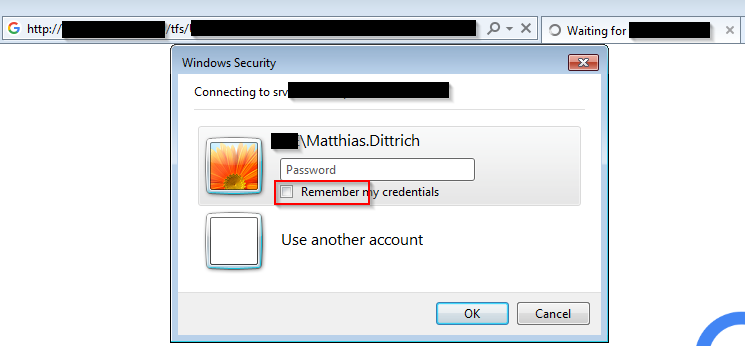
Now open the Url in internet explorer:
Make sure to select "Remember my credentials" and try again:
$ ./bin/Debug/netcoreapp2.1/win7-x64/publish/testtfs401.exe http://<tfs>/tfs/<>/_packaging/<>/nuget/v3/index.json
Retrieved Status Code: Unauthorized
$ ./bin/Debug/netcoreapp2.0/win7-x64/publish/testtfs401.exe http://<tfs>/tfs/<>/_packaging/<>/nuget/v3/index.json
# Works and creates out.txt with the response.
$ DOTNET_SYSTEM_NET_HTTP_USESOCKETSHTTPHANDLER=false ./bin/Debug/netcoreapp2.1/win7-x64/publish/testtfs401.exe http://<tfs>/tfs/<>/_packaging/<>/nuget/v3/index.json
# Works and creates out.txt with the response
I'm not too familiar with Fiddler/Wireshark but I'd assume it should be straightforward to reproduce with the sample I provided. Are you sure you need additional information?
I took a look at your repro. It was a little confusing to me because you defined an "EmptyProxy" object. However, I was able to repro the behavior you are seeing. I used a different server which is the following (one of the CoreFx test server endpoints we use in the repo):
The behavior you see in .NET Core 2.0 is because the HTTP stack is using WinHttpHandler which is based on native Windows WinHTTP. The Windows native HTTP stacks (both WinHTTP and WinINet) have a facility to share credentials among different processes via the Credentials Manager in Windows. This is most useful when using a browser (such as Internet Explorer which uses WinINet) and having to enter credentials for a proxy server. Those credentials can be applied and a request resubmitted automatically during 407/401 responses from a server. And then a different program can use those same credentials without having to have a UI popup be displayed, etc.
This is what the Credentials Manager looks like in Windows Control Panel.
In .NET Core 2.1, we changed to use the new HTTP stack, SocketsHttpHandler, as the implementation for the HttpClientHandler class. It does not support using the Windows Credential Manager at all. In fact, using the Windows Credential Manager is a side-affect of the .NET Core 2.0 HTTP stack using WinHTTP underneath. It wasn't something that we considered a feature itself. The .NET System.Net.Http API surface is designed to pass in credentials via the APIs themselves.
We recommend developers use the HttpClient API surface to pass credentials to either a server or proxy. If using a default system proxy (i.e. IE settings, WPAD, PAC file, Enterprise scenarios), and a password is required, you can use the HttpClientHandler.DefaultProxyCredentials property to set the credentials. Otherwise, for server authentication, one would use the HttpClientHandler.Credentials property.
So, the short summary is that, yes, this is a behavior change from .NET Core 2.0 to 2.1.
Yes this is kind of what I assumed, question is if handling and storing the credentials myself is my only option? Are you saying I could try to access the credentials store directly? Is this possible? If yes should it be added to the new stack?
Also, I don’t think we use basic authentication, but I might be wrong. Would that change anything or would I still just retrieve username/password from the cred store?
Yes this is kind of what I assumed, question is if handling and storing the credentials myself is my only option? Are you saying I could try to access the credentials store directly? Is this possible? If yes should it be added to the new stack?
Using the Windows credential manager is something that the low-level native Windows APIs tend to do and usually only caching proxy credentials to be re-used among different applications. It is not something that aligns with how the .NET API surface for HttpClient was designed for. So, it is not something likely that would be considered to be directly supported, especially since .NET Core is cross-platform.
Also, I don’t think we use basic authentication, but I might be wrong. Would that change anything or would I still just retrieve username/password from the cred store?
I don't think it matters whether it was basic or Windows auth schemes (Negotiate/NTLM). I was trying to get your repro to work and stumbled upon using our test server endpoint that supports Basic.
Thanks for all the pointers. With this I'll try to find a different approach but asking for and saving credentials is not a simple task :(. especially for a tool which is supposed to run in interactive and non-interactive environments...
I feel like this (breaking)change in behavior needs to be documented potentially with pointers to alternatives.
One last question: How long is the fallback to the old stack supported? Is there a timeframe or just forever?
I don't have any answer to that. There are no current plans to remove the fallback. But one can always directly use WinHttpHandler regardless of the fallback mechanism since WinHttpHandler is a public API.
One last question: How long is the fallback to the old stack supported? Is there a timeframe or just forever?
My expectation is that we will remove the fallback in 3.0: I see lack of HTTP/2 as the key blocker at this moment (we are working on it for 3.0/2.2). Also by 3.0 time I expect we will receive enough feedback to prove that it is reasonable replacement without too many rough edges (we won't shoot by bug-by-bug compatibility). WinHttpHandler is public API, so it will likely stay there forever, but HttpClient will always use SocketsHttpHandler by default, not matter what env vars the app sets.
IMO it would be good idea to have separate API for Windows credential manager. It does not have to be part of .NET Core / CoreFX, it could ship as independent package.
If there is enough people who need this functionality, we can reconsider and either expose the API in .NET Core, or automatically use it under the hood.
WinHttpHandler is public API, so it will likely stay there forever
Yes the API will stay but the behavior might not (It could still be mapped to the new implementation), that's why I was asking specifically. But from the answers I'd assume it will stay forever with the current behavior.
IMO it would be good idea to have separate API for Windows credential manager. It does not have to be part of .NET Core / CoreFX, it could ship as independent package.
If there is enough people who need this functionality, we can reconsider and either expose the API in .NET Core, or automatically use it under the hood.
Yes the API will stay but the behavior might not (It could still be mapped to the new implementation), that's why I was asking specifically. But from the answers I'd assume it will stay forever with the current behavior.
Personally, I don't think we should touch WinHttpHandler unless there is a bad bug. There is definitely not a point to make it worse / less compatible with previous versions just to make it more compatible with other implementations.
I just noticed that this is a problem with the SDK itself as well when it tries to download from a TFS/VSTS-based nuget server. The only "official" solution seems to be https://docs.microsoft.com/en-us/vsts/package/nuget/tfs?view=tfs-2018 which is "not recommended". What would be the "recommended" way to handle this?
Triage: Looks like very corner case feature, with only 1 upvote so far (+ @scalablecory apparently used it in his past life).
Given that it is complicated with low demand, we will close it for now.
If there is more customers asking for it, we can reconsider and reopen.
I think some people are hit by this but don't know what the issue is or where to report. Additionally, a lot of people will just use a different authentication method and go on with their life.
Activity
davidsh commentedon Jul 16, 2018
What do you mean by "restricted" URL's? Please give an example. Thanks.
matthid commentedon Jul 16, 2018
@davidsh Sorry I meant URLs where you need to be authenticated or get 401 otherwise (on-premise TFS for example). In our scenario we always get 401 with the new stack. Previously we told people to authenticate in internet explorer to "make it work".
davidsh commentedon Jul 16, 2018
Can you please show a full example with source code of what doesn't work? In general, .NET Core 2.1 supports authentication connections for both proxy (responding to 407) and server (responding to 401).
Perhaps there is some problem with how you are setting the credentials for that. You need to set them in the HttpClient.Credentials property.
matthid commentedon Jul 16, 2018
Ok I can try to create a quick sample tomorrow, but really I think it is as simple as (simplified with the relevant code path from a real application -> some stuff probably doesn't make any sense):
So maybe the behavior has changed on what is happening when
nullis returned?davidsh commentedon Jul 16, 2018
Thanks for posting this snippet of code. Looking at the code above, it sounds like the problem you're having is with proxy credentials/authentication and not server credentials/authentication? It also looks like you're trying to get "default credentials" to be passed automatically to the proxy?
If you're needing default logged-in credentials to be passed automatically to a proxy server, then you should be setting those in the HttpClientHandler.DefaultProxyCredentials property. That property is for setting credentials to a proxy server where the proxy settings are defined in the system (IE settings for Windows or environment variables for Linux). The proxy server is required to use Negotiate or NTLM schemes in order to transmit default logged-in credentials.
Is this your scenario?
cc: @karelz
matthid commentedon Jul 16, 2018
We don't use a proxy in this particular code-path I was testing (therefore we return
null) but maybe using this code-path leads to this particular behavior in the new implementation?matthid commentedon Jul 16, 2018
To explain a bit further: This code developed into this to support proxy configuration (we use a different
IWebProxyimplementation in the proxy scenario)davidsh commentedon Jul 16, 2018
It's still unclear what your scenario is. What sort of authentication is being used in your scenario? You mentioned "saving credentials in Internet Explorer" What kind of credentials are those? Are they to servers or proxies? Some of the issues you're citing that might be related are those involving the use of a proxy server that requires authentication.
I don't see how save credentials are ever used in .NET Framework or .NET Core 2.0 with HTTP requests since the HTTP stack doesn't read those credentials at all.
davidsh commentedon Jul 16, 2018
It's still unclear what your scenario is. What sort of authentication is being used in your scenario? You mentioned "saving credentials in Internet Explorer" What kind of credentials are those? Are they to servers or proxies? Some of the issues you're citing that might be related are those involving the use of a proxy server that requires authentication.
I don't see how save credentials are ever used in .NET Framework or .NET Core 2.0 with HTTP requests since the HTTP stack doesn't read those credentials at all.
matthid commentedon Jul 16, 2018
Ok the setup is:
Initially the code above errors out with 401 on full framework/netcore2.0 and 2.1
After opening internet explorer and logging in to the TFS (via windows login popup as my current user account is not the domain login) it works in full framework and netcore2.0 but not in 2.1 (only with the environment variable to switch back to the 2.0 implementation).
Does that clarify the situation? Like I said I can try to build a simple console application to reproduce and give a fully running sample (but I'd assume it will basically just contain the code from above)
I'm not sure either how it works but it does ;) That's why I'd like to get pointed to docs.
Note that the system is a windows 7 (But I'd assume windows 10 will behave the same, but I can test if required).
davidsh commentedon Jul 17, 2018
If you could post a repro application that we can simply compile/run in Visual Studio that would be good. Not sure how you will simulate the "TFS" server, etc. in your repro. Please don't include any proprietary/confidential URLs etc. in the repro.
If you could share Wireshark traces and/or Fiddler traces that would help diagnose this as well.
matthid commentedon Jul 17, 2018
Ok it looks basically exactly like the code above (besides the compilation error):
Try the following:
dotnet publish --runtime win7-x64netcoreapp2.1dotnet publish --runtime win7-x64Now you have the apps to reproduce:
Initially you have
Now open the Url in internet explorer:
Make sure to select "Remember my credentials" and try again:
I'm not too familiar with Fiddler/Wireshark but I'd assume it should be straightforward to reproduce with the sample I provided. Are you sure you need additional information?
davidsh commentedon Jul 18, 2018
I took a look at your repro. It was a little confusing to me because you defined an "EmptyProxy" object. However, I was able to repro the behavior you are seeing. I used a different server which is the following (one of the CoreFx test server endpoints we use in the repo):
The behavior you see in .NET Core 2.0 is because the HTTP stack is using WinHttpHandler which is based on native Windows WinHTTP. The Windows native HTTP stacks (both WinHTTP and WinINet) have a facility to share credentials among different processes via the Credentials Manager in Windows. This is most useful when using a browser (such as Internet Explorer which uses WinINet) and having to enter credentials for a proxy server. Those credentials can be applied and a request resubmitted automatically during 407/401 responses from a server. And then a different program can use those same credentials without having to have a UI popup be displayed, etc.
This is what the Credentials Manager looks like in Windows Control Panel.
In .NET Core 2.1, we changed to use the new HTTP stack, SocketsHttpHandler, as the implementation for the HttpClientHandler class. It does not support using the Windows Credential Manager at all. In fact, using the Windows Credential Manager is a side-affect of the .NET Core 2.0 HTTP stack using WinHTTP underneath. It wasn't something that we considered a feature itself. The .NET System.Net.Http API surface is designed to pass in credentials via the APIs themselves.
We recommend developers use the HttpClient API surface to pass credentials to either a server or proxy. If using a default system proxy (i.e. IE settings, WPAD, PAC file, Enterprise scenarios), and a password is required, you can use the
HttpClientHandler.DefaultProxyCredentialsproperty to set the credentials. Otherwise, for server authentication, one would use theHttpClientHandler.Credentialsproperty.So, the short summary is that, yes, this is a behavior change from .NET Core 2.0 to 2.1.
davidsh commentedon Jul 18, 2018
cc: @stephentoub @geoffkizer
matthid commentedon Jul 18, 2018
Yes this is kind of what I assumed, question is if handling and storing the credentials myself is my only option? Are you saying I could try to access the credentials store directly? Is this possible? If yes should it be added to the new stack?
Also, I don’t think we use basic authentication, but I might be wrong. Would that change anything or would I still just retrieve username/password from the cred store?
davidsh commentedon Jul 18, 2018
Using the Windows credential manager is something that the low-level native Windows APIs tend to do and usually only caching proxy credentials to be re-used among different applications. It is not something that aligns with how the .NET API surface for HttpClient was designed for. So, it is not something likely that would be considered to be directly supported, especially since .NET Core is cross-platform.
I don't think it matters whether it was basic or Windows auth schemes (Negotiate/NTLM). I was trying to get your repro to work and stumbled upon using our test server endpoint that supports Basic.
matthid commentedon Jul 18, 2018
Thanks for all the pointers. With this I'll try to find a different approach but asking for and saving credentials is not a simple task :(. especially for a tool which is supposed to run in interactive and non-interactive environments...
I feel like this (breaking)change in behavior needs to be documented potentially with pointers to alternatives.
One last question: How long is the fallback to the old stack supported? Is there a timeframe or just forever?
davidsh commentedon Jul 18, 2018
I don't have any answer to that. There are no current plans to remove the fallback. But one can always directly use WinHttpHandler regardless of the fallback mechanism since WinHttpHandler is a public API.
i.e.
karelz commentedon Jul 19, 2018
My expectation is that we will remove the fallback in 3.0: I see lack of HTTP/2 as the key blocker at this moment (we are working on it for 3.0/2.2). Also by 3.0 time I expect we will receive enough feedback to prove that it is reasonable replacement without too many rough edges (we won't shoot by bug-by-bug compatibility).
WinHttpHandleris public API, so it will likely stay there forever, butHttpClientwill always useSocketsHttpHandlerby default, not matter what env vars the app sets.IMO it would be good idea to have separate API for Windows credential manager. It does not have to be part of .NET Core / CoreFX, it could ship as independent package.
If there is enough people who need this functionality, we can reconsider and either expose the API in .NET Core, or automatically use it under the hood.
matthid commentedon Jul 19, 2018
Yes the API will stay but the behavior might not (It could still be mapped to the new implementation), that's why I was asking specifically. But from the answers I'd assume it will stay forever with the current behavior.
Yes makes sense, thanks!
karelz commentedon Jul 19, 2018
Personally, I don't think we should touch WinHttpHandler unless there is a bad bug. There is definitely not a point to make it worse / less compatible with previous versions just to make it more compatible with other implementations.
Revert impact of https://github.com/dotnet/corefx/issues/31098 by usi…
matthid commentedon Jul 29, 2018
I just noticed that this is a problem with the SDK itself as well when it tries to download from a TFS/VSTS-based nuget server. The only "official" solution seems to be https://docs.microsoft.com/en-us/vsts/package/nuget/tfs?view=tfs-2018 which is "not recommended". What would be the "recommended" way to handle this?
karelz commentedon Oct 9, 2019
Triage: Looks like very corner case feature, with only 1 upvote so far (+ @scalablecory apparently used it in his past life).
Given that it is complicated with low demand, we will close it for now.
If there is more customers asking for it, we can reconsider and reopen.
matthid commentedon Oct 9, 2019
I think some people are hit by this but don't know what the issue is or where to report. Additionally, a lot of people will just use a different authentication method and go on with their life.