
Appending to a file in Java means opening it with StandardOpenOption.APPEND, together with StandardOpenOption.CREATE, in Files.writeString() or Files.write(), so the new text goes after the existing content and the file is created on the first run. With the older java.io classes, we pass true as the append flag of the FileWriter or FileOutputStream constructor.
We append to files to keep logs and audit trails, to collect results of a batch job line by line, or to add records to a CSV file without rewriting it. Without the append option, every write method replaces the old content.
The following example adds three login events to a log file, two with Files.writeString() and one with a FileWriter in append mode.
Path log = Files.createTempFile("visits", ".log");

Files.writeString(log, "lokesh logged in\n", StandardOpenOption.CREATE, StandardOpenOption.APPEND);
Files.writeString(log, "alex logged in\n", StandardOpenOption.CREATE, StandardOpenOption.APPEND);
List<String> twoLines = Files.readAllLines(log);     // [lokesh logged in, alex logged in]

try (FileWriter writer = new FileWriter(log.toFile(), StandardCharsets.UTF_8, true)) {
    writer.write("maria logged in\n");
}
List<String> threeLines = Files.readAllLines(log);   // [lokesh logged in, alex logged in, maria logged in]
Notice that each piece of text ends with a line break, because append mode adds bytes and never adds separators for us. The sections that follow show the NIO methods, a BufferedWriter for many appends, the java.io classes, line breaks and appends from several threads.
1. How Appending Works
A file opened for writing has a position where the next byte goes. In the default mode, the write methods truncate the file to zero bytes and start at position 0, so the old content is gone. In append mode, the operating system moves the position to the current end of the file before every write, so the old content stays and the new bytes follow it.
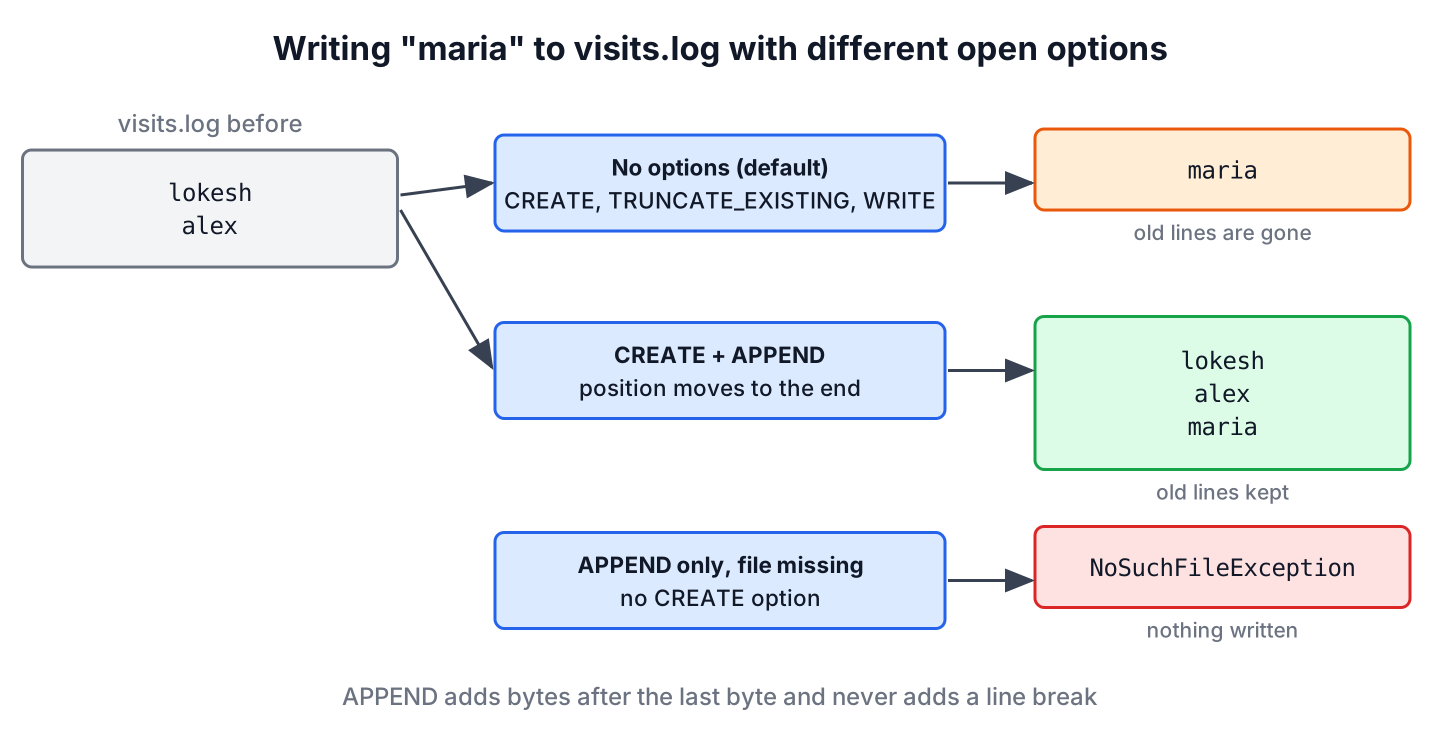
The open options from StandardOpenOption control the behavior for the Files methods. Two of them matter for appending.
- APPEND moves the position to the end of the file before each write. On its own, it requires the file to exist.
- CREATE creates the file if it is missing and does nothing if it exists, so together with APPEND the same code works on the first run and every later run.
Combining APPEND with TRUNCATE_EXISTING makes no sense, and the methods reject it with an IllegalArgumentException. The full table of options is in the guide on writing to a file in Java.
2. Appending Text With Files.writeString() and Files.write()
The method Files.writeString() (Java 11) appends a String, and Files.write() appends a list of lines or a byte[]. Both open the file, write, and close it in one call, and both encode text as UTF-8 unless we pass another charset.
Say an online shop writes an audit line every time an admin changes a price. The following example shows the line for a single change, a list of lines for a bulk change, and what happens if we forget CREATE on a new file.
Path audit = Files.createTempDirectory("shop").resolve("audit.log");

Path missing = Files.writeString(audit, "apple 5 -> 6\n", StandardOpenOption.APPEND);   // NoSuchFileException

Files.writeString(audit, "apple 5 -> 6\n", StandardOpenOption.CREATE, StandardOpenOption.APPEND);
Files.write(audit, List.of("banana 3 -> 4", "milk 2 -> 3"), StandardOpenOption.CREATE, StandardOpenOption.APPEND);
List<String> changes = Files.readAllLines(audit);   // [apple 5 -> 6, banana 3 -> 4, milk 2 -> 3]
The list version adds the line separator of the operating system after every element, including the last one, so the next append starts on a fresh line. For bytes, such as records of a binary file, the same options work with Files.write(path, bytes, options), as the post on writing a byte array to a file shows.
3. Appending Many Lines With Files.newBufferedWriter()
Each call to Files.writeString() opens and closes the file. That is fine for one audit line per request, but a job that appends 50,000 lines in a loop pays for 50,000 open and close operations. Files.newBufferedWriter() with the same options opens the file once and collects the text in a buffer of 8192 chars.
The following example appends the result of an import job, one line per processed file, to an existing report.
Path report = Files.createTempFile("import", ".txt");
Files.writeString(report, "run 1: ok\n");
List<String> results = List.of("prices.csv: 120 rows", "stock.csv: 80 rows");

try (BufferedWriter writer = Files.newBufferedWriter(report, StandardOpenOption.CREATE, StandardOpenOption.APPEND)) {
    writer.write("run 2:");
    writer.newLine();
    for (String result : results) {
        writer.write(result);
        writer.newLine();
    }
}
List<String> lines = Files.readAllLines(report);   // [run 1: ok, run 2:, prices.csv: 120 rows, stock.csv: 80 rows]
For more than a handful of appends, we open one BufferedWriter in append mode and keep it open for the whole loop instead of calling Files.writeString() for each line. The try-with-resources block flushes and closes the writer at the end, so no buffered line is lost.
4. Appending With FileWriter, PrintWriter and FileOutputStream
The java.io classes have no open options. Instead, the constructors of FileWriter and FileOutputStream take a boolean append argument, and true switches to append mode. Both create the file if it does not exist.
Path log = Files.createTempFile("visits", ".log");
File file = log.toFile();

try (BufferedWriter writer = new BufferedWriter(new FileWriter(file, StandardCharsets.UTF_8, true))) {
    writer.write("lokesh logged in");
    writer.newLine();
}

try (PrintWriter out = new PrintWriter(new FileWriter(file, StandardCharsets.UTF_8, true))) {
    out.printf("%s logged in at %d%n", "alex", 9);
}

try (FileOutputStream out = new FileOutputStream(file, true)) {
    out.write("maria logged in\n".getBytes(StandardCharsets.UTF_8));
}
List<String> visits = Files.readAllLines(log);   // [lokesh logged in, alex logged in at 9, maria logged in]
The constructor FileWriter(File, Charset, boolean) exists since Java 11. Older code often calls new FileWriter(name, true) without a charset, which used the operating system charset before Java 18 and UTF-8 from Java 18 on. A FileWriter with the flag set to false, or without the flag, truncates the file, so a missing true wipes the whole log.
5. Starting the Appended Text on a New Line
Append mode adds bytes right after the last byte of the file. If the file does not end with a line break, for example because another tool or a person wrote it, the first appended line joins the last existing line.
Path list = Files.createTempFile("groceries", ".txt");
Files.writeString(list, "apple\nbanana");

Files.writeString(list, "milk\n", StandardOpenOption.APPEND);
List<String> joined = Files.readAllLines(list);   // [apple, bananamilk]
We avoid that by checking the last byte before the first append and adding a separator when it is missing. A FileChannel reads one byte at a given position without loading the file.
static void appendLine(Path file, String line) throws IOException {
    boolean needsBreak = false;
    try (FileChannel channel = FileChannel.open(file, StandardOpenOption.READ)) {
        long size = channel.size();
        if (size > 0) {
            ByteBuffer last = ByteBuffer.allocate(1);
            channel.read(last, size - 1);
            needsBreak = last.get(0) != '\n';
        }
    }
    String text = (needsBreak ? System.lineSeparator() : "") + line + System.lineSeparator();
    Files.writeString(file, text, StandardOpenOption.APPEND);
}
Path list = Files.createTempFile("groceries", ".txt");
Files.writeString(list, "apple\nbanana");
appendLine(list, "milk");
appendLine(list, "eggs");
List<String> fixed = Files.readAllLines(list); // [apple, banana, milk, eggs]For files that only our code writes, it is simpler to end every appended record with System.lineSeparator(), newLine() or %n, as the earlier examples do. The file always ends with a line break that way, and the check is not needed.
6. Appending From Several Threads or Processes
Two threads that call write() on separate writers for the same file can mix their output, because each buffered writer flushes its buffer at a different time. Within one JVM, we share one writer and guard it with a lock, or use a logging library such as Logback, which already serializes writes to a file.
Across processes, whether an APPEND write to the end of the file is atomic depends on the file system. On local Linux and macOS file systems, each write call with APPEND starts at the current end of the file, but a record split into several calls can still interleave with the writes of another program, and network file systems such as NFS give weaker guarantees. When two programs must append records that never mix, we take an exclusive FileLock for each write.
Path log = Files.createTempFile("jobs", ".log");

try (FileChannel channel = FileChannel.open(log, StandardOpenOption.CREATE, StandardOpenOption.APPEND);
     FileLock lock = channel.lock()) {
    channel.write(ByteBuffer.wrap("job 42 done\n".getBytes(StandardCharsets.UTF_8)));
}
List<String> jobs = Files.readAllLines(log);   // [job 42 done]
A FileLock protects against other processes, not against other threads of the same JVM, and on some systems other programs can ignore it. The post on NIO channels covers FileChannel in more detail.
7. Appending With Commons IO
Projects that already use Apache Commons IO can call FileUtils.writeStringToFile() or FileUtils.writeLines() with the append flag set to true. Both also create missing parent directories, which the JDK methods do not.
File file = Files.createTempDirectory("shop").resolve("logs/audit.log").toFile();

FileUtils.writeStringToFile(file, "apple 5 -> 6\n", StandardCharsets.UTF_8, true);
FileUtils.writeStringToFile(file, "milk 2 -> 3\n", StandardCharsets.UTF_8, true);
List<String> audit = Files.readAllLines(file.toPath());   // [apple 5 -> 6, milk 2 -> 3]
For appending alone, the JDK methods in section 2 need no extra dependency, and Files.createDirectories() covers the missing directories.
8. Append to File FAQs
A wiped log file or two records glued into one line are the usual reasons developers search for these answers.
8.1. Does StandardOpenOption.APPEND Create the File?
No. With APPEND alone, the Files methods throw a NoSuchFileException when the file does not exist. We add StandardOpenOption.CREATE, which creates the file on the first write and is ignored afterwards. The FileWriter and FileOutputStream constructors with append set to true create the file without extra options.
8.2. How Do I Append a New Line to a File in Java?
We end the appended text with a line separator, for example System.lineSeparator(), BufferedWriter.newLine() or %n in printf(). Files.write() with a list of lines adds the separator after each line for us.
Path file = Files.createTempFile("notes", ".txt");
Files.writeString(file, "first" + System.lineSeparator(), StandardOpenOption.CREATE, StandardOpenOption.APPEND);
Files.write(file, List.of("second"), StandardOpenOption.APPEND);
List<String> notes = Files.readAllLines(file);   // [first, second]
8.3. How Do I Add Text at the Beginning of a File?
There is no prepend mode, because files grow only at the end. We read the old content, write the new text followed by the old content to a temp file, and move the temp file over the original.
Path file = Files.createTempFile("todo", ".txt");
Files.writeString(file, "milk\n");

Path tmp = Files.createTempFile(file.getParent(), "todo", ".tmp");
Files.writeString(tmp, "eggs\n" + Files.readString(file));
Files.move(tmp, file, StandardCopyOption.REPLACE_EXISTING);
List<String> todo = Files.readAllLines(file);   // [eggs, milk]
For large files, we copy the old content with Files.newInputStream() and transferTo() instead of reading it into a String.
8.4. Is Appending to a File Thread-Safe in Java?
Not by default. Separate writers for the same file can interleave their buffered output, so we share one writer behind a lock or use a logging library, as described in section 6.
8.5. Which Is Faster for Many Appends, Files.writeString() or BufferedWriter?
A BufferedWriter that stays open is faster for many appends, because Files.writeString() opens and closes the file on every call. For an occasional single line, the difference does not matter, and Files.writeString() is shorter.
9. Conclusion
Appending to a file in Java comes down to one setting. With the NIO methods, we pass CREATE and APPEND, and with FileWriter or FileOutputStream, we pass true as the append flag. Every other call replaces the content.
For many lines, a BufferedWriter opened once in append mode is the better choice. Append mode never adds line breaks, so we end every record with a separator, and when several threads or programs write to the same file, we share one writer or take a FileLock. The Java IO guide lists the related file tasks.
10. References
- StandardOpenOption Javadoc
- Files Javadoc (Java 25)
- FileWriter Javadoc
- FileOutputStream Javadoc
- FileChannel Javadoc
Happy Learning !!


Thank you