

The try-with-resources statement declares one or more resources in parentheses after try, and Java calls close() on each of them when the block ends, whether the block completes normally or throws an exception. A resource is any object that implements AutoCloseable, such as a file reader, a database connection or a network socket.
We use try-with-resources whenever code opens something that holds an operating system handle or a pooled connection. Forgetting to close such objects leaks file handles and connections until the app runs out of them.
The following example reads the first line of a small CSV file with a BufferedReader. The reader is closed when the block ends, and no finally block is needed.
Path path = Path.of("pantry.csv");
String first;
try (BufferedReader reader = Files.newBufferedReader(path)) {
    first = reader.readLine();
}
String firstLine = first;                       // "apple,5"
Notice that the reader is declared inside the parentheses, so its scope ends with the block. We compare the statement with the older finally pattern, cover the syntax rules and the close order of several resources, look at suppressed exceptions, write our own AutoCloseable class and use the statement with JDBC, streams and executors.
1. Why try-with-resources Replaced the finally Pattern
Before Java 7, we opened a resource before try and closed it in a finally block. The pattern needs a null check, a nested try around close(), and it has a hidden bug. When the body throws and close() also throws, the exception from finally replaces the first one, so the log shows the cleanup error and the real cause is lost.
The following example uses a small test resource that records what happens to it in a list, and that can be told to fail in close(). A recipe export opens two of them, one for the database and one for the CSV file.
class TrackedResource implements AutoCloseable {
    private final String name;
    private final List<String> log;
    private final boolean failOnClose;

    TrackedResource(String name, List<String> log, boolean failOnClose) {
        this.name = name;
        this.log = log;
        this.failOnClose = failOnClose;
        log.add("open " + name);
    }

    TrackedResource(String name, List<String> log) {
        this(name, log, false);
    }

    static TrackedResource openBroken(String name, List<String> log) {
        log.add("open " + name + " failed");
        throw new IllegalStateException("cannot open " + name);
    }

    @Override
    public void close() {
        log.add("close " + name);
        if (failOnClose) {
            throw new IllegalStateException("close failed: " + name);
        }
    }
}
Both export methods throw disk full from the body, and the CSV resource fails again when it is closed.
static void exportOldStyle(List<String> log) {
    TrackedResource csv = new TrackedResource("csv", log, true);
    try {
        throw new IllegalStateException("disk full");
    } finally {
        csv.close();
    }
}
static void exportNewStyle(List<String> log) {
try (TrackedResource csv = new TrackedResource("csv", log, true)) {
throw new IllegalStateException("disk full");
}
}static String messageOf(Runnable action) {
try {
action.run();
return "no exception";
} catch (RuntimeException e) {
return e.getMessage();
}
}String oldStyle = messageOf(() -> exportOldStyle(new ArrayList<>())); // "close failed: csv"
String newStyle = messageOf(() -> exportNewStyle(new ArrayList<>())); // "disk full"We can see that the finally version reports the cleanup failure and drops disk full. The try-with-resources version keeps the body exception as the main one and attaches the close() failure to it, as we see in section 4.
2. Syntax Rules for Resources
The parentheses after try hold one or more resource declarations separated by semicolons. Each resource type must implement AutoCloseable or its subinterface java.io.Closeable, otherwise the code does not compile. The resource variables are implicitly final, so the body cannot assign a new object to them.
// does not compile: incompatible types, String is not AutoCloseable
try (String name = "apple") {
    System.out.println(name);
}
Since Java 9 (JEP 213), the parentheses can also name an existing variable, as long as it is final or effectively final. This form helps when a method receives an open resource, or when the resource must be created before the try for another reason.
BufferedReader reader = Files.newBufferedReader(Path.of("pantry.csv"));
String header;
try (reader) {
    header = reader.readLine();
}
String readFirst = header;                      // "apple,5"
A resource that is null is allowed. Java calls close() only on non-null resources, so an optional resource does not need an extra if.
List<String> log = new ArrayList<>();
TrackedResource optionalCache = null;
try (optionalCache) {
    log.add("body");
}
List<String> steps = log;                       // [body]
Java 22 added unnamed variables, so a resource that the body never uses can be declared as _. We use that form for the lock guard in section 5.
3. Multiple Resources and the Close Order
Resources are closed in the reverse order of their declaration, and every catch and finally block runs after all resources are closed. The reverse order matters when one resource depends on another, such as a PreparedStatement that needs its Connection while it closes.
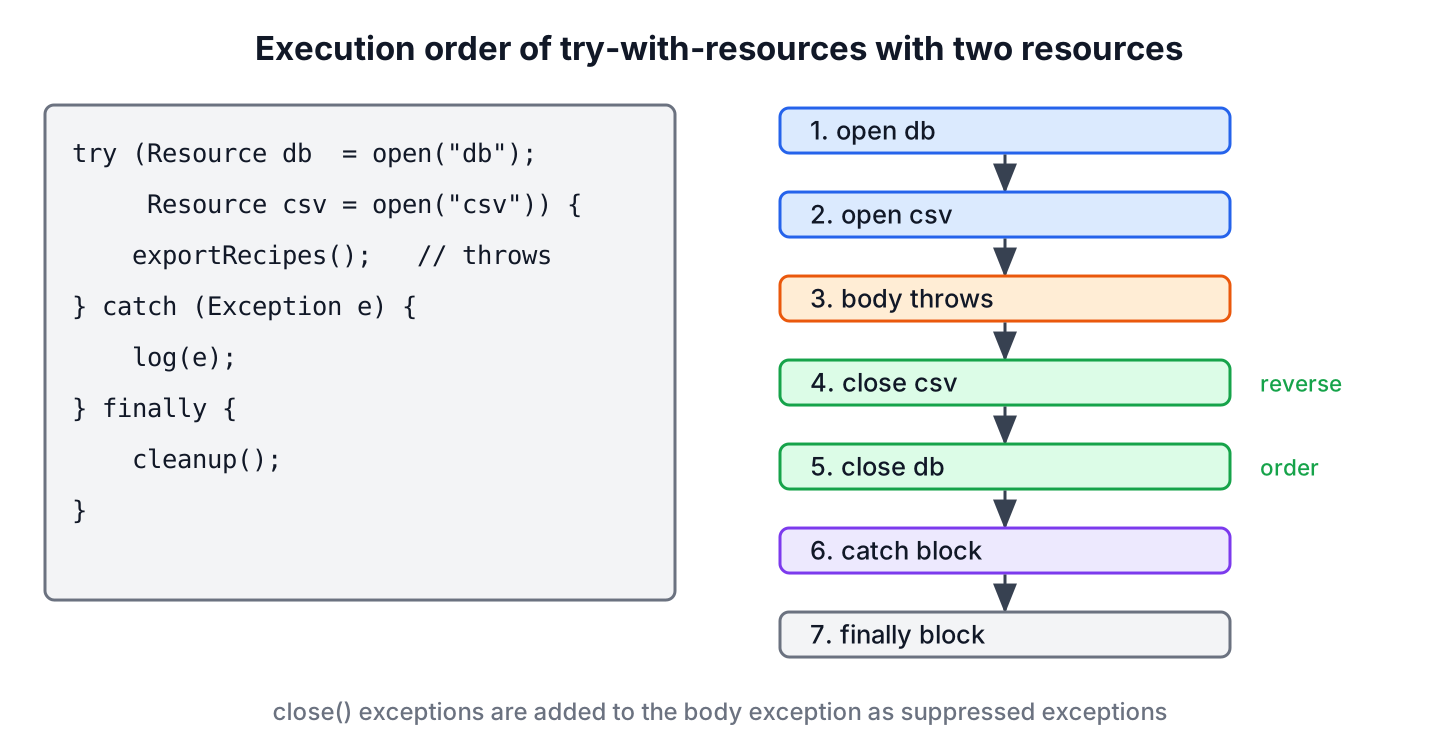
The following example opens the database resource first and the CSV resource second. The body throws, so we can follow the whole sequence in the log.
List<String> log = new ArrayList<>();
try (TrackedResource db = new TrackedResource("db", log);
     TrackedResource csv = new TrackedResource("csv", log)) {
    log.add("export recipes");
    throw new IllegalStateException("disk full");
} catch (IllegalStateException e) {
    log.add("catch " + e.getMessage());
} finally {
    log.add("finally");
}
List<String> order = log;   // [open db, open csv, export recipes, close csv, close db, catch disk full, finally]
When a resource fails while it is being created, Java closes the resources that were already opened and skips the body. The exception from the failed constructor or factory method propagates to the caller or to the catch block.
List<String> log = new ArrayList<>();
try (TrackedResource db = new TrackedResource("db", log);
     TrackedResource csv = TrackedResource.openBroken("csv", log)) {
    log.add("export recipes");
} catch (IllegalStateException e) {
    log.add("catch " + e.getMessage());
}
List<String> order = log;   // [open db, open csv failed, close db, catch cannot open csv]
Wrapped streams need the same care. In new BufferedReader(new FileReader(file)), only the outer reader is a resource. If the BufferedReader constructor threw, the inner FileReader would stay open, so we declare each object as its own resource or use a factory such as Files.newBufferedReader() that returns one object.
4. Exceptions From close() Become Suppressed
When the body throws and one or more close() calls also throw, the body exception is the one that leaves the statement. Java adds the close() exceptions to it with addSuppressed(), and we read them back with getSuppressed(). A full walkthrough, including suppressed exceptions in our own code, is in the article on suppressed exceptions.
List<String> log = new ArrayList<>();
Throwable caught = null;
try (TrackedResource db = new TrackedResource("db", log, true);
     TrackedResource csv = new TrackedResource("csv", log, true)) {
    throw new IllegalStateException("disk full");
} catch (IllegalStateException e) {
    caught = e;
}
String primary = caught.getMessage();                          // "disk full"
int suppressedCount = caught.getSuppressed().length;            // 2
String firstSuppressed = caught.getSuppressed()[0].getMessage(); // "close failed: csv"
Every resource is still closed, even though the first close() call failed. When only close() throws and the body succeeds, that exception is the one that propagates, with nothing suppressed.
Logging frameworks such as Logback and Log4j print suppressed exceptions in the stack trace under a Suppressed: line. A custom error handler that logs only getMessage() or getCause() misses them, so it needs to loop over getSuppressed() as well.
5. Writing a Custom AutoCloseable Class
Any class with cleanup work can implement AutoCloseable and take part in try-with-resources. The interface has one method, close(), declared to throw Exception. Implementations narrow the throws clause to a specific checked exception or remove it, so callers do not have to catch Exception.
Two more rules apply to AutoCloseable.close(). The method is not required to be idempotent, but implementations are strongly encouraged to be, because a second call can happen in real code. The method should also not throw InterruptedException, because a suppressed interrupt is hard to notice.
Say a cinema booking app holds a lock on a seat while it charges the card, and a payment error must never leave the seat locked. A small guard record turns a Lock into a resource, so unlock() runs on every exit path.
record LockGuard(Lock lock) implements AutoCloseable {
    static LockGuard acquire(Lock lock) {
        lock.lock();
        return new LockGuard(lock);
    }

    @Override
    public void close() {
        lock.unlock();
    }
}
ReentrantLock seatLock = new ReentrantLock();
boolean held;
try (LockGuard _ = LockGuard.acquire(seatLock)) {
held = seatLock.isHeldByCurrentThread();
}
boolean heldInside = held; // true
boolean lockedAfter = seatLock.isLocked(); // falseThe lock is taken inside acquire(), before the resource exists. If lock() failed, no guard would be created and nothing would be unlocked, which is the correct behavior for a lock that was never held.
The table compares the two interfaces we can implement.
| Interface | Package | close() throws | Idempotent close() |
|---|---|---|---|
| AutoCloseable | java.lang | Exception | Recommended, not required |
| Closeable | java.io | IOException | Required, a second call has no effect |
6. try-with-resources With JDBC, Streams and Executors
Many JDK types beyond I/O streams implement AutoCloseable. Three of them show up in most business apps, and each one leaks something different when it is not closed.
A JDBC Connection, its statements and each ResultSet are nested resources. The following example runs against an in-memory H2 2.4 database. The inner blocks close the result set and the query first, and the connection closes last.
int stock;
try (Connection con = DriverManager.getConnection("jdbc:h2:mem:pantry");
     Statement setup = con.createStatement()) {
    setup.execute("create table item(name varchar(20), qty int)");
    setup.execute("insert into item values ('apple', 5), ('banana', 3)");
    try (PreparedStatement query = con.prepareStatement("select qty from item where name = ?")) {
        query.setString(1, "apple");
        try (ResultSet rs = query.executeQuery()) {
            rs.next();
            stock = rs.getInt("qty");
        }
    }
}
int appleStock = stock;                         // 5
A stream from Files.lines() keeps the file open until the stream is closed, because it reads lazily. Terminal operations such as count() do not close it, so we put the stream itself in the parentheses. The guide on reading a file line by line uses the same pattern.
long count;
try (Stream<String> lines = Files.lines(Path.of("pantry.csv"))) {
    count = lines.filter(line -> line.startsWith("b")).count();
}
long itemsWithB = count;                        // 1
Since Java 19, ExecutorService implements AutoCloseable. Its close() method calls shutdown() and waits until all submitted tasks finish, which replaces the usual shutdown() and awaitTermination() code for short-lived executors.
AtomicInteger done = new AtomicInteger();
try (ExecutorService pool = Executors.newVirtualThreadPerTaskExecutor()) {
    for (int i = 0; i < 3; i++) {
        pool.submit(done::incrementAndGet);
    }
}
int finished = done.get();                      // 3
The java.net.http.HttpClient class also implements AutoCloseable since Java 21. Long-lived objects such as a shared HttpClient, a connection pool or a Spring bean do not go in try-with-resources, since they live as long as the app and the framework closes them at shutdown.
7. Common try-with-resources Mistakes
Most bugs with try-with-resources come from objects that are not declared in the parentheses, or from resources that outlive the block. The list covers the cases we meet in code reviews.
- Creating a resource before the try and not listing it in the parentheses, for example FileReader r = new FileReader(f); try (BufferedReader br = new BufferedReader(r)). If the BufferedReader constructor fails, r stays open.
- Returning the resource, or a lazy stream built on it, from inside the block. The caller gets an object that is already closed and fails with an IOException or IllegalStateException on first use.
- Wrapping new Scanner(System.in) in try-with-resources. Closing the scanner closes System.in, and every later read from the console fails.
- Calling close() by hand inside the block. The statement calls it again at the end, which is harmless for a Closeable but can fail for a non-idempotent AutoCloseable.
- Catching Exception around the statement only to satisfy the compiler. When close() declares Exception, we either declare the exception on our method or narrow the throws clause in our own class.
8. try-with-resources FAQs
Catch blocks, Java versions, execution order and null resources are the points to settle when we replace finally blocks with try-with-resources.
8.1. Does try-with-resources need a catch block?
No. A try-with-resources statement can stand alone, as the examples in section 2 show. A catch is needed only for checked exceptions that the method does not declare, and these include the exceptions declared by the resource’s close() method.
8.2. Does the finally block run after try-with-resources?
Yes. A finally block attached to a try-with-resources statement runs last, after every resource is closed and after any catch block. The resources are already closed inside finally, so it cannot use them.
8.3. Which Java version introduced try-with-resources?
Java 7 introduced the statement together with the AutoCloseable interface. Java 9 allowed effectively final variables in the parentheses, and Java 22 allowed the unnamed variable _ as a resource name.
8.4. Is close() called when the resource is null?
No. Java checks each resource for null before it calls close(), so a null resource neither throws a NullPointerException nor stops the other resources from being closed.
8.5. Does try-with-resources replace finalize() and Cleaner?
Partly. Try-with-resources is the main way to release a resource, and finalize() is deprecated for removal. A Cleaner is only a safety net for objects that a caller forgot to close, and it runs at an unknown time after garbage collection.
9. Conclusion
Try-with-resources closes every declared resource on every exit path, in reverse order, before any catch or finally block runs. Compared with the old finally pattern, it is shorter and keeps the real exception, because close() failures become suppressed exceptions instead of replacing it.
We declare each object that needs closing as its own resource, use the Java 9 form for variables that already exist, and implement AutoCloseable for our own cleanup work such as unlocking a lock. JDBC objects, lazy file streams and short-lived executors belong in try-with-resources as well. The Java tutorial lists the related language basics.
10. References
- JLS 25, try-with-resources
- AutoCloseable Javadoc
- Oracle Tutorial, The try-with-resources Statement
- JEP 213, Milling Project Coin
- ExecutorService.close() Javadoc
Happy Learning !!


Is it mandatory to use catch/resource block with try-with-resource statement?
Thanks for your post and its valuable
try (
BufferedReader br1 = new BufferedReader(new FileReader(“C:/temp/test1.txt”));
BufferedReader br2 = new BufferedReader(new FileReader(“C:/temp/test2.txt”));
BufferedReader br3 = new BufferedReader(new FileReader(“C:/temp/test3.txt”))
)
A request please added closing multiple resource to tutorial.
Finds interesting in the way you explain Thanks a ton!!!
Thanks for the post.
Your posts are Informative and clean.
can we add multiple resources in that line?
Good point. In fact, we can initialize and close multiple resources as well. For example:
public class ResourceManagementInJava7
{
public static void main(String[] args)
{
try (
BufferedReader br1 = new BufferedReader(new FileReader(“C:/temp/test1.txt”));
BufferedReader br2 = new BufferedReader(new FileReader(“C:/temp/test2.txt”));
BufferedReader br3 = new BufferedReader(new FileReader(“C:/temp/test3.txt”))
)
{
//Access resources
}
catch (IOException e)
{
e.printStackTrace();
}
}
}