

A lazy import defers loading a module until the code first uses it, whereas a regular (eager) import loads the module at the moment the import statement runs. Python 3.15, released on October 9, 2026, implements this with the lazy soft keyword from PEP 810, a Python Enhancement Proposal. So lazy import json binds the name json at once and loads the module on its first use.
Each import stays regular unless we write lazy in front of it. We use Python lazy imports in programs where start-up time matters and a single run needs only some of the imported modules. A command-line tool is the typical case, because –version or a small subcommand has no use for the XML, archive and network modules that the other subcommands need. In our test tool the list command starts in 57 ms instead of 141 ms, and that saving exists only for the imports a run doesn’t touch.
The example runs both forms of the keyword and shows the moment each module loads. Every line carries its result as a comment, and sys.modules is the dictionary of modules Python has already loaded.
import sys

lazy import json                          # binds a placeholder, json is not loaded
lazy from pathlib import Path             # binds a placeholder for Path
loaded = "json" in sys.modules            # loaded = False
text = json.dumps({"title": "Dune"})      # first use loads json, text = '{"title": "Dune"}'
loaded = "json" in sys.modules            # loaded = True
loaded = "pathlib" in sys.modules         # loaded = False, Path is not used yet
So json is missing from sys.modules until the call to json.dumps(), and pathlib stays unloaded because the code hasn’t used Path yet. The placeholder object that stands in for a lazy name is called a proxy.
The sections below cover what an import costs and how to measure it, then the syntax of the keyword and the rules around it, then a measured before-and-after on a real command-line tool, and the older techniques for Python 3.14 and earlier.
1. Where Lazy Imports Save Time
When Python runs import json, it checks sys.modules first. If the module isn’t there, Python finds the module file, runs its top-level code once and stores the module object in sys.modules. Every later import of the same module reads the stored object. The expensive step is running that top-level code, because a module such as urllib.request imports its own dependencies (http.client, ssl, email and more) before it finishes.
Eager loading runs those steps when the import statement executes, so a script pays for every import at start-up, including the imports a given run never needs. Lazy loading moves the cost of an import from start-up to the first use of the imported name, and a module that is never used costs nothing.
Let’s say a book catalog command-line tool named shelf has six subcommands. The list command reads one JSON file, but the tool imports csv, statistics, tarfile, zipfile, urllib.request and an XML parser at the top of the file, because the other subcommands need them, and every shelf list run loads all of them.
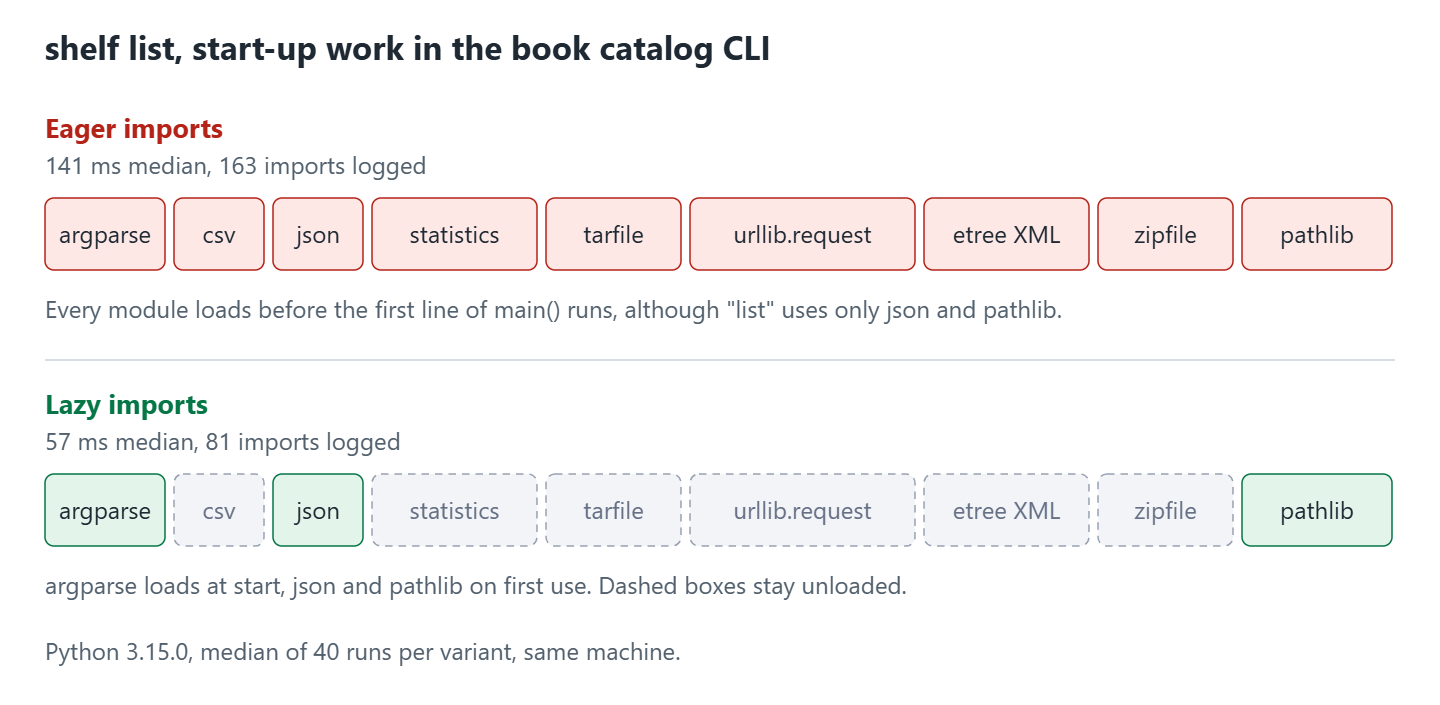
Python 3.15 implements lazy loading with the lazy keyword in front of an import statement. Older techniques work before Python 3.15, such as imports inside functions, a module-level __getattr__ and importlib.util.LazyLoader, and section 5 covers them.
1.1. Python Version and Status of PEP 810
PEP 810 (Explicit lazy imports) has the status Final, so the syntax is settled and a later 3.15 patch won’t change it. Older Python versions don’t know the keyword at all, so lazy import csv is a SyntaxError there.
| Item | Value |
|---|---|
| Status | Final, resolved on 2025-11-03 |
| First Python version | 3.15 |
| Python 3.15.0 release | 2026-10-09 |
On Python 3.14 the parser stops at the word import after lazy.
  File "shelf_lazy.py", line 2
    lazy import csv
         ^^^^^^
SyntaxError: invalid syntax
2. Measuring Import Time With -X importtime
Before we defer anything, we need to know which imports cost something. Import time refers to the time Python spends to find, load and run a module and everything that module imports. A module with three lines of its own can pull in a large dependency tree, so the name at the top of our file says nothing about its price.
CPython ships an import profiler of its own, the command-line option -X importtime, added in Python 3.7. It writes one line per imported module to standard error. The environment variable PYTHONPROFILEIMPORTTIME=1 turns on the same profiler without a change to the command.
import time: self [us] | cumulative | imported packageThe first column is self time in microseconds, which is the module’s own code. Cumulative time in the second column is that self time plus every module the line imported. Indentation gives the nesting depth, so a nested import sits further right than its parent.
Now we profile the eager version of our shelf tool and print the last six lines of the log sorted by cumulative time. Nested imports, such as the email modules, get a line each, which is why they turn up beside top-level ones.
python -X importtime shelf_eager.py list 2> imports_eager.log
sort -t'|' -k2 -n imports_eager.log | tail -6
import time: 1485 | 19336 | argparse
import time: 10822 | 24655 | email._policybase
import time: 1100 | 26684 | email.feedparser
import time: 598 | 27282 | email.parser
import time: 4160 | 48231 | http.client
import time: 3041 | 66484 | urllib.requestSo urllib.request and its nested imports account for 66 ms of the cumulative time in this run, and the list command never calls it. A single profiled run swings by several milliseconds, so the per-module figures in the table are the median of 9 profiled runs. That is why the first row is lower than the 66 ms of the run above.
| Module | Cumulative time |
|---|---|
| urllib.request | 42 ms |
| statistics | 12 ms |
| tarfile | 11 ms |
| xml.etree.ElementTree | 11 ms |
| zipfile | 9 ms |
These five modules add up to 85 ms, close to the 84 ms that the list command saves in section 4. Note that the profiler adds overhead of its own, so we use -X importtime to find the expensive modules and timed runs of the whole program to compare versions. The log of the eager version has 163 import lines, and the log of the lazy version has 81.
3. The lazy Keyword Syntax and Behavior
Once we know which modules cost the most, we can put the keyword in front of them. Python implements lazy loading by binding the imported name to a proxy, a placeholder object that stands in for the module or for one name from it. The first use of the name resolves the proxy, so Python imports the module at that point and binds the real object to the name. The diagram traces lazy import json through both outcomes, the loaded module and the failure.

3.1. Two Forms and the Moment of Loading
The word lazy is a soft keyword, which means it only has a special meaning before import or from. A variable named lazy is still valid code. Python 3.15 accepts two forms, and they differ in the names they bind.
| Statement | Name bound at once | The module loads when |
|---|---|---|
| lazy import json | json (proxy) | the code first uses json, e.g. json.dumps() |
| lazy import xml.etree.ElementTree as ET | ET (proxy) | the code first uses ET |
| lazy from pathlib import Path | Path (proxy) | the code first uses Path |
| lazy from json import dumps, loads | dumps and loads (one proxy each) | the code first uses either name |
With lazy from, each imported name gets its own proxy. The first use of one name loads the whole module, but Python replaces only that name with the real object. The other names stay proxies until the code uses them.
import sys

lazy from json import dumps, loads

kind = type(globals()["dumps"]).__name__         # kind = 'lazy_import'
text = dumps([1])                                # first use of dumps loads the whole json module
loaded = "json" in sys.modules                   # loaded = True
kind = type(globals()["dumps"]).__name__         # kind = 'function'
kind = type(globals()["loads"]).__name__         # kind = 'lazy_import', loads is still a proxy
3.2. Where lazy Is Not Allowed
Lazy imports are allowed only in the top-level code of a module, and not inside functions, classes or try blocks. The parser rejects every other position at compile time, so the mistake shows up before any of our code runs. Five positions are rejected and one that looks similar is fine, each with the message the parser prints.
| Position | Result | Message |
|---|---|---|
| Inside a function | SyntaxError | lazy import not allowed inside functions |
| Inside a class body | SyntaxError | lazy import not allowed inside classes |
| Inside a try block | SyntaxError | lazy import not allowed inside try/except blocks |
| lazy from json import * | SyntaxError | lazy from … import * is not allowed |
| lazy from __future__ import annotations | SyntaxError | lazy from __future__ import is not allowed |
| Inside a with block | Allowed | No error |
Top-level if, for and with statements are allowed, so a lazy import can depend on a condition. The problem with the try restriction is that it rules out the usual pattern for an optional dependency. A fallback that imports a package inside a try block and catches ImportError needs the import to run inside the block, so that one stays a regular import.
import sys

if sys.platform == "linux":
    lazy import json                     # allowed, json is lazy only on Linux

kind = type(globals()["json"]).__name__   # kind = 'lazy_import' on Linux
3.3. Errors Are Raised at First Use
An eager import raises ImportError when the statement runs, which for a module-level import means at start-up. A lazy import raises the same error at the first use of the name, and the traceback shows both places, the lazy statement and the line of first use. The script below binds a module that doesn’t exist and uses it three lines later.
lazy import no_such_module

print("started")
no_such_module.run()
started
Traceback (most recent call last):
File "late_error_trace.py", line 1, in <module>
lazy import no_such_module
ImportError: lazy import of 'no_such_module' raised an exception during resolution
The above exception was the direct cause of the following exception:
Traceback (most recent call last):
File "late_error_trace.py", line 4, in <module>
no_such_module.run()
^^^^^^^^^^^^^^
ModuleNotFoundError: No module named 'no_such_module'The last exception in the output is the original ModuleNotFoundError from the failed import. Python chains it under the ImportError that names the lazy statement, so the wrapper is printed first and the error that stopped the program is printed last. Note that a failed resolution leaves the proxy in place, so the next use of the name tries the import again.
The same rule applies to names rather than modules. After lazy from json import no_such_name the statement succeeds, and the first use of no_such_name raises ImportError with the message “cannot import name ‘no_such_name’ from ‘json'”.
3.4. Inspecting a Module With globals(), dir() and __all__
Code that inspects a module has to deal with proxies, because Python doesn’t load a lazy module when we only look at the namespace. globals() is the dictionary of names defined at module level, and dir() lists those same names without their values. The snippet shows what each of them returns for a lazy name, and how to load a proxy on purpose with its resolve() method.
import sys
import types

lazy import json

print("json" in sys.modules)                                     # False
print(isinstance(globals()["json"], types.LazyImportType))       # True, globals() does not load the module
print("json" in dir())                                           # True, dir() does not load it either
print("json" in sys.modules)                                     # False
module = globals()["json"].resolve()                             # loads the module explicitly
print(module.__name__, "json" in sys.modules)                    # json True
print(type(globals()["json"]).__name__)                          # lazy_import, the global still holds the proxy
print(json.dumps([1]))                                           # [1]
print(type(globals()["json"]).__name__)                          # module, normal use replaced the proxy
The class of a proxy is types.LazyImportType, and its name in the output is lazy_import. Using the name the normal way resolves it, so json.dumps([1]) replaces the global, whereas a dictionary read such as globals()[“json”] hands back the proxy untouched. The set sys.lazy_modules holds the names of the modules that have a lazy import and aren’t loaded yet.
import sys

lazy import json
lazy import csv

names = sorted(n for n in sys.lazy_modules if n in ("json", "csv"))   # names = ['csv', 'json']
text = json.dumps(1)                                                  # loads json
names = sorted(n for n in sys.lazy_modules if n in ("json", "csv"))   # names = ['csv']
The variable __all__ needs care. A star import (from package import *) reads every name listed in __all__, so it loads each lazy name in that list, whereas plain attribute access loads only the name the code uses. The package file allpkg/__init__.py below lists two lazy names.
# allpkg/__init__.py
__all__ = ["dumps", "Path"]

lazy from json import dumps
lazy from pathlib import Path| Code in the importing module | Does json load? |
|---|---|
| import allpkg | No |
| vars(allpkg)[“dumps”] | No, the value is a proxy |
| allpkg.dumps({“a”: 1}) | Yes, at this call |
| from allpkg import * | Yes, at the import statement |
So a star import loads every lazy name in __all__, and the callers that use it pay the import cost again.
3.5. Turning On Lazy Imports Without Editing Code
Editing every import isn’t always an option, for an application we didn’t write or for a quick measurement. Python 3.15 can make imports lazy without a change in the source files, through five settings.
The first three set the mode, which is either normal, where only the lazy keyword is lazy and which is the default, or all, where every eligible module-level import is lazy. An eligible import is a plain import or from … import in the top-level code of a module. So imports inside functions, imports in try blocks and star imports are not eligible and stay regular in every mode.
| Setting | Example | Effect |
|---|---|---|
| Command-line option | python -X lazy_imports=all app.py | Sets the mode for this run |
| Environment variable | PYTHON_LAZY_IMPORTS=all python app.py | Sets the mode for this run |
| Function call | sys.set_lazy_imports(“all”) | Sets the mode at run time, sys.get_lazy_imports() reads it |
| Filter | sys.set_lazy_imports_filter(func) | Decides per import, returns True to keep it lazy |
| Module list | __lazy_modules__ = [“json”, “csv”] | Makes the plain imports of the listed modules lazy |
The filter and the lazy keyword work together, and the filter wins. A filter that returns False turns an explicit lazy import back into a regular import, in mode normal as well as in mode all. It takes three arguments, the name of the importing module, the name of the imported module and the tuple of names written after import (the parameter fromlist, or None for a plain import).
The filter in this example keeps only the csv import lazy while the mode is all.
import sys


def keep_lazy(importing, imported, fromlist):
    return imported == "csv"


sys.set_lazy_imports_filter(keep_lazy)
sys.set_lazy_imports("all")

import csv
import json

kind = type(globals()["csv"]).__name__           # kind = 'lazy_import'
kind = type(globals()["json"]).__name__          # kind = 'module', the filter returned False
The variable __lazy_modules__ lets one source file serve Python 3.15 and older versions. Python 3.15 treats the listed modules as if their plain import statements carried the lazy keyword, and older versions ignore the variable and run the plain imports as usual.
import sys

__lazy_modules__ = ["json", "csv"]

import json
import csv
import zipfile

kind = type(globals()["json"]).__name__          # kind = 'lazy_import' on 3.15, 'module' on 3.13
kind = type(globals()["zipfile"]).__name__       # kind = 'module', zipfile is not in the list
loaded = "csv" in sys.modules                    # loaded = False on 3.15, True on 3.13
The PEP text lists a third mode none, but Python 3.15.0 accepts only normal and all. Calling sys.set_lazy_imports(“none”) raises ValueError with the message “mode must be ‘normal’ or ‘all'”, and -X lazy_imports=none stops the interpreter at start-up.
4. Start-Up Time Before and After in a Command-Line Tool
All of that is behavior. What it’s worth in milliseconds is what this section measures, using the command-line tool shelf from the diagram in section 1. It manages a small book catalog stored in a JSON file and has the subcommands list, stats, csv, xml, backup and fetch. We run it on Python 3.15.0, built from the python.org source with the standard library only, on a Linux virtual machine with 2 CPUs, and the complete code is in the python-lazy-imports folder on GitHub.
Three versions of the same program differ in where the imports sit and nowhere else.
- shelf_eager.py has all imports at the top of the file.
- shelf_functions.py has the imports inside the functions that need them.
- shelf_lazy.py has the same top-level imports with the lazy keyword.
Only the import block differs between shelf_eager.py and shelf_lazy.py. The rest of the file, the functions and the argument parser, is identical. The eager block is ten plain imports.
import argparse
import csv
import json
import statistics
import sys
import tarfile
import urllib.request
import xml.etree.ElementTree as ET
import zipfile
from pathlib import Path
The lazy block adds the keyword to every import that a run may not need.
import argparse
lazy import csv
lazy import json
lazy import statistics
import sys
lazy import tarfile
lazy import urllib.request
lazy import xml.etree.ElementTree as ET
lazy import zipfile
lazy from pathlib import Path
We keep argparse and sys eager, because every run uses both of them.
bench.py is the timing script in the same example folder. It starts each variant as a new process, so every run pays the full start-up cost, and it reports the median, the middle value of the sorted runs, which ignores a single slow one. It does 5 warm-up runs first, which fill the operating system file cache and write the compiled .pyc files, then 40 measured runs with the variants alternating so they share the same background noise.
One function in it does the measuring.
import subprocess
import time


def run_once(prefix, args):
    start = time.perf_counter()
    subprocess.run([*prefix, *args], stdout=subprocess.DEVNULL, check=True)
    return (time.perf_counter() - start) * 1000
The last column of the table runs the unchanged eager file with -X lazy_imports=all. The command python3.15 bench.py python3.15 40 prints it, where the second argument is the interpreter to measure and the third is the number of measured runs.
| Command | Eager imports | Imports in functions | lazy import | Eager file with -X lazy_imports=all |
|---|---|---|---|---|
| –version | 180 ms | 89 ms | 85 ms | 84 ms |
| list | 141 ms | 57 ms | 57 ms | 52 ms |
| csv | 145 ms | 64 ms | 64 ms | 57 ms |
| backup | 179 ms | 89 ms | 89 ms | 79 ms |
Each row is one command and each column one way of importing, so the comparison that matters runs across a row rather than down a column. Five of those differences need a word of explanation.
- The eager version needs 141 to 180 ms for every command, because it loads all ten modules before it looks at the arguments.
- The list command drops from 141 ms to 57 ms, which is 60% less, and the -X importtime log drops from 163 to 81 import lines.
- An empty Python program (python -c pass) takes 28 ms and python -c “import argparse” takes 37 ms on the same machine, so about 28 ms of every number in the table is the interpreter starting up.
- The –version row sits above the list row in every column, because argparse imports its _colorize module when it formats a message. That module shows about 24 ms of self time in the –version log and has no line at all in the list log, which covers most of the 39 ms gap between the two eager figures.
- The last column beats the keyword column because mode all also makes the imports inside argparse and other standard library modules lazy, whereas the keyword only touches our own file.
The backup command still takes 89 ms, because it uses zipfile and tarfile and writes two archive files on top of that. So the work a command does explains why rows of the same column differ, and lazy imports only remove the cost of the modules a run leaves alone. The absolute numbers depend on the machine and the Python build, so compare the columns with each other rather than with the timings you get.
5. Alternatives to the lazy Keyword
The keyword covers Python 3.15 and nothing earlier. Code that still has to run on Python 3.14 or older needs one of three older techniques, and __lazy_modules__ keeps a single source file working on both sides of that line. The decision tree shows how we pick between them.

5.1. Imports Inside Functions
The oldest technique moves the import statement into the function that uses the module, so the import runs at the first call of that function. Later calls find the module in sys.modules and don’t load it again. shelf_functions.py in the example folder uses it for every optional module.
def cmd_stats(args):
    import statistics

    pages = [book["pages"] for book in load(args.file)]
    print(f"average pages: {statistics.mean(pages):.1f}")
Function-level imports work on every Python version, which is their whole appeal. The problem with them is that the dependencies of a file are no longer in one block at the top, where PEP 8 wants them, and every function that needs the module repeats the import line.
5.2. Module-Level __getattr__
A function import hides a dependency inside a function body. A module-level __getattr__ keeps it at the package boundary instead. Python 3.7 added the hook in PEP 562. When code reads an attribute that the module does not have, Python calls that module’s __getattr__(name).
The file shelfkit/__init__.py below is a package that exposes stats and tables as attributes and imports the real modules on demand. The function stores the module in globals(), so the next access doesn’t call the hook again.
# shelfkit/__init__.py
import importlib

_LAZY = {"stats": "statistics", "tables": "csv"}


def __getattr__(name):
    if name in _LAZY:
        module = importlib.import_module(_LAZY[name])
        globals()[name] = module
        return module
    raise AttributeError(f"module {__name__!r} has no attribute {name!r}")
import sys
import shelfkit
first = "statistics" in sys.modules # False
average = round(shelfkit.stats.mean([412, 474, 730]), 1) # 538.7, the attribute access loads statistics
second = "statistics" in sys.modules # True
missing = hasattr(shelfkit, "unknown") # False, __getattr__ raised AttributeError5.3. importlib.util.LazyLoader
The package author writes __getattr__. LazyLoader works from the other side, in the code that does the importing. The class LazyLoader in the module importlib.util wraps a module’s loader so the module code runs at the first attribute access.
Two terms in that sentence need explaining. A module spec is the object that describes how to load a module, and its loader is the part that runs the module code through exec_module(). The function find_spec() returns the spec, and module_from_spec() creates the empty module object from it.
The documentation says LazyLoader works only with loaders that define exec_module(), and it discourages the class unless start-up time is critical, because loading errors turn up later and out of context. The function lazy_module() in the snippet follows the example from that documentation.
import importlib.util
import sys


def lazy_module(name):
    spec = importlib.util.find_spec(name)
    spec.loader = importlib.util.LazyLoader(spec.loader)
    module = importlib.util.module_from_spec(spec)
    sys.modules[name] = module
    spec.loader.exec_module(module)
    return module


statistics = lazy_module("statistics")
before = type(statistics).__name__                       # before = '_LazyModule'
average = round(statistics.mean([412, 474, 730]), 1)     # average = 538.7, the first attribute access runs the module code
after = type(statistics).__name__                        # after = 'module'
Note that statistics is in sys.modules before the first use here, as a placeholder of the class _LazyModule, which is not what the lazy keyword does. The function find_spec() returns None for a missing module, so production code checks the result before it touches spec.loader.
5.4. Comparing the Techniques
All five rows defer the module execution to the first use. They differ in the Python version they need, in where the change goes, and in the limit that follows from that. Read the last column first, because it is usually what rules a technique out.
| Technique | Python version | Where the change is | Module loads at | Main limit |
|---|---|---|---|---|
| lazy import | 3.15+ | The import statement | First use of the name | Module level only, not in try |
| __lazy_modules__ | 3.15+ (ignored before) | One list per module | First use of the name | Older versions run plain imports |
| Import in function | All | Each function | First call of the function | Repeated lines, hidden dependencies |
| Module __getattr__ | 3.7+ | The package | First attribute access | Name table kept by hand |
| LazyLoader | 3.5+ | A helper function | First attribute access | Needs exec_module(), errors appear late |
On Python 3.15 the keyword beats function imports, even though the two gave the same times in section 4. The keyword keeps every import in one block at the top, costs a one-word change per import, and binds the name once for every function in the file. Function imports repeat a line in each function, and a reader can’t see the file’s dependencies without reading all of it.
6. Pitfalls of Lazy Imports
Every technique above changes when code runs, and that one change is where the trouble comes from. Four problems come up often enough to plan for, each with what it looks like and what we do about it.
| Pitfall | What happens | What we do |
|---|---|---|
| Module side effects | Registration code in the module runs at the first use, not at start-up | Keep registration in an explicit function that the program calls |
| First-use delay | The first call pays the import time, for example inside a request handler of a web service | Call a function that touches the names during start-up, or keep that import regular |
| Late errors | A missing or broken module fails at the first use, which can be in production | Keep an eager import for a dependency whose absence must stop the start |
| Global mode reaches libraries | -X lazy_imports=all also changes the imports inside installed packages | Prefer the lazy keyword in our own code and test the mode before using it |
Module side effects deserve a worked example, because that failure is a silent one. A plugin here is a module that appends itself to a list, called a registry, which the program reads later. The two files below are that registry and one plugin, and the plugin appends itself while it is being imported.
# registry.py
PLUGINS = []

# plugin_csv.py
import registry

registry.PLUGINS.append("csv")
With a lazy import the registry is still empty after the import statement, and the plugin registers itself only when the code first touches the module.
import registry

lazy import plugin_csv

print(registry.PLUGINS)                          # []
print(plugin_csv.__name__)                       # plugin_csv, this first use runs the module code
print(registry.PLUGINS)                          # ['csv']
Threads and type checks are fine. In a test with four threads calling the same lazy module, every call returned its result, and after the first use isinstance() and is comparisons behave as they do with a regular import.
Global mode needs more care than the keyword does. When we set the mode to all, the filter from section 3.5 also receives the imports of the standard library modules, because the mode applies to every module that gets imported. So sys.set_lazy_imports() belongs in an application’s own start-up code, and a library should never call it.
7. Python Lazy Imports FAQs
These are the questions that come up once somebody has seen the keyword and starts working out what it costs to adopt.
Which Python Version Has the lazy Keyword?
Python 3.15, and nothing earlier. PEP 810 was accepted for that release. On Python 3.14 and older, lazy import json is a SyntaxError, and section 1.1 shows the message.
Do Lazy Imports Make Python Faster?
Only the start-up, and only when a run doesn’t use some of the imported modules. A run that uses every imported module takes the same time as before, because the loading moves to a later point rather than going away.
Can We Use lazy import Inside a Function?
No. The parser raises a SyntaxError for lazy import inside a function, a class body or a try block. You don’t need it there either, because a regular import inside a function already loads the module at the first call, as section 5.1 shows.
How Do We Get Lazy Imports on Python Older Than 3.15?
We use one of the techniques in section 5, usually imports inside functions, because those work on every Python version. Note that __lazy_modules__ gives no laziness at all on older versions, since they ignore the variable. What it does is let one file be lazy on 3.15 and plain everywhere else, so we keep a single copy of the source.
How Do We Make All Imports Lazy Without Changing the Code?
We start the program with python -X lazy_imports=all app.py, or set PYTHON_LAZY_IMPORTS=all in the environment. The mode reaches installed libraries too, so we test the whole application under it before we rely on it.
8. Conclusion
Python lazy imports postpone the loading of a module until its first use. In Python 3.15 the lazy keyword does that for lazy import and lazy from, and a proxy stands in for the name until then. We measure with -X importtime first, because a command that uses most of its modules has little to gain, as the backup command showed.
Errors and module side effects move to the first use. So a dependency whose absence must stop the program, and any registration code, stay regular imports. For Python 3.14 and older, imports inside functions, module-level __getattr__ and LazyLoader get us to a similar place with more work by hand.
9. References
- PEP 810, Explicit lazy imports
- Python reference, import statement and lazy imports
- What’s New In Python 3.15
- Command line options, -X importtime and -X lazy_imports
- sys module, set_lazy_imports()
- importlib.util.LazyLoader
- PEP 562, Module __getattr__ and __dir__
- Python 3.15.0 release page
Happy Learning !!

