

Data visualization is the process of representing data using charts graphs and other visual elements. Python provides several libraries that make it easier to explore data identify patterns and communicate insights effectively.
Features of Data Visualization
- Helps analyze datasets and understand relationships between different variables.
- Makes it easier to track changes and trends over time.
- Allows values or categories to be compared using appropriate visual formats.
- Helps identify unusual values and potential outliers in a dataset.
- Converts analytical results into clear visuals that are easier to communicate.
- Charts can be customized using labels legends axes styles and other elements.
Example: Plotting with Matplotlib
import matplotlib.pyplot as plt
import numpy as np

days = np.arange(1, 31)
prices = 100 + np.cumsum(np.random.randn(30))
plt.plot(days, prices, marker='o', linestyle='-', color='green')
plt.title("Simulated Stock Price")
plt.xlabel("Day")
plt.ylabel("Price ($)")
plt.grid(True)
plt.show()
Output
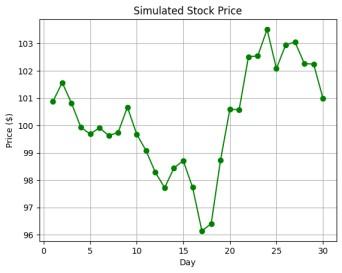
Explanation:
- np.arange(1, 31) creates an array of days from 1 to 30.
- np.cumsum(np.random.randn(30)) generates random daily changes and sums them to simulate stock prices.
- plt.plot() draws the stock price line with green circle markers.
- plt.title(), plt.xlabel(), plt.ylabel(), and plt.grid() add labels title and grid for clarity.
Basics
After analyzing data, visualization helps uncover patterns trends outliers and relationships that may not be clear from raw data. Choosing the appropriate chart type is important because different charts communicate different types of information.
- What is Data Visualization and Why is It Important?
- Types of Data Visualization Charts
- Choosing the Right Chart Type
Color selection also affects how effectively information is communicated. Appropriate colors can improve readability and help highlight important values.
Matplotlib
Matplotlib is a widely used Python library for creating static animated and interactive visualizations. It provides detailed control over charts and integrates well with libraries such as NumPy Pandas and Seaborn.
- Introduction to Matplotlib
- Setting up Python Environment for installation
- Pyplot in Matplotlib
- Matplotlib – Axes Class
- Data Visualization With Matplotlib
Seaborn
Seaborn is built on top of Matplotlib and provides a high-level interface for creating attractive and informative statistical plots. It integrates seamlessly with Pandas and makes it easier to create complex visualizations with minimal code.
- Data Visualization with Python Seaborn
- Data visualization with Seaborn Pairplot
- Data Visualization with FacetGrid in Seaborn
- Time Series Visualization with Seaborn : Line Plot
Pandas
Pandas is a powerful library primarily used for data manipulation, but it also offers basic plotting capabilities. While it may not be as feature-rich as dedicated visualization libraries like Matplotlib or Seaborn, Pandas' built-in plotting is convenient for quick and simple visualizations.
- Data Visualization With Pandas
- Visualizing Time Series Data with pandas
- Plotting Geospatial Data using GeoPandas
For more information, see Pandas and check Box Plots for details on specific charts.
Plotly
Plotly is an interactive visualization library that allows users to create a wide range of plots, including line plots, bar charts, and scatter plots. Plotly is known for its beautiful visuals and high interactivity, making it a popular choice for web-based dashboards.
Plotnine
Plotnine is a Python library that implements the Grammar of Graphics, inspired by R's ggplot2. It provides a powerful and consistent way to create complex plots with minimal code.
Altair
Altair is a Python library for creating clear, interactive charts with minimal code. Based on Vega and Vega-Lite, it uses a declarative approach (meaning you specify what the chart should show, not how to draw it), making complex visualizations easy to build and understand.
- Data Visualization with Altair
- Aggregating Data for Large Datasets
- Sharing and Publishing Visualizations with Altair
Bokeh
Bokeh is a powerful Python library for creating interactive data visualization and highly customizable visualizations. It is designed for modern web browsers and allows for the creation of complex visualizations with ease. Bokeh supports a wide range of plot types and interactivity features, making it a popular choice for interactive data visualization.
- Introduction to Bokeh in Python
- Interactive Data Visualization with Bokeh
- Practical Examples for Mastering Data Visualization with Bokeh
Pygal
Pygal is known for its ease of use and ability to create beautiful, interactive charts that can be embedded in web applications. We can also create a wide range of charts including line charts, bar charts, pie charts and more, all with interactive capabilities.
To learn about it in detail, refer to Data Visualization with Pygal
Choosing the Right Data Visualization Library
| Library | Best For | Strengths | Limitations |
|---|---|---|---|
| Matplotlib | Static plots | Highly customizable | Steep learning curve |
| Seaborn | Statistical visualizations | Easy to use, visually appealing | Limited interactivity |
| Plotly | Interactive visualizations | Web integration, modern designs | Requires browser rendering |
| Bokeh | Web-based dashboards | Real-time interactivity | More complex setup |
| Altair | Declarative statistical plots | Concise syntax | Limited customization |
| Pygal | Scalable SVG charts | High-quality graphics | Less suited for complex datasets |
To create impactful and engaging data visualizations. Start by selecting the appropriate chart type-bar charts for comparisons, line charts for trends, and pie charts for proportions.
- Simplify your visualizations to focus on key insights.
- Use annotations to guide the viewer’s attention.
- Strategically use color to differentiate categories or highlight important data, but avoid overuse to prevent confusion.
