Summary: in this tutorial, you’ll learn how to use PostgreSQL Index to increase the query performance.
Where PostgreSQL stores the data #
First, connect to the inventory database on the local PostgreSQL using psql:
psql -U postgres -d inventoryIt’ll prompt you to enter a password for the user postgres.
Second, show the location of the data directory using the following SHOW command:
SHOW data_directory;If you use windows, you’ll see the output like this:
data_directory
-------------------------------------
C:/Program Files/PostgreSQL/17/dataIf you use macOS or Linux, you’ll see a different path. Additionally, if you don’t use the PostgreSQL 17, you’ll get the different version number (17) in the returned path.
The data directory is a directory that PostgreSQL stores database files, configurations, and logs.
Third, view the directories of the base directory:
C:/Program Files/PostgreSQL/17/data/base/There will be directories whose names are numbers. Each directory represents a database in your PostgreSQL server.
Fourth, retrieve the oid and database name:
SELECT
oid,
datname
FROM
pg_database;Output:
oid | datname
-------+----------------
5 | postgres
1 | template1
4 | template0
46769 | inventory
...An oid (object identifier) is a unique identifier that PostgreSQL assigns to a database object, such as a database or a table.
The oid 46769 corresponds to the directory that stores the data of the inventory database.
Fifth, find the oid of the tables in the inventory database:
SELECT
c.oid,
c.relname
FROM
pg_class c
JOIN pg_namespace n ON n.oid = c.relnamespace
WHERE
c.relkind = 'r'
AND n.nspname NOT IN ('pg_catalog', 'information_schema');Output:
oid | relname
-------+-------------------
46908 | users
46917 | profiles
46936 | categories
46928 | brands
46949 | products
46977 | product_tags
46970 | tags
46999 | inventories
46993 | warehouses
47022 | transactions
47429 | product_groups How PostgreSQL Stores the data #
PostgreSQL stores data of a table using a heap file storage model. Each table corresponds to a heap file.
For example, PostgreSQL stores the data of the products table in a heap file with the name 46949. You can find the files in the database directory:
C:/Program Files/PostgreSQL/17/data/base/46949/Each heap file consists of blocks (or pages). Typically, a block has a size of 8KB by default. Each block contains multiple tuples (or rows).
Additionally, PostgreSQL maintains other information that determines which rows are accessible.
Full table scan #
When retrieving data from a table, PostgreSQL has to read data from the heap file and load it to the memory for filtering the rows.
A full table scan means that PostgreSQL must read all rows from a heap file (table) to memory and search for rows.
Most of the time, a full table scan is not efficient because PostgreSQL must read every block, even if only a few rows match the condition.
Introduction to PostgreSQL Index #
An index is a separate data structure that allows PostgreSQL to locate rows quickly without scanning the table.
An index is similar to an index in a book, which allows you to find information quickly without reading every page.
Here’s how you would create an index:
- Step 1. Identify one or more columns you want to have fast lookups on.
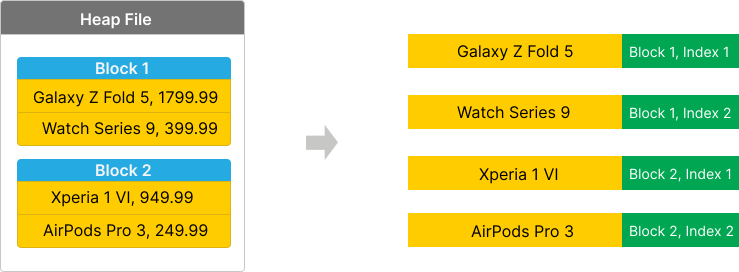
- Step 2. Extract data from specified columns and the corresponding block for each.
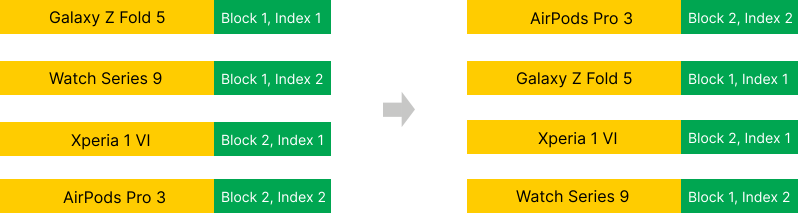
- Step 3. Sort the data. For example, sort the text data alphabetically, numbers from low to high, etc.
- Step 4. Organize data into a B-tree structure, evenly distributing data in leaf nodes from left to right.
- Step 5. Use the index to locate the exact rows.
We’ll create an index to speed up the following query:
SELECT
product_name,
price
FROM
products
WHERE
product_name = 'Xperia 1 VI';Step 1. The column that we want to have a fast lookup on the products table is product_name:
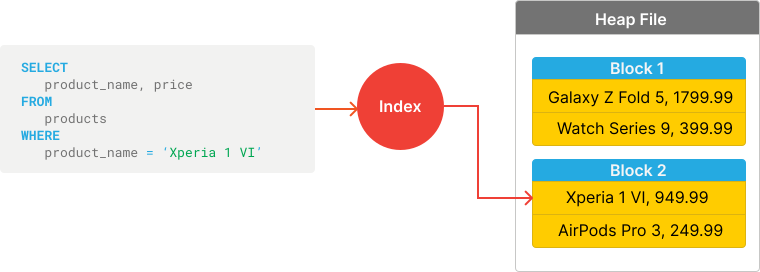
Step 2. Extract data from the product_name column. Assuming that the table has four rows with the following product names:
- Galaxy Z Fold 5
- AirPods Pro 3
- Xperia 1 VI
- Watch Series 9
Step 3. Sort the data. For example, sort the text data alphabetically, numbers from low to high, etc.
- AirPods Pro 3
- Galaxy Z Fold 5
- Watch Series 9
- Xperia 1 VI
Step 4. Organize the data in the B-tree data structure for fast lookup.
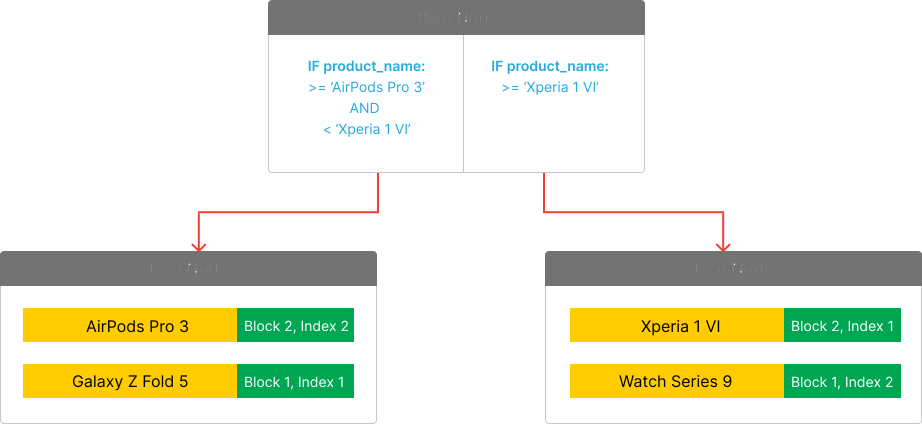
Step 5. When searching for a product with the name "Xperia 1 VI", PostgreSQL will start from the root node, go to the leaf node on the right, and find block #2 and index #1.
Instead of loading all blocks from the heap file, PostgreSQL can directly read the row from block #2 and index #1.
CREATE INDEX statement #
To create an index in PostgreSQL, you use the CREATE INDEX statement:
CREATE INDEX [index_name]
ON table_name (column1, column2);In this syntax:
- First, specify an optional name for the index. If you omit it, PostgreSQL automatically generates a name with the naming convention
table_column_idx. - Second, provide the table name followed by one or more columns you want to have a fast lookup.
For example, the following CREATE INDEX statement creates an index on the product_name column of the products table:
CREATE INDEX ON products(product_name);The CREATE INDEX statement does the following:
- First, extract values from the
product_namecolumn. - Second, sort them alphabetically.
- Third, store it on disk as a separate data structure.
When you find products by product names, PostgreSQL has a specific software component called a query optimizer that decides whether it should use the index or perform a full table scan.
If the number of rows is relatively small, the query optimizer performs a full table scan because it is more efficient than reading the index and locating the data.
Benchmarking queries #
To check if a query performs a full table scan or utilizes an index, you can use the EXPLAIN ANALYZE keywords before a query:
EXPLAIN ANALYZE query;The EXPLAIN ANALYZE returns the planned and actual execution time of the query.
For example, the following statement returns the planned and actual execution time of the query that finds a product with the name 'Xperia 1 VI':
EXPLAIN ANALYZE
SELECT
product_name,
price
FROM
products
WHERE
product_name = 'Xperia 1 VI';Output:
QUERY PLAN
----------------------------------------------------------------------------------------------------
Seq Scan on products (cost=0.00..25.83 rows=1 width=17) (actual time=0.035..0.036 rows=0 loops=1)
Filter: ((product_name)::text = 'Xperia 1 VI'::text)
Rows Removed by Filter: 26
Planning Time: 0.101 ms
Execution Time: 0.054 msThe output reveals that the query performs a full table scan (Seq Scan on products).
Note that you’ll learn how to read the output of the EXPLAIN ANALYZE statement in detail later.
The products the table needs more rows to utilize the index.
Generating dummy products #
First, create a user-defined function that inserts a specified number of dummy products (n) into the products table:
CREATE OR REPLACE FUNCTION insert_products(n INT)
RETURNS VOID
AS $$
BEGIN
INSERT INTO products (product_name, price, safety_stock, gross_weight, brand_id, category_id, description)
SELECT
'Product ' || i,
trunc(random() * 1000 + 1)::numeric(11,2),
0,k
trunc(random() * 50 + 1)::numeric(10,2),
trunc(random() * 10 + 1)::int,
trunc(random() * 12 + 1)::int,
'Description for Product ' || i
FROM generate_series(1, n) AS i;
END;
$$ LANGUAGE plpgsql;Second, insert 1,000 rows into the products table by calling the user-defined function:
SELECT insert_products(1000);Third, retrieve the number of rows from the products table:
SELECT
COUNT(*)
FROM
products;Output:
count
-------
1026Utilizing index #
The following query finds the product with the name 'Xperia 1 VI':
EXPLAIN ANALYZE
SELECT
product_name,
price
FROM
products
WHERE
product_name = 'Xperia 1 VI';Output:
QUERY PLAN
-------------------------------------------------------------------------------------------------------------------------------------
Index Scan using products_product_name_idx on products (cost=0.28..8.29 rows=1 width=17) (actual time=0.030..0.030 rows=0 loops=1)
Index Cond: ((product_name)::text = 'Xperia 1 VI'::text)
Planning Time: 5.062 ms
Execution Time: 0.045 msThe output indicates that the query utilizes the index to find the product named 'Xperia 1 VI' (Index Scan using products_product_name_idx on products). It took 0.045ms to find the product.
Note that the number may be different depending on your server’s performance.
Drop index #
To compare the performance of the query without an index, you can remove the index using the following DROP INDEX statement:
DROP INDEX products_product_name_idx;And find the product without the index:
EXPLAIN ANALYZE
SELECT
product_name,
price
FROM
products
WHERE
product_name = 'Xperia 1 VI';Output:
QUERY PLAN
----------------------------------------------------------------------------------------------------
Seq Scan on products (cost=0.00..25.83 rows=1 width=17) (actual time=0.140..0.140 rows=0 loops=1)
Filter: ((product_name)::text = 'Xperia 1 VI'::text)
Rows Removed by Filter: 1026
Planning Time: 2.591 ms
Execution Time: 0.170 msThe query performs a full table scan (Seq Scan on products) and it took 0.170ms to complete.
As a result, the query with index is 3.7 times (~0.170/0.045) faster than the one without an index.
Index types #
PostgreSQL supports various index types, each has a specific usage:
| Index Type | Usage |
|---|---|
| B-Tree | B-tree is the default index type. You can use B-tree index types for equality (=) and range queries (<, <=, >, >=). |
| Hash | Hash index type is optimized for simple equality lookups (=). |
| GIN (Generalized Inverted Index) | You use the GIN index types for indexing composite data types, such as JSONB, arrays, and full-text search. |
| GiST (Generalized Search Tree) | The GiST index type is useful for indexing complex data types, including ranges, geometric data, and full-text search. |
| SP-GiST (Space-Partitioned GiST) | The P-GiST index type is efficient for non-balanced tree structures, like hierarchical or spatial data. |
| BRIN (Block Range INdex) | The BRIN index type is suitable for very large tables with naturally ordered data, reducing storage and maintenance costs. |
Summary #
- PostgreSQL stores tables as heap files. Each heap file contains blocks. Each block has multiple tuples (rows).
- A full table scan means loading data from a heap file to memory to find matching rows.
- Use indexes to speed up a query.
- Use the
CREATE INDEXstatement to create an index. - Use the
DROP INDEXstatement to drop an index. - Use the
EXPLAIN ANALYZEstatement to provide the planned and actual execution time of a query.
Quiz #
PostgreSQL Index
Thank you for your feedback!
