
The SQLite length() function returns the number of characters of a string. If the argument is a BLOB, the length() function returns the number of bytes.
Syntax #
length(data)Arguments #
The length function accepts one argument which can be a string or a BLOB.
data
The string or a BLOB argument.
If data is NULL, the length function returns NULL. If data is not a text value, the length function will convert it to a text value first.
Return Type #
INTEGER
Examples #
1) Basic length() function example #
The following statement returns the number of characters in the SQLite string:
SELECT length('SQLite');Output:
length('SQLite')
----------------
62) Using the length function with Unicode #
The following example uses the length() function with a string that contains Unicode characters:
SELECT length('Äpfel') length;Output:
length
------
53) Using the length() function with table data #
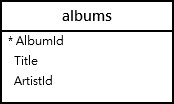
We’ll use the albums table from the sample database:
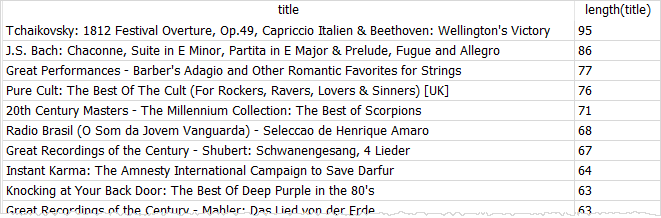
The following query uses the length() function to get the lengths of the album titles and sort the titles by the title length in descending order:
SELECT
title,
length (title)
FROM
albums
ORDER BY
length (title) DESC;Here’s the partial output:
The following example uses the length() function to find the album titles that have 10 characters:
SELECT title, length(title) AS title_length
FROM albums
WHERE length(title) = 10;Output:
Title title_length
---------- ------------
Audioslave 10
Body Count 10
Bongo Fury 10
Angel Dust 10
One By One 10
Blue Moods 10
...Thank you for your feedback!
