
Summary: in this tutorial, you will learn how to use the SQLite LEAD() function to get the value of the following row from the current row in the partition.
Introduction to SQLite LEAD() function #
SQLite LEAD() function is a window function that allows you to access the data of the following row at the given physical offset from the current row in the partition.
Here’s the syntax of the LEAD() function:
LEAD(expression [,offset[, default ]])
OVER (
PARTITION BY expression1, expression2,...
ORDER BY expression1 [ASC | DESC], expression2,...
)In this syntax:
expression #
It is an expression that is evaluated against the value of a row based on the specified offset. It must return a single value.
offset #
It is the number of rows forwarding from the current row to obtain the value. The default value of the offset is 1 if you don’t specify it explicitly.
default #
It is the default value to return in case the expression at offset is NULL. If you don’t specify default, then the LEAD() function returns NULL.
PARTITION BY clause #
The PARTITION BY clause distributes the rows of the result set into partitions to which the LEAD() function applies. If you don’t explicitly specify the PARTITION BY clause, the function treats the whole result set as a single partition.
ORDER BY clause #
The ORDER BY clause specifies the order of rows in each partition to which the LEAD() function applies.
In practice, you often use the LEAD() function to calculate the difference between the values of the current and subsequent rows.
SQLite LEAD() function examples #
We create a view named CustomerInvoices based on the invoices table in the sample database for the demonstration:
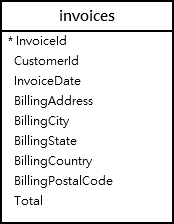
CREATE VIEW CustomerInvoices
AS
SELECT
CustomerId,
strftime('%Y',InvoiceDate) Year,
SUM( total ) Total
FROM
invoices
GROUP BY CustomerId, strftime('%Y',InvoiceDate);The following statement queries data against the CustomerInvoices view:
SELECT
*
FROM
CustomerInvoices
ORDER BY
CustomerId,
year,
Total;The following picture shows the partial output:
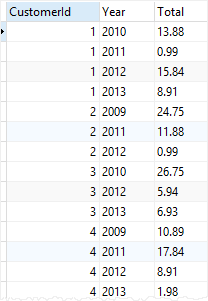
1) Using the LEAD() function over the result set example #
The following query uses the LEAD() function to return the difference in invoice amounts for a specific customer over subsequent years:
SELECT
CustomerId,
Year,
Total,
LEAD ( Total,1,0) OVER ( ORDER BY Year ) NextYearTotal
FROM
CustomerInvoices
WHERE
CustomerId = 1;
Here is the output:
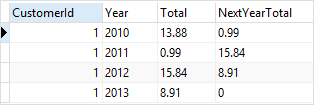
In this example:
- First, we did not use the
PARTITION BYclause so theLEAD()function treated the whole result set derived from theFROMclause as a single partition. - Second, since the last row has no lead value, the function returned the default value of zero.
3) Using the LEAD() function over partition by example #
The following example uses the LEAD() function to return the difference in invoice amounts for every customer over subsequent years:
SELECT
CustomerId,
Year,
Total,
LEAD ( Total, 1, 0 ) OVER (
PARTITION BY CustomerId
ORDER BY Year
) NextYearTotal
FROM
CustomerInvoices;The following picture shows the partial output:
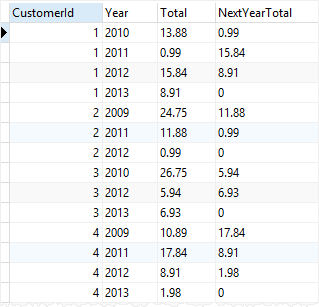
In this example:
- First, the
PARTITION BYclause partitioned the rows in the result set by customer Id. - Second, the
ORDER BYclause specified in theOVERclause sorted the rows in each partition by year before theLEAD()function was applied. - Third, the
LEAD()function is applied separately to each partition and the calculation restarted for each partition.
Notice that the last row of each partition has a value of zero (0) because it had no lead value.
Summary #
- Use the
LEAD()function to obtain data of the following row from the current row in the partition.
Thank you for your feedback!
