
Summary: in this tutorial, you will learn about the SQLite window frame and how to use it to specify a subset of partitions for calculation.
Introduction to the SQLite window frame #
Some window functions use the window frame in their calculations such as FIRST_VALUE(), LAST_VALUE(), and SUM(). A window frame is used to specify how many rows around the current row the window should include.
To define a window frame, you use one of the following syntaxes:
{ RANGE | ROWS } frame_start
{ RANGE | ROWS } BETWEEN frame_start AND frame_end
The frame_start can take one of the following options:
N PRECEDING
UNBOUNDED PRECEDING
CURRENT ROWAnd the frame_end can take one of the following options:
CURRENT ROW
UNBOUNDED FOLLOWING
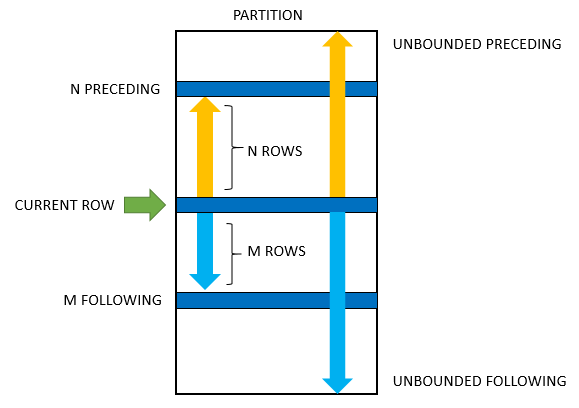
N FOLLOWINGThe following picture shows the structure of a frame in a partition:
Here is the meaning of each option:
UNBOUNDED PRECEDING: the frame starts at the first row of the partition.N PRECEDING: the frame starts atNthrows before the current row.CURRENT ROW: is the current row that is being processed.UNBOUNDED FOLLOWING: the frame ends at the final row of the partition.M FOLLOWING: the frame ends at theMthrow after the current row.
By default, window functions use the following option:
RANGE BETWEEN UNBOUNDED PRECEDING AND CURRENT ROWRANGE vs. ROWS #
The ROWS specifies the offset of the current row and the frame rows are row numbers. On the other hand, the RANGES indicates that the offset of the current row and frame rows are row values.
Note that RANGE must be used only with UNBOUNDED or CURRENT ROWS option.
SQLite window frame examples #
Let’s take some practical examples of using window frames.
Setting up a sample table #
First, create a new table named SaleInfo that stores the sales amounts by year and month for the demonstration:
CREATE TABLE SalesInfo (
year INT NOT NULL,
month INT NOT NULL,
amount NUMERIC(10,2),
PRIMARY KEY(year,month)
);Second, insert some data into the SalesInfo table:
INSERT INTO SalesInfo(year,month,amount)
VALUES(2018,1,100),
(2018,2,120),
(2018,3,120),
(2018,4,110),
(2018,5,130),
(2018,6,140),
(2018,7,150),
(2018,8,120),
(2018,9,110),
(2018,10,150),
(2018,11,170),
(2018,12,200);Third, query data from the SalesInfo table:
SELECT
year,
month,
amount
FROM
SalesInfo;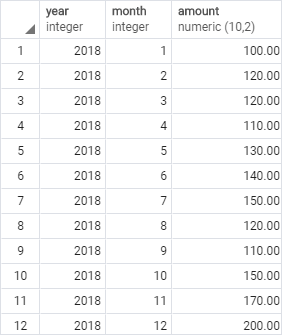
1) Using SQLite window frame to calculate running total example #
The following statement uses the SUM() window function to calculate the running total of sales by month:
SELECT
month,
amount,
SUM(amount) OVER (
ORDER BY month
) RunningTotal
FROM
SalesInfo;
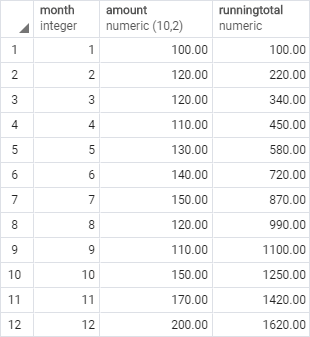
As mentioned earlier, the SUM() window function uses the following window frame options:
RANGE BETWEEN UNBOUNDED PRECEDING AND CURRENT ROW
It means that for the current row, the SUM() function will add values from the first row to the current row to calculate the sum.
2) Using SQLite window frame to calculate moving average example #
The following statement uses the AVG() window function to calculate the sales moving average:
SELECT
month,
amount,
AVG(amount) OVER (
ORDER BY month
ROWS BETWEEN 1 PRECEDING AND 1 FOLLOWING
) SalesMovingAverage
FROM
SalesInfo;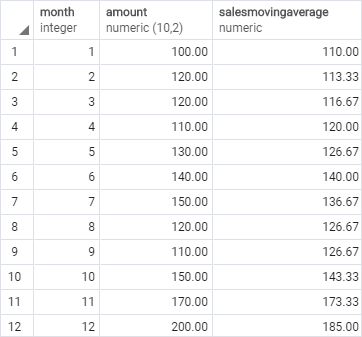
In this example, we used the window frame that has three rows: the current row, one row before, and one row after the current row. The AVG() used the values of these three rows to calculate the moving average.
You can use the output result set to make a visualization as shown in the following chart:
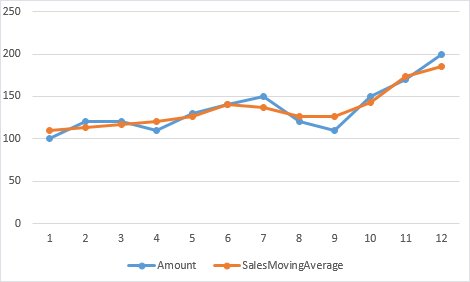
Note that a moving average is often used with time series data such as sales to smooth out short-term fluctuations and highlight longer-term sales trends.
In this tutorial, you have learned about the SQLite window frame to specify a subset of partitions for calculation.
Thank you for your feedback!
