New to Rust? Grab our free Rust for Beginners eBook Get it free →
10 Simple Steps to Solve SQL Problems [2026]

SQL problems become manageable when you turn the prompt into decisions about rows, columns, grouping, and result order, and I ran the worked example below with Python 3.11.16 and SQLite 3.53.1 so you can inspect how each clause changes the result.
Start with the requested result
Before writing SQL, mark the rows the prompt should include, the columns it should return, whether it needs one row per record or group, and the required order or limit.
A request for customers with at least 100 in paid orders is not asking for every order. It needs paid rows first, a total for each customer, a threshold applied to that total, and a stable order for the final list.
Inspect the tables before writing conditions
Write down the grain of each table because an orders row might mean one checkout while a customer row means one person, and that distinction tells you whether a join can multiply rows before an aggregate runs.
Check column names, data types, nullable fields, primary keys, and foreign keys before deciding whether “revenue” means paid orders, invoices, or a stored summary.
Build one query in visible stages
The safest way to solve SQL problems is to make each clause answer one part of the question. Run the smallest query that can prove the next decision, then add the next clause only after its input rows look right.
Start with rows and columns
Begin with the table and columns needed for the answer, following the PostgreSQL and SQLite documentation that separates input-row selection from later result shaping.
For the sample, the first decision is whether an order is paid. The paid_orders common table expression keeps that subset named and inspectable before any totals are calculated.
import sqlite3

connection = sqlite3.connect(":memory:")
connection.execute("""
CREATE TABLE orders (
    customer TEXT,
    region TEXT,
    status TEXT,
    total NUMERIC
)
""")
connection.executemany(
    "INSERT INTO orders VALUES (?, ?, ?, ?)",
    [
        ("Ari", "East", "paid", 120),
        ("Ari", "East", "paid", 80),
        ("Bo", "East", "paid", 60),
        ("Cy", "West", "paid", 200),
        ("Dee", "West", "cancelled", 500),
    ],
)

query = """
WITH paid_orders AS (
    SELECT customer, region, total
    FROM orders
    WHERE status = 'paid'
), customer_totals AS (
    SELECT customer, region, SUM(total) AS revenue
    FROM paid_orders
    GROUP BY customer, region
)
SELECT customer, region, revenue
FROM customer_totals
WHERE revenue >= 100
ORDER BY revenue DESC, customer;
"""

for row in connection.execute(query):
    print(f"{row[0]:<3} {row[1]:<4} {row[2]}")
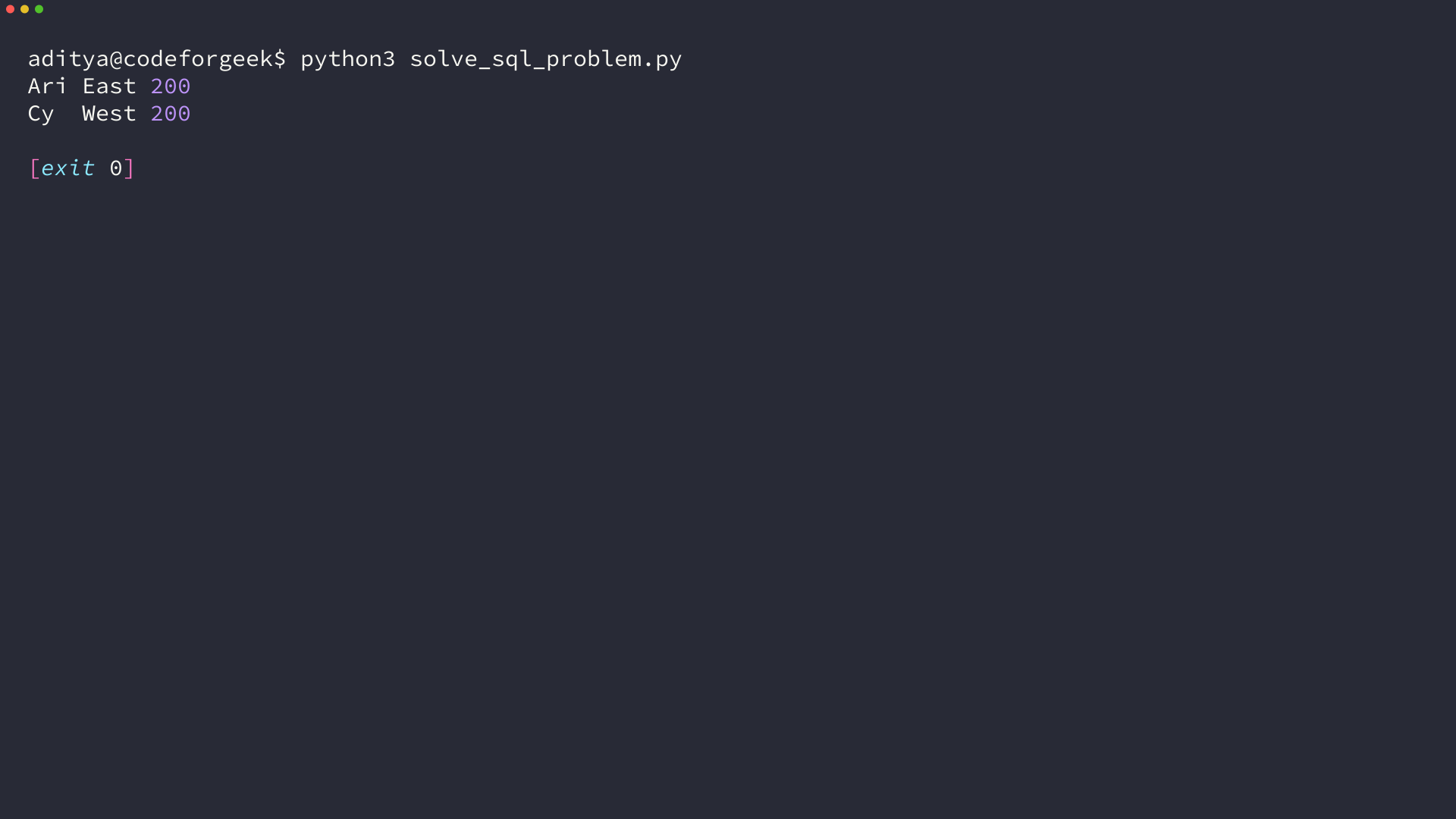
Save the file as solve_sql_problem.py and run python3 solve_sql_problem.py to confirm that the first WHERE condition removes the cancelled 500 order before aggregation.
Add filters and grouping
WHERE chooses source rows, while GROUP BY changes individual orders into one row per customer and region and SUM(total) calculates each group value.
The outer WHERE condition is valid because customer_totals already exposes revenue as a column, while an aggregate condition in one SELECT statement belongs in HAVING.
Check the result shape
The output has Ari East 200 and Cy West 200 because Bo does not meet the threshold and Dee is excluded before grouping.
That explanation is the test. If you cannot point to the clause that excludes a row or combines rows, the query may still return a plausible table for the wrong reason.
Add joins and CTEs only when they clarify the data path
Join a second table only when the requested output needs its columns or conditions, and inspect joined rows before GROUP BY because a one-to-many join can duplicate a value you intended to sum once.
A common table expression, or CTE, gives an intermediate result a name. PostgreSQL documents WITH queries as auxiliary statements attached to a larger query, which makes them useful when you need to inspect an input set, a joined set, or a grouped set separately.
Use a CTE when its name describes a decision you need to verify, such as paid_orders or customer_totals.
Trace a difficult prompt before writing the final query
Long prompts often combine several decisions. Separate them into a source set, a relationship, a filter, a calculation, and a display rule before you write the final SELECT.
For a prompt asking for each customer’s paid revenue in a selected region above 100, identify the order source, any customer relationship, status and region filters, a grouped total, and the threshold applied after that total exists.
Name the result at each stage
Use names that describe the rows, not names such as step1 or temp. paid_orders tells you what survived the first filter, while customer_totals tells you that the row grain has changed from orders to customers.
Run each intermediate SELECT during development so a cancelled order in paid_orders points directly to the source filter instead of the aggregation or display clause.
Choose WHERE or HAVING from the value you are testing
Use WHERE when the condition tests a row before grouping. Use HAVING when the condition tests an aggregate produced by the same SELECT, such as SUM(total) greater than or equal to 100.
The sample uses an outer WHERE because revenue is already a customer_totals column, although one grouped SELECT with HAVING SUM(total) >= 100 also works when you do not need an inspectable intermediate result.
Do not hide a row-count change
Grouping, DISTINCT, and joins can all change how many rows you have. Count rows before and after each operation when the answer looks suspicious, especially after joining a table that can match more than once.
For example, joining orders to order_items before summing order totals can repeat each order once for every item. Aggregate order_items first, or join at a grain that matches the calculation you need.
Set ordering only after the result is complete
ORDER BY controls presentation rather than membership, so add it after you know the correct rows and values and use a secondary column when ties need a stable display order.
The sample orders revenue from high to low and uses customer as the tie-breaker. Without the second expression, two equal totals can appear in either order unless your database documents a stronger guarantee.
Test the boundary cases that change an answer
Before you call a solution complete, create a tiny test set that includes an empty result, a null, a duplicate, and a value on the threshold. These cases expose whether a condition belongs before or after grouping and whether a join changed the row count.
For a ranking question, add ties. For a date-range question, add values at both endpoints. For a left join, add a source row with no match and confirm whether the prompt expects it to remain in the result.
Review the prompt as a test specification
Every noun in a SQL prompt deserves a source column or a calculation, and every qualifier deserves a condition you can point to in the query.
Words such as each, only, latest, unique, and top change the result shape because “each customer” asks for a customer-level group, “only paid” asks for a row filter, “latest order” asks for a ranking or maximum-date rule, and “unique” asks whether duplicate rows or values are the concern.
Translate ambiguous words before choosing syntax
Business terms often have more than one database meaning, with customer referring to an account, contact, or billing entity and revenue referring to a completed payment, invoice amount, or amount after refunds.
Ask for the definition when the schema cannot answer it because SQL syntax cannot repair a query built on the wrong business rule.
Make a hand-checkable expectation
Calculate the expected answer for a few rows before you run the query so you have a compact oracle that separates a data misunderstanding from a SQL mistake.
In the sample, Ari has two paid orders that total 200, Cy has one paid order of 200, Bo remains below the threshold, and Dee is cancelled. Those facts let you inspect every result row rather than accepting a total because it looks reasonable.
Use nulls deliberately
A null does not behave like an empty string or zero. A comparison with null does not produce true, so write IS NULL or IS NOT NULL when the prompt asks whether a value is absent.
Aggregates have their own boundaries. COUNT(column) skips null values, COUNT(*) counts rows, and SUM can return null when no non-null input exists, so decide whether the reader task needs a missing value, a zero, or a row omitted from the result.
Keep the smallest diagnostic query
When the final query is wrong, remove clauses until you have the smallest query that still shows the unexpected rows. Add conditions back one at a time and compare the new result with the hand-checkable expectation.
That method teaches you which decision changed the data and gives the next prompt a process you can inspect instead of syntax you only half remember.
Inspect the plan after the result is correct
Use your database’s EXPLAIN command only after the query returns the intended result on representative data.
PostgreSQL documents EXPLAIN and EXPLAIN ANALYZE as plan-inspection tools, while SQLite documents how indexes change searches and sorts. A plan is not a substitute for checking output, but it tells you where a correct query may become slow as data grows.
Use the same checklist on the next problem
Keep a short query log with the prompt, table grain, first SELECT, unexpected result, and correcting clause so each error becomes a reference for a later similar decision.
When you compare two valid queries, prefer the one whose row grain, calculation, filters, grouping, and ordering are easiest to explain and verify.
Database dialects differ in functions, date handling, and edge behavior, so check the documentation for the database you run after you have defined rows and result shape.
Use this order every time: identify the output, inspect table grain, select the smallest input set, add one decision per clause, compare the result shape, then inspect the plan if scale makes it necessary. Keep a clause only when you can explain what rows it changes.
If you need a clause reference while you work, use the SQL commands guide with examples. Start your next practice prompt by writing the expected rows in plain language, then make the first SELECT prove that description.
What is the first step when solving an SQL problem?
Write the expected result in plain language. Identify the required rows, columns, grouping, order, and limit before you choose SQL clauses.
When should you use a CTE in SQL?
Use a CTE when a named intermediate result makes the data path easier to inspect, such as a filtered set, a joined set, or grouped totals. It is optional when one clear SELECT already expresses the task.
Should you use EXPLAIN before testing SQL output?
No. Confirm that the query returns the intended rows and values first. Use EXPLAIN after correctness to inspect how the database will access larger tables.