Image

COSMAC Elf Turns 50

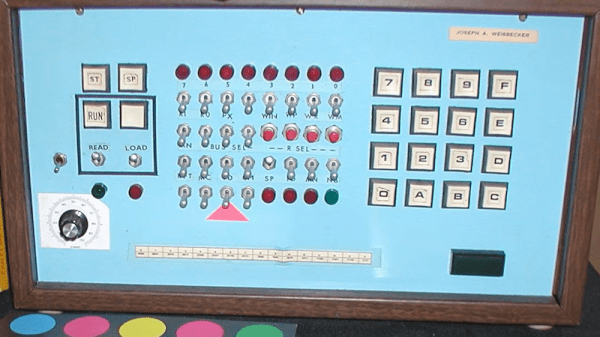
If you were interested in computers in the early 1970s, you struggled to get time on real computers since owning your own was all but impossible. In the middle of the decade, though, you could get a few computers: the Mark VIII, the Altair, the Apple I, and several others. Those were still pretty expensive, though. But in late 1976, an article in Popular Electronics said you could build a “powerful, expandable” computer for $80. The article in question was by [Joseph Weisbecker], who, unknown to most of us at the time, was actually the RCA employee behind the CPU — an RCA 1802. [Tech Time Traveler] takes a close look at the spunky little computer’s history in the video you can see below.

The 1802 was actually the second generation of the CPU, but the first that was all-in-one chip. [Weisbecker] started building the CPU as a personal project. He’d been a hacker even in high school, building relay-based tic-tac-toe games, among other things.

The first incarnation in his lab was “Fred,” with 100 TTL chips, and his idea was to have the computer be at least partially used as a video game — an interesting point, with Pong being very popular at the time.

Continue reading “COSMAC Elf Turns 50”

Image

How A 1981 RAM Expansion Worked

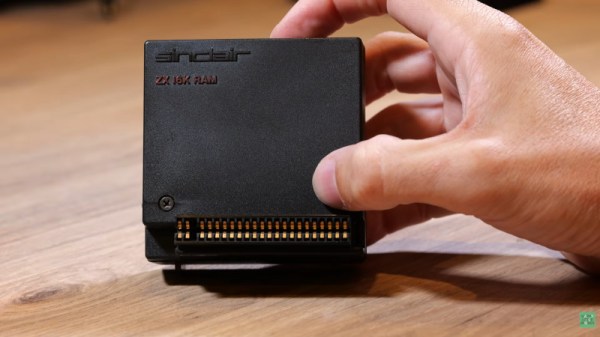
Sir Clive Sinclair and his company were notorious for pushing the limits of electronic parts in search of a low price, and his ZX series 8-bit computers were fine examples of this art. The ZX81 came with a meagre 1K of memory, and a popular upgrade was a 16K RAM pack. [Happy Little Diodes] has opened one up, and to his surprise, found many more parts than expected.

Inside the box is a pair of PCBs connected by ribbon cables, one of which has a selection of 74 chips and the other the 4116 RAM chips and a discrete component power circuit. This complexity comes from that cheapness, the 4116 is an inexpensive DRAM chip and requires an eclectic set of power supplies.

The functions of address selection are straightforward enough, as is the DRAM refresh circuitry. The power supply is clever in that it’s a self-oscillating switcher that provides +12 and -5 volts with a single transistor. We particularly like the quench diode in the 12 V Zener diode regulator  circuit.

The ZX81 gave a huge number of British kids their first taste of computing, and learning to use a limited memory space is something that stays with you for life. The film doesn’t mention the most notorious feature of the 16K pack though, that it had been developed with a machine clamped to the desk. Using one in a real-life location was an exercise in not jogging your machine, because the slightest disturbance would trigger a reset.

The ’81 was also famous for its membrane keyboard. Another popular upgrade back then was a new one.

Continue reading “How A 1981 RAM Expansion Worked”

Image

“I’m Not Dead Yet!” Reverse Polish Notation Calculators You Can Still Buy

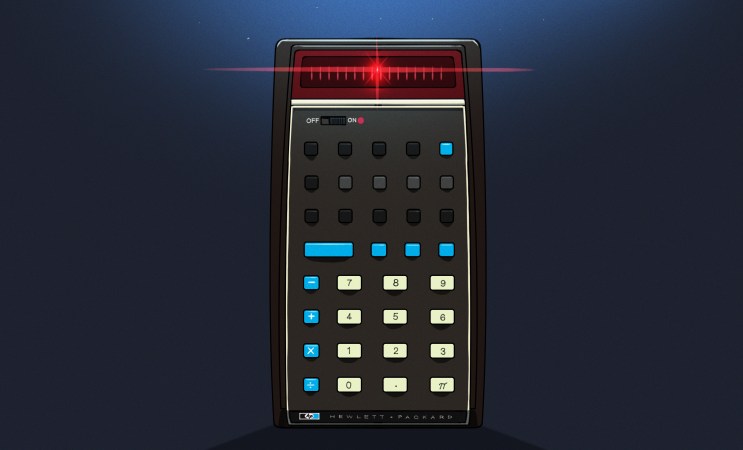
If you used a scientific calculator in the 1970s or 1980s, there was a fair chance that it worked differently from almost every calculator you see today. Instead of typing:

2 + 3 =

you entered:

2 ENTER 3 +

There wasn’t even an equals key. Hewlett-Packard made this system — Reverse Polish Notation, or RPN — practically synonymous with serious scientific calculators until other players like TI and Casio got serious. Once you got used to it, ordinary algebraic calculators could feel annoyingly clumsy.

Today, RPN calculators look like a nearly extinct species. HP left the calculator market, licensing the HP calculator line to Moravia Consulting. Old HP-15Cs, 16Cs, 32Ss, 42Ss, and 48s have become collectibles. But RPN isn’t dead. You can still buy new hardware, build your own, or turn almost any computer or phone into a very capable RPN machine. There are reasons some of us still want to.

But Why Polish?

The name goes back to Polish logician [Jan Łukasiewicz], who devised a notation in which operators precede their operands. Instead of writing:

A + B

you can write:

+ A B

The big advantage is that parentheses aren’t required. The structure of the expression tells you exactly what operates on what. Reverse Polish notation simply puts the operator at the other end:

A B +

[Łukasiewicz] wasn’t designing calculators, of course, but the same idea turned out to be extremely convenient for computers and calculators. Your software doesn’t have to remember what operation is in progress. Each operator is ready to go and can simply work on the operands that you’ve already read.

RPN isn’t exactly the way people calculate with pencil and paper, and it certainly wasn’t derived from the slide rule, but there is a similarity in the way you work. With a slide rule, you generally establish some value, operate on it, and continue from the result. When doing a long-hand calculation, you often calculate a subexpression, write down the answer, and use that answer in the next step. You will probably start with the inner parenthesis and work outward, just like someone with an RPN calculator does. RPN formalizes that process with a stack.

Suppose you want:

(3 + 4) × (5 + 6)

On a conventional calculator, you either need parentheses, or you have to calculate one result and remember it. On an RPN calculator:

3 ENTER

4 +

5 ENTER

6 +

×

The first + leaves 7 on the stack. The second leaves 11 above it. The multiply consumes both and leaves 77.

Notice what’s missing: parentheses, an equals key, and any need to tell the calculator about precedence. This isn’t much of a win for a five-key calculation. It becomes more apparent with something like computing the value of a bunch of parallel resistors:

R=1/(1/R1+1/R2+1/R3…)

An RPN user can calculate each reciprocal, add it to the running result on the stack, and finally take the reciprocal. Intermediate answers stay in the calculator naturally instead of being stuffed into memory registers or enclosed in increasingly impressive collections of parentheses.

Is RPN better? Calculator users have been arguing about that for half a century. But once RPN gets wired into your fingers, it can be surprisingly hard to give up.

Continue reading ““I’m Not Dead Yet!” Reverse Polish Notation Calculators You Can Still Buy”

Image

HDMI For The Color Computer 2

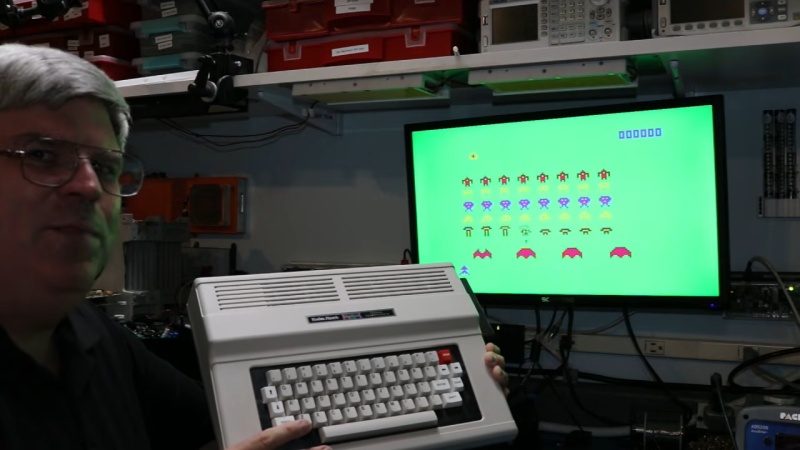
[Scott Baker] bought a TRS-80 Color Computer off eBay some five years ago. He’d always intended to add a CoCoVGA or CoCoDV upgrade to hook it up to a monitor, but the device was sold out and his name never made it off the waitlist. Thus, he decided to build his own solution to give the classic machine a proper HDMI output.

The concept behind the project is simple enough—grab the digital signals that feed the MC6847 IC responsible for generating the analog video output, and use them to create an all-digital video output over HDMI. [Scott] achieved this by using a Tang Nano board, which hosts a Gowin GW1N-1 FPGA. It’s able to snoop the signals heading to the MC6847 and, with some supporting components and level shifters, it can spit out video befitting modern screens. To make the system nicely complete, an analog-to-digital converter is also included to pick up the analog sound output from the TRS-80 and spit it out down the same HDMI cable. Such convenience!

There’s something strangely anachronistic about grabbing a TRS-80 off the shelf and hooking it up to a flatscreen with a single HDMI cable. Regardless, it’s a pretty great way to play with your old machine without having to futz with heavy old CRTs. We’ve featured plenty of similar projects before, too. Continue reading “HDMI For The Color Computer 2”

Image

How Gold Plastic Syndrome Is Killing Toys And Game Consoles

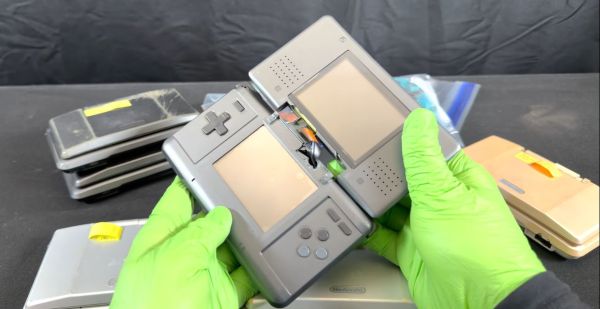
In a recent video [Sqwerks] does a deep-dive into the problem of disintegrating plastic enclosures of Nintendo DS consoles. These original NDS handheld consoles have a metallic-like coating that appears to interact with the ABS plastic, causing yellowing as well as extreme brittleness and correspondingly broken hinges. Unsurprisingly, this causes the shell to essentially disintegrate the moment you try to disassemble them for something like a screen replacement.

While somewhat the opposite of plasticizer migration into ABS from PVC insulation that we covered before, the underlying cause is probably similar, with the Transformers toy community having come to call it Gold Plastic Syndrome (GPS) based on the fact that it were mostly gold-colored parts on these plastic toys that seemed to be affected. Over time the additives used to add a cool metal sheen and swirls to the plastic appear to interact in a way that makes the ABS plastic very brittle.

Although the underlying cause of GPS doesn’t appear to be known yet, the Transformers community has documented this happening since the late 1980s and into the early 2000s, with even reports that some toys from the mid-2010s suffer from this. Whatever the underlying cause of GPS is, the result is always the same, with disintegrating brittle plastic and often a powdery residue.

In the case of NDS consoles, replacing the affected shell with a third-party replacement is still a viable option today, with [Sqwerks] recommending this solution. For other enclosures and toys where the plastic effectively is the toy, it might be that all we can do is watch them slowly disintegrate until we figure out how to revert GPS.

Continue reading “How Gold Plastic Syndrome Is Killing Toys And Game Consoles”

Image

All The Best Computers Boot To BASIC

Anyone whose first computing experience came in the form of an 8-bit home computer will tell you about booting straight into a BASIC interpreter. The machine invited you to program it, and no doubt many of our middle aged readers are here today because they ran with that.

Modern computers with their fancy 64-bit multitasking supercomputer operating systems may have lost that experience, but now thanks to [Tarjan] you can bring it back. They’ve produced Thoreau BASIC, a bootable bare-metal BASIC interpreter for x86 machines with UEFI.

It’s largely GW-BASIC compatible, but with a few upgrades for the 21st century. The available memory is now whatever the system reports, so imagine a BASIC machine with gigabytes of the stuff. And while it has all the old-style BASIC you know and love, it also has high-res 24-bit graphics, and can load bitmaps. There can even be multiple text windows, it’s BASIC as you have never seen it before.

We are not sure how many will take this interpreter and run with it, after all maybe those modern 64-bit operating systems can be rather useful at times. But we’re guessing there will be plenty who’ll at least have a play with it for old time’s sake. Meanwhile, BASIC is not the only piece of UEFI goodness we’ve brought you.

Image

Encoding MOD Files Optically On Paper, Because Amiga’s Legacy Will Outlast M-Disks

All but a few of our very youngest readers are surely familiar with music formats that rely on optical disks. When we say [RobSmithDev] made a MOD tracker that uses an optical disk, then, you might be forgiven for thinking he stuck a bunch of MOD files onto a CD– MOD files being a format of electronic music that was conceived of on the Commodore Amiga that is still used to this day. A dedicated MOD-CD player might be a fun project, but it’s not what [Rob] did; his project is far more impressive and impractical, as he’s come up with a way to encode the MOD files on paper for optical playback. This way the Amiga’s legacy can be preserved longer than the paltry thousand years promised by the optical M-disk format.

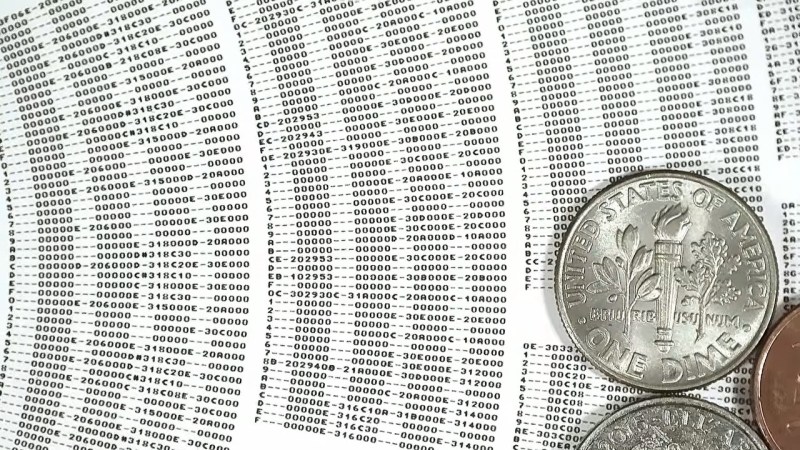
Zooming way, way in on the disk reveals that he’s actually printing the patterns of the MOD file row by row, just like you’d see playing it in a ‘tracker’ program. A MOD file, you see, does not encode music like a WAV or MP3. Rather, like with MIDI, it lists the notes the software reading the file — traditionally called a tracker — is to recreate. Unlike a MIDI file, though, you don’t have to store the same notes more than once: repeating sections are stored in patterns. So most of the disk is just a long list of hexadecimal numbers: several columns worth, one for each ‘voice’ or instrument playing in the song. Another difference with MIDI is that MOD files are self-contained in that they are supposed to contain the samples, which isn’t in evidence until you flip over the disk.

There’s no B-side to [Rob]’s album. Instead a QR-code like series of barcodes is used to encode the samples used in each track on the disk, as well as other information needed to recreate the MOD file, including metadata like title and artist, and the sequencing of the patterns on the front. Of course this means he needs two cameras on his physical mod player, one on each side, and steppers to slide them across the disk like a linear tracking turntable. The front is read via OCR of his modified Amiga “Topaz” font, while the rear holds the first 1084 bytes of the MOD file in a QR-inspired format [Rob] produced specifically for this project.

Unlike the last time we saw someone store music in QR codes, the more modest size requirements of modfiles — something that led to their use in keygens — means this player can store the music’s 8-bit sound samples without the OPUS compression [Rob] is using affecting fidelity. He’s working on another video to give the details of the player– as he works out the bugs, right now it can’t jump betwixt patterns on the disk as fast as some modfiles need–but we’re willing to hazard a guess he’s got a Raspberry Pi in there, and that it’s probably not running the Amiga-inspired AROS operating system.

Continue reading “Encoding MOD Files Optically On Paper, Because Amiga’s Legacy Will Outlast M-Disks”