
Açıklama
THE #1 NO CODE DRAG & DROP WORDPRESS WEBSITE BUILDER POWERING 23M+ WEBSITES WORLDWIDE, NOW WITH AGENTIC AI.
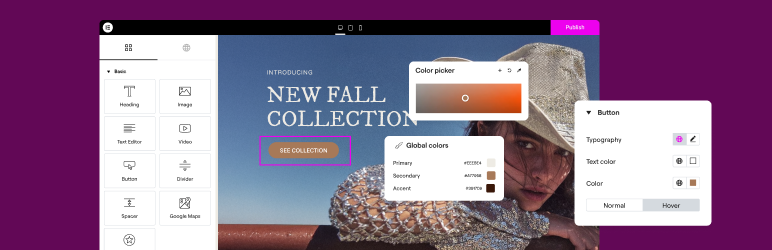
Elementor, the leading WordPress website creation platform, empowers you to build professional, pixel-perfect websites seamlessly with its no-code, drag-and-drop Atomic Editor.
Supporting the full website lifecycle, Elementor lets you build, optimize, and manage your website with extended capabilities such as agentic AI creation, image optimization, transactional email delivery, accessibility tools, performance boosters, and more.
Now in version 4, the Atomic Editor!. A new generation of performance-first atomic building blocks that puts you in control of every part of your site. Define your global design systems and reusable components once, and they apply everywhere instantly – turning hours or even days of work into single clicks. Elementor AI builds in the same structure, so anything it generates is a native, fully editable part of your site.
Unlock all Pro features with Elementor Pro.
Need fast and secure cloud hosting for your Elementor site? Try out Elementor Host Powered by Google Cloud & Cloudflare. 4.9/5 TrustPilot score.
🌟 Create professional stunning websites
- Intuitive drag & drop builder: Build any website with our no-code, drag-and-drop Editor. Achieve design precision with full control over layout and style.
- Pixel-perfect design tools: Upload SVGs, apply masks, gradients, box shadows, headline effects, shape dividers, and use built-in CSS controls for advanced customization.
- Template Library: Apply complete website kits for instant setups, or choose from a vast library of single pages, blocks, and pop-up templates.
- Advanced widgets: Access over 40 FREE widgets, including heading, image, text editor, video, button, gallery, carousels, and more.
- Agentic AI for WordPress capabilities: Describe what you want in natural language and Elementor AI builds it: custom widgets, sections, full layouts, and WordPress snippets, delivered as production-ready, fully editable code native to your site.
🗝️ Key features
- Design system: Use Variables and Classes for consistent colors, typography, and design elements that update everywhere at once.
- Responsive design: Optimize your design for every device with custom breakpoints, ensuring a seamless desktop, tablet, and mobile experience.
- Mask shapes: Turn any element, like an image or video, into whatever shape you desire to create standout designs.
- CSS transform: Use CSS Transform to rotate, scale, and skew elements, adding dynamic styling to your site.
- Entrance animations: Add entrance animations to elements to create engaging and interactive user experiences.
- Revision history: Track and revert to previous versions of your designs at any point in the creative process.
- Developer-friendly: Extensive documentation, API, developer tools, and custom code areas, let developers extendElementor and build custom solutions.
- Floating buttons: Add customizable, floating action buttons that stay in view as users scroll.
- Components [Pro]: Reuse the same building blocks across pages and sites, and update them everywhere they appear, with controlled content editing, so collaborators and clients update only exposed content properties.
- Theme Builder [Pro]: Design every part of your site: headers, footers, posts, and archives,for full control over appearance.
- Popup Builder [Pro]: Create popups with advanced targeting and triggering options to optimize user engagement and conversions.
- Forms [Pro]: Design and integrate custom forms with advanced features and integrations to capture lead submissions.
- WooCommerce Builder [Pro]: Design custom product pages, shop layouts, archives, carts, checkout and account pages for your store.
- Dynamic Content [Pro]: Connect your designs to data sources to build personalized, interactive web experiences.
- Notes [Pro]: Leave feedback and comments directly on the design interface for better team collaboration.
- Custom Code [Pro]: Insert custom code to extend the functionality of your site, with flexibility for advanced customizations.
- Custom CSS [Pro]: Apply Custom CSS to fine-tune the styling of elements with precise control.
- Motion effects [Pro]: Add motion effects to elements for a more dynamic and engaging user experience.
- Custom fonts and icons [Pro]: Upload and use custom fonts and icons that match your brand’s identity.
😍 Elementor’dan ÜCRETSİZ widget’lar
Access a suite of free widgets and tools built to support your website creation process:
- Heading: Add eye-catching headlines.
- Image: Control the size, opacity and more.
- Text Editor: Just like the WordPress text editor.
- Video: Add YouTube, Vimeo, VideoPress, Dailymotion or self-hosted videos.
- Button: Create interactive buttons.
- Link in Bio: Build link in bio components to promote your business / services.
- Image Box: A box with image, headline and text.
- Testimonials: Customer testimonials.
- Icon: Place one or more of 600+ icons available.
- Icon Box: An icon, headline, and text with one widget.
- Social Icons: Link to your social pages with the Facebook/X (formerly Twitter) icons.
- Image Gallery: Display your images in a grid.
- Image Carousel: Create rotating carousels or sliders for chosen images.
- Icon List: Use any icon to create a bullet list.
- Counter: Show numbers in an escalating manner.
- Progress Bar: Include an escalating progress bar.
- Nested Tabs: Display content in vertical or horizontal tabs.
- Nested Accordion: Display any type of content in collapsible sections.
- Rating: Display how many stars (or another icon) other visitors gave.
- Alert: Include a colored alert box to draw visitor’s attention.
- HTML: Insert code into the page.
- Shortcode: Insert shortcodes from any plugin into the page.
- Menu Anchor: Link any menu to this anchor.
- Read More: Set the Read More cut-off for the excerpt in archive pages.
- Sidebar: Add sidebars onto the page.
- Google Maps: Embed maps into the page.
- SoundCloud: Add SoundCloud audio bits.
- Divider: Separate content with a designed divider.
- Spacer: Add space between elements.
- Text Path: Attach your text to a path.
- And more.
🚀 Enhance your website
High-performing websites: Website performance affects your visitors’ experience and search result ranking. Elementor, in partnership with Google Chrome, continuously improves performance without compromising design.
Anahtar özellikler şunlardır:
- Reduced DOM output: Streamlined HTML structure for faster rendering.
- Improved media file loading: Optimized loading of images, videos, and other media assets.
- Reduced CSS and JS files: Minimized stylesheets and scripts individually loaded only on demand for quicker load times.
- Lazy loading: Deferred loading of non-critical resources to improve initial page load speed.
- Faster font loading: Efficient delivery of web fonts to enhance text rendering speed.
- Optimized front-end asset loading: Efficient loading of assets like JavaScript and CSS to minimize render-blocking.
- Element caching: Cache frequently accessed design elements to reduce server response time and enhance overall performance.
🔥 Elementor Editor Pro features
Create unparalleled websites while saving time, money and resources with Elementor Pro’s full website builder. Get access to 100+ professional widgets, features, and tools.
Editor Pro design widgets:
- Yazılar: Blog yazılarınızı özelleştirilebilir düzenler ve stillerle görüntüleyin.
- Share Buttons: Let visitors share your content on various social media platforms.
- Portfolio: Showcase your work or projects with portfolio layouts.
- Slides: Create slideshows with custom animations and transitions.
- Form: Kullanıcı etkileşimi ve veri toplama için gelişmiş formlar tasarlayın ve özelleştirin.
- Login: Web sitenize bir giriş formu veya kullanıcı kayıt modülü ekleyin.
- WordPress Menu: Customize and style your website’s navigation menu.
- Animasyonlu Başlık: Animasyonlu efektlerle dikkat çekici başlıklar oluşturun.
- Price Table: Display pricing plans or packages in a structured format.
- Price List: Showcase a list of prices or services with customizable styling.
- Gallery: Create image galleries with layout options and lightbox support.
- Flip Box: Add flip animations to highlight content or features.
- Call to Action: Encourage user interaction and conversions with dedicated sections.
- Medya Karuseli: Görseller veya videolar gibi medya dosyalarından oluşan bir karusel sergileyin.
- Deneyim Karuseli: Sosyal kanıt için müşteri referanslarını bir karusel biçiminde görüntüleyin.
- İç İçe Karusel: Daha karmaşık içerik organizasyonu için iç içe karuseller oluşturun.
- Döngülü Karusel: Sürekli görüntüleme için içeriği döngülü bir karuselde görüntüleyin.
- Table of Contents: Generate a table of contents for longer articles or guides.
- Geri Sayım: Promosyonlar veya etkinlikler için aciliyet yaratmak için geri sayım zamanlayıcıları ekleyin.
- Facebook Sayfası: Facebook sayfanızın akışını veya içeriğini web sitenize yerleştirin.
- Blok Not: Şık biçimlendirme seçenekleriyle alıntıları veya referansları vurgulayın.
- Şablon: Tutarlı marka ve düzen için tasarım şablonlarını kaydedin ve yeniden kullanın.
- Yorumlar: Güven ve güvenilirlik oluşturmak için müşteri yorumlarını ve derecelendirmelerini sergileyin.
- Facebook Butonu: Facebook sayfanızla veya içeriğinizle etkileşimleri teşvik etmek için butonlar ekleyin.
- Facebook Gömülü Kodu: Facebook gönderilerini veya içeriklerini web sitenize yerleştirin.
- Facebook Comments: Enable Facebook comments on your website’s pages or posts.
- PayPal Button: Integrate PayPal buttons for online payments.
- Stripe Button: Integrate Stripe payment buttons for secure online transactions.
- Lottie Bileşeni: Görsel çekiciliği ve etkileşimi artırmak için Lottie animasyonları ekleyin.
- Kod Vurgulama: Daha iyi okunabilirlik için kod parçacıklarını sözdizimi vurgulamasıyla görüntüleyin.
- Video Oynatma Listesi: Web sitenizdeki video içeriği için oynatma listeleri oluşturun ve özelleştirin.
- Mega Menu: Customize advanced menus for better navigation and displaying complex content.
- Off Canvas: Create off-canvas areas that slide in to show extra info or menus without cluttering the main layout.
Editor Pro theme widgets:
Build and customize all the key parts of your website including headers, footers, 404 page, global archives, and more.
- Yazı Başlığı: Tek tek blog gönderilerinin veya sayfalarının başlığını özelleştirin.
- Yazıdan Alıntı: Blog yazılarınızın kısa bir özetini veya teaser’ını görüntüleyin.
- Gönderi İçeriği: Blog yazılarınızın veya sayfalarınızın ana içerik alanını özelleştirin.
- Öne Çıkan Görsel: Blog gönderileri veya sayfaları için öne çıkan görselleri ayarlayın ve özelleştirin.
- Yazar Kutusu: Blog gönderilerinde yazar bilgilerini ve biyografilerini görüntüleyin.
- Yorum Gönderimi: Web sitenizdeki yorum bölümlerinin görünümünü ve işlevselliğini özelleştirin.
- Gönderi Gezinme: Kolay gezinme için bitişik gönderilere gezinme bağlantıları ekleyin.
- Post Bilgisi: Blog gönderileri hakkında yazar ve tarih gibi ek bilgileri görüntüleyin.
- Site Logo: Upload and customize your website’s logo for branding purposes.
- Site Başlığı: Web sitenizin başlığını özelleştirin.
- Sayfa Başlığı: Tek tek sayfaların başlığını özelleştirin.
- Search Bar: Add a search bar to allow users to search your website’s content.
- Ekmek Kırıntıları: Daha iyi kullanıcı navigasyonu için hiyerarşik navigasyon yollarını görüntüleyin.
- Site Haritası: Daha iyi arama motoru indekslemesi ve kullanıcı navigasyonu için bir site haritası oluşturun.
- Döngü Izgarası: Blog yazısı arşivleri veya ürün listeleri için ızgara düzenleri tasarlayın ve özelleştirin.
Editor Pro WooCommerce widgets:
Design and customize a complete online shopping experience across your entire website.
- Ürün: Özelleştirilebilir düzenler ve stillerle tek tek ürünleri görüntüleyin.
- Ekmek Kırıntıları: Mağazanızda daha iyi kullanıcı navigasyonu için hiyerarşik navigasyon yollarını görüntüleyin.
- Ürün Başlığı: Tek tek ürünlerin başlığını özelleştirin.
- Ürün Görselleri: Ürün listeleri için görselleri ayarlayın ve özelleştirin.
- Ürün Fiyatı: Tek tek ürünlerin fiyatını görüntüleyin.
- Sepete Ekle: Kolay satın alma için özelleştirilebilir sepete ekle düğmeleri ekleyin.
- Ürün Değerlendirme: Ürünler için derecelendirmeleri ve yorumları görüntüleyin.
- Ürün Stoku: Ürünler için stok durumunu görüntüleyin.
- Ürün Metası: Ürünler hakkında SKU ve kategoriler gibi ek bilgileri görüntüleyin.
- Ürün İçeriği: Ürün açıklamalarının ana içerik alanını özelleştirin.
- Kısa Açıklama: Ürünlerin kısa özetlerini veya tanıtımlarını görüntüleyin.
- Ürün Veri Sekmeleri: Daha iyi organizasyon için ürün bilgilerini sekmeli bölümler halinde düzenleyin.
- Ek Bilgiler: Boyutlar ve ağırlık gibi ürünlerle ilgili ek ayrıntıları görüntüleyin.
- Ürünle İlgili: Ek satın alımları teşvik etmek için ilgili ürünleri sergileyin.
- Üst Satışlar: Ortalama sipariş değerini artırmak için üst satış ürünlerini tanıtın.
- Ürünler: Özelleştirilebilir ayarlarla bir ızgara veya ürün listesi görüntüleyin.
- Sepete Özel Ekle: Belirli ürünler için sepete ekle düğmesini özelleştirin.
- WooCommerce Sayfaları: Sepet ve ödeme sayfaları gibi WooCommerce’e özgü sayfaları tasarlayın ve özelleştirin.
- Ürün Kategorileri: Mağazanızda kolay gezinme için ürün kategorilerini görüntüleyin.
- Menü Sepeti: Alışveriş sepetine kolay erişim için navigasyon menünüzde bir sepet simgesi görüntüleyin.
- Sepet: Alışveriş sepeti sayfasının görünümünü ve işlevselliğini özelleştirin.
- Checkout: Ödeme sayfasının görünümünü ve işlevselliğini özelleştirin.
- Hesabım: Müşteri hesabı alanının görünümünü ve işlevselliğini özelleştirin.
- Satın Alma Özeti: Ödeme işlemi sırasında satın alımların bir özetini görüntüleyin.
- WooCommerce Bildirimleri: Sipariş onay mesajları gibi WooCommerce bildirimlerinin görünümünü ve işlevselliğini özelleştirin.
Build professional websites with Elementor Pro
🔒 Security and compliance
Elementor places a strong backed by industry certifications such as ISO/IEC 27001, ISO/IEC 27017, ISO/IEC 27018, ISO/IEC 27701, and SOC 2 Type II. These certifications reflect our commitment to robust security measures and recognized industry standards.
We encourage ethical security research through our Bug Bounty program. We work with leading bug bounty services so researchers can report vulnerabilities in our service backed by a triage team available 24/7/365.
Daha fazla bilgi için: Trust Center.
♿ Accessibility best practices
Elementor offers accessibility tools and enhancements to help you provide a better experience for all users. Including HTML5 semantics, full keyboard navigation menus, ongoing improvements of features and widget.
🌐 63+ dile çevrilmiştir, RTL desteği içerir
Elementor supports multiple languages, typographies, and RTL, with editor translations in over 63 languages.
It’s compatible with WPML, Polylang, TranslatePress, Weglot, and more. To contribute, add a new language via translate.wordpress.org. See our guide on how to translate and localize the plugin.
🧩 Use of 3rd-party services
Kullanıcı deneyimini geliştirmek için Elementor, gerekli özellik etkinleştirilirse aşağıdaki 3. taraf hizmetlerini kullanabilir:
- Google Fonts are loaded to add additional fonts to your website. Google’s TOS and Privacy Policy apply.
- Some Elementor features require loading assets from Elementor.com. These assets are not used for tracking unless explicitly stated, and require your approval and manual opt-in. Learn more in our TOS and Privacy Policy.
📧 Related products by Elementor
Image Optimizer: Image compression for faster, high-quality website performance.
Site Mailer: Reliable email management without SMTP plugins, keeping your communications reliable.
Ally: Improves website usability for people with disabilities. Ally scans, detects, and remediates key accessibility violations, and works on all WordPress and Elementor websites.
Manage: Centralized dashboard to monitor, optimize, and maintain multiple WordPres sites without switching between individual site admins.
Cookiez: GDPR and CCPA compliant cookie banner with automatic cooking scanning, script blocking and consent logging.
Activity Log: Records every change on your WordPress site, who did it, when, and where the request came from (WP Admin, REST API, WP-CLI, WP-Cron, or the WP Abilities API), for a full audit trail).
📣 See what our users have to say
“Elementor is hands down the best page builder out there” – ★★★★★ Graphicvision1
“An incredibly user-friendly plugin” – ★★★★★ Hyeyoga
🌍 Join a global community
Join a global community that helps each other achieve their goals.
- Facebook Community – Over 150K+ members, offering support, advice, feedback, and tutorials.
- Learn valuable insights and techniques from our YouTube Channel.
- Show your support by …
Ekran Görüntüleri


Yükleme
Minimum Gereksinimler
- WordPress 6.8 or greater
- PHP 7.4 veya üstü
- MySQL version 5.6 or MariaDB version 10.5 or greater
- PHP Memory limit of 256 MB or greater
- WordPress Memory limit of 256 MB or greater
Önerilen Gereksinimler
- WordPress 7.0 or greater
- PHP version 8.3 or greater
- MySQL version 8.0 or MariaDB version 10.6 or greater
- PHP Memory limit of 512 MB (768 MB for best performance) or greater
- WordPress Memory limit of 512 MB (768 MB for best performance) or greater
Note: These requirements are for Elementor and Elementor Pro only. If you are using additional plugins on your site that also have minimum requirements such as WooCommerce or Elementor addons, you may need to increase your PHP and WordPress Memory limit to help avoid loading issues. See also, the following documentation Elementor Widget Panel Not Loading.
Kurulum
- WordPress yerleşik Eklenti yükleyicisini kullanarak yükleyin veya zip dosyasını çıkarın ve içeriği WordPress kurulumunuzun
wp-content/plugins/dizinine bırakın. - WordPress panelindeki ‘Eklentiler’ menüsünden eklentiyi etkinleştirin.
- Sayfalara Git > Yeni Ekle
- ‘Elementor ile Düzenle’ düğmesine basın.
- Artık sol panelden widget’ları içerik alanına sürükleyip bırakabilir ve sayfa yapısını oluşturan yeni bölümler ve sütunlar ekleyebilirsiniz.
Dokümantasyon ve eğitimler için Bilgi Bankası adresimizi ziyaret edin.
SSS
-
Elementor’u nasıl kurarım?
-
To install the free version of Elementor, follow the steps below:
From your WordPress dashboard -> Go to Plugins -> Click on ‘Add new’-> In the Search field, enter Elementor and choose Elementor website builder.
Press install -> After installation, click Activate. -
Does Elementor work with all the themes?
-
Elementor works with any theme that respects the coding standards of WordPress set by its Codex. We recommend using Elementor’s Hello Theme, a lightweight blank canvas, to enjoy full flexibility when using Elementor Editor, and optimize your experience.
-
Is Elementor compatible with Gutenberg?
-
Elementor and Gutenberg work together. You can easily decide which editor to use at every point while editing your site.
-
Bir çevrimiçi mağaza oluşturabilir miyim?
-
Yes, with the Elementor Pro WooCommerce Builder you can customize every page of your store to build a customer experience that drives sales.
-
Diğer WordPress eklentileriyle çalışır mı?
-
It works with almost all the plugins. If you experience an incompatibility issue, please report it to us and to the plugin that conflicts with Elementor.
-
Kodlamayı bilmem gerekiyor mu?
-
No. Elementor provides you with all the widgets and features that you need to build a professional website without using code.
-
Do I need to know how to design?
-
No. Choose between professionally designed kits and templates that fit to every industry and have all you need to create your own professional website.
-
Will Elementor slow down my website?
-
As Elementor prioritizes speed and performance, you enjoy better and faster performance with each new version of the Editor. When testing the same page layout on older versions you can see a significant performance improvement, from a score of 82 in Google PageSpeed Insight in version 3.1, to a score of 95 in version 3.5.
-
Is my site secure with Elementor?
-
The security of your website matters to us and we take proactive measures to keep your websites secure. Elementor is ISO 27001 certified, and has a dedicated team of security professionals that implements industry best-practices for maximum security and compliance, 24/7.
There is also a managed security Bug Bounty program, using the power of community for 24/7/365 crowdsourced vulnerability detection.
-
Şablonları ayrı olarak satın alabilir miyim?
-
Yes. you can use any template that supports Elementor
-
Is Elementor compatible with Post and Custom Post Types?
-
Yes. You can set which post types will enable Elementor in the settings page.
-
What is the difference between Elementor’s free Editor plugin and Elementor Pro?
-
Elementor’s Free version gives you our drag & drop live editor, basic widgets and templates. Elementor Pro (Essential, Advanced, Expert, Studio, and Agency) adds professional tools that speed up your workflow, help you build more advanced content, and convert visitors.
-
How can I become a Contributor?
-
If you want to contribute, go to our Elementor GitHub Repository and see where you can help. You can also add a new language via translate.wordpress.org. We’ve built a short guide explaining how to translate and localize the plugin.
İncelemeler


Katkıda Bulunanlar ve Geliştiriciler
“Elementor Website Builder – more than just a page builder” açık kaynaklı yazılımdır. Aşağıdaki kişiler bu eklentiye katkıda bulunmuşlardır.
Katkıda bulunanlar
“Elementor Website Builder – more than just a page builder” 64 dile çevrildi. Katkıda bulundukları için çevirmenlere teşekkürler.
“Elementor Website Builder – more than just a page builder” eklentisini dilinize çevirin.
Geliştirmeyle ilgilenir misiniz?
Kodu görüntüleyin, SVN deposuna göz atın ya da RSS ile geliştirme günlüğüne abone olun.
Değişiklik Kaydı
4.2.4 – 2026-08-31
- Tweak: Updated WordPress compatibility to version 7.1
- Fix: Improved code security enforcement in query handling
4.2.3 – 2026-08-19
- Fix: Improved code security enforcement in template handling
- Fix: Invalid style properties prevent pages from being published
4.2.2 – 2026-08-06
- Fix: Editor top bar integrations may not appear in non-English languages
4.2.1 – 2026-07-28
- Fix: Improved code security enforcement in template handling
- Fix: Improved code security enforcement in document handling
- Fix: Invalid border-radius values in Global Classes prevent class changes – Atomic Editor
- Fix: Atomic Variables synced from Atomic Classes are missing after site import – Atomic Editor
4.2.0 – 2026-07-20
- New: Introducing Grid for building advanced row and column layouts – Atomic Editor
- Tweak: Improved Angie layout, composition, and design system creation from prompts and images – Atomic Editor
- Tweak: Added dynamic tag support for AI-generated element properties
- Fix: VideoPress URLs do not display on the frontend when used in Background Video and Lightbox dynamic tags (#24467)
- Fix: Grid containers can cause slower Editor performance on complex pages
- Fix: Filters do not work as expected in Website Templates
- Fix: The Save as Template button is unreachable when the modal does not fit the browser viewport
- Fix: AI-related Editor features show a console error when required services are not available yet
- Fix: Missing classes can affect the editing panel when they are still applied to elements – Atomic Editor
- Fix: Unsaved Class changes are not detected when switching between Design System tabs – Atomic Editor
- Fix: Custom Font names with spaces or special characters do not work in the Font Family control – Atomic Editor
- Fix: The drop indicator is missing when dragging Atomic elements inside row Containers – Atomic Editor
- Fix: Global Classes can be shared across multiple Kits instead of being separated per Kit – Atomic Editor
- Fix: Angie cannot update text in some Atomic elements – Atomic Editor
