Summary: in this tutorial, you will learn about the JavaScript Location object and how to manipulate the location effectively.
The Location object represents the current location (URL) of a document. You can access the Location object by referencing the location property of the window or document object.
Both window.location and document.location link to the same Location object.
JavaScript Location properties
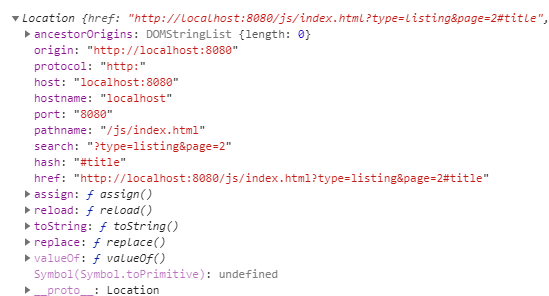
Suppose that the current URL is:
http://localhost:8080/js/index.html?type=listing&page=2#titleThe following picture illustrates the properties of the Location object:
Location.href
The location.href is a string that contains the entire URL.
"http://localhost:8080/js/index.html?type=listing&page=2#title"Location.protocol
The location.protocol represents the protocol scheme of the URL including the final colon (:).
'http:'Location.host
The location.host represents the hostname:
"localhost:8080"Location.port
The location.port represents the port number of the URL.
"8080"Location.pathname
The location.pathname contains an initial '/' followed by the path of the URL.
"/js/index.html"Location.search
The location.search is a string that represents the query string of the URL:
"?type=listing&page=2"Location.hash
The location.hash returns a string that contains a ‘#’ followed by the fragment identifier of the URL.
"#title"Location.origin
The location.origin is a string that contains the canonical form of the origin of the specific location.
"http://localhost:8080"Location.username
The location.username is a string that contains the username before the domain name.
Location.password
THe location.password is a string that represents the password specified before the domain name.
Manipulating the location
The Location object has a number of useful methods: assign(), reload(), and replace().
assign()
The assign() method accepts an URL, navigate to the URL immediately, and make an entry in the browser’s history stack.
location.assign('https://www.javascripttutorial.net');When the window.location or location.href is set to a URL, the assign() method is called implicitly:
window.location = 'https://www.javascripttutorial.net';
location.href = 'https://www.javascripttutorial.net';If you change hostname, pathname, or port property, the page reloads with the new value. Note that changing hash property doesn’t reload the page but does record a new entry in the browser’s history stack.
When a new entry is created in the browser’s history stack, you can click the back button of the browser to navigate to the previous page.
replace()
The replace() method is similar to the assign() method except it doesn’t create a new entry in the browser’s history stack. Therefore, you cannot click the back button to go to the previous page.
The following code uses the replace() method to navigate to the URL https://www.javascripttutorial.net after 3 seconds:
setTimeout(() => {
location.replace('https://www.javascripttutorial.net');
}, 3000);reload()
The reload() method reloads the currently displayed page. When you call the reload() method with no argument, the browser will reload the page in the most efficient way e.g., it loads the page resources from the browser’s cache if they haven’t changed since the last request.
reload();To force a reload from the server, you pass true to the reload() method:
reload(true);Note that the code after the reload() may or may not execute, depending on many factors like network latency and system resources. Therefore, it is a good practice to place the reload() as the last line in the code.
Summary
- The
Locationobject represents the current URL of a page. It can be accessed viawindow.locationordocument.location. - The
Locationobject has a number of properties that represent the URL such asprotocol,host,pathname, andsearch. - To manipulate the location, you set its properties new values or use
assign(),replace(), andreload()methods.
Thank you for your feedback!
