Summary: in this tutorial, you will learn how to use the numpy amax() function to find the maximum element in an array.
Introduction to the NumPy amax() function #
The amax()amax()
numpy.amax(a, axis=None, out=None, keepdims=<no value>, initial=<no value>, where=<no value>)The amax()max() method of the ndarray object:
ndarray.max(axis=None, out=None, keepdims=False, initial=<no value>, where=True)NumPy amax() function examples #
Let’s take some examples of using the amax() function.
1) Using numpy amax() function on 1-D array example #
The following example uses the numpy amax() function to find the maximum value in a 1-D array:
import numpy as np
a = np.array([1, 2, 3])
min = np.amax(a)
print(max)Output:
1How it works.
First, create a new array that has three numbers 1, 2, and 3:
a = np.array([1, 2, 3])Second, find the maximum number using the amax() function:
max = np.amax(a)Third, display the result:
print(max)2) Using numpy amax() function on multidimensional array examples #
The following example uses the amax() funciton to find the maximum number in a 2-D array:
import numpy as np
a = np.array([
[1, 2],
[3, 4]]
)
max = np.amax(a)
print(max)Output:
1If you want to find the maximum value on each axis, you can use the axis argument. For example, the following uses the amax() function to find the maximum value on axis 0:
import numpy as np
a = np.array([
[1, 2],
[3, 4]]
)
max = np.amax(a, axis=0)
print(max)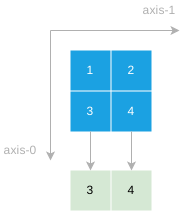
Output:
[3 4]Similarly, you can use the amax() function to find the maximum value on axis 1:
import numpy as np
a = np.array([
[1, 2],
[3, 4]]
)
max = np.amax(a, axis=1)
print(max)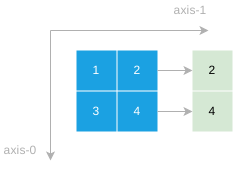
Output:
[2 4]Summary #
- Use the numpy
amax()function to find the maximum element in an array or maximum element along an axis.
Thank you for your feedback!
