
The SQLite lower() function returns a new string with all ASCII characters converted to lowercase. For handling Unicode characters, you can utilize the ICU extension of this function.
Syntax #
lower(string)Arguments #
The lower() function accepts one argument that has the text data type.
string
The input string will be converted to lowercase.
Return Type #
TEXT
Examples #
The following statement uses the lower() function to return the lowercase of a string:
SELECT lower('SQLite LOWER');Output:
lower('SQLite LOWER')
---------------------
sqlite lowerThe following query selects the first name, last name, and lowercase email of the employees in the employees table.
SELECT
lastname,
firstname,
lower(email)
FROM
employees;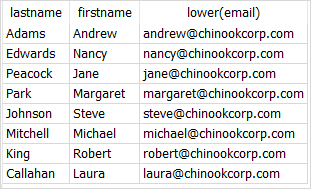
See Also #
Thank you for your feedback!
