
Summary: in this tutorial, you will learn how to use the SQLite UNIQUE constraint to ensure all values in a column or a group of columns are unique.
Introduction to SQLite UNIQUE constraint #
A UNIQUE constraint ensures all values in a column or a group of columns are distinct from one another or unique.
To define a UNIQUE constraint, you use the UNIQUE keyword followed by one or more columns.
You can define a UNIQUE constraint at the column or the table level. Only at the table level, you can define a UNIQUE constraint across multiple columns.
The following shows how to define a UNIQUE constraint for a column at the column level:
CREATE TABLE table_name(
...,
column_name type UNIQUE,
...
);Or at the table level:
CREATE TABLE table_name(
...,
UNIQUE(column_name)
);The following illustrates how to define a UNIQUE constraint for multiple columns:
CREATE TABLE table_name(
...,
UNIQUE(column_name1,column_name2,...)
);Once a UNIQUE constraint is defined, if you attempt to insert or update a value that already exists in the column, SQLite will issue an error and abort the operation.
SQLite UNIQUE constraint examples #
Let’s take some examples of using the UNIQUE constraint.
Defining a UNIQUE constraint for one column example #
The following statement creates a new table named contacts with a UNIQUE constraint defined for the email column:
CREATE TABLE contacts(
contact_id INTEGER PRIMARY KEY,
first_name TEXT,
last_name TEXT,
email TEXT NOT NULL UNIQUE
);The following example inserts a new row into the contacts table:
INSERT INTO contacts(first_name,last_name,email)
VALUES ('John','Doe','[email protected]');If you attempt to insert a new contact with the same email, you will get an error message:
INSERT INTO contacts(first_name,last_name,email)
VALUES ('Johnny','Doe','[email protected]');Here is the error message:
Error while executing SQL query on database 'chinook': UNIQUE constraint failed: contacts.emailDefining a UNIQUE constraint for multiple columns example #
The following statement creates the shapes table with a UNIQUE constraint defined for the background_color and foreground_color columns:
CREATE TABLE shapes(
shape_id INTEGER PRIMARY KEY,
background_color TEXT,
foreground_color TEXT,
UNIQUE(background_color,foreground_color)
);The following statement inserts a new row into the shapes table:
INSERT INTO shapes(background_color,foreground_color)
VALUES('red','green');The following statement works because of no duplication violation in both background_color and foreground_color columns:
INSERT INTO shapes(background_color,foreground_color)
VALUES('red','blue');However, the following statement causes an error due to the duplicates in both background_color and foreground_color columns:
INSERT INTO shapes(background_color,foreground_color)
VALUES('red','green');Here is the error:
Error while executing SQL query on database 'chinook': `UNIQUE` constraint failed: shapes.background_color, shapes.foreground_colorSQLite UNIQUE constraint and NULL #
SQLite treats all NULL values are different, therefore, a column with a UNIQUE constraint can have multiple NULL values.
The following statement creates a new table named lists whose email column has a UNIQUE constraint:
CREATE TABLE lists(
list_id INTEGER PRIMARY KEY,
email TEXT UNIQUE
);The following statement inserts multiple NULL values into the email column of the lists table:
INSERT INTO lists(email)
VALUES(NULL),(NULL);Let’s query data from the lists table:
SELECT * FROM lists;Here is the output:
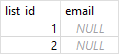
As you can see, even though the email column has a UNIQUE constraint, it can accept multiple NULL values.
In this tutorial, you have learned how to use the SQLite UNIQUE constraint to ensure all values in a column or a group of columns are unique.
Thank you for your feedback!
