
Summary: in this tutorial, you will learn how to read data from a CSV file and insert it into a table using a multi-insert statement.
This tutorial begins where the inserting data into a table left off.
We’ll read author data from a CSV file and perform a multi-insert statement to insert author data into the Authors table.
Reading a CSV file #
Create a csv.php file and define a function that reads data from the authors.csv file and returns a list of Author objects:
<?php
function readAuthorsFromCSV($filePath)
{
$authors = [];
if (($handle = fopen($filePath, 'r')) !== false) {
// Skip the header line
fgetcsv($handle);
// Read each line of the CSV
while (($data = fgetcsv($handle)) !== false) {
// Create a new Author object
$author = new Author($data[0], $data[1], $data[2]);
// Add to the authors array
$authors[] = $author;
}
fclose($handle);
}
return $authors;
}How it works.
Step 1. Define a new function named readAuthorsFromCSV that has one parameter $filepath, which is the path to the CSV file:
function readAuthorsFromCSV($filePath)Step 2. Initialize an empty $authors array to store the Author objects created from parsing data in the CSV file:
$authors = [];Step 3. Open the CSV file for reading using the fopen() function.
if (($handle = fopen($filePath, 'r')) !== false) {The fopen() function returns a file handle if reads the file successfully or false otherwise. The if statement checks if the file was opened successfully.
Step 4. Read a line from the CSV file using the fgetcsv() function to skip the header line of the CSV file:
fgetcsv($handle);Step 5. Read each line from the CSV file as an array containing the CSV fields and assign it to the $data variable. The while statement and condition check will read all the lines:
while (($data = fgetcsv($handle)) !== false) {Step 6. Create an Author object for each CSV line using values from the $data array:
$author = new Author($data[0], $data[1], $data[2]);Step 7. Add the Author object to the $authors array:
$authors[] = $author;Step 8. Close the file handle to free up any resources associated with it:
fclose($handle);Step 9. Return the array of Author object:
return $authors;Performing multi-insert statement #
Define the insertMany method to insert a list of authors into the Authors table:
public function insertMany($authors)
{
$sql = 'INSERT INTO Authors(FirstName, LastName, BirthDate)
VALUES ';
$placeholders = array_fill(0, count($authors), '(?, ?, ?)');
$sql .= implode(', ', $placeholders);
$stmt = $this->conn->prepare($sql);
$data = [];
foreach ($authors as $author) {
$data[] = $author->getFirstName();
$data[] = $author->getLastName();
$data[] = $author->getBirthDate();
}
$stmt->execute($data);
}How it works.
Step 1. Define a public method named insertMany that takes an array of Authors objects as a parameter:
public function insertMany($authors)Step 2. Construct a multi-insert statement for inserting multiple rows into the Authors table:
$sql = 'INSERT INTO Authors(FirstName, LastName, BirthDate)
VALUES ';
$placeholders = array_fill(0, count($authors), '(?, ?, ?)');
$sql .= implode(', ', $placeholders);The statement uses a set of placeholders (?) to prevent SQL injection attacks by separating SQL code from data.
The code constructs an INSERT statement that can insert multiple rows in one operation, improving performance over executing multiple single-row insert statements.
Step 3. Create a prepared statement object to execute the multi-insert statement with the provided data:
$stmt = $this->conn->prepare($sql);Step 4. Collect data from the array of Author objects into a flat array, matching the order of placeholders in the prepared statement.
$data = [];
foreach ($authors as $author) {
$data[] = $author->getFirstName();
$data[] = $author->getLastName();
$data[] = $author->getBirthDate();
}Step 5. Execute the prepared statement with data:
$stmt->execute($data);This statement fills the placeholders with the corresponding values from the $data array and executes the multi-insert statement.
Importing data from the CSV file #
Modify the index.php file to read data from the authors.csv file and insert it into the Authors table:
<?php
require_once 'authordb.php';
require_once 'csv.php';
// Connect to the SQL Server
$conn = require_once 'connect.php';
// Read data from CSV file
$authors = readAuthorsFromCSV('authors.csv');
// Insert data into the Authors table
$authorDB = new AuthorDB($conn);
$authorDB->insertMany($authors);How it works.
Step 1. Include two PHP files authordb.php and csv.php using the require_once function:
require_once 'authordb.php';
require_once 'csv.php';Step 2. Connect to the SQL Server and assign the Connection object to the $conn variable:
$conn = require_once 'connect.php';Step 3. Read data from the authors.csv file and return an array of Author objects:
$authors = readAuthorsFromCSV('authors.csv');Step 4. Create an instance of the AuthorDB class, passing the database connection $conn to its constructor:
$authorDB = new AuthorDB($conn);Step 5. Call the insertMany() method of the AuthorDB object to insert an array of Author objects into the Authors table:
$authorDB->insertMany($authors);Running the script #
Open the index.php page on your web browser to import data from the authors.csv file into the Authors table.
Verifying inserts #
Step 1. Open the Microsoft SQL Server and connect to the BookStore database.
Step 2. Execute the following query to retrieve data from the Authors table:
SELECT * FROM Authors;Output:
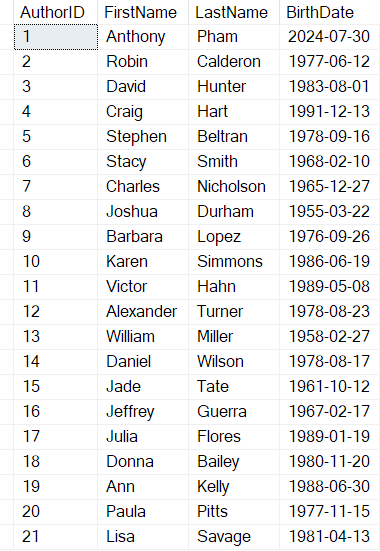
Summary #
- Use a multi-insert statement to insert multiple rows into a table from PHP.
Thank you for your feedback!
